USA
USA UAE
UAESmall Business
Designed for startups and growing businesses

See More





Brand: Esangrah Technologies Pvt Ltd
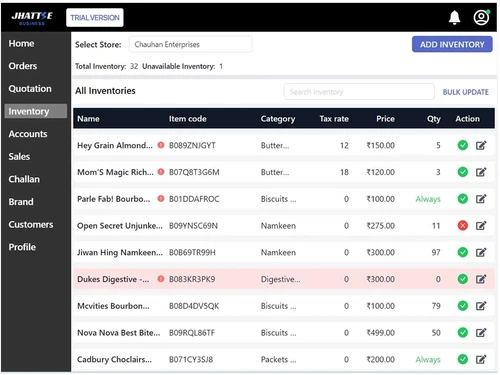
Streamline your billing and inventory management process with Jhattse software that works both online and offline.
See MoreHave you used Jhattse before?
Share your insights for better experience
Brand: Esangrah Technologies Pvt Ltd
Founded Year: -0001
Jhattse Business offer Billing, Inventory management, Customer Management, Sales Report, Payments and many more feature packed. Best for brands restaurants, cafes, grocery stores of all ranges.
Looking for The Right Pricing?
Share your requirements and get a plan built around your business.
Price Available on Request
Get personalised Jhattse pricing that fits your needs. Our team will connect with you.
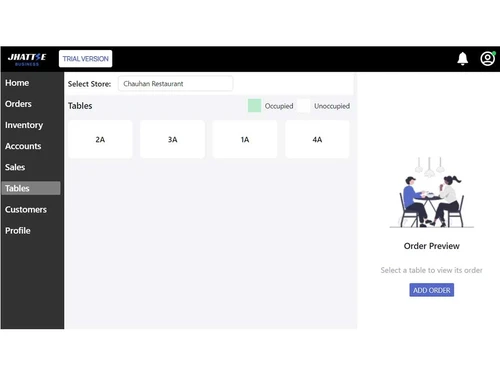
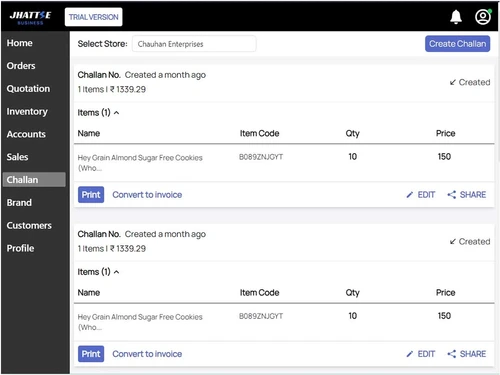
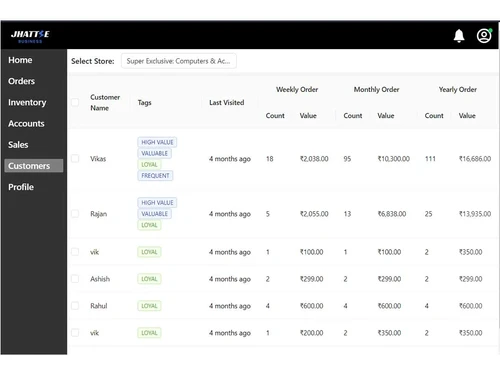
 Billing & Invoicing Sales Reports Inventory Management Dashboards Order Management Delivery Tracking Customer Management Staff Account Create your store online

Watch the demo video to explore key features, real workflows, and how the software fits your business needs.
 Ubuntu
  Windows
  iOS
iOS  Android MacOS Windows(Phone)
  Desktop
  Mobile
  Cloud-Based
  Perpetual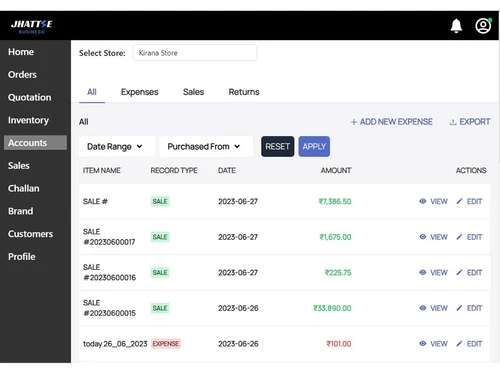
Small Business
Designed for startups and growing businesses
Medium Business
Built for business growth and flexibility
Enterprises
Designed for complex and large-scale business needs
4.9
Out of 5

Overall Rating
Based on
58 Verified Reviews
Rating Breakdown
98% Recommend this Product
Add ReviewOverall, users express high satisfaction with Jhattse Business Billing Software, highlighting its user-friendly interface, affordability, and comprehensive features that streamline billing, inventory management, and multi-store operations. Many appreciate the software's ability to manage multiple outlets from a single platform and its effective reporting capabilities. While there are no significant complaints noted, a few users mention the limitation of only having online demos. Despite this, the overwhelming sentiment is positive, with many recommending it for its efficiency and value for money.
Pros
"It is easy to use, low cost, in budget software, and provide very good features and multi-store setup."
"Share online bills, download reports check credit/debit amounts, manage customer and vendor data"
"Quotation, Inventory Management, Bulk upload Functionality, Multiple store setup, Multiple staff access, ledger records, delivery challan."
Cons
"Online demo only. Physical demo not available but it was okay for me."

Aug 3, 2024
Techjockey Verified
“very good software”
Pros
It is easy to use, low cost, in budget software, and provide very good features and multi-store setup.
Cons
None
Reason to switch
Esay to use
May 25, 2024
Techjockey Verified
“Recommend Jhattse Business Billing Software for Retail”
Using jhattse business billing software for my clothes store. It helps me manage my business efficiently like sharing online bills, downloading reports checking credit/debit amounts, managing customer and vendor data
Pros
Share online bills, download reports check credit/debit amounts, manage customer and vendor data
Cons
None
Reason to switch
better functionality and esay to use
Feb 3, 2024
Techjockey Verified
“Nice Experience With this Software”
I have been using Jhattse Software for past 1 month. It gave me access to set up multiple stores. compatible with Android, tablets, laptops, and cloud platforms. and has a features like table QR menu, Restaurant Inventory management, online menu, and multiple staff access.
Pros
Provides Zomato Swiggy integration, Table QR code facility and Online Menu, Punch bills and generates KOT, Multiple Staff Access, Ledger Accounts, Menu updates and changes, Multiple Store Setup, Restaurant Inventory Management, Works on all devices(Laptop, Tablet, Android), Regulate menu availability.
Cons
NO CONS

Jhattse
Price On Request
Desktop
Mobile
Web based
On Premises
Windows
Mac OS

Vyapar Billing Software
Price On Request
Desktop
Mobile
Web based
On Premises
Windows
Mac OS
Raseed
Price On Request
Desktop
Mobile
Web based
On Premises
Windows
Mac OS
InvoiceZy
₹ 99
Desktop
Mobile
Web based
On Premises
Windows
Mac OS

KaroSauda
₹ 1999
Desktop
Mobile
Web based
On Premises
Windows
Mac OS

Billing Fast
₹ 3588
Desktop
Mobile
Web based
On Premises
Windows
Mac OS

Apna Billbook
₹ 6998
Desktop
Mobile
Web based
On Premises
Windows
Mac OS

Swipe - Billing Software
₹ 2542
Desktop
Mobile
Web based
On Premises
Windows
Mac OS

Petpooja Invoice
₹ 5000
Desktop
Mobile
Web based
On Premises
Windows
Mac OS
Billing Buddy
₹ 5000
Desktop
Mobile
Web based
On Premises
Windows
Mac OS
Asli Bill
₹ 7000
Desktop
Mobile
Web based
On Premises
Windows
Mac OS
(0) Product(s) selected

Jhattse billing and invoicing software is compatible with Android, iOS, Windows and Mac operating systems.
Jhattse Business app is also available for mobile devices.
Jhattse Business software supports cloud-based deployment type.
Jhattse Business pricing starts at Rs.2,124 (included GST) for Jhattse business.
Jhattse software is typically used by retailers, manufacturers, small and medium businesses to manage billing and invoicing, sales report, customer and inventory.
The 7 days demo is available for free with techjockey.com.
Jhattse Business offers a free trial. However, the premium plan with advanced features starts at Rs. 2,124 (included GST).
For Jhattse Business software download the installation file on your system and open the Setup Wizard to get started.
Jhattse Business, a billing and invoicing software, works by providing a centralized platform for managing billing processes. It allows users to generate digital or physical bills, integrate payment gateways, track inventory, and more.
20,000+ Software Listed
Best Price Guranteed
Free Expert Consultation
2M+ Happy Customers
Terms and Condtions

Users with registered businesses can purchase goods from merchants on the platform to satisfy their business needs. Users are not permitted to utilize any products acquired through the platform for resale, advertising, business, or further distribution.
For each purchase made, users will receive a Tax Invoice (or 'GST invoice') that includes specific details such as:
the GSTIN of the user associated with their registered business, and
the specified Entity Name for their business.
It should be noted that not all products are eligible for GST Invoice. Only the products displayed by participating sellers with the 'GST-based Invoice Available' callout on the product description page would qualify.
Certain goods and services are not eligible to get a GST Invoice, including items with VAS, i.e., Value Added Services (e.g., Total Mobile Protection/Assured Buyback) and those involving an exchange offer at the time of purchase.
Users must ensure the accuracy of the GSTIN, and business entity name provided for the GST Invoice. Requests for corrections into GST Invoice would not be accommodated by Techjockey.com or any Seller, and any issues arising from user-provided information are the sole responsibility of users.
Techjockey.com is not liable for the GST Invoice or any associated input tax credit. To efficiently claim an input tax credit, users should select the registered place of business address as per the GST authority's data and follow the provisions of the GST Act and rules.
To claim an input tax credit, the delivery and billing addresses must match. Furthermore, input tax credits will not be granted if the delivery address and GSTIN on the invoice are from different states. In case of incorrect GST details provided during the order placement, the order will be canceled automatically.