USA
USA UAE
UAESmall Business
Designed for startups and growing businesses

See More




Brand: Webwingz
BillBooks is an innovative cloud-based billing and invoicing software designed to streamline financial processes for businesses of all sizes.
See MoreHave you used Billbooks before?
Share your insights for better experience
Brand: Webwingz
Founded Year: 2010
Billbooks is an online invoicing software with a magical user interface to send invoices in less than 60 seconds.
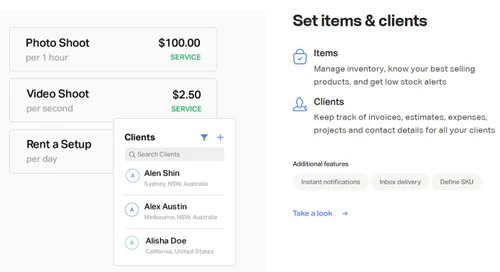
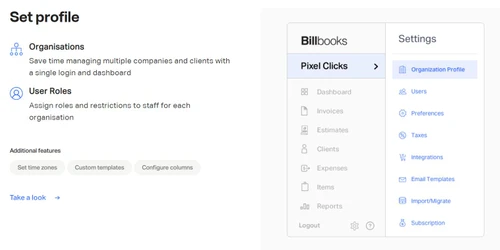
 Expense Management Multi User login & Role based access Recurring Invoice Inventory Management Customer Management Billing & Invoicing Quotation & Estimates Supplier and Purchase Order Management Taxation Management Purchase Order Import & Export Reports Tax Management Invoice Template Multi-currency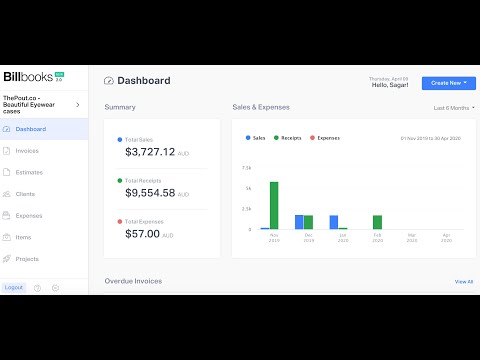

Watch the demo video to explore key features, real workflows, and how the software fits your business needs.
 Windows
  iOS
iOS  Android MacOS
  Desktop
  Mobile
  Cloud-Based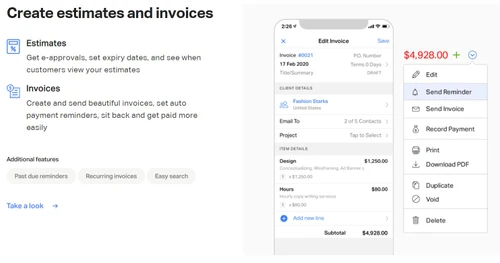
Small Business
Designed for startups and growing businesses
Medium Business
Built for business growth and flexibility
Enterprises
Designed for complex and large-scale business needs
4.0
Out of 5

Overall Rating
Based on
7 Verified Reviews
Rating Breakdown
78% Recommend this Product
Add ReviewBillbooks is generally well-received among freelancers and small businesses for its ease of use, affordability, and convenient cloud-based access. Users appreciate the automatic reminders for overdue payments and the straightforward invoicing process. However, a common concern is its lack of advanced features and flexibility, particularly as businesses grow and require more robust tools for managing larger projects or client volumes. While it serves basic needs effectively, many users foresee the need for more capabilities as their operations expand.

Sep 1, 2024
Techjockey Verified
“A Great Start for Freelancers, But Lacks Long-Term Scalability”
Billbooks has been a useful tool for invoicing and payment tracking in my freelance work. It’s easy to use and doesn’t require much setup, which I appreciate. The automatic reminders help me stay on top of unpaid invoices, and it’s great that I can access it from any device. However, as I take on more clients, I’ve noticed that it doesn’t offer the advanced features I might need in the future.
Pros
Billbooks has made it easy for me to manage invoices and track payments for my freelance projects. It’s affordable and offers all the basic features I need for sending out invoices and following up with clients. The cloud-based access is also a bonus, allowing me to check in from anywhere.
Cons
I’ve noticed that it could use more advanced features as my business grows. It works well for smaller tasks, but as my client base expands, I find that it lacks some of the options I’d like for managing larger workloads.
Reason to switch
Zoho Invoice was too expensive for my needs, and Billbooks offered a better pricing option for the features I use.
Sep 2, 2024
Techjockey Verified
“Great for people like me, But May Fall Short for Growing Businesses”
Billbooks has been my go-to for freelance invoicing. It’s online, so I can send invoices and manage payments no matter where I am. I find the system pretty easy to use, and I like that it has automatic reminders for overdue payments. However, as my client list grows, I’m starting to see that it might not be able to handle larger volumes as well as other software.
Pros
I really like how easy it is to manage invoices and keep track of client payments with Billbooks. It’s been a reliable option for my freelance work, and I find it helpful that I can access everything from my laptop or phone. The automatic reminders make sure I don’t forget to follow up on unpaid invoices.
Cons
I do think it’s lacking when it comes to handling more advanced features, especially if your business starts to grow. It works for now, but as I take on more clients, I’ll likely need something with more capabilities.
Reason to switch
I wanted to explore more options.
Sep 2, 2024
Techjockey Verified
“Easy to Use for Freelancers, But Limited for Larger Projects”
Billbooks has been a good tool for my freelance work. It makes it easy to send invoices and track payments, and the fact that it’s online means I can use it from anywhere. The automatic payment reminders have been helpful, but I’ve noticed that it’s starting to fall short when it comes to managing more complex tasks. It’s great for smaller businesses or freelancers, but bigger companies might need more features.
Pros
I like using Billbooks for sending invoices and keeping track of payments. It’s simple to use, which makes it a great tool for freelancers like me who need to manage billing without spending too much time on it.
Cons
I wish it had more features for managing larger projects or more clients. As my freelance business grows, I’ve noticed that it doesn’t handle more complicated needs as well.
Reason to switch
Invoice Ninja was more than I needed, and Billbooks had a better balance of features and affordability for my freelance work.

Billbooks
₹ 757.00 excl. GST
Desktop
Mobile
Web based
On Premises
Windows
Mac OS

Vyapar Billing Software
Price On Request
Desktop
Mobile
Web based
On Premises
Windows
Mac OS
Raseed
Price On Request
Desktop
Mobile
Web based
On Premises
Windows
Mac OS
InvoiceZy
₹ 99
Desktop
Mobile
Web based
On Premises
Windows
Mac OS

KaroSauda
₹ 1999
Desktop
Mobile
Web based
On Premises
Windows
Mac OS

Billing Fast
₹ 3588
Desktop
Mobile
Web based
On Premises
Windows
Mac OS

Apna Billbook
₹ 6998
Desktop
Mobile
Web based
On Premises
Windows
Mac OS

Swipe - Billing Software
₹ 2796
Desktop
Mobile
Web based
On Premises
Windows
Mac OS

Petpooja Invoice
₹ 5000
Desktop
Mobile
Web based
On Premises
Windows
Mac OS
Billing Buddy
₹ 5000
Desktop
Mobile
Web based
On Premises
Windows
Mac OS
Asli Bill
₹ 7000
Desktop
Mobile
Web based
On Premises
Windows
Mac OS
(0) Product(s) selected
To use BillBooks, visit the official website and sign up for a free trial. You can explore the features of the software without any commitment. Once you decide to continue, you can choose from various subscription plans.
You can choose from various templates, add your company logo, and adjust the layout and color scheme to suit your preferences.
BillBooks is a cloud-based platform, meaning you can access it from any device with an internet connection. Whether you're using a laptop, tablet, or smartphone, BillBooks offers seamless functionality across all devices.
BillBooks is equipped to handle GST and other tax calculations, making it easier for businesses to manage tax compliance. You can automatically set up tax rates based on your region and apply them to your invoices.
Yes, BillBooks takes data security seriously. The platform uses encryption and other advanced security measures to ensure the safety and security of your business and client data.
20,000+ Software Listed
Best Price Guranteed
Free Expert Consultation
2M+ Happy Customers
Terms and Condtions

Users with registered businesses can purchase goods from merchants on the platform to satisfy their business needs. Users are not permitted to utilize any products acquired through the platform for resale, advertising, business, or further distribution.
For each purchase made, users will receive a Tax Invoice (or 'GST invoice') that includes specific details such as:
the GSTIN of the user associated with their registered business, and
the specified Entity Name for their business.
It should be noted that not all products are eligible for GST Invoice. Only the products displayed by participating sellers with the 'GST-based Invoice Available' callout on the product description page would qualify.
Certain goods and services are not eligible to get a GST Invoice, including items with VAS, i.e., Value Added Services (e.g., Total Mobile Protection/Assured Buyback) and those involving an exchange offer at the time of purchase.
Users must ensure the accuracy of the GSTIN, and business entity name provided for the GST Invoice. Requests for corrections into GST Invoice would not be accommodated by Techjockey.com or any Seller, and any issues arising from user-provided information are the sole responsibility of users.
Techjockey.com is not liable for the GST Invoice or any associated input tax credit. To efficiently claim an input tax credit, users should select the registered place of business address as per the GST authority's data and follow the provisions of the GST Act and rules.
To claim an input tax credit, the delivery and billing addresses must match. Furthermore, input tax credits will not be granted if the delivery address and GSTIN on the invoice are from different states. In case of incorrect GST details provided during the order placement, the order will be canceled automatically.