USA
USA UAE
UAESmall Business
Designed for startups and growing businesses


See More


Brand: RePOS
RePOS software is a billing and POS solution for restaurants to manage inventory, customer data and counter sales. It also helps with franchise management, menu and recipe management and other head office tasks. RePOS software offers reports over sales activities in the form of graphical analysis, something that makes it easy to identify both top-selling and lowest selling items for better decisi...
See MoreHave you used RePOS before?
Share your insights for better experience
Brand: RePOS
Founded Year: 2017
RePOS was designed with the intention to revolutionize the way retail businesses and restaurants manage their front store and back end operations.
Looking for The Right Pricing?
Share your requirements and get a plan built around your business.
Price Available on Request
Get personalised RePOS pricing that fits your needs. Our team will connect with you.
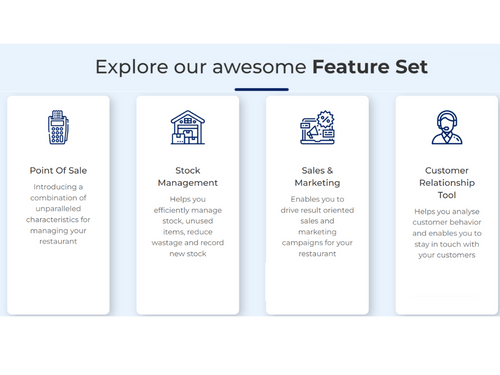
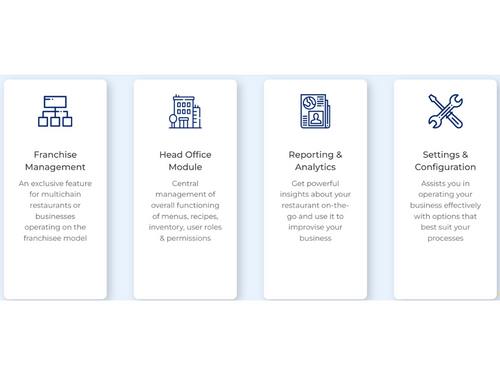
 Point of Sale (POS) Stock Management Sales & Marketing Customer Relationship Tool Franchise Management Head Office Module Reporting & Analytics Settings & Configuration
  Windows
  iOS
iOS  Android
  Desktop
  Mobile
  Tablet
  iPad
iPad  Cloud-Based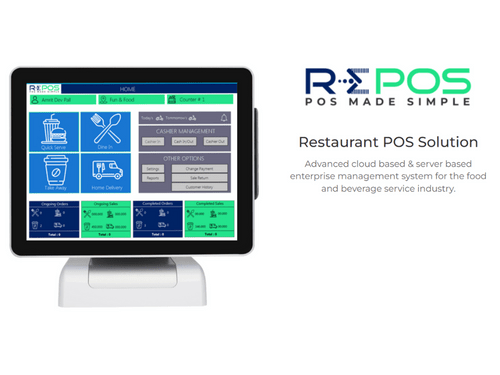
Small Business
Designed for startups and growing businesses
Medium Business
Built for business growth and flexibility
Enterprises
Designed for complex and large-scale business needs
4.7
Out of 5

Overall Rating
Based on
7 Verified Reviews
Rating Breakdown
95% Recommend this Product
Add ReviewUsers generally express high satisfaction with RePOS, highlighting its user-friendly dashboard and effective management of orders, inventory, and reporting across multiple restaurant locations. Many appreciate the software's ability to streamline operations and enhance revenue. However, a recurring concern is occasional slow performance, which some find frustrating. Despite this, most users report no significant issues and commend the responsive tech support, indicating that RePOS effectively meets their restaurant management needs.
Pros
"If you want an easy to go software for your restaurant, go with RePOS. Everything you want is in front of your eyes. Inventory management module is great."
"RePOS is a great help in eliminating the bottlenecks with restaurant operations. We have significantly improved the way we manage our inventory, billing, and sales, and marketing."
"The user-friendly dashboard of RePOS lets us manage orders and inventory optimally. And the reports section provides detailed information about the performance."
Cons
"We have no complaints regarding RePOS as of now. It has worked great for us."
"RePOS hangs randomly. It’s not a major issue but it gets irritating at times."
"We have not encountered any problems while using RePOS as of now. It manages everything smoothly."

Nov 9, 2021
Techjockey Verified
“Excellent Software for Restaurant’s Point of Sale Operations”
Pros
If you want an easy to go software for your restaurant, go with RePOS. Everything you want is in front of your eyes. Inventory management module is great.
Cons
We have no complaints regarding RePOS as of now. It has worked great for us.
Reason to switch
Poster POS had issues with managing table positioning. Another important issue with that software was kitchen communications. The KOT feature barely functions.
Oct 26, 2021
Techjockey Verified
“We manage our restaurant seamlessly with RePOS”
Pros
The software allows to manage tables easily. The software lets us take orders on the fly. A customer can make multiple orders even after their first order and RePOS will manage it all in the bill. RePOS is one of the best software for computerized monitoring of restaurant.
Cons
RePOS hangs randomly. It’s not a major issue but it gets irritating at times.
Reason to switch
HungerRush had a poor customer service and tech support. Reports customization was a difficult thing to do.
Jan 20, 2021
Techjockey Verified
“RePOS offers customizable features for restaurant management”
Pros
We manage a variety of operations across different chains of restaurants. And RePOS has helped us with all of them. It lets us reconfigure the app design for bakeries, cafe, and food trucks with a single license. Plus, their tech support team is available at all the time.
Cons
A specific feature to integrate with delivery applications would be helpful and an HR module for managing workers across different chains. Except that RePOS works very efficiently for the work we deployed it for.
Reason to switch
The order management feature was poor. Orders would vanish and we would lose track of them regularly.

RePOS
Price On Request
Desktop
Mobile
Web based
On Premises
Windows
Mac OS

RePOS Tab My Order
Price On Request
Desktop
Mobile
Web based
On Premises
Windows
Mac OS
Petpooja
₹ 10000
Desktop
Mobile
Web based
On Premises
Windows
Mac OS

Feedo
₹ 899
Desktop
Mobile
Web based
On Premises
Windows
Mac OS

SpotOn
Price On Request
Desktop
Mobile
Web based
On Premises
Windows
Mac OS

SpeedLine POS
Price On Request
Desktop
Mobile
Web based
On Premises
Windows
Mac OS

Rezku POS
Price On Request
Desktop
Mobile
Web based
On Premises
Windows
Mac OS

Track My Table
₹ 399
Desktop
Mobile
Web based
On Premises
Windows
Mac OS

RestoMPOS
Price On Request
Desktop
Mobile
Web based
On Premises
Windows
Mac OS
Solo Billing
₹ 8000
Desktop
Mobile
Web based
On Premises
Windows
Mac OS

TMBill POS
₹ 5999
Desktop
Mobile
Web based
On Premises
Windows
Mac OS
(0) Product(s) selected
Available
Price on Request
Starting Price:
$55 /Month
Available
Price on Request
Starting Price:
$49 /Month
Starting Price:
₹399 /Month
Available
Price on Request

Available
Price on Request

Starting Price:
$49 /Month

Starting Price:
₹550 /month
RePOS is ideal for managing the inventory and tracking the stock levels in terms of the new stock, unused items and fast selling items. It helps reduce the wastage significantly.
The POS software offers a head office module that is ideal for managing multiple business outlets with defined user roles & permissions.
RePOS point of sales oftware offers real-time analytics for understanding customer data and their buying behavior.
The RePOS software’s license includes the ongoing software updates.
RePOS software can be used by fine dine, bakery, pizzeria, ice cream parlor, food trucks, bars and pubs, cafes, etc.
20,000+ Software Listed
Best Price Guranteed
Free Expert Consultation
2M+ Happy Customers
Terms and Condtions

Users with registered businesses can purchase goods from merchants on the platform to satisfy their business needs. Users are not permitted to utilize any products acquired through the platform for resale, advertising, business, or further distribution.
For each purchase made, users will receive a Tax Invoice (or 'GST invoice') that includes specific details such as:
the GSTIN of the user associated with their registered business, and
the specified Entity Name for their business.
It should be noted that not all products are eligible for GST Invoice. Only the products displayed by participating sellers with the 'GST-based Invoice Available' callout on the product description page would qualify.
Certain goods and services are not eligible to get a GST Invoice, including items with VAS, i.e., Value Added Services (e.g., Total Mobile Protection/Assured Buyback) and those involving an exchange offer at the time of purchase.
Users must ensure the accuracy of the GSTIN, and business entity name provided for the GST Invoice. Requests for corrections into GST Invoice would not be accommodated by Techjockey.com or any Seller, and any issues arising from user-provided information are the sole responsibility of users.
Techjockey.com is not liable for the GST Invoice or any associated input tax credit. To efficiently claim an input tax credit, users should select the registered place of business address as per the GST authority's data and follow the provisions of the GST Act and rules.
To claim an input tax credit, the delivery and billing addresses must match. Furthermore, input tax credits will not be granted if the delivery address and GSTIN on the invoice are from different states. In case of incorrect GST details provided during the order placement, the order will be canceled automatically.