 USA
USA UAE
UAESmall Business
Designed for startups and growing businesses

See More



Brand: RecMaster
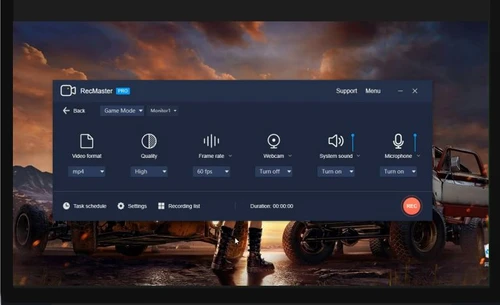
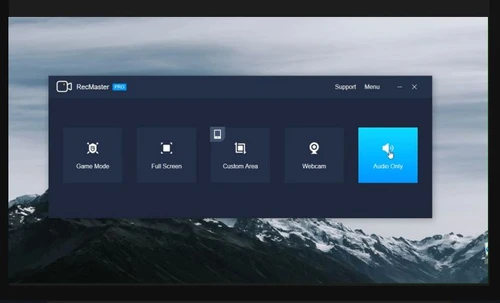
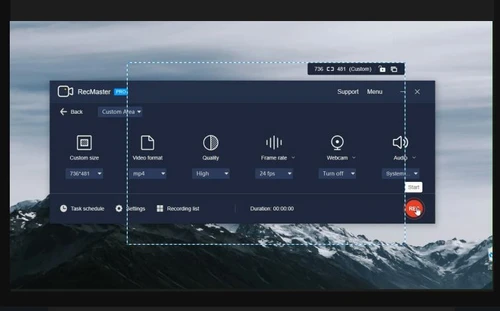
RecMaster is one of the best screen recording software developed for domestic and office usage. The software offers multiple variations in screen recording and enables users to create innovative videos. It facilitates seamless recording of any part of their screen or taking screenshots. Furthermore, the software consists of video editing feature which helps in cropping, merging, and adding differ...
See MoreHave you used RecMaster before?
Share your insights for better experience
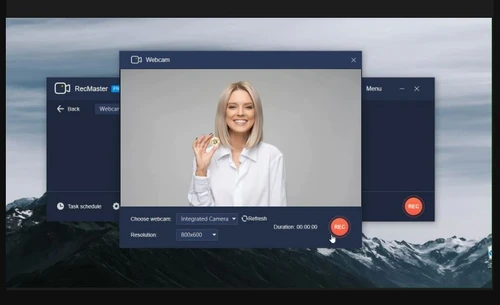
 4K / HD Recording Custom Region Annotation Tools Watermark Screen Recording Webcam Recording Audio Recording Video Editing Effects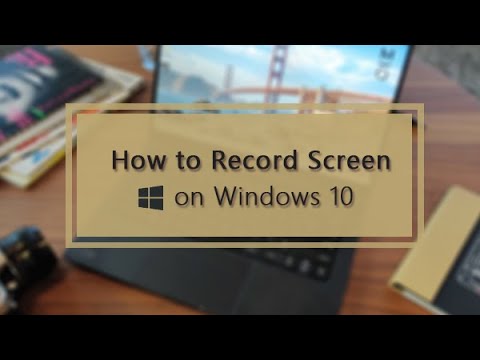

Watch the demo video to explore key features, real workflows, and how the software fits your business needs.
 Windows
  MacOS
MacOS  Desktop
  Cloud-Based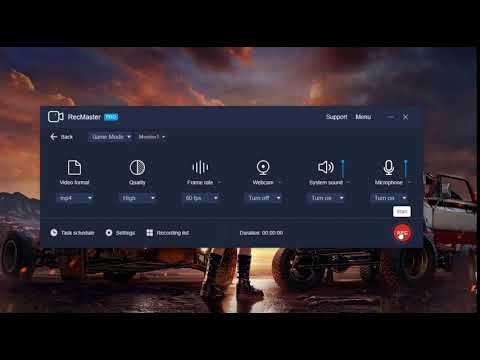
Small Business
Designed for startups and growing businesses
Medium Business
Built for business growth and flexibility
Enterprises
Designed for complex and large-scale business needs
5
Out of 5

Overall Rating
Based on
1 Verified Review
Rating Breakdown
80% Recommend this Product
Add Review
Dec 7, 2020
Techjockey Verified
“A great and most importantly easy-to-use recorder!”
Pros
It's so simple to use that whenever I want to record a screen video, I just choose one suitable recording option and use the shortcuts to make it start and stop. It’s also great that the available video settings, embedded drawing tool, video editor and scheduler give me more flexibility on each different recording. I originally got it for saving some online meetings, but now I also leverage it to produce video or audio messages for email feedback and move some of my favorite streaming contents to my local storage (surely for personal fair usage)...
Cons
It doesn't support taking screenshots.

RecMaster
Price On Request
Desktop
Mobile
Web based
On Premises
Windows
Mac OS

Apowersoft Screen Recorder
Price On Request
Desktop
Mobile
Web based
On Premises
Windows
Mac OS

Camtasia
₹ 7099
Desktop
Mobile
Web based
On Premises
Windows
Mac OS

Ace Thinker Screen Recorder
Price On Request
Desktop
Mobile
Web based
On Premises
Windows
Mac OS

ScreenPal
Price On Request
Desktop
Mobile
Web based
On Premises
Windows
Mac OS
Fraps
Price On Request
Desktop
Mobile
Web based
On Premises
Windows
Mac OS

Fluvid
Price On Request
Desktop
Mobile
Web based
On Premises
Windows
Mac OS

Screen Studio
Price On Request
Desktop
Mobile
Web based
On Premises
Windows
Mac OS

Macro Recorder
₹ 9376
Desktop
Mobile
Web based
On Premises
Windows
Mac OS

TechSmith Snagit
₹ 1499
Desktop
Mobile
Web based
On Premises
Windows
Mac OS

Movavi Screen Recorder
₹ 2399
Desktop
Mobile
Web based
On Premises
Windows
Mac OS
(0) Product(s) selected
Starting Price:
$40 /Month
Starting Price:
$10 /Month
Starting Price:
$3 /Month
Starting Price:
$37 /Quantity
Starting Price:
$29 /Month
Starting Price:
₹9,376 /Quantity

Starting Price:
$39 /LifeTime

Starting Price:
$33 /Year
Starting Price:
$30 /Year

Available
Price on Request

Starting Price:
$6 /Month




RecMaster works on both Windows and mac operating systems. For Windows, it works on Windows XP and beyond, while for Mac the threshold is macOS 10.11 or above.
You have to purchase a valid license code to remove the watermark from the exported video.
Please export the log file of RecMaster by clicking on “Export logs” in the drop-down menu to rectify the error.
Yes, RecMaster offers a wide range of movement colors, effects, and sound for cursor movement and mouse clicks.
RecMaster is available for an online demo at Techjockey. Please request a call back to get the demo scheduled for yourself.
The price of RecMaster starts at $15 at techjockey.com.
20,000+ Software Listed
Best Price Guranteed
Free Expert Consultation
2M+ Happy Customers
Terms and Condtions

Users with registered businesses can purchase goods from merchants on the platform to satisfy their business needs. Users are not permitted to utilize any products acquired through the platform for resale, advertising, business, or further distribution.
For each purchase made, users will receive a Tax Invoice (or 'GST invoice') that includes specific details such as:
the GSTIN of the user associated with their registered business, and
the specified Entity Name for their business.
It should be noted that not all products are eligible for GST Invoice. Only the products displayed by participating sellers with the 'GST-based Invoice Available' callout on the product description page would qualify.
Certain goods and services are not eligible to get a GST Invoice, including items with VAS, i.e., Value Added Services (e.g., Total Mobile Protection/Assured Buyback) and those involving an exchange offer at the time of purchase.
Users must ensure the accuracy of the GSTIN, and business entity name provided for the GST Invoice. Requests for corrections into GST Invoice would not be accommodated by Techjockey.com or any Seller, and any issues arising from user-provided information are the sole responsibility of users.
Techjockey.com is not liable for the GST Invoice or any associated input tax credit. To efficiently claim an input tax credit, users should select the registered place of business address as per the GST authority's data and follow the provisions of the GST Act and rules.
To claim an input tax credit, the delivery and billing addresses must match. Furthermore, input tax credits will not be granted if the delivery address and GSTIN on the invoice are from different states. In case of incorrect GST details provided during the order placement, the order will be canceled automatically.



