USA
USA UAE
UAESmall Business
Designed for startups and growing businesses


See More


Brand: Square
Square Payroll simplifies your payroll process, ensuring your employees get paid on time, every time.
See MoreHave you used Square Payroll before?
Share your insights for better experience
Brand: Square
Founded Year: 2009
Square is a merchant services aggregator and mobile payment company that aims to simplify commerce through technology.
Payroll Management
 Overtime Management Automated Payroll Multiple Pay Rates and Schedules Bonus and Incentive Management Variable Pay & Commission Management Expense Reimbursements Employee Benefits Management Direct Bank Transfers Off-Cycle Payroll Processing Tax Deductions Gratuity Calculation
 Compliance Management
Income Tax (TDS) Management Provident Fund (PF) Compliance Professional Tax (PT) Compliance Labour Welfare Fund (LWF) Management Employee State Insurance (ESI) Compliance Time, Attendance & Leave Management
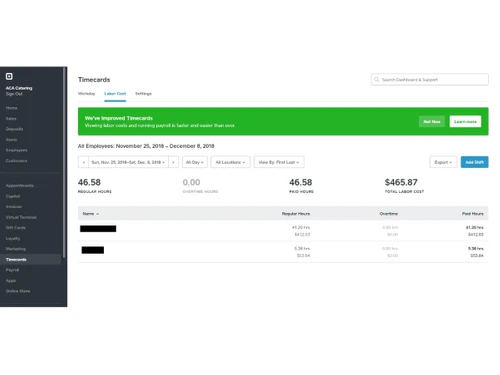
Sick Leave and Vacation Tracking Attendance Tracking Holiday & Leave Calendar Leave & Absence Management Leave Policy Customization Employee Self-Service (ESS)
Payslip Access Income Tax Planner Expense Claims Employee Lifecycle Management
Employee Database Document Management Employee Shift Scheduling F&F Settlement Banking Integration & Payment Processing
Bank Transfer Files Cheque Processing Direct Deposit Scheduling Multi-Bank Support Automation and Customization
Alerts & Notifications API Access Custom Payroll Rules and Policies Scheduled Payroll Processing Configurable Workflows & Approvals Security and Data Privacy
User Access Management Two-Factor Authentication (2FA) Data Backup and Recovery Encrypted Data Transmission Audit Logs and Monitoring Integrations
API Integration Performance Management Third Party Integration Accounting Software HRMS Payment Gateway Biometric Integration Reporting and Analytics
Payroll Reports Compliance Reports Leave and Attendance Reports Employee Master Report  Ubuntu
  Windows
  MacOS
MacOS  Linux
Linux  Desktop
  Mobile
  Tablet
  iPad
iPad  Cloud-Based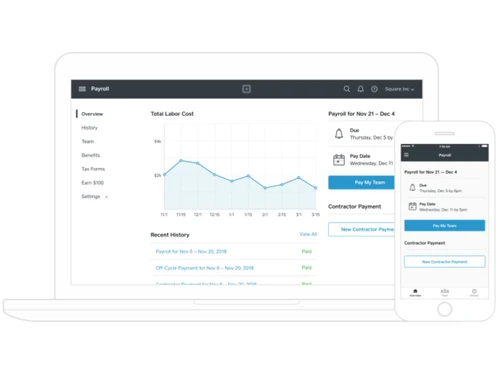
Small Business
Designed for startups and growing businesses
Medium Business
Built for business growth and flexibility
Enterprises
Designed for complex and large-scale business needs
4.0
Out of 5

Overall Rating
Based on
14 Verified Reviews
Rating Breakdown
88% Recommend this Product
Add ReviewOverall, users appreciate Square Payroll for its seamless integration with other Square services, which simplifies payroll management, including tax filings and employee payments. Many find it particularly beneficial for small businesses, citing the ease of use and time-saving features. However, common complaints include the lack of advanced reporting tools and flexibility in employee payroll plans, as well as the absence of a free trial, which leaves some users hesitant to fully commit.
Pros
"The software takes care of all payroll duties, from time tracking to tax filing. The fact that I could transfer my old payroll data for free made the switch a lot easier for me."
Cons
"I wish there were more options for reports. They offer the basics, but for deeper analysis, it’s lacking."
"Reporting could be a bit more advanced. It does offer the basics, but if you’re looking for detailed insights, you may find it lacking."
"The lack of a free trial was disappointing, as I would have liked to try it out before committing. "



Sep 11, 2024
Techjockey Verified
“Adiyogi Payroll Has Taken Care of All My Payroll Needs”
Adiyogi Payroll has made managing my employees’ salaries easy and hassle-free. From calculating salaries to making sure taxes are filed properly, it’s all taken care of. The integration with my HR and accounting tools is a plus, even though it wasn’t as seamless as I hoped.
Pros
The best thing about Adiyogi is that it automatically takes care of all the payroll needs. It calculates everything accurately, like salaries, taxes, and deductions. I no longer worry about compliance because the software updates itself with the latest tax rates and regulations. The employee portal also helps my staff get what they need without bothering me every month.
Cons
The only downside is that the system can sometimes feel overwhelming if you are new to payroll software. It has many features, and setting everything up can be time-consuming initially.
Reason to switch
Gusto didn’t keep up with tax law changes, and I needed something more reliable for staying compliant.
Sep 6, 2024
Techjockey Verified
“Square Payroll makes handling payroll stress-free for my business!”
Square Payroll is designed for small businesses already using Square’s other services. It automates tax filings and employee payments, making payroll easier to manage. It’s available nationwide, which is helpful for companies with remote workers, and the mobile app allows for easy access to payroll tasks while on the go.
Pros
The integration with my existing Square tools was one of the most significant benefits of using Square Payroll. It manages time tracking, wages, and taxes for me, so I don’t have to worry about keeping up with it myself. I also appreciated the free migration, which made switching easier.
Cons
I was disappointed by the lack of a free trial. The reporting tools are also pretty basic and don’t provide much in terms of in-depth analysis. The employee payroll plan lacks flexibility as well, with only one option available.
Reason to switch
Square Payroll offered better integration with my existing business tools and was more affordable for my small team.
Sep 12, 2024
Techjockey Verified
“Payroll with Square has made life so much easier for me!”
Square Payroll handles the essential tasks of payroll well, from paying your employees to filing taxes. It’s especially useful for small businesses already using Square’s other products, as everything syncs smoothly. The mobile app also helps me stay on top of things when I’m away from the office.
Pros
Square Payroll is an excellent tool for keeping up with payroll duties. It helps me manage my team’s hours, pay them, and file taxes without breaking a sweat. The fact that I could migrate my data for free made switching to Square Payroll a breeze.
Cons
I think the software could benefit from better reporting tools. The current features cover the basics but lack depth for more detailed business insights. Additionally, there’s only one plan for employee payroll, and I would’ve liked to try it out before committing, but there’s no free trial.
Reason to switch
Square Payroll fit better with my existing Square setup and saved me money in the long run.
Square Payroll
Price On Request
Desktop
Mobile
Web based
On Premises
Windows
Mac OS
PagarBook
₹ 499
Desktop
Mobile
Web based
On Premises
Windows
Mac OS
PayWise
₹ 300
Desktop
Mobile
Web based
On Premises
Windows
Mac OS

Zoho Payroll
₹ 1250
Desktop
Mobile
Web based
On Premises
Windows
Mac OS
ADP Vista
Price On Request
Desktop
Mobile
Web based
On Premises
Windows
Mac OS

QuickBooks Payroll
Price On Request
Desktop
Mobile
Web based
On Premises
Windows
Mac OS

RazorpayX Payroll
₹ 29988
Desktop
Mobile
Web based
On Premises
Windows
Mac OS

Papaya Global
Price On Request
Desktop
Mobile
Web based
On Premises
Windows
Mac OS

UnboxPayroll
₹ 2000
Desktop
Mobile
Web based
On Premises
Windows
Mac OS

HivePayroll
₹ 1499
Desktop
Mobile
Web based
On Premises
Windows
Mac OS

SPIKYARC Payroll
Price On Request
Desktop
Mobile
Web based
On Premises
Windows
Mac OS
(0) Product(s) selected
Available
Price on Request
Starting Price:
$15
Available
Price on Request

Available
Price on Request
Starting Price:
₹10 /Month

Starting Price:
₹25 /Month

Starting Price:
$25 /Employee/Month

Available
Price on Request

Starting Price:
$39 /Month

Square Payroll is ideal for small to medium-sized businesses looking for a streamlined payroll solution.
Square Payroll automatically calculates federal, state, and local taxes, ensuring compliance and reducing errors.
Yes, Square Payroll supports direct deposit for easy and timely payments.
Yes, Square Payroll offers a mobile app for managing payroll on the go.
Square Payroll can handle multi-state payroll, automatically calculating the appropriate taxes.
Pricing details can vary based on the number of employees and additional features you choose.
Yes, Square Payroll provides dedicated customer support to assist with any issues or questions.
Yes, Square Payroll allows you to manage various employee benefits easily.
You can choose from weekly, bi-weekly, or monthly payment schedules based on your preference.
Yes, it accommodates both hourly and salaried employees efficiently.
Yes, with the mobile app, you can manage and access payroll data from anywhere.
Yes, you can get a free demo of Square Payroll at techjockey.com.
Yes, Square Payroll offers a free trial to the users.
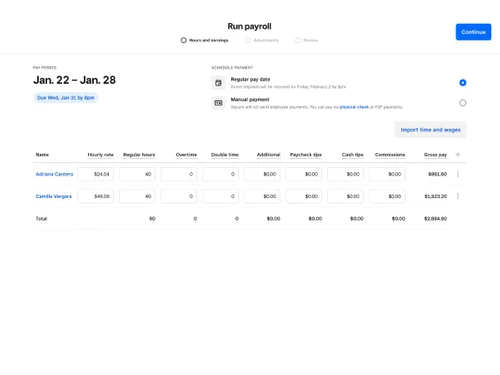
To Run Payroll with Square Payroll, follow the steps given below:
0 0
To set up automatic, instant transfers with Square Payroll, follow the steps given below:
0 0
To run payroll processing for contractors in Square Payroll, follow the steps given below:
0 0
To share a payment link in Square Payroll, follow the steps given below:
0 0
Usually, once you initiate a payment in Square Payroll, it takes one day to process payroll. The platform also offers employees the option to receive their pay instantly if they use Cash App. However, the exact moment is determined by the processing speed of your bank and the payment method you have selected.
0 0
20,000+ Software Listed
Best Price Guranteed
Free Expert Consultation
2M+ Happy Customers
Terms and Condtions

Users with registered businesses can purchase goods from merchants on the platform to satisfy their business needs. Users are not permitted to utilize any products acquired through the platform for resale, advertising, business, or further distribution.
For each purchase made, users will receive a Tax Invoice (or 'GST invoice') that includes specific details such as:
the GSTIN of the user associated with their registered business, and
the specified Entity Name for their business.
It should be noted that not all products are eligible for GST Invoice. Only the products displayed by participating sellers with the 'GST-based Invoice Available' callout on the product description page would qualify.
Certain goods and services are not eligible to get a GST Invoice, including items with VAS, i.e., Value Added Services (e.g., Total Mobile Protection/Assured Buyback) and those involving an exchange offer at the time of purchase.
Users must ensure the accuracy of the GSTIN, and business entity name provided for the GST Invoice. Requests for corrections into GST Invoice would not be accommodated by Techjockey.com or any Seller, and any issues arising from user-provided information are the sole responsibility of users.
Techjockey.com is not liable for the GST Invoice or any associated input tax credit. To efficiently claim an input tax credit, users should select the registered place of business address as per the GST authority's data and follow the provisions of the GST Act and rules.
To claim an input tax credit, the delivery and billing addresses must match. Furthermore, input tax credits will not be granted if the delivery address and GSTIN on the invoice are from different states. In case of incorrect GST details provided during the order placement, the order will be canceled automatically.