linkedin
sumHR logo
sumHR Digitize Data
sumHR Payroll
sumHR Attendence

sumHR

Brand: Amica Financial Technologies

  • 4.0

  • 6 Ratings

sumHR software is a cloud-based human resource management software. The software enables startups and SMEs to streamline their day-to-day HR and payroll processes. It provides access to valuable information from anywhere around the world. Users can automate the existing excel based manual process of managing employee payroll. sumHR also allows its users to monitor the attendance of employees and ...

See More

Have you used sumHR before?

Share your insights for better experience

Add a Review
Starting Price
₹588 excl.GST
₹ 694 incl. GST

View plans

100% Genuine
Products
Best Price
Guaranteed
Safe & Secure
Payment
  • Description

  • Pricing

  • Features

  • Specification

  • Review

  • Compare

  • Alternatives

  • FAQ

Starting at ₹588

sumHR Software Overview

What is sumHR?

sumHR software is a cloud-based human resource management software. The software enables startups and SMEs to streamline their day-to-day HR and payroll processes. It provides access to valuable information from anywhere around the world. Users can automate the existing excel based manual process of managing employee payroll. sumHR also allows its users to monitor the attendance of employees and track their leaves along based on biometrics integrations.

How Does sumHR Help with Payroll Management?

The software enables its users to keep a record of the exited employees and their pending full and final settlements in one place. Using the sumHR, users can automate and set up the most complex payroll operations easily and run the overall salary processing process within a few clicks.

sumHR software assists in managing the salary structure of employees. You can create and manage multiple salary structures based on different salary components for various job roles with the help of this HR and payroll management system.

You can easily manage loan/advance salary disbursements. Employees can declare or submit proof of their tax-saving investments themselves. Accurate tax deductions help avoid compliance penalties regardless of your business size and the salary payments are done on time. With automatic tax benefit calculation, implementing a flexible benefits plan (FBP) becomes easier.

sumHR Features for Employee Management

sumHR software enables its users to maintain secure and free communication among the people in the organization through the useful tool of employee management.

The self-service portal enables employees to create their profiles, upload HR documents, and ensure smooth exit with off-boarding checklists.

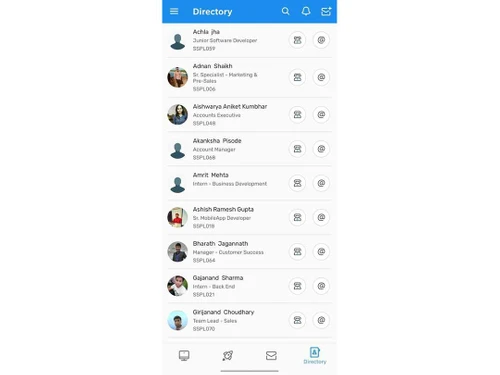
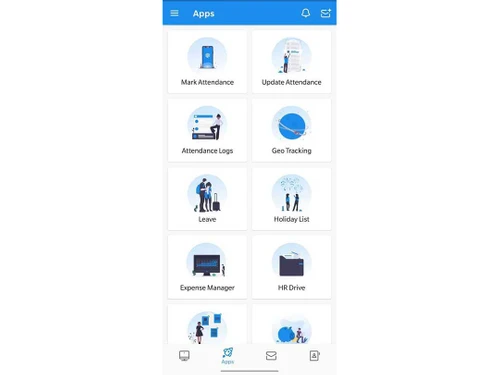
sumHR mobile app is available on both Android smartphones and iPhones. It has the following features:

  1. Profile details for every employee including employee number, image, and so on
  2. Creates a central platform to ask, approve, manage all HR requests
  3. An online directory to have quick access to your colleagues
  4. GPS-based attendance to easily mark attendance on field trips
  5. Location details to seniors via Geo tracking
  6. Make expense claims and settle expenditures from anywhere
  7. Built in storage to securely store HR related data

sumHR Pricing

sumHR software provides its users with one plan costing Rs.49/- per employee every month.

Benefits of Using sumHR

sumHR can streamline your HR process via management of attendance, leaves, payroll, reimbursement, performance appraisal, and so on. There are several benefits of using sumHR software such as:

  1. Managers can keep an accurate track of the leaves and unavailability of their employees.
  2. sumHR software assists HR professionals and accountants with tax calculation and bonus administration.
  3. It makes the separation and full & final settlement process hassle-free.
  4. Consistent performance evaluation for employees
  5. Applicant tracking and recruitment

sumHR Features

  1. Attendance Management: The software enables users to create and manage shifts and keep track of the attendance of employees.
  2. Performance Management: The new Performance Review module of sumHR allows users to keep track of the performance of every employee and set reminders.
  3. Biometric: The software uses eSSL servers to provide users with a robust biometric attendance system.
  4. Leave Management: Manage the leave approval process online, saving time for both employees and managers.
  5. Payroll Management: The software enables users to upload data and export them in spreadsheets in an organized manner.
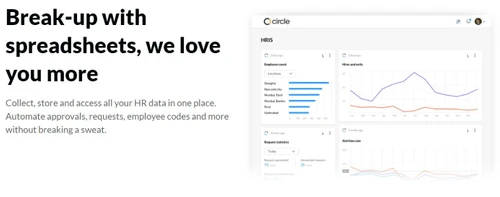
  6. Employee Data Base: The software accumulates the data of employees online for quick access anytime.
  7. Analytics: The software enables HR teams to make crucial decisions based on real insights through comprehensive reports.
  8. Reimbursement Management: This feature enables its users to tackle all the reimbursement requests from one place, hence reducing confusion.
  9. Employee Lifecycle Management: The software allows tracking the entire work lifecycle of every employee to plan their learning & growth.
  10. Recruitment Management: sumHR assists in managing the recruitment of their employees with streamlined applicant tracking and interview scheduling.
  11. Taxation Management: Users can manage and calculate the taxes of employees and organizations through the software.
  12. Expense Management: The software enables its users to track and manage their expenses to get effective results.
  13. Shift Management: This feature enables users to manage and track the schedule of individual employees with ease.
  14. Helpdesk Management: The software helps companies provide sufficient helpdesk assistance to their employees.
  15. Loan Management: Users can track and manage the loans and proceedings of each employee.
  16. Learning Management: The software generates educational strategies to achieve the learning outcomes for every employee.
  17. Timesheets: The software tracks an employee’s time spent on each task or a project.
  18. MIS Reports: This feature helps evaluate daily business activities and make effective decisions based on the data generated.
  19. Asset Management: The software enables users to track assets’ location and maintenance needs.
Read more

Amica Financial Technologies Company Details

Founded Year:  2019

Jupiter is a digital banking app with one simple aim – to deliver a banking experience that keeps pace with you. We help you cut through the banking jargon, offer smart insights based on your spending, and provide you with a range of new-age features to enable you to make sense of your finances.

Director/Founders Jitendra Gupta
Company Size 1-100 Employees

sumHR Pricing & Plans

STARTUP (INR 49/Month)

Calculated Price

588 Exclusive of all taxes
    • Employees

      Employees
      Employees
    • Monthly

      Monthly
      Monthly

Key Features

  • Employee Lifecycle Management

  • Employee Data Base

  • HRIS - employee database

  • Employee self help service

  • Online employee onboarding

BASIC (INR 69/Month)

Calculated Price

828 Exclusive of all taxes
    • Employees

      Employees
      Employees
    • Monthly

      Monthly
      Monthly

Key Features

  • Expense Claims

  • Policy centre

  • Basic HR Checklists

  • HR letters & email templates

  • Asset manager

  • 360° performance reviews

ADVANCED (INR 119/Month)

Calculated Price

1428 Exclusive of all taxes
    • Employees

      Employees
      Employees
    • Monthly

      Monthly
      Monthly

Key Features

  • Offer Letter tracking & automation

  • Online direct salary transfer

  • HR/IT/ Finance Helpdesks

  • OKRs/Goals & KRAs & KPIs

  • More options in all basics modules

  • Policy sign-off / acknowledgment

  • Multipurpose triggered checklist

  • HR drive + digital signature

sumHR Features

  • icon_check Attendance Management
    The software enables users to create and manage shifts and keep track on the attendance of employees through the software.
  • icon_check Performance Management
    The new Performance Review module of sumHR allows users to keep track of the performance of every employee and also set reminders
  • icon_check Biometric
    The software uses eSSL servers to provide users with a robust biometric attendance system.
  • icon_check Leave Management
    Bid adieu to getting leave applications approved and tracked on emails. With sumHR’s Leave Management System you get the
  • icon_check Payroll Management
    This enables users to upload data and export them in spreadsheets in an organized manner.
  • icon_check Employee Data Base
    The software accumulates the data of employees into heavyweight text, files and images, making it easier for users to find
  • icon_check Analytics
    The software enables the HR team and management to make crucial decisions based on real insights through comprehensive and
  • icon_check Reimbursement Management
     This feature enables its users to tackle all the reimbursement requests from one place, hence reducing confusion for users.
  • icon_check Taxation Management
    Users can manage and calculate the taxes of employees and organizations through the software.
  • icon_check Expense Management
    The software enables its users to track and manage their expenses to get effective results.
  • icon_check Shift Management
    This feature enables users to manage and track the schedule of individual employees with ease.
  • icon_check Helpdesk Management
    The software helps companies provide sufficient helpdesk assistance to its employees.
  • icon_check Loan Management
    Users can track and manage the loans and proceedings of each employee. 
  • icon_check Learning Management
     The software generates educational strategies to achieve the learning outcomes for every employee.
  • icon_check Timesheets
    The software records the amount of worker’s time spent on each task by individual employees. 
  • icon_check MIS Reports
    This feature helps users evaluate their daily business activities and make effective decisions based on the data generated.
  • icon_check Asset Management
    The software keeps track of organiza enabling users to make decisions regarding buying and selling assets based on the
  • icon_check Employee Lifecycle Management
    The software allows tracking the entire work lifecycle of every employee to plan their learning & growth. 
  • icon_check Recruitment Management
    sumHR assists its users to manage the recruitment of their employees.  

sumHR Specifications

Supported Platforms
Windows Windows iOS iOS Android Android
Devices
Desktop Desktop Mobile Mobile Tablet Tablet iPad iPad
Deployment
Cloud-Based Cloud-Based
Suitable For
Education ITES Retail E-Commerce
Business Specific
All Businesses
Business Size
Small Business Startups Medium Business SMBs SMEs MSMBs
Language
English

Explore the Best Alternative Solutions Similar to Your Business Size and Needs

sumHR Review

4.0

Out of 5

img

Overall Rating

Based on
6 Verified Ratings

Rating Breakdown

  • Features 4
  • Value for Money 4.3
  • Ease of Use 3.6
  • Customer Support 4.0

93% Recommend this Product

Add Review

Techjockey Trusted Reviews from Verified Users

No reviews are currently available for sumHR. Discover similar HR Software reviews

  • Zfour HRMS

    4.9

    Whats great - The service is professional, user-friendly, and genuinely helpful. Highly recommend to anyone looking for quality and trust. read more

  • HROne

    4.8

    Whats great - None read more

  • factoHR

    4.6

    Whats great - Get real-time HR insights! Data-driven reports help you make faster, smarter decisions for workforce management read more

Compare sumHR With other HR Software

Products
Ratings
Pricing
Device Supported
Deployment
Supported Platforms
  • img

    sumHR

  • 4.0

  • ₹ 588.00 excl. GST

  • Desktop

    Mobile

  • Web based

    On Premises

  • Windows

    Mac OS

  • img

    Spine HR

  • 4.3

  • Price On Request

  • Desktop

    Mobile

  • Web based

    On Premises

  • Windows

    Mac OS

  • img

    ClusterHR

  • 5

  • ₹ 40

  • Desktop

    Mobile

  • Web based

    On Premises

  • Windows

    Mac OS

  • img

    Fix HR

  • 4.9

  • ₹ 600

  • Desktop

    Mobile

  • Web based

    On Premises

  • Windows

    Mac OS

  • img

    Zfour HRMS

  • 4.9

  • ₹ 45

  • Desktop

    Mobile

  • Web based

    On Premises

  • Windows

    Mac OS

  • img

    WeekMate

  • 4.7

  • ₹ 3999

  • Desktop

    Mobile

  • Web based

    On Premises

  • Windows

    Mac OS

  • img

    SignalHRM

  • 4.6

  • ₹ 648

  • Desktop

    Mobile

  • Web based

    On Premises

  • Windows

    Mac OS

  • img

    WoCo

  • 4.8

  • ₹ 50

  • Desktop

    Mobile

  • Web based

    On Premises

  • Windows

    Mac OS

  • img

    Presence360

  • 4.9

  • ₹ 2999

  • Desktop

    Mobile

  • Web based

    On Premises

  • Windows

    Mac OS

  • img

    TruHR

  • 4.9

  • ₹ 2200

  • Desktop

    Mobile

  • Web based

    On Premises

  • Windows

    Mac OS

  • img

    Keka HR

  • 4.4

  • Price On Request

  • Desktop

    Mobile

  • Web based

    On Premises

  • Windows

    Mac OS

(0) Product(s) selected

sumHR Alternatives

See All sumHR Alternatives

Starting Price:

₹600 /Month ₹900

SAVE UPTO 33%

Starting Price:

₹2,200 /Month

Starting Price:

₹49 /Month

Starting Price:

₹890 /Month
Starting Price:

₹1,499 /Month

Starting Price:

$49 /Month

Available

Price on Request

Starting Price:

₹5,000 /Month

Articles for sumHR

See All Related Articles

Does sumHR software help with performance management?

Yes, sumHR software helps managers assess the performance of employees for different projects.

Does sumHR software provide payroll features?

Yes, sumHR software provides payroll features that help manage salary, bonus, overtime, loans & advances.

Is sumHR software user-friendly?

Yes, the software is straightforward to install and use, and an individual can use it without any complications.

What kinds of industries is the software suitable for?

The software is suitable for industries like ITES, education, E-Commerce and retail.

What are the various services provided by the software?

The software provides various HRM services like attendance and leaves management, employee data and profile management and payroll processing.

Who can use sumHR software?

sumHR software is suitable for industries like ITES, education, E-Commerce and retail.

What are the key features of sumHR software?

The software provides various HRM features like attendance and leaves management, employee data and profile management and payroll processing.

Can I download sumHR app?

SumHR app can be download on android and iOS devices.

20,000+ Software Listed

Best Price Guranteed

Free Expert Consultation

2M+ Happy Customers

Terms and Condtions

close

Users with registered businesses can purchase goods from merchants on the platform to satisfy their business needs. Users are not permitted to utilize any products acquired through the platform for resale, advertising, business, or further distribution.

For each purchase made, users will receive a Tax Invoice (or 'GST invoice') that includes specific details such as:

  • the GSTIN of the user associated with their registered business, and

  • the specified Entity Name for their business.

It should be noted that not all products are eligible for GST Invoice. Only the products displayed by participating sellers with the 'GST-based Invoice Available' callout on the product description page would qualify.

Certain goods and services are not eligible to get a GST Invoice, including items with VAS, i.e., Value Added Services (e.g., Total Mobile Protection/Assured Buyback) and those involving an exchange offer at the time of purchase.

Users must ensure the accuracy of the GSTIN, and business entity name provided for the GST Invoice. Requests for corrections into GST Invoice would not be accommodated by Techjockey.com or any Seller, and any issues arising from user-provided information are the sole responsibility of users.

Techjockey.com is not liable for the GST Invoice or any associated input tax credit. To efficiently claim an input tax credit, users should select the registered place of business address as per the GST authority's data and follow the provisions of the GST Act and rules.

To claim an input tax credit, the delivery and billing addresses must match. Furthermore, input tax credits will not be granted if the delivery address and GSTIN on the invoice are from different states. In case of incorrect GST details provided during the order placement, the order will be canceled automatically.