linkedin
Work Hour Monitor logo
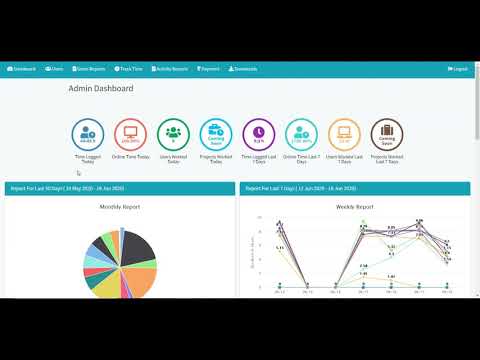
play WorkHourMonitor demo
play WHM Employee panel | Automated Time Tracking Software | Employee Activity Monitoring
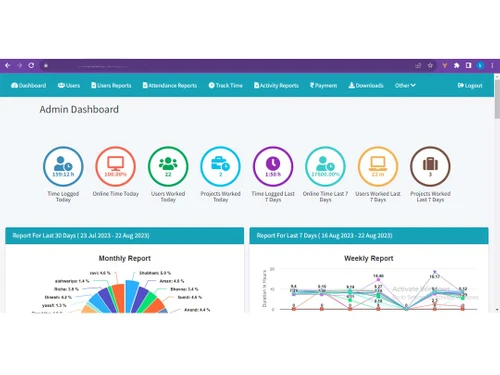
work hour monitor dashboard

Work Hour Monitor

Brand: Variable Soft

  • 5

  • 1 Rating & 1 Review

Efficiently track and manage your work hours with Work Hour Monitor time tracking solution and maintain a precise record of employee productivity.

See More

Have you used Work Hour Monitor before?

Share your insights for better experience

Add a Review
Starting Price
₹150 excl.GST
₹ 177 incl. GST

View plans

offer Save upto 18%, Get GST Invoice on your business purchase T&C
offer Buy Now & Pay Later, Check offer on payment page.
Buy Now
100% Genuine
Products
Best Price
Guaranteed
Safe & Secure
Payment
  • Description

  • Pricing

  • Features

  • Specification

  • Review

  • Compare

  • Alternatives

  • FAQ

Starting at ₹150
Buy Now

Work Hour Monitor Software Overview

What is Work Hour Monitor Software?

Work Hour Monitor is a state-of-the-art, smart time-tracking software for employers seeking to enhance workforce productivity and time management. Designed with the aim of revolutionizing work processes, this cutting-edge software eliminates the guesswork associated with managing employee work hours. There is no longer a need for entering the time manually as the software seamlessly automates the tracking of work hours, ensuring precision and accuracy whether employees are engaged in project work or attending meetings.

It provides employers with deep insights into software usage, enabling the identification of productivity bottlenecks and distractions that may hinder workforce efficiency. Furthermore, even in situations without internet connectivity, Work Hour Monitor continues to record offline work hours, ensuring that no critical data is missed, regardless of location or connectivity constraints.

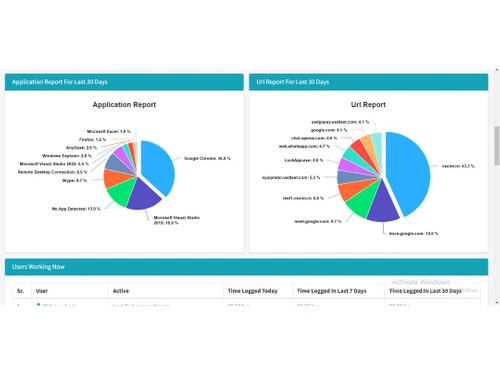
Employers can also benefit from the platform's ability to monitor web activities during work hours, ensuring that employees stay focused on their designated tasks. The customizable reports feature allows employers to customize the work-hour data to their specific business needs, facilitating productivity analysis and the identification of areas for improvement.

Why Choose Work Hour Monitor System

Whether striving for personal productivity or being part of a team or organization, Work Hour Monitor software empowers you to make data-driven choices and optimize your work hours.

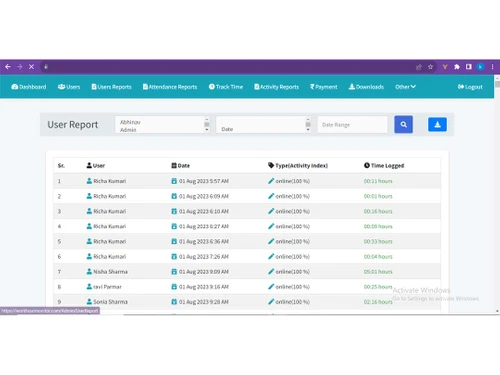
It is an invaluable tool for managers and team leaders to ensure productivity. It helps track the work hours of team members, provides data on application and website usage, and offers customizable reports, enabling better resource allocation and performance management.

Business owners and entrepreneurs can also use this software to enhance productivity across their organizations. It aids in resource allocation, project management, and budgeting by providing accurate time-tracking data, application usage insights, and customized reports. All these features ultimately lead to effective decision making and increased profitability.

Benefits of Work Hour Monitor Time Tracking Solution

  • It will streamline your workday with automated time tracking for enhanced efficiency.
  • Will help identify productivity bottlenecks and distractions with application tracking.
  • Ensure accurate time records, even when offline, for comprehensive work-hour insights.
  • Help optimize your online focus by monitoring and managing your web activity.
  • You can tailor your work data to your needs with customizable reports for data-driven decision making.
  • You can increase accountability and visualize your workflow with automated screenshots.

Pricing of the Work Hour Monitor Time Tracking System

Work Hour Monitor time tracking system pricing starts at INR 200/Month at techjockey.com.

The pricing model is based on different parameters, including extra features, deployment type, and the total number of users. For further queries related to the product, you can contact our product team and learn more about the pricing and offers.

Read more

Variable Soft Company Details

Founded Year:  2013

Variable Infotech India Pvt Ltd ( Variable Soft ) is a leading Web Development, Integration, Application Development, Graphics Design, and complete IT Services Company based in Jaipur, India. Variable Soft was established in sept 2013 by a group of highly creative and competent Engineering Professi

Director/Founders Maan Khatri
Company Size 1-100 Employees

Work Hour Monitor Pricing & Plans

Small Teams

Calculated Price

200 Exclusive of all taxes
    • Users

      Users
      Users
    • Monthly

      Monthly
      Monthly

Key Features

  • Automatic time tracking

  • URL and app tracking

  • Auto screenshots

  • Offline time tracking

  • Project time tracking

  • Employee absence calendar

Companies

Calculated Price

150 Exclusive of all taxes
    • Users

      Users
      Users
    • Monthly

      Monthly
      Monthly

Key Features

  • Automatic time tracking

  • URL and app tracking

  • Auto screenshots

  • Offline time tracking

  • Project time tracking

  • Employee absence calendar

Work Hour Monitor Features

  • icon_check Auto Time Tracking
    Effortlessly capture and record your work hours without manual input.
  • icon_check Application Tracking
    Gain insights into your productivity by monitoring the usage of various applications.
  • icon_check Offline Time Tracking
    Keep track of your work hours, offline or on the go.
  • icon_check URL Tracking
    Monitor the websites you visit during work hours for improved online productivity.
  • icon_check Custom Reports
    Create personalized reports to analyze your work habits and enhance efficiency.
  • icon_check Automated Screenshots
    Visualize your work activities with automated screen captures regularly.
  • icon_check Keystroke Logging
    The system captures the total number of keyboard keys pressed by an employee to verify active engagement during work sessions.
  • icon_check Mouse Click Counter
    This utility tracks the frequency of mouse clicks to provide deep insights into user activity and interaction consistency.
  • icon_check Admin Invite System
    Administrators can easily add new team members by sending invitation links that allow users to join without manual signups.
  • icon_check Project Time Tracking
    This tool enables users to allocate their tracked hours to specific client projects for more accurate billing and analysis.
  • icon_check Absence Calendar View
    A centralized dashboard that displays employee leaves and holidays to help managers plan resources and project timelines.
  • icon_check Real-Time Dashboard
    The live interface allows managers to see which employees are currently active and what tasks they are working on right now.
Work Hour Monitor Demo Video play icon

Get Work Hour Monitor Demo

Watch the demo video to explore key features, real workflows, and how the software fits your business needs.

Understand
Key Features
Personal
Demo Insights
Interactive
Demo Support

Work Hour Monitor Specifications

Supported Platforms
Windows Windows iOS iOS Android Android MacOS MacOS Windows(Phone) Windows(Phone)
Devices
Desktop Desktop Mobile Mobile
Deployment
Cloud-Based Cloud-Based Perpetual Perpetual
Suitable For
Basic Office Software Education ITES E-Commerce
Business Specific
All Businesses
Business Size
Small Business Startups Medium Business Enterprises SMBs SMEs MSMBs MSMEs
Customer Support
Phone Email Live Chat Communities
Language
English हिन्दी
Training Resources
Documentation Videos

Explore the Best Alternative Solutions Similar to Your Business Size and Needs

Work Hour Monitor Review

5

Out of 5

img

Overall Rating

Based on
1 Verified Review

Rating Breakdown

  • Features 5
  • Value for Money 5
  • Ease of Use 5
  • Customer Support 5

100% Recommend this Product

Add Review

madhu prajapati

User

Industry: IT User since: 6-12 months

5

Reviewed on: Oct 11, 2023

Techjockey Verified

“Best employee tracking software”

Pros

it is a time tracking software that helps the organization to track the employee's active time on the system it is software for an organization offering remote working and wants to track their employees and provide screenshots of the screen of what they are doing on the system if online, it is an easy to use software that anyone can use, can be implemented on your system very easily with a number of features.

Cons

What I dislike is that it does not support Mac devices to use this software it is necessary to have a Windows device.

Switched from Timetrack Time Tracking

Reason to switch

it help us to view our active time on work and help us to focus on the wok more other than any other thing, it increases the productivity and effeciency of the work .

Compare Work Hour Monitor With other Time Tracking Software

Products
Ratings
Pricing
Device Supported
Deployment
Supported Platforms
  • img

    Work Hour Monitor

  • 5

  • ₹ 150.00 excl. GST

  • Desktop

    Mobile

  • Web based

    On Premises

  • Windows

    Mac OS

  • img

    Hubstaff

  • 4.3

  • Price On Request

  • Desktop

    Mobile

  • Web based

    On Premises

  • Windows

    Mac OS

  • img

    ADP SecurTime

  • 4.0

  • Price On Request

  • Desktop

    Mobile

  • Web based

    On Premises

  • Windows

    Mac OS

  • img

    Time Doctor

  • 4.4

  • Price On Request

  • Desktop

    Mobile

  • Web based

    On Premises

  • Windows

    Mac OS

  • img

    TopTracker

  • 4.4

  • Price On Request

  • Desktop

    Mobile

  • Web based

    On Premises

  • Windows

    Mac OS

  • img

    DeskViu

  • 4.1

  • ₹ 100

  • Desktop

    Mobile

  • Web based

    On Premises

  • Windows

    Mac OS

  • img

    TimeChart

  • 4.1

  • Price On Request

  • Desktop

    Mobile

  • Web based

    On Premises

  • Windows

    Mac OS

  • img

    OnTheClock

  • 4.4

  • Price On Request

  • Desktop

    Mobile

  • Web based

    On Premises

  • Windows

    Mac OS

  • img

    Beebole

  • 4.3

  • Price On Request

  • Desktop

    Mobile

  • Web based

    On Premises

  • Windows

    Mac OS

(2) Product(s) selected

Work Hour Monitor Alternatives

See All Work Hour Monitor Alternatives

Available

Price on Request

Available

Price on Request

Starting Price:

€9 /User/Month

Starting Price:

$50 /Month

Starting Price:

$28 /Month

Starting Price:

$12 /Month

Starting Price:

$4 /Month

Starting Price:

$14 /Seat/Month

Articles for Work Hour Monitor

See All Related Articles

Which operating system does Work Hour Monitor Software Support?

Work Hour Monitor software is compatible with Windows and macOS device systems.

Is there any Work Hour Monitor Time Tracking App?

Work Hour Monitor time tracking app is not available on Android and iOS devices.

What is the deployment type of the Work Hour Monitor System?

Work Hour Monitor system supports web-based deployment.

How Much Does the Work Hour Monitor Time Tracking Software Cost?

Work Hour Monitor time tracking software pricing is available on request at techjockey.com.

Who are the potential users of the Work Hour Monitor Time Tracking System?

Work Hour Monitor system is a suitable solution for employers and businesses of all sizes looking to monitor and track their employees' work hours and computer activities for enhanced productivity and accountability.

Is there any free trial or demo for the Work Hour Monitor Platform?

Work Hour Monitor platform demo is available for free with techjockey.com.

Is the Work Hour Monitor Time Tracking Solution Free?

Work Hour Monitor Time Tracking solution does not offer a free trial.

How can you download the Work Hour Monitor Time Tracking Software?

Work Hour Monitor Time Tracking software installation is not required, as it is web-based. Just open the Setup Wizard to get started.

How does Work Hour Monitor Work?

Work Hour Monitor is a user-friendly time tracking software that enables employers to monitor their employees' computer activities and work hours effectively. It captures screenshots to track productivity, providing insights into when and how long employees work. This tool helps businesses improve efficiency and accountability.

20,000+ Software Listed

Best Price Guranteed

Free Expert Consultation

2M+ Happy Customers

Terms and Condtions

close

Users with registered businesses can purchase goods from merchants on the platform to satisfy their business needs. Users are not permitted to utilize any products acquired through the platform for resale, advertising, business, or further distribution.

For each purchase made, users will receive a Tax Invoice (or 'GST invoice') that includes specific details such as:

  • the GSTIN of the user associated with their registered business, and

  • the specified Entity Name for their business.

It should be noted that not all products are eligible for GST Invoice. Only the products displayed by participating sellers with the 'GST-based Invoice Available' callout on the product description page would qualify.

Certain goods and services are not eligible to get a GST Invoice, including items with VAS, i.e., Value Added Services (e.g., Total Mobile Protection/Assured Buyback) and those involving an exchange offer at the time of purchase.

Users must ensure the accuracy of the GSTIN, and business entity name provided for the GST Invoice. Requests for corrections into GST Invoice would not be accommodated by Techjockey.com or any Seller, and any issues arising from user-provided information are the sole responsibility of users.

Techjockey.com is not liable for the GST Invoice or any associated input tax credit. To efficiently claim an input tax credit, users should select the registered place of business address as per the GST authority's data and follow the provisions of the GST Act and rules.

To claim an input tax credit, the delivery and billing addresses must match. Furthermore, input tax credits will not be granted if the delivery address and GSTIN on the invoice are from different states. In case of incorrect GST details provided during the order placement, the order will be canceled automatically.