USA
USA UAE
UAESmall Business
Designed for startups and growing businesses

See More




Brand: Microsoft Corporation
Audio Conferencing in Office 365 is a dial-in conference system that enables its users to plan and execute meetings over calls. The software adds dial-in conference options to Skype for Business and team meetings. Users can add up to 250 members or phone attendees in one meeting. One can join the conference even without using Skype for Business or Microsoft Teams. Audio Conferencing in Office 365...
See MoreHave you used Audio Conferencing in Office 365 before?
Share your insights for better experience
Brand: Microsoft Corporation
Founded Year: 1975
Microsoft Corporation is an American multinational technology company with headquarters in Redmond, Washington.
 Cost Effective Meeting Audio Conference Call conferencing Integration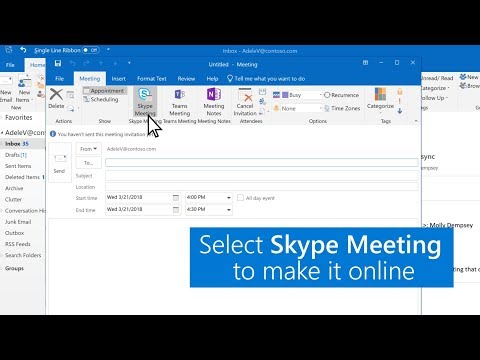

Watch the demo video to explore key features, real workflows, and how the software fits your business needs.
 Windows
  Desktop
  Cloud-Based
Small Business
Designed for startups and growing businesses
Medium Business
Built for business growth and flexibility
Enterprises
Designed for complex and large-scale business needs
4.5
Out of 5

Overall Rating
Based on
3 Verified Reviews
Rating Breakdown
90% Recommend this Product
Add ReviewUsers generally appreciate the advanced AI technology and professional appearance of Audio Conferencing in Office 365, highlighting its scalability and user-friendly interface. Many find the transcription and translation features beneficial for improving business operations. However, some users report occasional connectivity issues during calls, requiring system restarts, and challenges with low network connectivity. Overall, the software is well-received, though there are minor limitations that could impact user experience.

May 16, 2020
Techjockey Verified
“Incredible AI technology”
Pros
I am really happy with the services provided by Audio Conferencing in Office 365. I can get access to advanced AI technology provided by the software and transcribe voicemails and translate chat messages. It has really helped boost up my business as now I can view the problematic areas and try to make improvements within them.
Cons
I was not able to connect between calls and this happens occasionally. I have to restart my whole system. It exhaust a lot of my working time.
Mar 16, 2020
Techjockey Verified
“Provides a professional outlook”
Pros
The software provides new dial-in numbers for every meeting, making it look far more professional and business-worthy. The conferencing platform is absolutely scalable and allows me to get access to my account from any device.
Cons
I have not faced any other issues, except that the software does not function properly with low network connectivity.
Jan 5, 2020
Techjockey Verified
“Friendly user interface”
Pros
The software features a friendly user interface. I was able to set up my account within a few minutes. I can also share my screen with my teammates by clicking on the buttons at the bottom of the screen.
Cons
I have not found any major issues with Audio Conferencing in Office 365.

Audio Conferencing in Office 365
Price On Request
Desktop
Mobile
Web based
On Premises
Windows
Mac OS

Cisco Webex
₹ 950
Desktop
Mobile
Web based
On Premises
Windows
Mac OS

Tencent RTC
Price On Request
Desktop
Mobile
Web based
On Premises
Windows
Mac OS
Interactio
Price On Request
Desktop
Mobile
Web based
On Premises
Windows
Mac OS
AONMeetings
₹ 152
Desktop
Mobile
Web based
On Premises
Windows
Mac OS

Pexip
Price On Request
Desktop
Mobile
Web based
On Premises
Windows
Mac OS

VideoMeet
₹ 499
Desktop
Mobile
Web based
On Premises
Windows
Mac OS

VidyoConnect
Price On Request
Desktop
Mobile
Web based
On Premises
Windows
Mac OS

JioMeet
Price On Request
Desktop
Mobile
Web based
On Premises
Windows
Mac OS

xpression camera
Price On Request
Desktop
Mobile
Web based
On Premises
Windows
Mac OS

GoToMeeting
Price On Request
Desktop
Mobile
Web based
On Premises
Windows
Mac OS
(0) Product(s) selected
Available
Price on Request
Available
Price on Request
Available
Price on Request
Available
Price on Request
Starting Price:
$8

Starting Price:
$849 /Month

Starting Price:
₹1,299 /Month

Starting Price:
$20

Starting Price:
$99 /Month

Available
Price on Request



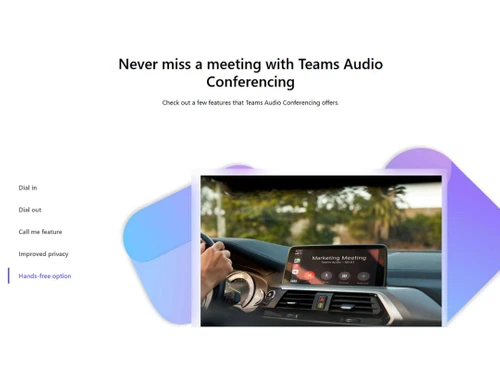
Users can join a meeting by using a hands-free Bluetooth device for their convenience.
One can add up to 250 attendees in a single call to facilitate better and more effective collaboration.
Techjockey provides an online demo for Audio Conferencing in Office 365, based on your preferred time and date.
Users can join the call by entering the PIN and conference ID number in the space provided.
No, Audio Conferencing in Office 365 does not have a dedicated mobile application.
20,000+ Software Listed
Best Price Guranteed
Free Expert Consultation
2M+ Happy Customers
Terms and Condtions

Users with registered businesses can purchase goods from merchants on the platform to satisfy their business needs. Users are not permitted to utilize any products acquired through the platform for resale, advertising, business, or further distribution.
For each purchase made, users will receive a Tax Invoice (or 'GST invoice') that includes specific details such as:
the GSTIN of the user associated with their registered business, and
the specified Entity Name for their business.
It should be noted that not all products are eligible for GST Invoice. Only the products displayed by participating sellers with the 'GST-based Invoice Available' callout on the product description page would qualify.
Certain goods and services are not eligible to get a GST Invoice, including items with VAS, i.e., Value Added Services (e.g., Total Mobile Protection/Assured Buyback) and those involving an exchange offer at the time of purchase.
Users must ensure the accuracy of the GSTIN, and business entity name provided for the GST Invoice. Requests for corrections into GST Invoice would not be accommodated by Techjockey.com or any Seller, and any issues arising from user-provided information are the sole responsibility of users.
Techjockey.com is not liable for the GST Invoice or any associated input tax credit. To efficiently claim an input tax credit, users should select the registered place of business address as per the GST authority's data and follow the provisions of the GST Act and rules.
To claim an input tax credit, the delivery and billing addresses must match. Furthermore, input tax credits will not be granted if the delivery address and GSTIN on the invoice are from different states. In case of incorrect GST details provided during the order placement, the order will be canceled automatically.