 USA
USA UAE
UAE
Booky
Whats great - Booky.io has a clean and minimal layout. It's perfect for keeping my most-used links all in one place. The drag-and-drop make... read more



Brand: AudioRelay
A cross-platform utility software that lets you stream audio between devices (PC, phone, or tablet) in real time.
See MoreHave you used AudioRelay before?
Share your insights for better experience
Looking for The Right Pricing?
Share your requirements and get a plan built around your business.
Price Available on Request
Get personalised AudioRelay pricing that fits your needs. Our team will connect with you.
 Audio Source Streaming Speaker Playback Routing Wireless Network Transfer Multiple Device Output Cross-Platform Support Network Audio Server Mode Local Network Detection Device Identification Network Compression Handling Wireless Audio Bridging Buffer Configuration Controls Audio Relay Operation
  Windows
  Android
  MacOS
MacOS  Linux
Linux  Desktop
  Mobile
  Perpetual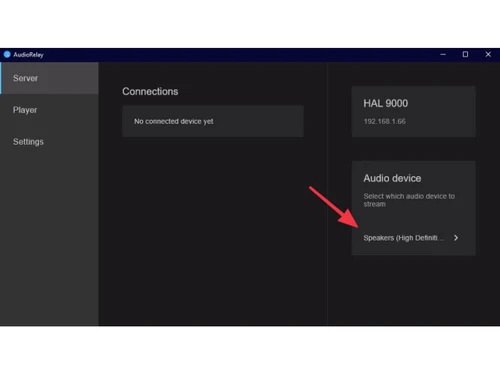
Techjockey Trusted Reviews from Verified Users
No reviews are currently available for AudioRelay. Discover similar Utility Software reviews
Booky
Whats great - Booky.io has a clean and minimal layout. It's perfect for keeping my most-used links all in one place. The drag-and-drop make... read more

Defencebyte Computer Opmitizer
Whats great - Really I am happy now after using defencebyte Computer optimizer, My Pc performance boost after using defencebyte Computer op... read more

VMware
Whats great - Vmware offers a wide variety of management tools and features to help with both the initial configuration and ongoing adminis... read more









AudioRelay pricing can be requested at techjockey.com. Pricing is customised based on specific business needs.
AudioRelay supports Windows, Android, and Linux, allowing cross-device audio streaming. It does not have full native support for macOS or iOS.
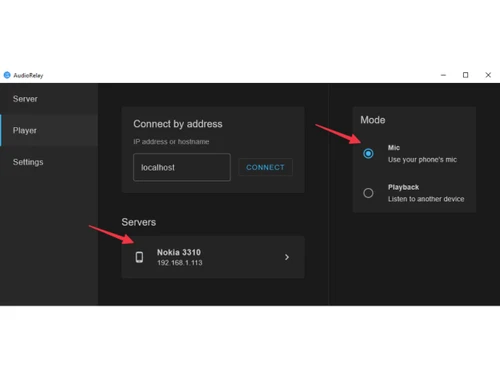
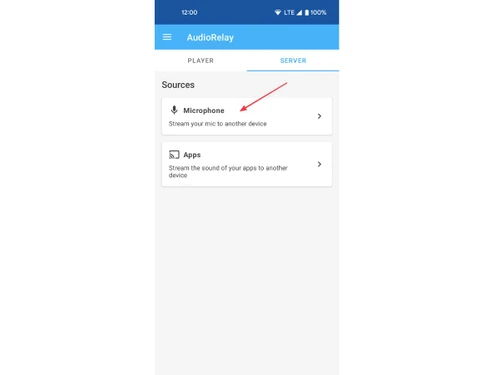
It transmits audio between devices over Wi-Fi or USB by installing a server on your PC and an app on your mobile device. This enables real-time audio streaming with low latency.
Yes, it can be useful for small businesses in setups like remote meetings, presentations, or shared audio environments. However, it is more commonly used by individual users.
AudioRelay offers a free version with basic features, along with a paid version that unlocks advanced capabilities.
Key features include wireless audio streaming, low latency, multi-device support, microphone functionality, and flexible connectivity options like Wi-Fi and USB.
Yes, AudioRelay provides a mobile app for Android devices, which works alongside the desktop client.
It is ideal for gamers, remote workers, students, content creators, and anyone who needs flexible audio streaming across devices.
AudioRelay is generally safe when used on trusted networks, but users should ensure secure connections (like private Wi-Fi) to avoid potential data exposure.
It is used to stream audio between devices, turn phones into speakers or microphones, and create flexible audio setups for work or entertainment.
20,000+ Software Listed
Best Price Guranteed
Free Expert Consultation
2M+ Happy Customers
Terms and Condtions

Users with registered businesses can purchase goods from merchants on the platform to satisfy their business needs. Users are not permitted to utilize any products acquired through the platform for resale, advertising, business, or further distribution.
For each purchase made, users will receive a Tax Invoice (or 'GST invoice') that includes specific details such as:
the GSTIN of the user associated with their registered business, and
the specified Entity Name for their business.
It should be noted that not all products are eligible for GST Invoice. Only the products displayed by participating sellers with the 'GST-based Invoice Available' callout on the product description page would qualify.
Certain goods and services are not eligible to get a GST Invoice, including items with VAS, i.e., Value Added Services (e.g., Total Mobile Protection/Assured Buyback) and those involving an exchange offer at the time of purchase.
Users must ensure the accuracy of the GSTIN, and business entity name provided for the GST Invoice. Requests for corrections into GST Invoice would not be accommodated by Techjockey.com or any Seller, and any issues arising from user-provided information are the sole responsibility of users.
Techjockey.com is not liable for the GST Invoice or any associated input tax credit. To efficiently claim an input tax credit, users should select the registered place of business address as per the GST authority's data and follow the provisions of the GST Act and rules.
To claim an input tax credit, the delivery and billing addresses must match. Furthermore, input tax credits will not be granted if the delivery address and GSTIN on the invoice are from different states. In case of incorrect GST details provided during the order placement, the order will be canceled automatically.