linkedin
A.V. Mapping logo
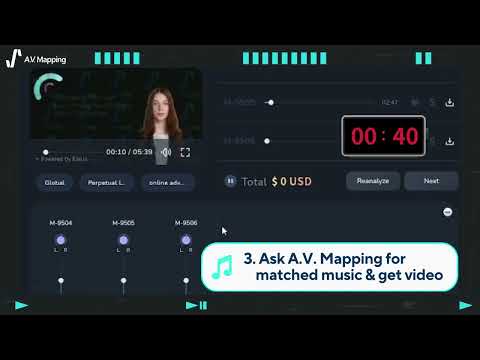
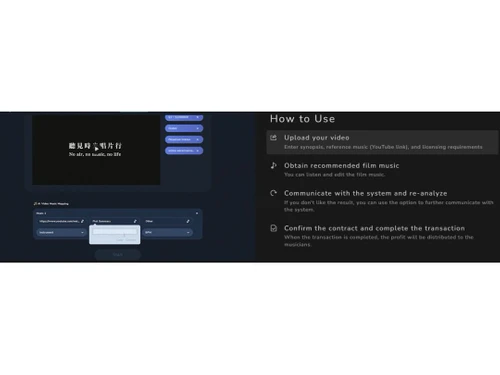
play AI made me a blog, a video, and a musician's music within 40 minutes.
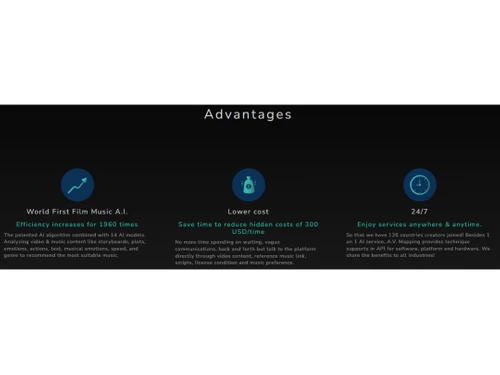
AV mapping Advantages
AV mapping AI Music Editing

A.V. Mapping

Brand: Memuriesic Corporation

  • 4.3

  • 4 Ratings

Experience the next level of audio editing with AV Mapping. Elevate your sound design and create immersive 3D audio experiences with precision and ease.

See More

Have you used A.V. Mapping before?

Share your insights for better experience

Add a Review
Starting Price
$60

View plans

100% Genuine
Products
Best Price
Guaranteed
Safe & Secure
Payment
  • Description

  • Pricing

  • Features

  • Specification

  • Review

  • Compare

  • Alternatives

  • FAQ

Starting at $60

A.V. Mapping Software Overview

What is AV Mapping Software?

A.V. Mapping is comprehensive audio editing software designed to meet all your video background music needs. With an extensive library of royalty-free music, it serves as a one-stop solution for creators seeking high-quality soundtracks for their videos.

A.V. Mapping caters to a wide range of audio editing needs. Its advanced mapping capabilities enable spatial audio design, allowing users to create captivating 3D soundscapes. Whether it's post-production editing, virtual reality projects, or interactive audio installations, A.V. Mapping is the go-to software for elevating the auditory experience.

The platform is powered by advanced A.I. technology and supports a unique recommendation system that suggests free downloadable music tailored for YouTube content. By utilizing A.I. musicians, this platform ensures that you have access to a diverse range of music styles and genres to enhance the impact and appeal of your videos.

Why Choose AV Mapping Audio Editing Software?

  • Smart metadata tagging: It utilizes intelligent metadata tagging to categorize and label music tracks for simplifying search and discovery processes.
  • Dynamic tempo adjustment: The A.I. video music platform allows users to modify the speed and tempo of the music to match video pacing.
  • Multi-track audio editing: The software enables users to edit multiple audio tracks simultaneously to facilitate complex audio editing and mixing.
  • Advanced audio effects: It offers audio effects such as reverb, echo, and distortion for users to add depth and creativity to their video soundtracks.
  • Intelligent beat matching: The tool utilizes A.I. algorithms to automatically match the beat of the background music with the rhythm and tempo of the video.
  • Customizable music playlists: Users can create personalized playlists within A.V. Mapping, organizing, and managing their preferred music selections for different projects.

Benefits of AV Mapping Software

  • The A.I. video music platform lets users preview music selections and edits in real-time.
  • It employs intelligent volume leveling techniques to balance the audio levels across different clips or music tracks.
  • The platform displays audio waveforms in real-time, assisting users in precise audio editing and synchronization.

Pricing of AV Mapping Audio Editing System

AV Mapping pricing starts at $60.00 on TechJockey.com.

The overall pricing model is based on different factors such as personalization, extra features required, total users, and the deployment type. Please feel free to request a call from our product experts if you want to learn more about our subscription plans or premium package deals.

Read more

Memuriesic Corporation Company Details

Founded Year:  2020

A.V. Mapping, one-stop AI video music matching & licensing platform with SFX and audio editing, changing media, film & music industries. A.V. Mapping finds the most suitable licensed music for videos with AI in seconds. Bringing money into creator economy.

Director/Founders Frinny Lee
Company Size 1-100 Employees

A.V. Mapping Pricing & Plans

Personal
Key Features
  • Up to 3 video analysis
  • Unlimited reanalyzing
  • Best for casual usage
  • Over 1M music tracks
  • Multiple license choices
  • For Public
Starting at $60
    • Licenses

      Licenses
      Licenses
    • Monthly

      Monthly
      Monthly

Key Features

  • Up to 3 video analysis

  • Unlimited reanalyzing

  • Best for casual usage

  • Over 1M music tracks

  • Multiple license choices

  • For Public

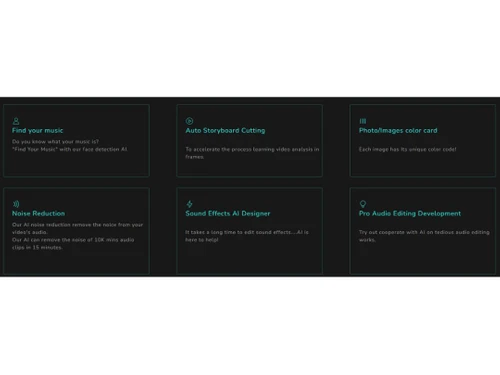
A.V. Mapping Features

  • icon_check AI driven Video analysis
    Utilizes A.I. technology to analyze and understand video content for intelligent processing and enhancement.
  • icon_check AI driven text analysis
    Employs A.I. algorithms to analyze text within videos for creating accurate captions or subtitles.
  • icon_check AI driven music analysis
    Analyzes music tracks to better categorize and match music to specific video themes or moods.
  • icon_check Auto storyboard cutting
    Automates the process of cutting video footage into a storyboard to save time and effort in post-production editing.
  • icon_check Noise Reduction
    Enhances the audio quality of videos to minimize unwanted background noise for a more professional sound.
  • icon_check Sound effects AI designer
    Users can customize and create unique video sound effects.
  • icon_check Find your music
    Provides a library for users to search and discover the perfect background music for their videos.
  • icon_check Pro audio editing development
    Offers advanced audio editing tools and features for professional-grade audio refinement and manipulation.
  • icon_check Photo/Images color card
    Assists users in adjusting and matching colors between photos or images for a consistent visual aesthetic.
  • icon_check Efficient
    Streamlines video production processes and optimizes resource usage for a smooth and productive workflow.
A.V. Mapping Demo Video play icon

Get A.V. Mapping Demo

Watch the demo video to explore key features, real workflows, and how the software fits your business needs.

Understand
Key Features
Personal
Demo Insights
Interactive
Demo Support

A.V. Mapping Specifications

Supported Platforms
Ubuntu Ubuntu Windows Windows MacOS MacOS Linux Linux
Devices
Desktop Desktop Mobile Mobile Tablet Tablet iPad iPad
Deployment
Cloud-Based Cloud-Based
Suitable For
All Industries
Business Specific
All Businesses
Business Size
Small Business Startups Medium Business Enterprises
Customer Support
Phone Email Communities
Language
English
Integration
API Integration
Training Resources
Documentation
AI Features
AI Integrated

Explore the Best Alternative Solutions Similar to Your Business Size and Needs

A.V. Mapping Review

4.3

Out of 5

img

Overall Rating

Based on
4 Verified Ratings

Rating Breakdown

  • Features 4
  • Value for Money 4.2
  • Ease of Use 4.5
  • Customer Support 4.5

92% Recommend this Product

Add Review

Techjockey Trusted Reviews from Verified Users

No reviews are currently available for A.V. Mapping. Discover similar Audio Editing Software reviews

  • Luna DAW

    4.4

    Whats great - Innovative features, high-quality sound, seamless Apollo integration. read more

  • ocenaudio

    4.7

    Whats great - I appreciate that Ocenaudio supports VST plugins, so I can explore and expand the functionality of the software with more too... read more

  • GoldWave

    4.5

    Whats great - As a veteran user of GoldWave I have seen that it has retained the same basic look and features over the last 10 years which ... read more

Compare A.V. Mapping With other Audio Editing Software

Products
Ratings
Pricing
Device Supported
Deployment
Supported Platforms
  • img

    A.V. Mapping

  • 4.3

  • Price On Request

  • Desktop

    Mobile

  • Web based

    On Premises

  • Windows

    Mac OS

  • img

    Cleanvoice AI

  • 4.3

  • Price On Request

  • Desktop

    Mobile

  • Web based

    On Premises

  • Windows

    Mac OS

  • img

    Cubase Elements

  • 4.7

  • ₹ 9281

  • Desktop

    Mobile

  • Web based

    On Premises

  • Windows

    Mac OS

  • img

    Moises

  • 4.7

  • Price On Request

  • Desktop

    Mobile

  • Web based

    On Premises

  • Windows

    Mac OS

  • img

    Audacity

  • 4.6

  • Price On Request

  • Desktop

    Mobile

  • Web based

    On Premises

  • Windows

    Mac OS

  • img

    Adobe Podcast

  • 4.2

  • Price On Request

  • Desktop

    Mobile

  • Web based

    On Premises

  • Windows

    Mac OS

  • img

    Qtractor

  • 4.1

  • Price On Request

  • Desktop

    Mobile

  • Web based

    On Premises

  • Windows

    Mac OS

  • img

    Supertone CLEAR

  • 4.5

  • Price On Request

  • Desktop

    Mobile

  • Web based

    On Premises

  • Windows

    Mac OS

  • img

    BandLab

  • 4.5

  • Price On Request

  • Desktop

    Mobile

  • Web based

    On Premises

  • Windows

    Mac OS

  • img

    LALAL AI

  • 4.3

  • Price On Request

  • Desktop

    Mobile

  • Web based

    On Premises

  • Windows

    Mac OS

(2) Product(s) selected

A.V. Mapping Alternatives

See All A.V. Mapping Alternatives

Starting Price:

$25 /month

Available

Price on Request

Starting Price:

$15 /month

Starting Price:

$10 /Month
Available

Price on Request

Available

Price on Request

Articles for A.V. Mapping

See All Related Articles

Which operating system does A.V. Mapping Software Support?

A.V. Mapping is compatible with Windows and macOS operating systems.

Is there any A.V. Mapping App?

The A.V. Mapping software app is unavailable for Android and iOS devices.

What is the deployment type of an A.V. Mapping Audio Editing System?

A.V. Mapping audio editing system supports web-based deployment.

How much does A.V. Mapping Audio Editing Software Cost?

A.V. Mapping pricing starts from $60 at Techjockey.com.

Who are the potential users of A.V. Mapping Audio Editing Software Solution?

A.V. Mapping audio editing software can be useful for music enthusiasts, DJs, music editors, and producers who want to streamline their music selection and editing process.

Is there any free trial or demo for A.V. Mapping System Software?

A.V. Mapping system software demo is available for free with techjockey.com.?

Is A.V. Mapping software free?

A.V. Mapping software does not offer a free trial.

How can you download A.V. Mapping?

A.V. Mapping is a web-based platform. So, you need not download any software or app to use it.

How does A.V. Mapping Audio Editing Software work??

A.V. Mapping audio editing software uses advanced A.I. algorithms to identify and categorize music based on videos and images you uploaded, genre, tempo, and even from text. It also helps with editing music.

20,000+ Software Listed

Best Price Guranteed

Free Expert Consultation

2M+ Happy Customers

Terms and Condtions

close

Users with registered businesses can purchase goods from merchants on the platform to satisfy their business needs. Users are not permitted to utilize any products acquired through the platform for resale, advertising, business, or further distribution.

For each purchase made, users will receive a Tax Invoice (or 'GST invoice') that includes specific details such as:

  • the GSTIN of the user associated with their registered business, and

  • the specified Entity Name for their business.

It should be noted that not all products are eligible for GST Invoice. Only the products displayed by participating sellers with the 'GST-based Invoice Available' callout on the product description page would qualify.

Certain goods and services are not eligible to get a GST Invoice, including items with VAS, i.e., Value Added Services (e.g., Total Mobile Protection/Assured Buyback) and those involving an exchange offer at the time of purchase.

Users must ensure the accuracy of the GSTIN, and business entity name provided for the GST Invoice. Requests for corrections into GST Invoice would not be accommodated by Techjockey.com or any Seller, and any issues arising from user-provided information are the sole responsibility of users.

Techjockey.com is not liable for the GST Invoice or any associated input tax credit. To efficiently claim an input tax credit, users should select the registered place of business address as per the GST authority's data and follow the provisions of the GST Act and rules.

To claim an input tax credit, the delivery and billing addresses must match. Furthermore, input tax credits will not be granted if the delivery address and GSTIN on the invoice are from different states. In case of incorrect GST details provided during the order placement, the order will be canceled automatically.