 USA
USA UAE
UAESmall Business
Designed for startups and growing businesses


See More




Brand: BiteSpeed
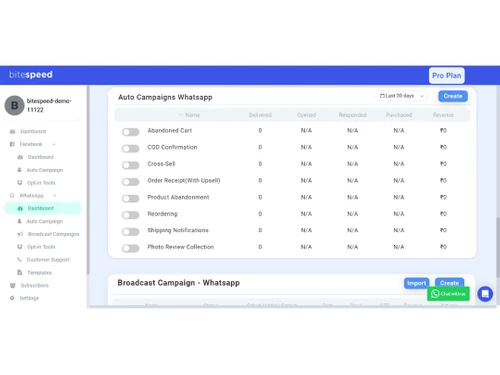
BiteSpeed is an e-commerce automation tool that uses tools like cart abandonment recovery and upselling to promote sales and customer engagement. The platform streamlines operations with the help of chatbots, omnichannel communication, and personalized marketing.
See MoreHave you used BiteSpeed before?
Share your insights for better experience
Brand: BiteSpeed
Founded Year: 2019
BiteSpeed is an AI-native marketing, support, and chatbots suite for 2500+ E-commerce brands globally helping them drive over 25% revenue from owned channels like WhatsApp, Email, SMS, Instagram & Push Notifications.
Looking for The Right Pricing?
Share your requirements and get a plan built around your business.
Price Available on Request
Get personalised BiteSpeed pricing that fits your needs. Our team will connect with you.
Bulk Messaging & Broadcasting
 Bulk Messaging Customizable Templates Auto Replies Rich Media Support Scheduled Messaging Message Templates Broadcast Lists Preview Mode
 Contact Management & Segmentation
Sync Contacts Import/Export Contacts Contact Tagging & Segmentation Deduplication Blacklist/Unsubscribe Chatbot & Automation
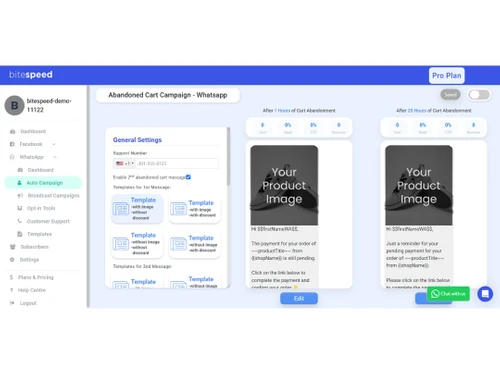
Workflow Automation Auto Replies Recurring Messaging Drip Campaigns Canned Responses Automated Follow-Ups Campaign Scheduling Automatic Retry Hybrid Mode AI Features
AI Chatbots Auto-Responders AI Sentiment Analysis Predictive Analytics Lead Qualification Multi-Agent & Team Collaboration
Shared Inbox Alerts & Notifications Live Agent Support Unlimited Agents Internal Notes Chat Transfer Integrations
WhatsApp Business API Payment Gateway Integration API Integration Third Party Integrations E-Commerce Platforms Chatbot Integration OpenAI Integration CRM Integration Webhooks Integration ERP Integration TallyPrime Integration E-Signatures Analytics & Reporting
Campaign Performance Delivery & Read Reports Engagement Metrics Conversion Tracking Real Time Dashboards Agent Performance Metrics Security & Compliance
Opt-In/Opt-Out Management GDPR & CCPA Compliance Data Encryption API Rate Limiting Anti Spam Filtering Role-Based Access Control (RBAC) Audit Logs Data Retention Audit Trail IP Whitelisting Others
Multi-Language Support Polls & Surveys Customer Activity Tracking Omnichannel Support & Engagement Lead Generation WhatsApp Store Integration Product Catalog Integration 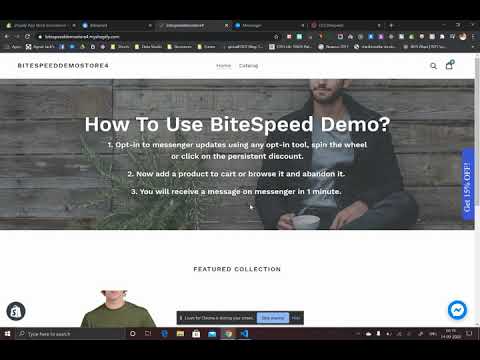

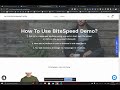
Watch the demo video to explore key features, real workflows, and how the software fits your business needs.
 Ubuntu
  Windows
  MacOS
MacOS  Linux
Linux  Desktop
  Cloud-Based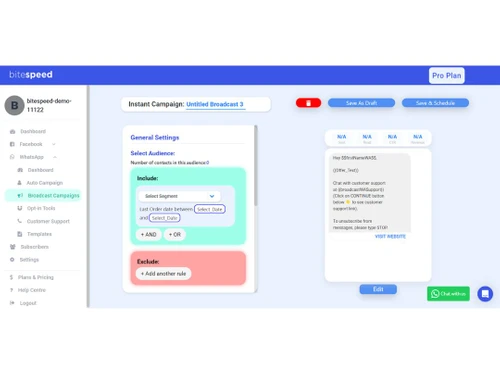
Small Business
Designed for startups and growing businesses
Medium Business
Built for business growth and flexibility
Enterprises
Designed for complex and large-scale business needs
3.4
Out of 5

Overall Rating
Based on
2 Verified Reviews
Rating Breakdown
60% Recommend this Product
Add Review
Jul 22, 2025
Techjockey Verified
“Very bad experience...They billed me 150 USD during trial perion and when I opted out my whatsapp number got banned permanent”
Pros
Not recommended to anyone!
Cons
We had a deeply disappointing experience with this company called BiteSpeed, which offers WhatsApp API integration and has an app listed on the Shopify App Store. After receiving regular follow-ups from a polite and knowledgeable marketing representative, I decided to give their product a try and enrolled in a 15-day free trial. During onboarding, they connected my Facebook account and linked my WhatsApp number through their platform. However, during the entire trial period, the promised features didn’t work as expected. The integration was unreliable, and most functions didn’t deliver the performance they claimed. Even before the trial ended, they informed me that the paid plan would cost $150/month, but also began pushing for additional charges for basic feature add-ons—none of which were transparently communicated upfront. Their pricing is not clear and there's no proper pricing chart on their website. I informed them I would not be continuing. In response, they offered a one-week extension to fix the issues. I gave them 5 more days, but the problems remained unresolved, and I withdrew from the platform. Soon after that, my WhatsApp number was permanently banned, which created serious disruption in our business communication. Despite multiple follow-ups over three weeks, there has been no resolution or refund for the wallet recharge I had done. I strongly advise others to stay away from BiteSpeed. Their sales pitch is promising, but the delivery is poor, and their practices are unethical and unprofessional. The lack of transparency, accountability, and proper support makes this service a serious risk for any business.
Reason to switch
Poor customer support from Zoko and no new developments
Jun 9, 2025
Techjockey Verified
“Good Features, But Poor Support Experience”
BiteSpeed offers strong product features, but the post-purchase experience is disappointing. We've faced repeated billing errors that were only resolved after we raised concerns — raising questions about transparency. The support team often lacks accountability, making it frustrating to get timely resolutions. While the tool has potential, inconsistent service and poor support undermine the overall value.
Pros
BiteSpeed is a fantastic tool for businesses looking to automate and personalize customer interactions on WhatsApp. The platform is easy to set up, offers powerful chatbot capabilities, and supports features like abandoned cart recovery, broadcast messaging, and real-time customer support. It’s especially helpful for D2C brands aiming to boost engagement and conversions through WhatsApp marketing.
Cons
While BiteSpeed offers solid features for automating customer engagement on WhatsApp, the platform can feel limiting for larger businesses needing advanced customization. The analytics dashboard could be more detailed, and integration options with third-party tools are somewhat limited. Additionally, pricing may be a bit steep for small startups

BiteSpeed
Price On Request
Desktop
Mobile
Web based
On Premises
Windows
Mac OS

Whatso
Price On Request
Desktop
Mobile
Web based
On Premises
Windows
Mac OS
Flowcart
₹ 1900
Desktop
Mobile
Web based
On Premises
Windows
Mac OS
Chati
₹ 999
Desktop
Mobile
Web based
On Premises
Windows
Mac OS

Foxglove
₹ 10000
Desktop
Mobile
Web based
On Premises
Windows
Mac OS

Gallabox
₹ 43188
Desktop
Mobile
Web based
On Premises
Windows
Mac OS

WappBlaster
₹ 1549
Desktop
Mobile
Web based
On Premises
Windows
Mac OS

WAPlus
₹ 9999
Desktop
Mobile
Web based
On Premises
Windows
Mac OS
ChatMitra
₹ 980
Desktop
Mobile
Web based
On Premises
Windows
Mac OS

NovoChat
Price On Request
Desktop
Mobile
Web based
On Premises
Windows
Mac OS

WhatSender Pro
₹ 1000
Desktop
Mobile
Web based
On Premises
Windows
Mac OS
(0) Product(s) selected
Starting Price:
₹999 /Month
Starting Price:
₹10,000 /OneTime
Starting Price:
$25 /Month

Starting Price:
₹24,999 /Year

Starting Price:
₹1,999

Available
Price on Request

Starting Price:
₹9,999 /Month
Starting Price:
$49 /Month



To use BiteSpeed, simply sign up for the website, install the software within your store, and begin configuring all its automation options for marketing and customer acquisition, sales retrieval, and re-engagement efforts.
BiteSpeed can automate e-commerce operations for optimized sales and customer interaction.
The core features of the software are abandoned cart recovery, upsell & cross-sell, and segmentation for bulk messages and omnichannel inbox, chatbots, analytics, and reports, and personalization.
Yes, BiteSpeed offers a free demo to users before getting started with paid plans.
The BiteSpeed cost starts from $249.99/month.
Yes, BiteSpeed is free to use, however, with limited functionalities and add-ons.
To remove the tracking code:
0 0
BiteSpeed tracks conversions by multiple methods, including tracking purchases, add-to-cart, form submissions, and others. It uses tracking pixels to know when a user completes a conversion on your site.
BiteSpeed uses attribution models where a sale or an action can be linked back to exactly which campaign, channel, or interaction caused the conversion-which may include monitoring sent messages via SMS, email, or WhatsApp, mapping those back to sales or lead generation.
0 0
WhatsApp links not clickable: Possible causes include:
0 0
The +1 prefix is your international dialing code number for North America, meaning it represents both the United States and Canada. Therefore, calls coming through BiteSpeed are, in effect, coming from a North America number even if you operate from a region elsewhere. You may be able to change your account settings so you can use local numbers.
0 0
Generally, BiteSpeed tries to optimize performance and would have minimal or no negative impact on load times. However, any additional tracking code or script that doesn't correctly implement the code can affect performance. You can also check if it causes big delays by testing the page speed using tools like Google PageSpeed Insights.
Optimize implementation of the tracking code for example async load to minimize potential performance impact.
0 0
20,000+ Software Listed
Best Price Guranteed
Free Expert Consultation
2M+ Happy Customers
Terms and Condtions

Users with registered businesses can purchase goods from merchants on the platform to satisfy their business needs. Users are not permitted to utilize any products acquired through the platform for resale, advertising, business, or further distribution.
For each purchase made, users will receive a Tax Invoice (or 'GST invoice') that includes specific details such as:
the GSTIN of the user associated with their registered business, and
the specified Entity Name for their business.
It should be noted that not all products are eligible for GST Invoice. Only the products displayed by participating sellers with the 'GST-based Invoice Available' callout on the product description page would qualify.
Certain goods and services are not eligible to get a GST Invoice, including items with VAS, i.e., Value Added Services (e.g., Total Mobile Protection/Assured Buyback) and those involving an exchange offer at the time of purchase.
Users must ensure the accuracy of the GSTIN, and business entity name provided for the GST Invoice. Requests for corrections into GST Invoice would not be accommodated by Techjockey.com or any Seller, and any issues arising from user-provided information are the sole responsibility of users.
Techjockey.com is not liable for the GST Invoice or any associated input tax credit. To efficiently claim an input tax credit, users should select the registered place of business address as per the GST authority's data and follow the provisions of the GST Act and rules.
To claim an input tax credit, the delivery and billing addresses must match. Furthermore, input tax credits will not be granted if the delivery address and GSTIN on the invoice are from different states. In case of incorrect GST details provided during the order placement, the order will be canceled automatically.



