linkedin
Bizcompass HRMS logo
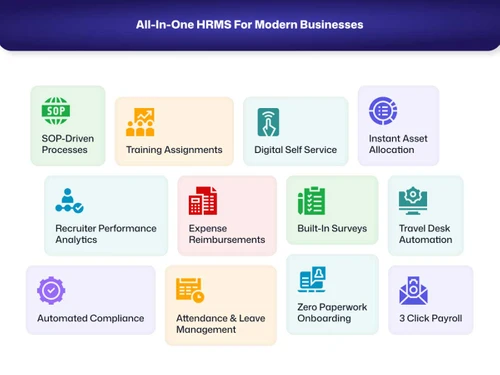
bizcompass features
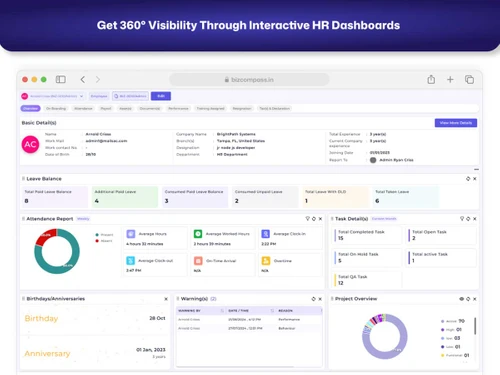
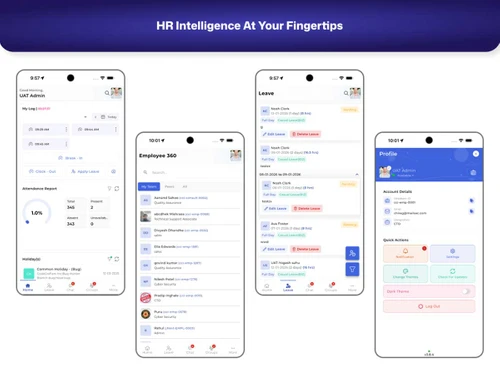
bizcompass dashboard
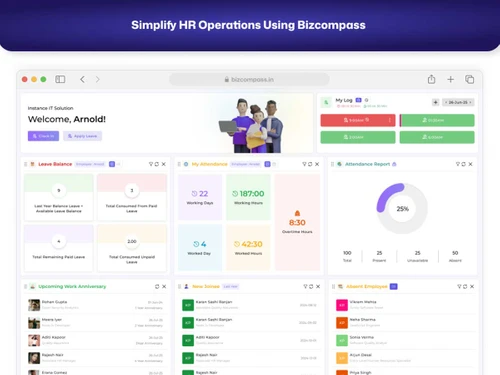
bizcompass hr operations

Bizcompass HRMS

Brand: Bizcompass

Streamline your HR operations with Bizcompass HRMS, an all-in-one HR, Payroll & People Automation Suite. A Unified HR Ecosystem Built for Modern Organizations. Manage recruitment, onboarding, attendance, payroll, performance, compliance, and employee engagement seamlessly from a single, powerful...

See More

Explore Alternatives
img
Mewurk

4.6

img

12+ people visited in last 30 minutes

Price Available on Request

Questions about pricing or customization? We’re here to help, just a click away.

100% Genuine
Products
Best Price
Guaranteed
Safe & Secure
Payment
  • Description

  • Pricing

  • Features

  • Specification

  • Review

  • Compare

  • Alternatives

  • FAQ

Bizcompass HRMS Software Overview

What is Bizcompass HRMS?

Bizcompass is a complete HRMS suite that transforms how you hire, manage, pay, engage, and grow your people. Bizcompass HRMS is a modern, cloud-based Human Resource Management System designed to automate, streamline, and centralize every HR function within a single platform. With intelligent workflows, role-based access, and real-time dashboards, Bizcompass HRMS allows HR teams to operate with clarity and control while delivering seamless experience to employees and managers. The platform is built to scale with your organization, supporting multi-company structures and growing teams with ease.

Get strong analytics, employee-centric design, and enterprise-ready scalability with Bizcompass a complete HR operating system built for modern, fast-growing organizations.

Benefits of Bizcompass HRMS

  • Bizcompass HRMS delivers measurable value by simplifying HR operations and enhancing workforce efficiency.
  • Automates end-to-end HR ecosystem on a single platform
  • Reduces manual HR workload and dependency on spreadsheets
  • Reduces manual errors in attendance, payroll, and compliance
  • Improves employee engagement and HR transparency
  • Enables faster hiring, onboarding, and approvals through workflows
  • Helps in faster decision-making and strategic planning with real-time HR analytics
  • Supports multi-company, multi-location, and growing teams
  • Enhances employee experience through self-service portals

Bizcompass HRMS offers a complete suite of HR functionalities that work together as one connected system. Each feature is designed to reduce manual effort while increasing accuracy, accountability, and efficiency. Bizcompass HRMS offers a powerful and integrated set of HR features, including:

  • Recruitment Management: Manage hiring with structured workflows, candidate tracking, interviews, and faster offer processing.
  • Digital Onboarding: Simplify joining, onboarding, and employee record management by keeping all records organized in one secure system.
  • Attendance, Leave & Shift Management: Track attendance, manage shifts, and automate leave approvals with complete workforce visibility.
  • Payroll Automation & Compliance: Run accurate payroll with automated calculations, statutory compliance, and secure verification.
  • Performance Reviews & KRA/KPI Tracking: Measure performance with goal setting, reviews, and clear KRA/KPI tracking for better growth.
  • Surveys & Feedback Automation: Collect employee feedback through surveys and polls to improve engagement and workplace culture.
  • Employee Engagement & Announcements:Keep teams connected with announcements, celebrations, and recognition in one platform.
  • Expense & Travel Desk Management: Manage expenses, travel requests, and approvals with better control and faster reimbursements.
  • Asset, Exit & Clearance Management: Track assets, manage exits, and automate clearance processes for smooth employee transitions.
  • Workflow Automation & Multi-Level Approvals: Streamline processes with automated workflows and structured multi-level approvals.
  • Interactive Dashboards & Report Wizard: Get real-time insights with customizable dashboards and powerful reporting tools.

Who Should Use Bizcompass HRMS?

Bizcompass HRMS is ideal for organizations looking to modernize and scale their HR operations. It is best suited for:

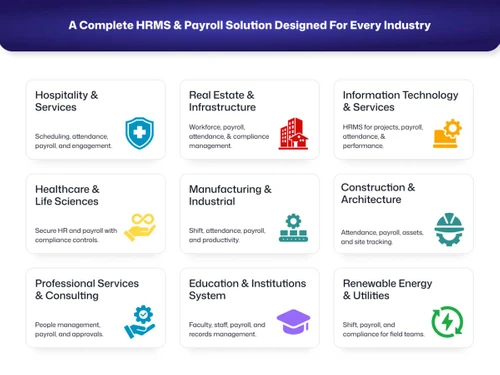
  • Small & Mid-Sized Businesses looking to automate HR processes
  • Growing Companies & Startups managing their expanding workforce and teams
  • Enterprises & Multi-Company Organizations needing centralized control
  • HR Teams seeking automation, accuracy, and better reporting
  • Finance Teams managing payroll, compliance, and reimbursements
  • Operations Teams handling attendance, shifts, and workforce data
  • HR teams seeking automation, accuracy, and better reporting
  • Management teams requiring visibility into workforce metrics

Deployment & Support

Bizcompass HRMS is a cloud-based solution that can be deployed quickly with guided implementation support. The platform offers configurable workflows and structures, ensuring that businesses can adapt the system to their internal processes. Users receive onboarding assistance, training support, and access to HR experts to ensure smooth adoption across teams.

  • Deployment Type: Cloud-Based HRMS
  • Implementation: Fast onboarding with guided setup
  • Customization: Highly configurable workflows and structures
  • Training: Product training and onboarding support available
  • Support: Dedicated customer support & HR experts assistance
  • Scalability: Designed to grow with your organization

Ongoing customer support is available to help organizations maximize platform usage, resolve queries, and continuously improve HR efficiency.

Why Choose Bizcompass HRMS?

Bizcompass is a complete HR operating system for modern organizations. Bizcompass HRMS stands out by offering truly integrated HR ecosystems rather than isolated HR modules. Unlike many tools that require multiple add-ons or integrations, Bizcompass delivers a unified experience with consistent data flow across all HR functions.

It is a reliable choice for organizations seeking long-term HR efficiency.

What sets Bizcompass HRMS apart:

  • Bizcompass HRMS Improve Employee Experience & Work Culture. It creates a transparent and people-centric work environment by connecting employees, managers, and HR teams through a unified system.
  • Bizcompass HRMS offers continuous, communication & Engagement. Company announcements, celebrations, and updates keep employees informed and connected, fostering a strong internal culture.
  • Bizcompass HRMS ensures regular feedback, task clarity, and continuous development through performance reviews, peer reviews, KRA/KPI tracking, and performance improvement plans (PIP).
  • Bizcompass HRMS allows employees to access attendance logs, leave balances, letters, documents, performance data, and exit formalities, reducing dependency on HR and improving trust.
  • Bizcompass HRMS provides data-driven interactive analytics to help organizations identify trends, workforce challenges, and improvement opportunities in real time.

Bizcompass HRMS Pricing

Bizcompass HRMS pricing depends on the number of users, required modules, and level of customization.

Request a callback to get detailed pricing information.

Read more

Bizcompass Company Details

Founded Year:  2022

Bizcompass software is an all-in-one Automation Platform for businesses. You can simplify workflows, enhance productivity, and boost your potential with cutting-edge technology and innovative software solutions that allow you to streamline business operations successfully.

Director/Founders Chirag Gadhiya
Company Size 1-100 Employees

Bizcompass HRMS Pricing & Plans

Looking for The Right Pricing?

Share your requirements and get a plan built around your business.

  • Define your business needs
  • Get customised pricing
  • Choose features that fit your workflow

Price Available on Request

Get personalised Bizcompass HRMS pricing that fits your needs. Our team will connect with you.

Bizcompass HRMS Features

  • icon_check Applicant Tracking
    Manage candidates end-to-end from application to hire without missing any details.
  • icon_check Job Postings
    Post openings across job boards and platforms with centralised control.
  • icon_check Expense Reimbursements
    Submit, approve, and reimburse employee expenses with policy-based controls.
  • icon_check Performance Management
    Track goals, reviews, and feedback to improve employee performance.
  • icon_check Statutory Compliances
    Handle PF, ESI, PT, TDS, and other local payroll regulations.
  • icon_check Attendance Management
    Monitor employee attendance with real-time tracking and detailed reports.
  • icon_check Leave Management
    Manage leave requests, approvals, and balances with configurable policies.
  • icon_check Employee Onboarding
    Digitize onboarding with task lists, documents, and automated workflows.
  • icon_check Role-Based Access Control (RBAC)
    Restrict system access by roles to keep HR data secure.
  • icon_check Time Tracking
    Track work hours, overtime, and productivity accurately.
  • icon_check Document Management
    Store, manage, and retrieve employee documents securely.
  • icon_check Calendar Management
    Sync meetings, shifts, and leaves with external calendars.
  • icon_check Collaboration Tools
    Enable team communication, task sharing, and real-time updates.
  • icon_check Interview Management
    Schedule interviews, manage feedback, and streamline hiring decisions.
  • icon_check Employee Self Service
    Employees view payslips, tax docs, and payroll history online.
  • icon_check Reports & Analytics
    Access dashboards and reports on cost, trends, and workforce spend.
  • icon_check Payslip Generation
    Generate payslips in PDF with detailed earnings and deductions.

Bizcompass HRMS Specifications

Supported Platforms
Ubuntu Ubuntu Windows Windows iOS iOS Android Android MacOS MacOS Linux Linux
Devices
Desktop Desktop Mobile Mobile Tablet Tablet iPad iPad
Deployment
Cloud-Based Cloud-Based
Suitable For
All Industries
Business Specific
All Businesses
Business Size
Small Business Startups Medium Business Enterprises SMBs SMEs MSMBs MSMEs
Customer Support
Phone Email Live Chat Forums
Language
English
Integration
API Integration
Training Resources
Live Online Documentation Videos

Explore the Best Alternative Solutions Similar to Your Business Size and Needs

Bizcompass HRMS Reviews

4.6

Out of 5

img

Overall Rating

Based on
22 Verified Reviews

Rating Breakdown

  • Features 4.7
  • Value for Money 4.7
  • Ease of Use 4.5
  • Customer Support 4.6

92% Recommend this Product

Add Review
AI Generated Summary Based on Real Reviews

Customers generally express high satisfaction with Bizcompass HRMS, highlighting its user-friendly interface and effective automation features that streamline HR tasks, payroll, and project management. Users appreciate the centralized platform that enhances efficiency and reduces manual work. However, some reviews note limitations such as occasional delays due to network issues, the need for improved mobile experience, and time-consuming initial setup. Overall, Bizcompass is recommended for its strong support and adaptability to growing business needs.

Pros

  • "Simple to use, strong core features, good support, and excellent overall value."

    Priyal JaviaMar 3, 2026

  • "What I liked most about the product is its overall ease of use and thoughtful design."

    Chirag KaklotarMar 3, 2026

  • "Reliable HRMS for attendance, leave, payroll, and core HR processes"

    Dishant ChudasamaJan 31, 2026

Cons

  • "Minor delays can occur when internet connectivity is unstable."

    Priyal JaviaMar 3, 2026

  • "Some time due to network issue, taking some time to open software"

    VasuFeb 5, 2026

  • "Responsiveness and optimization for different screen sizes need refinement"
    Vinay MuliyaJan 31, 2026

Bizcompass HRMS Video Reviews

youtubeVideoId

4.9

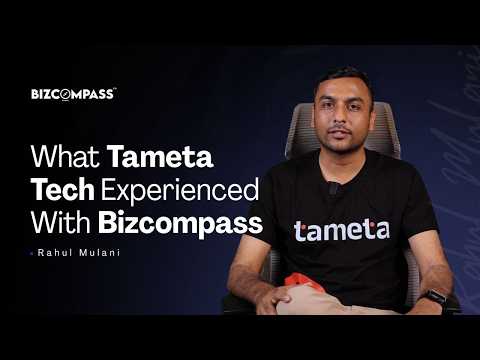
“How Bizcompass Helped Tameta Tech Streamline HRMS Operations”

Review by: Rahul Mulani

youtubeVideoId

4.8

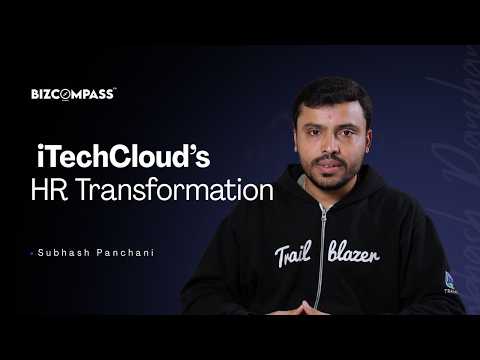
“How iTechCloud Streamlined Their HR Operations with Bizcompass HRMS”

Review by: Subhash Panchani

youtubeVideoId

4.4

“Why Flexion Infotech Chose BizCompass as Their HRMS Automation Partner”

Review by: Jay sabhaya

priyal javia

UX Designer & UI Developer

Industry: Design

5

Reviewed on: Mar 3, 2026

Techjockey Verified

“Reliable All-in-One HR Tool”

Bizcompass HRMS effectively simplifies HR tasks and helps manage workflows with ease. The interface is intuitive, and the automation features have made a real difference in our daily processes.

Pros

Simple to use, strong core features, good support, and excellent overall value.

Cons

Minor delays can occur when internet connectivity is unstable.

Reason to switch

It helps me understand user workflows better, collaborate efficiently with teams, and design intuitive solutions aligned with business goals.

Chirag Kaklotar

Web Designer

Industry: Design

5

Reviewed on: Mar 3, 2026

Techjockey Verified

“Best product for HRMS”

User-friendly all-in-one HRMS with strong payroll automation, performance tools, and attendance tracking.

Pros

What I liked most about the product is its overall ease of use and thoughtful design.

Cons

Nothing

Tanvi

Associate

Industry: Design

4

Reviewed on: Mar 3, 2026

Techjockey Verified

“Reliable and Easy-to-Use HRMS for Daily Operations”

Bizcompass HRMS has helped us manage attendance, leave requests, and employee records in a more organized way. The approval workflow is straightforward, and the system reduces paperwork significantly. It’s easy for employees to submit requests and for managers to review them quickly.

Pros

Improves HR efficiency and Simple leave and log request flow

Cons

Mobile experience can improve

Reason to switch

Easy leave and attendance tracking

See All Bizcompass HRMS Reviews

Compare Bizcompass HRMS With other HR Software

Products
Ratings
Pricing
Device Supported
Deployment
Supported Platforms
  • img

    Bizcompass HRMS

  • 4.6

  • Price On Request

  • Desktop

    Mobile

  • Web based

    On Premises

  • Windows

    Mac OS

  • img

    ClusterHR

  • 5

  • ₹ 40

  • Desktop

    Mobile

  • Web based

    On Premises

  • Windows

    Mac OS

  • img

    Fix HR

  • 4.9

  • ₹ 600

  • Desktop

    Mobile

  • Web based

    On Premises

  • Windows

    Mac OS

  • img

    SignalHRM

  • 4.6

  • ₹ 648

  • Desktop

    Mobile

  • Web based

    On Premises

  • Windows

    Mac OS

  • img

    WeekMate

  • 4.5

  • ₹ 3999

  • Desktop

    Mobile

  • Web based

    On Premises

  • Windows

    Mac OS

  • img

    Spine HR

  • 4.3

  • Price On Request

  • Desktop

    Mobile

  • Web based

    On Premises

  • Windows

    Mac OS

  • img

    TankhaPay

  • 4.9

  • ₹ 40

  • Desktop

    Mobile

  • Web based

    On Premises

  • Windows

    Mac OS

  • img

    WoCo

  • 4.8

  • ₹ 50

  • Desktop

    Mobile

  • Web based

    On Premises

  • Windows

    Mac OS

  • img

    Zfour HRMS

  • 4.9

  • ₹ 45

  • Desktop

    Mobile

  • Web based

    On Premises

  • Windows

    Mac OS

  • img

    Keka HR

  • 4.4

  • Price On Request

  • Desktop

    Mobile

  • Web based

    On Premises

  • Windows

    Mac OS

  • img

    TruHR

  • 4.9

  • ₹ 2200

  • Desktop

    Mobile

  • Web based

    On Premises

  • Windows

    Mac OS

(2) Product(s) selected

Bizcompass HRMS Alternatives

See All Bizcompass HRMS Alternatives

Starting Price:

₹600 /Month ₹900

SAVE UPTO 33%

Starting Price:

₹2,200 /Month

Starting Price:

₹49 /Month

Starting Price:

₹890 /Month

Starting Price:

₹1,499 /Month
Starting Price:

₹5,000 /Month

Starting Price:

$49 /Month
Available

Price on Request

Articles for Bizcompass HRMS

See All Related Articles

How do I track recruiter performance?

The Recruiters Performance Management dashboard provides Report Wizard & Analytics to monitor time-to-hire and candidate conversion rates.

Does Bizcompass support a Multi-Company setup?

Absolutely. Our Best HR Management Software allows you to manage Multi Company data under one dashboard with Digital Employee Records.

Can I track employee attendance with Geo-Fencing?

Yes. Use Geo Fencing for mobile Clock In - Clock Out to ensure employees mark attendance only from authorized office locations.

How do I manage multiple shifts and rotations?

Use Multiple Shift Management and Shift Roster & Rotation to automate duty changes and handle Half Day/Full Day Rule Setup.

Where can I manage HR policies and manuals?

Upload all documents to the HR Manual & Organization Policies section for Online Letter Acknowledgement by all employees.

How does the Performance Review (KRA/KPI) system work?

Admins can set KRA/KPI, conduct Peer Reviews, and initiate a Performance Improvement Plan (PIP) through the HR Analytics Dashboard.

Does the system automate TDS and Income Tax?

Yes. It features Auto TDS Calculation based on employee Investment Declarations and handles Flexible Salary Structures.

Does it generate Form 16 and PF/ESI reports?

Yes, the Payroll Software India module provides one-click PF, ESI, PT Reports and generates Form 16 via the Report Wizard.

What is a Mood Bot in employee engagement?

The Mood Bot is an automated Employee Engagement Platform tool that checks employee sentiment daily to track team morale.

How can I recognize top performers publicly?

Use the Praise/Knock feature on the company Stream to give shout-outs and foster a culture of appreciation.

Can I run quick internal polls?

Yes. Use the Polls feature to get instant feedback on office events, changes, or policy updates.

Can I create custom surveys for performance reviews?

Yes. Use the Form Builder to create any survey and utilize Form Integration with Performance for data-driven appraisals.

20,000+ Software Listed

Best Price Guranteed

Free Expert Consultation

2M+ Happy Customers

Terms and Condtions

close

Users with registered businesses can purchase goods from merchants on the platform to satisfy their business needs. Users are not permitted to utilize any products acquired through the platform for resale, advertising, business, or further distribution.

For each purchase made, users will receive a Tax Invoice (or 'GST invoice') that includes specific details such as:

  • the GSTIN of the user associated with their registered business, and

  • the specified Entity Name for their business.

It should be noted that not all products are eligible for GST Invoice. Only the products displayed by participating sellers with the 'GST-based Invoice Available' callout on the product description page would qualify.

Certain goods and services are not eligible to get a GST Invoice, including items with VAS, i.e., Value Added Services (e.g., Total Mobile Protection/Assured Buyback) and those involving an exchange offer at the time of purchase.

Users must ensure the accuracy of the GSTIN, and business entity name provided for the GST Invoice. Requests for corrections into GST Invoice would not be accommodated by Techjockey.com or any Seller, and any issues arising from user-provided information are the sole responsibility of users.

Techjockey.com is not liable for the GST Invoice or any associated input tax credit. To efficiently claim an input tax credit, users should select the registered place of business address as per the GST authority's data and follow the provisions of the GST Act and rules.

To claim an input tax credit, the delivery and billing addresses must match. Furthermore, input tax credits will not be granted if the delivery address and GSTIN on the invoice are from different states. In case of incorrect GST details provided during the order placement, the order will be canceled automatically.