linkedin
BUSINESS SENDER logo
BUSINESS SENDER-Setup & run
BUSINESS SENDER-Import file
BUSINESS SENDER-Importing

BUSINESS SENDER

Brand: TigerVikram

  • 4.2

  • 4 Ratings

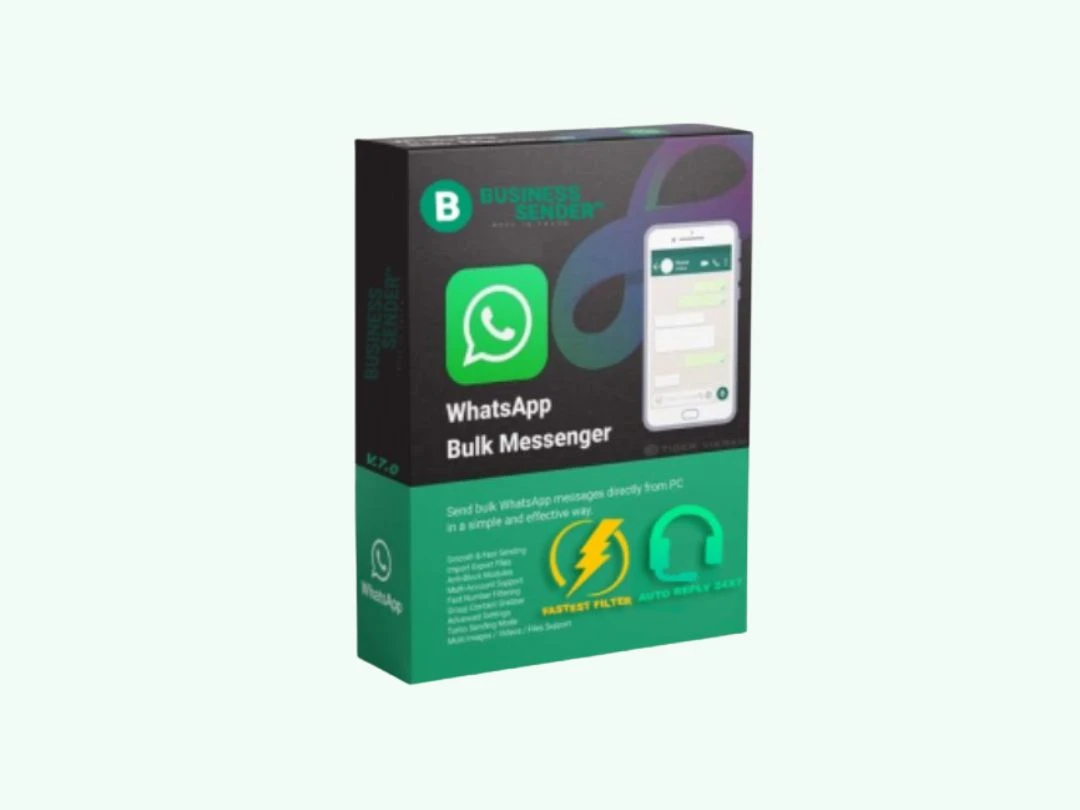
BUSINESS SENDER helps businesses reach and engage customers instantly with powerful WhatsApp marketing tools designed to streamline campaigns and drive business growth.

See More

Have you used BUSINESS SENDER before?

Share your insights for better experience

Add a Review
Starting Price 67% OFF
₹490 ₹1,490

View plans

100% Genuine
Products
Best Price
Guaranteed
Safe & Secure
Payment
  • Description

  • Pricing

  • Features

  • Specification

  • Review

  • Compare

  • Alternatives

  • FAQ

Starting at ₹490

BUSINESS SENDER Software Overview

What is BUSINESS SENDER?

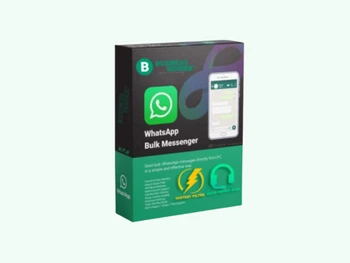
BUSINESS SENDER is a professional WhatsApp Marketing Software designed to empower businesses to connect with their audience directly through the world's most popular messaging platform. It serves as a comprehensive communication tool that facilitates bulk messaging, campaign management, and customer engagement automation. By linking directly to a WhatsApp account via QR code scan, the software enables organizations to send personalized promotional messages, notifications, alerts, and customer support responses at scale. It is engineered for businesses of all sizes, from startups to large enterprises, seeking to enhance their marketing reach, improve customer service efficiency, and drive sales through a direct and highly effective communication channel.

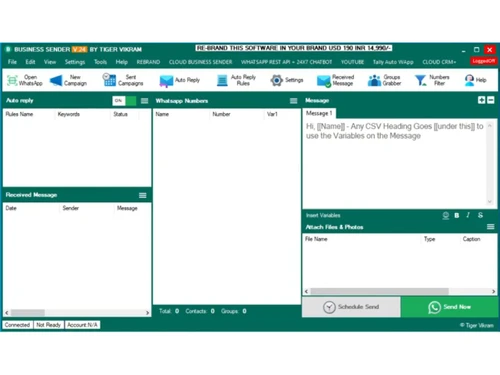
The core purpose of BUSINESS SENDER is to transform standard WhatsApp communication into a powerful marketing and support engine. It provides a centralized dashboard to manage contacts, craft compelling multimedia messages, schedule campaigns, and analyze performance with detailed reports. This eliminates the manual effort and limitations associated with using a standard WhatsApp account for business purposes, offering greater scalability and professionalism.

Why Choose BUSINESS SENDER?

  • Unparalleled Reach and Open Rates: With over two billion users globally, WhatsApp offers a massive audience. Messages sent via the platform have significantly higher open and read rates compared to traditional email marketing, ensuring your communications are seen by customers.
  • Enhanced Customer Engagement: The software facilitates two-way, real-time conversations. This direct line of communication helps in building stronger customer relationships, gathering instant feedback, and providing swift support, which boosts loyalty and satisfaction.
  • Automation for Maximum Efficiency: BUSINESS SENDER automates repetitive communication tasks. You can set up auto-responders for common queries, send automated welcome messages to new contacts, or schedule transactional notifications like order confirmations and shipping updates, freeing up valuable team resources.
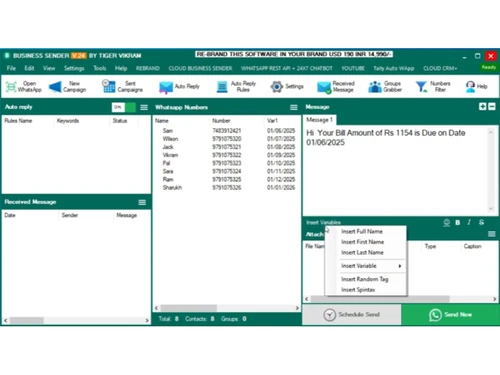
  • Personalization at Scale: Despite sending messages in bulk, the software allows for deep personalization. By using dynamic variables such as customer names, order details, or appointment times, each message feels personal and relevant, dramatically increasing its impact.
  • Cost-Effective Communication: It presents a highly affordable alternative to traditional marketing channels like SMS, print, or telemarketing. By reducing marketing spend while increasing engagement, it delivers an exceptional return on investment.

Advanced Features of BUSINESS SENDER

  • Bulk & Multimedia Messaging: Send thousands of messages simultaneously without the need to save numbers. Campaigns can include text, images, videos, audio files, and documents (like PDFs and catalogs) to create rich, engaging content.
  • Advanced Contact Management: Easily import and manage unlimited contacts from files like CSV or TXT. The software includes powerful tools for creating and segmenting contact groups based on demographics, purchase history, or engagement level for highly targeted campaigns.
  • Auto-Responder: Configure rule-based auto-replies so that incoming messages receive an instant, pre-set response, useful for after-hours coverage and common queries. (A 24/7 advanced chatbot tier is available as a separate add-on.)
  • Basic Delivery Tracking: Monitor delivery status after a campaign is sent to gauge whether messages reached recipients.
  • Number Filtering & Validation: An essential feature that allows you to clean your contact lists by filtering for active and inactive WhatsApp numbers. This improves delivery rates, reduces campaign costs, and protects your sender reputation.
  • Group & Lead Extraction Tools: Includes a Group Contact Extractor for pulling member lists from WhatsApp groups, an Auto Group Joiner, Bulk Group Member Adder, Bulk Group Posting, and a companion G-Extractor tool for scraping lead data from Google Maps.
  • Campaign Scheduling: Plan your marketing activities in advance by scheduling campaigns to be sent at a specific date and time. This ensures your messages reach your audience at the most optimal moments for engagement.

Key Capabilities of BUSINESS SENDER

  • The Campaign Engine: This is the central hub for all outbound messaging. Here, users can compose messages using a rich editor, select their target audience from saved contact groups, and choose to send immediately or schedule for later.
  • The Contact Manager: A robust system for all contact-related activities. It facilitates seamless importing from various file formats, creation of unlimited contact groups, and segmentation for precise targeting.
  • The Automation Suite: This capability powers all automated interactions. It includes the setup and management of keyword-based auto-responders, with an advanced 24/7 chatbot tier available as a separate add-on.
  • The Analytics Dashboard: A visual interface that provides a clear overview of all campaign statistics. It generates exportable reports that help in evaluating campaign success and making data-driven decisions for future marketing efforts.

How to Use BUSINESS SENDER?

  1. Installation and Account Linking: First, install the BUSINESS SENDER software on your computer or access its web-based panel. Launch the application and link your WhatsApp account by simply scanning the provided QR code with your phone.
  2. Import and Organize Contacts: Navigate to the contact management section. Import your customer contact list from a CSV, Excel, or TXT file. Organize these contacts into different groups for targeted messaging (e.g., "New Leads," "Loyal Customers").
  3. Craft Your Message Campaign: Create a new campaign and compose your message. Utilize the built-in editor to add text, emojis, and personalization tags like {FullName}. You can also attach media files such as product images, promotional videos, or e-brochures.
  4. Select Audience and Send/Schedule: Choose the contact group(s) you wish to send the message to. You have the option to send the campaign instantly or use the scheduler to select a future date and time for delivery.
  5. Monitor Performance: Once the campaign is sent, check the delivery status to see whether your messages reached recipients.

BUSINESS SENDER Pricing

BUSINESS SENDER price starts at INR 490 at techjockey.com.

The pricing model is based on different parameters, including extra features, deployment type, and the total number of users. For further queries related to the product, you can contact our product team and learn more about the pricing and offers.

Read more

BUSINESS SENDER Pricing & Plans

BUSINESS SENDER V.28
Key Features
  • Contact Management
  • WhatsApp Bulk Message Sender
  • Fast & Secure
  • Message Scheduling
  • Campaign Automation
Starting at ₹490 ₹1490 SAVE UPTO 67%
    • Pc

      Pc
      Pc
    • Yearly

      Yearly
      Yearly

Key Features

  • Contact Management

  • WhatsApp Bulk Message Sender

  • Fast & Secure

  • Message Scheduling

  • Campaign Automation

BUSINESS SENDER Features

  • icon_check Message Personalization
    Sends customized messages using variables like name or invoice number to improve engagement and response rates.
  • icon_check Auto Reply Bot
    Automatically responds to incoming messages, enabling 24×7 communication and improved customer interaction.
  • icon_check Group Messaging
    Sends messages to WhatsApp groups and manages group campaigns efficiently for promotions and updates.
  • icon_check Media & Attachment Sending
    Supports sending images, videos, documents and audio files to enhance marketing communication.
  • icon_check Contact Extractor
    Extracts phone numbers from chats, groups or sources like Google to build targeted contact databases.
  • icon_check Message Scheduling
    Schedule messages to be sent at specific times for campaigns, reminders and automated outreach.
  • icon_check Campaign Automation
    Automates bulk messaging workflows, reducing manual effort and improving marketing efficiency.
  • icon_check Multi-Language Support
    Supports multiple languages for sending messages, enabling communication with diverse audiences globally.
  • icon_check Contact Management
    Organizes and manages customer contacts, groups and lists to enable targeted messaging and efficient communication.
  • icon_check WhatsApp Bulk Message Sender
    Sends bulk WhatsApp messages to thousands of users with text, images and attachments, saving time and effort.
  • icon_check Fast & Secure
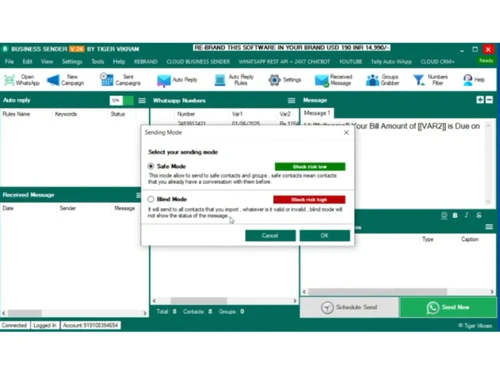
    Ensures quick message delivery with optimized speed and safe sending modes to reduce risk of account blocking.
  • icon_check Desktop Versions of Office Applictns for PC & Mac
    Available as desktop software for Windows and Mac, enabling easy setup and usage without browser dependency.

BUSINESS SENDER Specifications

Supported Platforms
Windows Windows
Devices
Desktop Desktop
Deployment
Perpetual Perpetual
Suitable For
All Industries
Business Specific
All Businesses
Business Size
Individual Small Business Startups Medium Business
Customer Support
Phone Email
Language
English
Training Resources
Documentation

Explore the Best Alternative Solutions Similar to Your Business Size and Needs

BUSINESS SENDER Review

4.2

Out of 5

img

Overall Rating

Based on
4 Verified Ratings

Rating Breakdown

  • Features 4.1
  • Value for Money 4.5
  • Ease of Use 4.6
  • Customer Support 3.7

87% Recommend this Product

Add Review

Techjockey Trusted Reviews from Verified Users

No reviews are currently available for BUSINESS SENDER. Discover similar WhatsApp Marketing Software reviews
  • Whatso

    4.1

    Whats great - It is more efficient with excellent response. read more

  • Rapbooster

    4.3

    Whats great - It works Perfectly fine, with the best support, interactive, Responsive UI, and API. read more

  • WappBlaster

    3.9

    Whats great - Nothing read more

Compare BUSINESS SENDER With other WhatsApp Marketing Software

Products
Ratings
Pricing
Device Supported
Deployment
Supported Platforms
  • img

    BUSINESS SENDER

  • 4.2

  • ₹ 490.00 excl. GST

  • Desktop

    Mobile

  • Web based

    On Premises

  • Windows

    Mac OS

  • img

    RichAutomate

  • 5

  • Price On Request

  • Desktop

    Mobile

  • Web based

    On Premises

  • Windows

    Mac OS

  • img

    Whatso

  • 4.0

  • Price On Request

  • Desktop

    Mobile

  • Web based

    On Premises

  • Windows

    Mac OS

  • img

    Flowcart

  • 4.4

  • ₹ 1900

  • Desktop

    Mobile

  • Web based

    On Premises

  • Windows

    Mac OS

  • img

    Chati

  • 4.3

  • ₹ 999

  • Desktop

    Mobile

  • Web based

    On Premises

  • Windows

    Mac OS

  • img

    WappBlaster

  • 3.9

  • ₹ 1549

  • Desktop

    Mobile

  • Web based

    On Premises

  • Windows

    Mac OS

  • img

    Gallabox

  • 4.1

  • ₹ 43188

  • Desktop

    Mobile

  • Web based

    On Premises

  • Windows

    Mac OS

  • img

    Foxglove

  • 5

  • ₹ 10000

  • Desktop

    Mobile

  • Web based

    On Premises

  • Windows

    Mac OS

  • img

    ChatMitra

  • 4.5

  • ₹ 980

  • Desktop

    Mobile

  • Web based

    On Premises

  • Windows

    Mac OS

  • img

    WAPlus

  • 4.2

  • ₹ 9999

  • Desktop

    Mobile

  • Web based

    On Premises

  • Windows

    Mac OS

  • img

    WhatSender Pro

  • 4.6

  • ₹ 1000

  • Desktop

    Mobile

  • Web based

    On Premises

  • Windows

    Mac OS

(0) Product(s) selected

BUSINESS SENDER Alternatives

See All BUSINESS SENDER Alternatives

Starting Price:

₹999 /Month

Starting Price:

₹10,000 /OneTime

Starting Price:

$25 /Month

Starting Price:

₹24,999 /Year

Available

Price on Request

Articles for BUSINESS SENDER

See All Related Articles

What is BUSINESS SENDER?

BUSINESS SENDER is a WhatsApp Marketing Software designed to help businesses automate and manage their communication with customers on the WhatsApp platform, facilitating bulk messaging, customer support, and promotional campaigns.

How to use BUSINESS SENDER?

Typically, using a WhatsApp Marketing Software like BUSINESS SENDER involves importing contact lists, composing personalized messages, and scheduling or sending campaigns directly through the platform.

How much does BUSINESS SENDER cost?

BUSINESS SENDER price starts at INR 490 at techjockey.com.

Who can use BUSINESS SENDER?

BUSINESS SENDER is typically designed for small to large businesses, marketers, sales teams, and customer support departments looking to streamline and scale their communication efforts on WhatsApp.

Does BUSINESS SENDER support bulk messaging?

As a WhatsApp Marketing Software, BUSINESS SENDER supports bulk messaging capabilities, allowing users to send a single message to multiple contacts simultaneously for marketing or informational purposes.

Can BUSINESS SENDER help with customer engagement?

Yes, by enabling efficient and personalized communication, BUSINESS SENDER can significantly enhance customer engagement through timely updates, promotional offers, and direct support on WhatsApp.

20,000+ Software Listed

Best Price Guranteed

Free Expert Consultation

2M+ Happy Customers

Terms and Condtions

close

Users with registered businesses can purchase goods from merchants on the platform to satisfy their business needs. Users are not permitted to utilize any products acquired through the platform for resale, advertising, business, or further distribution.

For each purchase made, users will receive a Tax Invoice (or 'GST invoice') that includes specific details such as:

  • the GSTIN of the user associated with their registered business, and

  • the specified Entity Name for their business.

It should be noted that not all products are eligible for GST Invoice. Only the products displayed by participating sellers with the 'GST-based Invoice Available' callout on the product description page would qualify.

Certain goods and services are not eligible to get a GST Invoice, including items with VAS, i.e., Value Added Services (e.g., Total Mobile Protection/Assured Buyback) and those involving an exchange offer at the time of purchase.

Users must ensure the accuracy of the GSTIN, and business entity name provided for the GST Invoice. Requests for corrections into GST Invoice would not be accommodated by Techjockey.com or any Seller, and any issues arising from user-provided information are the sole responsibility of users.

Techjockey.com is not liable for the GST Invoice or any associated input tax credit. To efficiently claim an input tax credit, users should select the registered place of business address as per the GST authority's data and follow the provisions of the GST Act and rules.

To claim an input tax credit, the delivery and billing addresses must match. Furthermore, input tax credits will not be granted if the delivery address and GSTIN on the invoice are from different states. In case of incorrect GST details provided during the order placement, the order will be canceled automatically.