linkedin
Clipy logo
clipy record
clipy capture
clipy draggable

Clipy

Brand: Codersera

  • No Ratings & Reviews

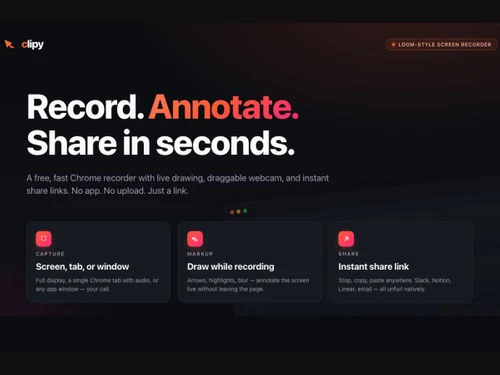
Clipy makes screen recording quick, simple, and effortless. Users can record, share, and move on in moments.

See More

Have you used Clipy before?

Share your insights for better experience

Add a Review

Price Available on Request

Questions about pricing or customization? We’re here to help, just a click away.

100% Genuine
Products
Best Price
Guaranteed
Safe & Secure
Payment
  • Description

  • Pricing

  • Features

  • Specification

  • Review

  • FAQ

Clipy Software Overview

What is Clipy Software?

Clipy is a screen recording tool used through browsers and devices. It helps users capture activity occurring on their screens. The digital solution records desktop views, browser tabs, and application windows. Its main purpose is creating video recordings of on-screen actions. Users can start and stop recordings directly from supported platforms. In other words, the software focuses on recording visual activity from devices.

Clipy works through a browser, extension, or Mac application. It creates video clips based on recorded screen content. The platform is designed for capturing screen-based information clearly. Users can record different areas depending on their unique requirements. The tool is available across multiple supported environments. It is predominantly used for creating and sharing screen recordings.

Why Choose Clipy Software?

  • Free Recording Access: All recording tools are available without subscription fees. Even long recordings do not require paid upgrades.
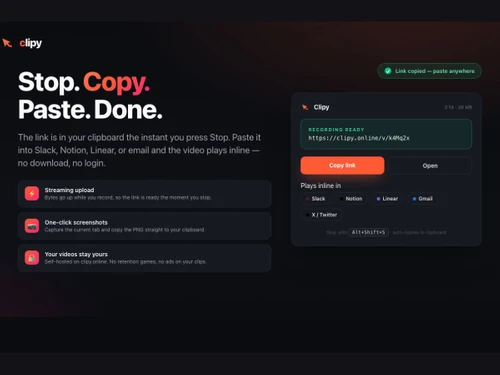
  • Instant Video Sharing: Finished recordings generate links immediately after capture. Recipients can watch videos without account creation.
  • Private Viewing Control: Shared recordings are hidden from public browsing. Access depends on possession of the video link.
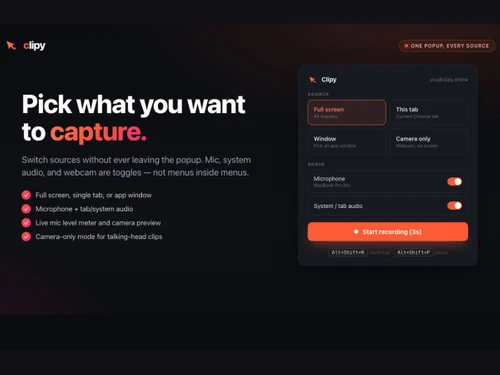
  • Flexible Recording Options: Different screen areas can be captured with ease. Users can choose desktops, tabs, or application windows.
  • Built-in Audio: Voice and system sounds can be easily recorded. No separate tools are needed for audio capture.
  • No Watermark Limits: Videos are created without added branding elements. Recorded content looks clean when shared.
  • Browser Based Access: Recording starts directly from supported web browsers. Installation requirements are reduced for many users.

Benefits of Clipy Software

  • Simplified Problem Reporting: Visual evidence shows issues more clearly. Others can understand certain situations without lengthy descriptions.
  • Useful Learning Resources: Recorded demonstrations provide repeatable reference material. Learners can revisit explanations whenever needed.
  • Reduced Communication Gaps: Videos present information exactly as shown. Viewers receive fewer mixed interpretations.
  • Focused Viewer Attention: Visual highlights direct attention effectively. Important screen actions gain greater visibility.
  • Safer Information Sharing: Sensitive content can be concealed visually. Recordings avoid exposing private details unnecessarily.
  • Better Work Documentation: Important activities can be recorded in visuals. Future reference material becomes readily available.
  • Quick Knowledge Transfer: Screen recordings explain processes through apt examples. Information reaches others with less effort.

Clipy Software Pricing

Clipy Software price is available on request at techjockey.com.

The pricing model is based on different parameters, including extra features, deployment type, and the total number of users. For further queries related to the product, you can contact our product team and learn more about the pricing and offers.

Read more

Codersera Company Details

Founded Year:  2017

Codersera is a tech remote-jobs platform that lets businesses spin up engineering teams in days, not quarters. We're fully remote ourselves — a 5,000+ professional network across six continents, matching outstanding developers with outstanding companies.

Director/Founders Aditya Raj Srivastava
Company Size 1-100 Employees

Clipy Pricing & Plans

Looking for The Right Pricing?

Share your requirements and get a plan built around your business.

  • Define your business needs
  • Get customised pricing
  • Choose features that fit your workflow

Price Available on Request

Get personalised Clipy pricing that fits your needs. Our team will connect with you.

Clipy Features

  • icon_check Screen Recording
    Record full screen, browser tabs, windows, or webcam instantly.
  • icon_check Browser-Based Recorder
    Record directly from the browser without installing software.
  • icon_check Chrome Extension
    Capture screens using a dedicated Chrome extension.
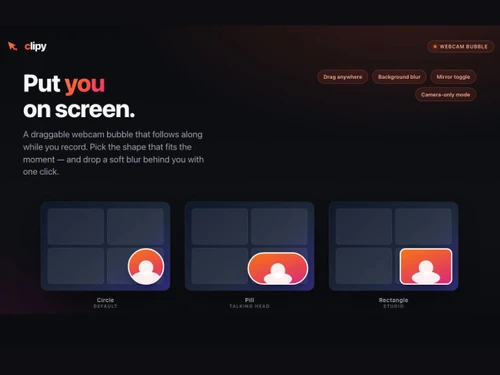
  • icon_check Webcam Recording
    Capture webcam-only videos for tutorials, demos, and presentations.
  • icon_check Pause & Resume Recording
    Pause recordings anytime and continue without restarting sessions.
  • icon_check Loom-Style Video Sharing
    Share screen recordings quickly for collaboration and communication.
  • icon_check Instant Shareable Links
    Generate shareable video links immediately after recording stops.
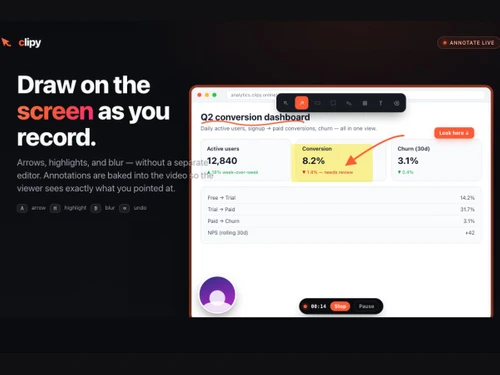
  • icon_check Data Blur Tool
    Blur confidential information instantly during screen recordings.
  • icon_check Live Annotations
    Draw arrows, highlights, and text while recording the screen.
  • icon_check Screenshots Capture
    Capture screenshots instantly and copy them as PNG files.
  • icon_check Cursor Spotlight Effects
    Highlight cursor movements and clicks for clearer walkthroughs.
  • icon_check Audio Recording
    Record microphone, tab audio, and system audio simultaneously.

Clipy Specifications

Supported Platforms
Windows Windows MacOS MacOS Linux Linux
Devices
Desktop Desktop
Deployment
Cloud-Based Cloud-Based
Suitable For
All Industries
Business Specific
All Businesses
Business Size
Individual Small Business Startups Medium Business SMBs SMEs MSMBs Freelancers
Customer Support
Email Forums
Language
English
Training Resources
Documentation Videos
AI Features
AI Integrated

Clipy Review

Techjockey Trusted Reviews from Verified Users

No reviews are currently available for Clipy. Discover similar Screen Recording Software reviews

  • GOM CAM Screen Recording

    4.8

    Whats great - So easy to use, not only for simply recording your pc screen also you can add text, underline it, add webcams. So useful for ... read more

  • Camtasia

    4.6

    Whats great - Have made great videos for my youtube channel and the overall experience is great read more

  • DU Recorder

    4.4

    Whats great - Edit all your recordings with this recorder. Equally easy is cropping and linking together of the different fragments. read more


Articles for Clipy

See All Related Articles

How much does Clipy Software cost?

Clipy's pricing can be availed on request at techjockey.com. Final costs may vary (for certain buyers) depending on feature selection, deployment needs, and user requirements.

Who uses Clipy Software?

The trusted screen recording platform is used by individuals and teams who need to record and share screen activity. It is also useful for creating visual explanations and demonstrations.

Is there a mobile app available for Clipy Software?

No, there is no official mobile app available for Clipy. The platform is designed primarily for desktop use.

Which operating systems are compatible with Clipy Software?

It is compatible with Windows, macOS, and Linux. Users can easily access the platform across supported operating systems.

Does Clipy Software offer a free trial?

Yes, a free trial is available for all users. They can easily try its features before making a decision.

How does Clipy Software function?

It records screen activity and creates shareable video clips. Users can capture content and share recordings through generated links.

20,000+ Software Listed

Best Price Guranteed

Free Expert Consultation

2M+ Happy Customers

Terms and Condtions

close

Users with registered businesses can purchase goods from merchants on the platform to satisfy their business needs. Users are not permitted to utilize any products acquired through the platform for resale, advertising, business, or further distribution.

For each purchase made, users will receive a Tax Invoice (or 'GST invoice') that includes specific details such as:

  • the GSTIN of the user associated with their registered business, and

  • the specified Entity Name for their business.

It should be noted that not all products are eligible for GST Invoice. Only the products displayed by participating sellers with the 'GST-based Invoice Available' callout on the product description page would qualify.

Certain goods and services are not eligible to get a GST Invoice, including items with VAS, i.e., Value Added Services (e.g., Total Mobile Protection/Assured Buyback) and those involving an exchange offer at the time of purchase.

Users must ensure the accuracy of the GSTIN, and business entity name provided for the GST Invoice. Requests for corrections into GST Invoice would not be accommodated by Techjockey.com or any Seller, and any issues arising from user-provided information are the sole responsibility of users.

Techjockey.com is not liable for the GST Invoice or any associated input tax credit. To efficiently claim an input tax credit, users should select the registered place of business address as per the GST authority's data and follow the provisions of the GST Act and rules.

To claim an input tax credit, the delivery and billing addresses must match. Furthermore, input tax credits will not be granted if the delivery address and GSTIN on the invoice are from different states. In case of incorrect GST details provided during the order placement, the order will be canceled automatically.