linkedin
Coevera logo
play Coevera demo
Coevera Pipeline Management
Coevera AI Assistant

Coevera

Brand: Pipelinersales, Inc

  • No Ratings & Reviews

Coevera boosts sales productivity with AI-powered visual pipeline management, sales automation, and a unified 360 degree command centre.

See More

Have you used Coevera before?

Share your insights for better experience

Add a Review
Starting Price
$780

View plans

100% Genuine
Products
Best Price
Guaranteed
Safe & Secure
Payment
  • Description

  • Pricing

  • Features

  • Specification

  • Review

  • FAQ

Starting at $780

Coevera Software Overview

What is Coevera?

Coevera is a comprehensive CRM Software platform engineered to provide a highly visual and intuitive approach to sales management. Designed for a wide range of businesses including Startups, SMBs, SMEs, and Agencies, it offers end-to-end solutions that unify sales processes. The software transforms disconnected lists of opportunities, leads, accounts, and contacts into a single, 360 degree sales command center. Coevera is a web-based solution fully compatible with Windows, iOS, and Android operating systems, ensuring seamless access across desktop, mobile, and tablet devices for teams on the move.

At its core, the platform focuses on making sales data understandable and actionable. By visualizing the sales pipeline and customer relationships, it empowers sales professionals and managers to track progress, identify bottlenecks, and make informed decisions quickly. Its architecture is built to support key business functions including account management, sales automation, contact management, and robust reporting.

Why Choose Coevera?

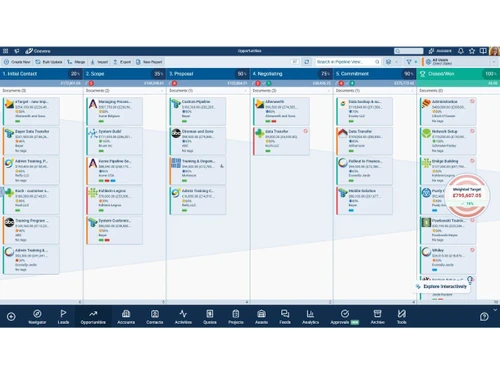
  • Visual Sales Pipeline: Coevera most distinct advantage is its visual representation of the sales process. This allows teams to instantly grasp the status of every deal, identify opportunities, and manage their workflow with greater precision.
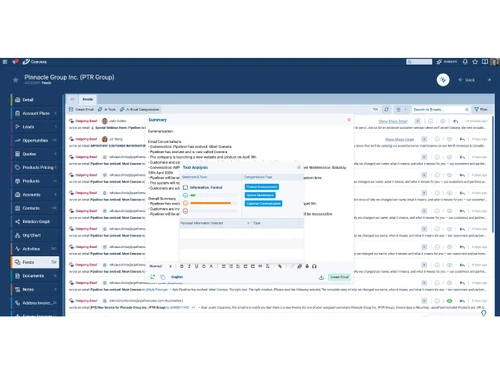
  • AI-Powered Productivity: With the integrated Voyager AI, Coevera automates time-consuming tasks. It transcribes and summarizes calls, crafts professional emails, generates intelligent reports from natural language queries, and even analyzes email sentiment to help prioritize high-value deals.
  • Unified Sales Hub: It consolidates all critical sales data, accounts, contacts, leads, opportunities, and activities, into one cohesive view. This ensures total team alignment and eliminates the need to switch between multiple applications.
  • Actionable Insights: The platform is designed to turn raw data into strategic intelligence. Features like the AI Coach provide instant sales advice, while advanced analytics help managers track KPIs and forecast accurately.
  • Reduced Manual Entry: Through features like AI-powered speech-to-text for notes and automated lead capture from online forms, Coevera significantly reduces the burden of manual data entry, freeing up sales teams to focus on selling.

Advanced Features of Coevera

  • Voyager AI Suite: A powerful AI assistant integrated directly into the CRM. Its capabilities include an AI Coach for real-time guidance, automatic transcription and summarization of audio/video files, an AI email assistant for crafting messages, and an AI report generator that responds to natural language commands.
  • AI Automatizer: This revolutionary tool allows users to build, refine, and deploy complex workflows using simple natural language. It dramatically speeds up the process of creating sales automations with AI precision and human oversight.
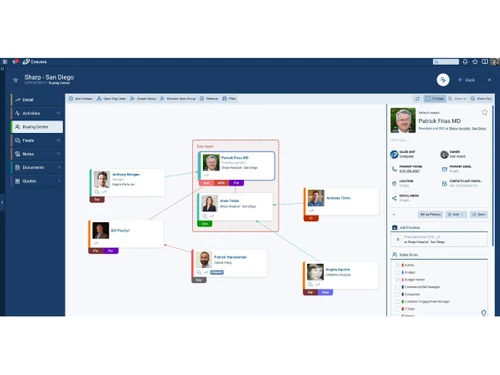
  • Visual Buying Center: An essential tool for B2B sales, it helps map out all key decision-makers and influencers within a deal. Users can assign custom roles and visualize relationships to tailor their outreach, shorten sales cycles, and improve win rates.
  • Integrated Calling & Texting: Sales professionals can call and text prospects directly from the Coevera interface. This feature includes one-click dialing and automatic logging of all communication activities for accurate reporting.
  • Online Forms: Instantly capture leads from your website or landing pages. These forms automatically create or update records in the CRM and can trigger sales automation sequences, ensuring no lead is missed.
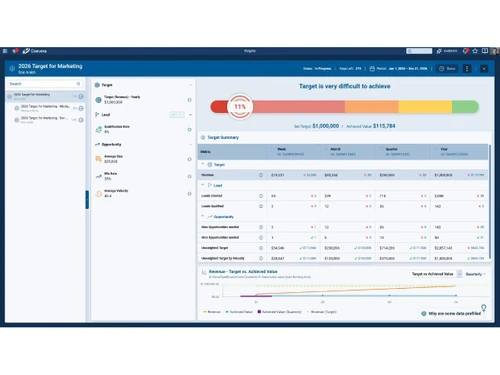
  • Advanced Data Visualization: Beyond the standard pipeline view, Coevera offers multiple ways to analyze data, including an Opportunity Bubble Chart View, Map View for geographic insights, and Dynamic Target Views to track multiple KPIs simultaneously.

Key Capabilities of Coevera

  • Sales Management: Visual opportunity and lead pipeline management, dynamic target tracking, and multiple currency support.
  • Account & Contact Management: 360-degree views of customers, relationship mapping, visual org charts, and key account planning.
  • Lead Management: Tools for capturing, nurturing, and converting leads into opportunities efficiently.
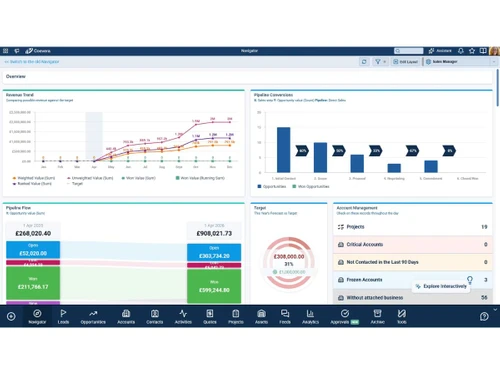
  • Analytics & Reporting: Standard and custom reporting, AI-generated reports, and advanced dashboard visualizations like the Navigator Dashboard.
  • Productivity & Automation: AI-powered workflow automation, automated activity suggestions, and integrated communication tools to eliminate manual tasks.
  • Email Integration: Seamless integration with email clients, featuring AI-driven sentiment analysis and message categorization.
  • Mobile CRM: Full-featured mobile applications for iOS and Android, enabling sales teams to manage their pipeline from anywhere.
  • Administration & Customization: Extensive options for customizing fields, views, and workflows to match specific business processes.

How to Use Coevera?

  1. Setup and Customization: Begin by importing existing accounts and contacts. Customize your sales pipeline stages, fields, and profile views to align with your unique sales process.
  2. Lead and Opportunity Management: Populate your pipeline by adding new leads and opportunities, either manually or automatically through web forms. Visually drag and drop deals from one stage to the next as they progress.
  3. Engage and Communicate: Use the integrated calling, texting, and email features to interact with prospects. All activities are automatically logged against the relevant contact or opportunity record.
  4. Leverage AI and Automation: Use the AI Automatizer to build workflows that handle repetitive tasks. Let Voyager AI assist with writing emails, summarizing meetings, and generating performance reports.
  5. Analyze and Optimize: Regularly review your performance using the Navigator Dashboard and custom reports. Use the visual analytics to identify trends, forecast sales, and refine your strategy for continuous improvement.

Coevera Pricing

Coevera price starts at USD 65 at techjockey.com.

The pricing model is based on different parameters, including extra features, deployment type, and the total number of users. For further queries related to the product, you can contact our product team and learn more about the pricing and offers.

Read more

Pipelinersales, Inc Company Details

Founded Year:  2009

Pipeliner CRM, a sales enablement tool for Sales management and salespeople – focusing on pipeline management, sales process and analytics.

Director/Founders Nikolaus Kimla
Company Size 101-500 Employees

Coevera Pricing & Plans

Starter (USD 65/user/month billed annually)
Key Features
  • Voyager I
  • Account Management
  • Contact Management
  • Visual Opportunity and Lead Buying Center
  • Unlimited Accounts & Contacts
  • Import Accounts and Contacts from CSV files
  • Notes Management
  • Unlimited Leads & Opportunities
  • Opportunity and Lead Pipeline View
  • Dynamic Velocity View
Starting at $780
    • Quantity

      Quantity
      Quantity
    • Yearly

      Yearly
      Yearly

Key Features

  • Voyager I

  • Account Management

  • Contact Management

  • Visual Opportunity and Lead Buying Center

  • Unlimited Accounts & Contacts

  • Import Accounts and Contacts from CSV files

  • Notes Management

  • Unlimited Leads & Opportunities

  • Opportunity and Lead Pipeline View

  • Dynamic Velocity View

Coevera Features

Customer Data Management (CDM)

  • icon_check Contact Management
    Store, organize, and access customer contact details for easy retrieval and updates.
  • icon_check Account Management
    Track and manage business relationships with key accounts and clients.
  • icon_check Customer Profiles
    Build comprehensive profiles with data on preferences, interactions, and purchase history.
  • icon_check Contact Segmentation
    Group contacts based on behavior, demographics, or interests for personalized engagement.
  • icon_check Activity History
    Record and review all past customer interactions, including calls, emails, and meetings.

Sales Management

  • icon_check Lead Management
    Capture, track, and nurture leads across different stages of the sales cycle.
  • icon_check Territory Management
    Assign, monitor, and optimize sales territories to improve regional sales efforts.
  • icon_check Quote Management
    Generate accurate, branded quotes and proposals to accelerate sales processes.
  • icon_check Sales Forecasting
    Predict future sales and revenue using historical data and current opportunities.
  • icon_check Deal Management
    Organize, prioritize, and manage deals, ensuring timely follow-up and closure.
  • icon_check Sales Automation
    Automate tasks like follow-up emails, lead assignment, and reminder notifications.
  • icon_check Workflow Automation and Management
    Automate repetitive tasks and workflows to improve sales team efficiency.
  • icon_check Opportunity & Pipeline Management
    Visualize and track deals through stages from lead generation to closing.
  • icon_check Order Management
    Track and manage orders from customers to ensure timely fulfillment and accurate billing.
  • icon_check Contract Management
    Managing contracts from their creation, execution, and performance tracking to their eventual termination.

Marketing Automation

  • icon_check Email Marketing
    Design and send personalized email campaigns, track opens, clicks, and conversions.
  • icon_check Campaign Management
    Plan, execute, and monitor marketing campaigns across channels and touchpoints.
  • icon_check Lead Nurturing
    Engage and educate leads over time with targeted content to move them toward conversion.
  • icon_check Customer Journey Tracking
    Monitor and analyze the customer journey from awareness to purchase.
  • icon_check Customer Segmentation
    Group customers based on behavior, demographics, or preferences for tailored campaigns.
  • icon_check Event-Triggered Workflows
    Automate responses and actions based on customer behaviors (e.g., email opens, site visits).
  • icon_check Automated Campaigns
    Automatically trigger campaigns based on customer behavior, interests, or milestones.

Data Sourcing / Integrations

  • icon_check Social Media Integration
    Manage social media accounts and track customer engagement directly within the CRM.
  • icon_check Data Import/Export
    Easily import/export customer and business data in bulk or via integration with other systems.
  • icon_check API Access
    Customizable API for integrating with other business applications or extending CRM capabilities.
  • icon_check Calendar Integration
    Sync CRM with calendars to schedule and manage appointments and follow-ups.
  • icon_check Third Party Integrations
    Connect CRM with a variety of third-party tools and services to enhance functionality.
  • icon_check Email Marketing Tools Integration
    Connect CRM with email platforms like Mailchimp or SendGrid for seamless campaigns.
  • icon_check Marketing Tools Integration
    Integrate with marketing platforms (e.g., Google Ads, HubSpot) to enhance campaign effectiveness.
  • icon_check Interactive Voice Response (IVR) Integration
    Integrate CRM with IVR systems to manage customer calls and enhance support.
  • icon_check eCommerce Integrations
    Sync CRM with eCommerce platforms like Shopify, WooCommerce for a unified customer experience.

Collaboration Tools

  • icon_check Team Communication
    Enable real-time internal communication between teams with built-in messaging or chat features.
  • icon_check Task / Activity Management
    Assign, track, and manage tasks and activities to ensure team productivity and accountability.
  • icon_check Document Sharing & File Storage
    Store and share important files, documents, and customer resources easily.
  • icon_check Omnichannel Support & Engagement
    Provide consistent customer support across multiple channels, including email, chat, and social media.

Security & Compliance

  • icon_check Audit Trail
    Track changes and updates within the system for enhanced security and transparency.
  • icon_check Data Encryption
    Encrypt data both at rest and in transit to safeguard customer information.
  • icon_check Role-Based Access Control (RBAC)
    Control user access based on their roles, limiting access to sensitive data.
  • icon_check Backup & Disaster Recovery
    Ensure business continuity with secure backups and disaster recovery plans.
  • icon_check GDPR & Data Privacy
    Comply with regulations such as GDPR, HIPAA, and CCPA. to protect customer privacy.

AI & Machine Learning

  • icon_check Predictive Analytics
    Leverage AI to predict future trends, sales, and customer behavior for better decision-making.
  • icon_check Lead Scoring
    Use AI to score leads based on their likelihood to convert, helping prioritize sales efforts.
  • icon_check Chatbots
    Automate customer interactions with AI-driven chatbots to assist or direct inquiries efficiently.

Reporting & Analytics

  • icon_check Predictive Analytics
    Leverage AI to predict future trends, sales, and customer behavior for better decision-making.
  • icon_check Real Time Analytics
    Monitor and analyze real-time data to make timely, informed decisions.
  • icon_check Campaign Performance
    Measure the effectiveness of marketing campaigns, including ROI, reach, and conversion rates.
  • icon_check Custom Dashboards
    Create personalized dashboards to visualize key metrics and data relevant to your business.
  • icon_check Sales Performance Reports
    Track individual and team sales metrics, including revenue, win rates, and pipeline health.
  • icon_check Customer Insights
    Analyze customer behavior and interactions to gain actionable insights for better engagement.
  • icon_check Forecasting & Trends
    Use historical data to forecast future sales and trends for improved business planning.
  • icon_check Performance Tracking
    Monitor team performance across various functions, tracking progress against KPIs.

Alerts & Notifications

  • icon_check Event-Triggered Notifications
    Automatically notify users of key events, such as new leads, meetings, or customer actions.
  • icon_check Custom Workflow Alerts
    Create custom alerts for specific workflows or actions, ensuring nothing gets missed.
  • icon_check System Errors/Failures
    Receive immediate notifications for any system failures or errors for quick resolution.
  • icon_check Customer Interaction Alerts
    Get notified when customers engage with emails, forms, or other touchpoints.
  • icon_check Workflow Trigger Alerts
    Alert users when specific workflow conditions or triggers are met.
  • icon_check SLA Violations
    Receive notifications when service level agreements are breached or approaching deadlines.
  • icon_check Lead Activity Alerts
    Get alerts when leads take important actions (e.g., filling out a form or making a purchase).
Coevera Demo Video play icon

Get Coevera Demo

Watch the demo video to explore key features, real workflows, and how the software fits your business needs.

Understand
Key Features
Personal
Demo Insights
Interactive
Demo Support

Coevera Specifications

Supported Platforms
Windows Windows MacOS MacOS
Devices
Desktop Desktop
Deployment
Cloud-Based Cloud-Based
Suitable For
All Industries
Business Specific
All Businesses
Business Size
Small Business Medium Business Enterprises
Customer Support
Email Forums
Language
English
Integration
API Integration
Training Resources
Live Online Documentation Videos
Compliance Regulation
HIPAA

Coevera Review

Techjockey Trusted Reviews from Verified Users

No reviews are currently available for Coevera. Discover similar CRM Software reviews

  • Kylas CRM

    4.1

    Whats great - Allowed me to track everything I needed to succeed. With Kylas, I now have all the information at hand and can use that data ... read more

  • NCH Reflect CRM

    4.2

    Whats great - The fields you require can be modified by adding additional fields and can customize them. read more

  • Salesforce CRM

    4.3

    Whats great - Salesforce CRM’s beat notification feature ensures timely updates, helping sales teams stay on top of their schedules and cli... read more
Articles for Coevera

See All Related Articles

What is Coevera?

Coevera is a comprehensive customer relationship management software designed to serve startups, SMBs, SMEs, and agencies with a focus on visual sales management and process automation.

How much does Coevera cost?

Coevera price starts at USD 65 at techjockey.com.

Is Coevera a good CRM?

Coevera is a feature-rich CRM that emphasizes visual pipeline management, sales automation, and AI-powered productivity tools to help sales teams effectively track and close deals.

What does Coevera do?

Coevera helps businesses manage their entire sales process, including account and contact management, lead management, sales automation, email integration, and advanced reporting and analytics.

What is Voyager AI in Coevera?

Voyager AI is Coevera's integrated artificial intelligence assistant that automates tasks like call transcription, email creation, sentiment analysis, and generating smart reports to boost sales productivity.

How does Coevera help visualize B2B deals?

The software features a visual Buying Center that allows you to map out decision-makers, identify key influencers, and understand relationships to target your outreach more effectively.

Can I contact customers directly from Coevera?

Yes, Coevera allows you to call and text prospects directly from the application, with features like one-click dialing and automatic logging of communication activities for accurate reporting.

How does Coevera handle lead capture?

Coevera uses Online Forms to instantly capture leads, which automatically update records within the CRM and can trigger sales automation workflows without requiring manual data entry.

Who can use Coevera?

Coevera is ideal for sales professionals, sales managers, startups, SMBs, SMEs, and agencies looking to manage sales pipelines, improve forecasting, automate tasks, and strengthen customer relationships.

20,000+ Software Listed

Best Price Guranteed

Free Expert Consultation

2M+ Happy Customers

Terms and Condtions

close

Users with registered businesses can purchase goods from merchants on the platform to satisfy their business needs. Users are not permitted to utilize any products acquired through the platform for resale, advertising, business, or further distribution.

For each purchase made, users will receive a Tax Invoice (or 'GST invoice') that includes specific details such as:

  • the GSTIN of the user associated with their registered business, and

  • the specified Entity Name for their business.

It should be noted that not all products are eligible for GST Invoice. Only the products displayed by participating sellers with the 'GST-based Invoice Available' callout on the product description page would qualify.

Certain goods and services are not eligible to get a GST Invoice, including items with VAS, i.e., Value Added Services (e.g., Total Mobile Protection/Assured Buyback) and those involving an exchange offer at the time of purchase.

Users must ensure the accuracy of the GSTIN, and business entity name provided for the GST Invoice. Requests for corrections into GST Invoice would not be accommodated by Techjockey.com or any Seller, and any issues arising from user-provided information are the sole responsibility of users.

Techjockey.com is not liable for the GST Invoice or any associated input tax credit. To efficiently claim an input tax credit, users should select the registered place of business address as per the GST authority's data and follow the provisions of the GST Act and rules.

To claim an input tax credit, the delivery and billing addresses must match. Furthermore, input tax credits will not be granted if the delivery address and GSTIN on the invoice are from different states. In case of incorrect GST details provided during the order placement, the order will be canceled automatically.