 USA
USA UAE
UAESmall Business
Designed for startups and growing businesses

See More



Brand: Desktop Ghost Pro
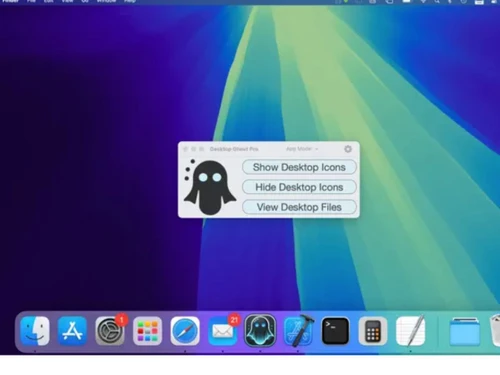
A macOS productivity utility software that helps users instantly hide and show all desktop files and icons to create a clean, distraction-free workspace.
See MoreHave you used Desktop Ghost Pro before?
Share your insights for better experience
Looking for The Right Pricing?
Share your requirements and get a plan built around your business.
Price Available on Request
Get personalised Desktop Ghost Pro pricing that fits your needs. Our team will connect with you.
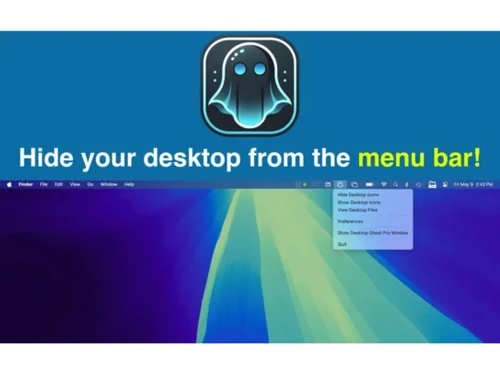
 Desktop Icon Concealment Batch Visibility Toggle Global Hotkey Support Finder Sync Integration Siri Voice Command Support Exclusion List Management Desktop File Explorer Drag and Drop Functionality Menu Bar Operation Mode Dock Application Mode Dock Context Menu Controls Deep & Dark Web Monitoring Preview Functionality
  MacOS
MacOS  Desktop
  Perpetual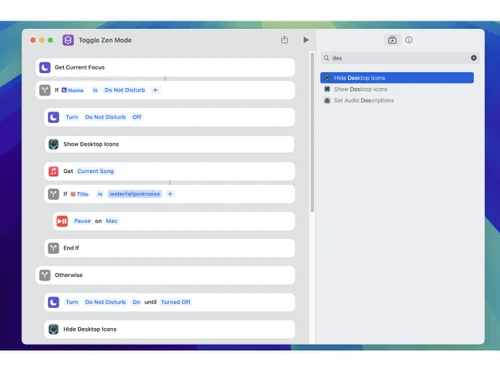
Small Business
Designed for startups and growing businesses
Medium Business
Built for business growth and flexibility
Enterprises
Designed for complex and large-scale business needs
Techjockey Trusted Reviews from Verified Users
No reviews are currently available for Desktop Ghost Pro. Discover similar Utility Software reviews

Booky
Whats great - Booky.io has a clean and minimal layout. It's perfect for keeping my most-used links all in one place. The drag-and-drop make... read more

Defencebyte Computer Opmitizer
Whats great - Really I am happy now after using defencebyte Computer optimizer, My Pc performance boost after using defencebyte Computer op... read more

VMware
Whats great - Vmware offers a wide variety of management tools and features to help with both the initial configuration and ongoing adminis... read more

Desktop Ghost Pro
Price On Request
Desktop
Mobile
Web based
On Premises
Windows
Mac OS
Nero Platinum Suite
₹ 4065
Desktop
Mobile
Web based
On Premises
Windows
Mac OS

Truecaller
₹ 84
Desktop
Mobile
Web based
On Premises
Windows
Mac OS

WizTree
Price On Request
Desktop
Mobile
Web based
On Premises
Windows
Mac OS

RestoreX360
₹ 1499
Desktop
Mobile
Web based
On Premises
Windows
Mac OS

Xplorer
Price On Request
Desktop
Mobile
Web based
On Premises
Windows
Mac OS
CHIRP
Price On Request
Desktop
Mobile
Web based
On Premises
Windows
Mac OS

IrfanView
Price On Request
Desktop
Mobile
Web based
On Premises
Windows
Mac OS

Iobit Driver Booster 13 Pro
Price On Request
Desktop
Mobile
Web based
On Premises
Windows
Mac OS

Opal
Price On Request
Desktop
Mobile
Web based
On Premises
Windows
Mac OS

Iobit Protected folder
Price On Request
Desktop
Mobile
Web based
On Premises
Windows
Mac OS
(0) Product(s) selected
Starting Price:
₹4,065 /PC/Year ₹5,350
Starting Price:
₹84 /Month
Starting Price:
$25 /Quantity
Available
Price on Request
Available
Price on Request
Starting Price:
$12 /License
Starting Price:
$19 /Year
Starting Price:
$20 /Month

Starting Price:
$60 /Year

Available
Price on Request

Available
Price on Request









Desktop Ghost Pro pricing can be requested at techjockey.com. Pricing is customised based on specific business needs.
Desktop Ghost Pro is designed specifically for macOS. It integrates smoothly with Mac systems and works across modern macOS versions.
It temporarily hides all desktop icons and files without deleting or moving them. Users can toggle visibility using a click or customizable keyboard shortcuts.
Yes, it can be useful for small businesses, especially for presentations and maintaining a clean workspace.
Desktop Ghost Pro is typically a paid app available on the Mac App Store. Some versions may offer a trial or limited preview before purchase.
It includes instant hide/show functionality, keyboard shortcuts, menu bar access, Finder integration, and automation support for a seamless experience.
Yes, it is available as a desktop application for macOS. There is no mobile app for Android or iOS devices.
It is ideal for professionals, presenters, content creators, and anyone who prefers a clean desktop.
It is safe to use as it does not alter or delete files. It simply hides them temporarily, ensuring data remains secure and intact.
It is used to hide and reveal desktop icons instantly. Its main purpose is to create a clutter-free workspace and maintain privacy during presentations or screen sharing.
20,000+ Software Listed
Best Price Guranteed
Free Expert Consultation
2M+ Happy Customers
Terms and Condtions

Users with registered businesses can purchase goods from merchants on the platform to satisfy their business needs. Users are not permitted to utilize any products acquired through the platform for resale, advertising, business, or further distribution.
For each purchase made, users will receive a Tax Invoice (or 'GST invoice') that includes specific details such as:
the GSTIN of the user associated with their registered business, and
the specified Entity Name for their business.
It should be noted that not all products are eligible for GST Invoice. Only the products displayed by participating sellers with the 'GST-based Invoice Available' callout on the product description page would qualify.
Certain goods and services are not eligible to get a GST Invoice, including items with VAS, i.e., Value Added Services (e.g., Total Mobile Protection/Assured Buyback) and those involving an exchange offer at the time of purchase.
Users must ensure the accuracy of the GSTIN, and business entity name provided for the GST Invoice. Requests for corrections into GST Invoice would not be accommodated by Techjockey.com or any Seller, and any issues arising from user-provided information are the sole responsibility of users.
Techjockey.com is not liable for the GST Invoice or any associated input tax credit. To efficiently claim an input tax credit, users should select the registered place of business address as per the GST authority's data and follow the provisions of the GST Act and rules.
To claim an input tax credit, the delivery and billing addresses must match. Furthermore, input tax credits will not be granted if the delivery address and GSTIN on the invoice are from different states. In case of incorrect GST details provided during the order placement, the order will be canceled automatically.


