linkedin
Dialpad logo
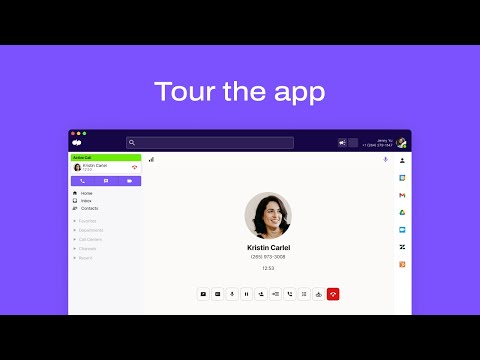
play Dialpad 101 | Tour the App
dialpad meetings
dialpad recording

Dialpad

Brand: Dialpad

  • 4.3

  • 4 Ratings & 1 Review

Dialpad is a cloud-based communication platform offering voice, video, and messaging services for businesses, providing seamless collaboration and productivity tools. It integrates with various business applications and offers AI-powered features for enhanced efficiency in communication.

See More

Have you used Dialpad before?

Share your insights for better experience

Add a Review
Starting Price
$20

View plans

100% Genuine
Products
Best Price
Guaranteed
Safe & Secure
Payment
  • Description

  • Pricing

  • Features

  • Specification

  • Review

  • Compare

  • Alternatives

  • FAQ

Starting at $20

Dialpad Software Overview

What is Dialpad?

Dialpad is a cloud-based communication platform designed for businesses, offering voice, video, and messaging services. It enables seamless collaboration and communication across teams, regardless of location. With integrations to various business applications, Dialpad enhances workflow efficiency by centralizing communication tools.

Its AI-powered features, such as real-time transcriptions and voice analytics, improve productivity and decision-making. Dialpad's flexible scalability allows businesses to adapt to changing communication needs easily.

Why Choose Dialpad Video Conferencing Software?

  • Unified Communication: It integrates voice, video, and messaging services into one platform, providing a seamless communication experience for teams.
  • Cloud-Based Flexibility: As a cloud-based solution, It offers flexibility and scalability, allowing businesses to easily adapt to changing communication needs without the hassle of physical infrastructure.
  • Productivity Features: With AI-powered features like real-time transcriptions and voice analytics, It enhances productivity by streamlining communication processes and providing valuable insights.
  • Integration Capabilities: It integrates with various business applications, allowing for easy collaboration and workflow efficiency by centralizing communication tools.
  • Mobility: Its mobile app enables employees to stay connected and productive while on the go, ensuring seamless communication regardless of location.
  • Cost-Efficiency: By eliminating the need for expensive hardware and offering flexible pricing plans, It helps businesses save on communication costs while providing robust features and functionality.

Benefits of Dialpad Software

  • Enhanced Collaboration: It fosters collaboration by providing features such as screen sharing and file sharing, facilitating teamwork and knowledge sharing among team members.
  • Improved Customer Service: With advanced call handling features and integration with CRM systems, It enhances customer service by enabling efficient call management and access to customer information.
  • Remote Work Enablement: It supports remote work by providing seamless communication tools accessible from anywhere with an internet connection, empowering teams to work efficiently from remote locations.
  • Compliance and Security: It ensures compliance with data protection regulations and offers robust security measures to safeguard sensitive communication data, providing peace of mind to businesses regarding data privacy and security concerns.

Pricing Of Dialpad

Dialpad price in India starts at $20 at techjockey.com.

The pricing model is based on different parameters, including extra features, deployment type, and the total number of users. For further queries related to the product, you can contact our product team and learn more about the pricing and offers.

Read more

Dialpad Company Details

Founded Year:  2011

Dialpad is the leading Ai-Powered Customer Intelligence Platform that is completely transforming how the world works together.

Director/Founders Alex Cornell, Brian Peterson, Craig Walker, John Rector
Company Size 1000+ Employees

Dialpad Pricing & Plans

Ai Meetings-Business
Key Features
  • Max meeting duration: 5 hours per meeting
  • End of meeting reminder
  • Unlimited meetings
  • Screen sharing
  • HD video and HD audio
  • Personal meeting ID
  • Join by desktop and mobile browser with no downloa
  • No meeting PINS required
  • Desktop and mobile apps
  • Unlimited audio recordings
Starting at $20
    • Licenses

      Licenses
      Licenses
    • Monthly

      Monthly
      Monthly

Key Features

  • Max meeting duration: 5 hours per meeting

  • End of meeting reminder

  • Unlimited meetings

  • Screen sharing

  • HD video and HD audio

  • Personal meeting ID

  • Join by desktop and mobile browser with no downloa

  • No meeting PINS required

  • Desktop and mobile apps

  • Unlimited audio recordings

Dialpad Features

  • icon_check Unlimited Collaboration
    Facilitates seamless collaboration among team members with unlimited access to communication tools.
  • icon_check HD Video
    Provides high-definition video calling capabilities for clear and immersive virtual meetings.
  • icon_check Clear Audio
    Ensures crystal-clear audio quality during calls and conferences for effective communication.
  • icon_check Content Sharing
    Enables easy sharing of documents, presentations, and other content during meetings and discussions.
  • icon_check Artificial Intelligence
    Utilizes AI-powered features for enhancing communication efficiency and productivity.
  • icon_check Time Management
    Helps users effectively manage their time by providing tools for scheduling and organizing meetings.
  • icon_check Call Summaries
    Generates summaries of calls, capturing key points and action items for reference and follow-up.
  • icon_check Action Items
    Identifies and tracks action items discussed during meetings, ensuring accountability and progress.
  • icon_check Personalized Experience
    Offers personalized settings and preferences to tailor the communication experience to individual needs.
  • icon_check One-click Meetings
    Enables quick and convenient initiation of meetings with just one click, streamlining the meeting scheduling process.
Dialpad Demo Video play icon

Get Dialpad Demo

Watch the demo video to explore key features, real workflows, and how the software fits your business needs.

Understand
Key Features
Personal
Demo Insights
Interactive
Demo Support

Dialpad Specifications

Supported Platforms
Ubuntu Ubuntu Windows Windows iOS iOS Android Android MacOS MacOS Linux Linux
Devices
Desktop Desktop Mobile Mobile Tablet Tablet iPad iPad
Deployment
Cloud-Based Cloud-Based Perpetual Perpetual
Suitable For
All Industries
Business Specific
All Businesses
Business Size
Small Business Startups Medium Business Enterprises
Customer Support
Phone Email Communities
Language
English français Deutsche 日本人
Training Resources
Webinars Documentation Videos
AI Features
AI Integrated

Explore the Best Alternative Solutions Similar to Your Business Size and Needs

Dialpad Review

4.3

Out of 5

img

Overall Rating

Based on
1 Verified Review

Rating Breakdown

  • Features 4
  • Value for Money 4.3
  • Ease of Use 4.1
  • Customer Support 4.7

95% Recommend this Product

Add Review

Dialpad Video Review

youtubeVideoId

4.3

“Dialpad Connection Honest Review - Watch Before Using”

Review by: Smart Format

Compare Dialpad With other Video Conferencing Software

Products
Ratings
Pricing
Device Supported
Deployment
Supported Platforms
  • img

    Dialpad

  • 4.3

  • Price On Request

  • Desktop

    Mobile

  • Web based

    On Premises

  • Windows

    Mac OS

  • img

    Cisco Webex

  • 4.6

  • ₹ 950

  • Desktop

    Mobile

  • Web based

    On Premises

  • Windows

    Mac OS

  • img

    Tencent RTC

  • 4.0

  • Price On Request

  • Desktop

    Mobile

  • Web based

    On Premises

  • Windows

    Mac OS

  • img

    Interactio

  • 4.5

  • Price On Request

  • Desktop

    Mobile

  • Web based

    On Premises

  • Windows

    Mac OS

  • img

    AONMeetings

  • 4.7

  • ₹ 152

  • Desktop

    Mobile

  • Web based

    On Premises

  • Windows

    Mac OS

  • img

    Pexip

  • 4.2

  • Price On Request

  • Desktop

    Mobile

  • Web based

    On Premises

  • Windows

    Mac OS

  • img

    VideoMeet

  • 4.5

  • ₹ 499

  • Desktop

    Mobile

  • Web based

    On Premises

  • Windows

    Mac OS

  • img

    JioMeet

  • 3.6

  • Price On Request

  • Desktop

    Mobile

  • Web based

    On Premises

  • Windows

    Mac OS

  • img

    GoToMeeting

  • 4.1

  • Price On Request

  • Desktop

    Mobile

  • Web based

    On Premises

  • Windows

    Mac OS

  • img

    xpression camera

  • 4.4

  • Price On Request

  • Desktop

    Mobile

  • Web based

    On Premises

  • Windows

    Mac OS

  • img

    Vidyo

  • 4.4

  • Price On Request

  • Desktop

    Mobile

  • Web based

    On Premises

  • Windows

    Mac OS

(0) Product(s) selected

Dialpad Alternatives

See All Dialpad Alternatives

Starting Price:

$125 /Month

Available

Price on Request

Starting Price:

₹1,299 /Month

Starting Price:

$849 /Month

Starting Price:

$20

Starting Price:

$99 /Month

Available

Price on Request

Available

Price on Request
Articles for Dialpad

See All Related Articles

Which operating system does Dialpad Software Support?

Dialpad Software is compatible with Ubuntu, Windows, Linux, iOS, Android and MacOS.

Is there any Dialpad Software App?

Yes, Dialpad Software app is available for Android and iOS app users.

What is the deployment type of Dialpad Software?

Dialpad Video Conferencing Software supports web-based deployment.

How much does Dialpad Software Cost?

Dialpad price in India starts at $20 at techjockey.com.

Who are the potential users of Dialpad Video Conferencing Software?

Dialpad Software is typically used by all industries for businesses, providing seamless collaboration and productivity tools.

Is there any free demo for Dialpad Video Conferencing Software?

Free demo of Dialpad is available at techjockey.com.

Is Dialpad Software Free?

Yes, Dialpad Software is available for free.

Does this product offer a free trial?

Yes, Dialpad Software offers a free trial.

How can you download Dialpad Video Conferencing Software?

Dialpad Software installation is not required, as it is web-based. Just open the Setup Wizard to get started.

How does Dialpad Software Work?

Dialpad Software operates as a cloud-based communication platform, facilitating seamless voice, video, and messaging services for businesses.

20,000+ Software Listed

Best Price Guranteed

Free Expert Consultation

2M+ Happy Customers

Terms and Condtions

close

Users with registered businesses can purchase goods from merchants on the platform to satisfy their business needs. Users are not permitted to utilize any products acquired through the platform for resale, advertising, business, or further distribution.

For each purchase made, users will receive a Tax Invoice (or 'GST invoice') that includes specific details such as:

  • the GSTIN of the user associated with their registered business, and

  • the specified Entity Name for their business.

It should be noted that not all products are eligible for GST Invoice. Only the products displayed by participating sellers with the 'GST-based Invoice Available' callout on the product description page would qualify.

Certain goods and services are not eligible to get a GST Invoice, including items with VAS, i.e., Value Added Services (e.g., Total Mobile Protection/Assured Buyback) and those involving an exchange offer at the time of purchase.

Users must ensure the accuracy of the GSTIN, and business entity name provided for the GST Invoice. Requests for corrections into GST Invoice would not be accommodated by Techjockey.com or any Seller, and any issues arising from user-provided information are the sole responsibility of users.

Techjockey.com is not liable for the GST Invoice or any associated input tax credit. To efficiently claim an input tax credit, users should select the registered place of business address as per the GST authority's data and follow the provisions of the GST Act and rules.

To claim an input tax credit, the delivery and billing addresses must match. Furthermore, input tax credits will not be granted if the delivery address and GSTIN on the invoice are from different states. In case of incorrect GST details provided during the order placement, the order will be canceled automatically.