USA
USA UAE
UAESmall Business
Designed for startups and growing businesses

See More





Brand: AONMeetings
A video conferencing software that enables secure, real-time online meetings, collaboration, and virtual events without requiring any software installation.
See MoreHave you used AONMeetings before?
Share your insights for better experience
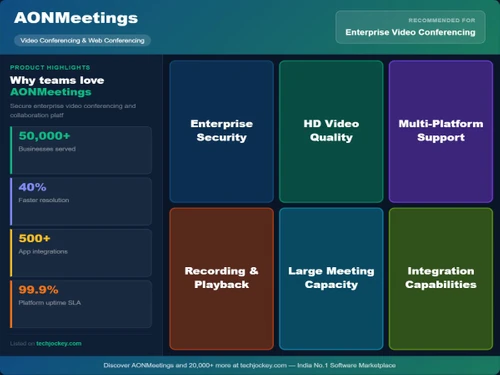
 End-to-End Encryption Screen Sharing AI Meeting Summaries Digital Whiteboard Waiting Room Control Live Polling Multi-Camera Support Custom Branding RTMP Streaming In-Session Chat Moderator Tools Calendar Integration

Watch the demo video to explore key features, real workflows, and how the software fits your business needs.
 Ubuntu
  Windows
  MacOS
MacOS  Linux
Linux  Desktop
  Cloud-Based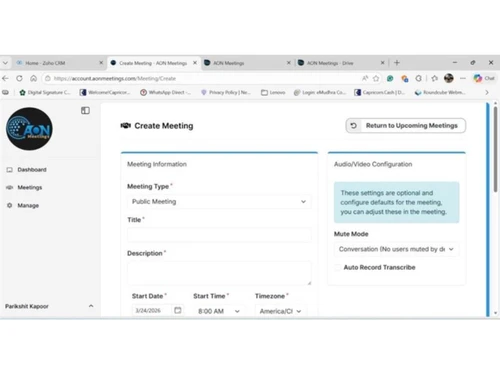
Small Business
Designed for startups and growing businesses
Medium Business
Built for business growth and flexibility
Enterprises
Designed for complex and large-scale business needs
4.7
Out of 5

Overall Rating
Based on
6 Verified Reviews
Rating Breakdown
96% Recommend this Product
Add ReviewAONMeetings has garnered positive feedback for its user-friendly interface, affordability, and reliable performance, making it particularly suitable for small to medium-sized businesses. Users appreciate the essential features like screen sharing, chat, and recording that enhance online collaboration. However, some customers have noted the need for more advanced features, third-party integrations, and improved navigation for new users. Overall, the platform is viewed as a practical solution for regular meetings, though enhancements could further elevate the user experience.
Pros
"Easy to use, reliable meetings, smooth browser access, useful screen sharing and recording features, and a clean interface."
"AONMeetings makes recruitment interviews easier with simple scheduling, clear audio and video, panel interview support, and an easy joining process that saves time for HR teams."
"Easy to join with a simple interface and useful meeting features that support smooth online communication."
Cons
"Some features could be improved further to provide a more complete and polished meeting experience."
"The platform can load slightly slowly on mobile data, and first-time users may take a little time to locate the meeting join option."
"Some features could be easier to find and navigate for new users."

Aug 21, 2026
Techjockey Verified
“A Smooth and Affordable Online Meeting Experience”
I have had a smooth experience using AONMeetings so far. The platform is easy to understand, and joining or managing meetings does not require much effort. Its simple interface and affordable pricing make it a practical option for regular business meetings and team communication.
Pros
AONMeetings is easy to use, affordable, and straightforward for regular online meetings. Its simple interface makes joining and managing meetings convenient, especially for small businesses and teams looking for a budget-friendly solution.
Cons
More advanced features, third-party integrations, and customization options would make the platform more suitable for larger teams and businesses with more complex meeting requirements.
Reason to switch
It was paid, and on mobile, I usually need to download an app to join the meeting. With AONMeetings, I didn’t need to download anything, which made it much more convenient.
Aug 20, 2026
Techjockey Verified
“Simple and Convenient Platform for Online Meetings”
AONMeetings is a simple and convenient platform for online meetings and team collaboration. The interface is easy to navigate, and features such as screen sharing, chat, and recording are useful for regular meetings. Overall, it is a practical and affordable option for businesses.
Pros
AONMeetings is easy to use and offers essential features such as screen sharing, chat, and recording. Its pricing also makes it a cost-effective option compared with similar meeting platforms.
Cons
Some features could be improved further to provide a more complete and polished meeting experience.
Reason to switch
The whiteboard feature is helpful for faculty to explain topics clearly to students. It is also convenient because meeting, screen sharing, and other useful features are available in one app.
Aug 19, 2026
Techjockey Verified
“A Simple and Reliable Meeting Platform with Excellent Browser-Based Access”
AONMeetings offers a reliable and professional video conferencing experience with convenient browser-based access. Features such as screen sharing, recording, chat, webinars, and meeting summaries make it useful for different business needs. Overall, it is a practical platform for teams looking for simple and secure online meetings.
Pros
Easy to use, reliable meetings, smooth browser access, useful screen sharing and recording features, and a clean interface.
Cons
More third-party integrations and customization options would make the platform more flexible. Advanced collaboration features could also be expanded, and adding meeting room management would be a valuable enhancement.
Reason to switch
For me price was reason to switch and quality also

AONMeetings
₹ 151.69 excl. GST
Desktop
Mobile
Web based
On Premises
Windows
Mac OS

Cisco Webex
₹ 950
Desktop
Mobile
Web based
On Premises
Windows
Mac OS

Tencent RTC
Price On Request
Desktop
Mobile
Web based
On Premises
Windows
Mac OS

Interactio
Price On Request
Desktop
Mobile
Web based
On Premises
Windows
Mac OS

Pexip
Price On Request
Desktop
Mobile
Web based
On Premises
Windows
Mac OS

VideoMeet
₹ 499
Desktop
Mobile
Web based
On Premises
Windows
Mac OS

JioMeet
Price On Request
Desktop
Mobile
Web based
On Premises
Windows
Mac OS

GoToMeeting
Price On Request
Desktop
Mobile
Web based
On Premises
Windows
Mac OS

xpression camera
Price On Request
Desktop
Mobile
Web based
On Premises
Windows
Mac OS

Vidyo
Price On Request
Desktop
Mobile
Web based
On Premises
Windows
Mac OS

Evercast
Price On Request
Desktop
Mobile
Web based
On Premises
Windows
Mac OS
(2) Product(s) selected
Available
Price on Request
Starting Price:
$125 /Month
Available
Price on Request
Starting Price:
₹1,299 /Month
Starting Price:
$849 /Month

Starting Price:
$20

Starting Price:
$99 /Month

Available
Price on Request

Available
Price on Request

Available
Price on Request




AONMeetings pricing starts at INR 152, as listed on techjockey.com.
AONMeetings works via web browsers, so a dedicated mobile app is not available.
AONMeetings is compatible with all major operating systems, including Windows, macOS, Ubuntu, and Linux.
Yes, AONMeetings offers a free trial for users to explore its features.
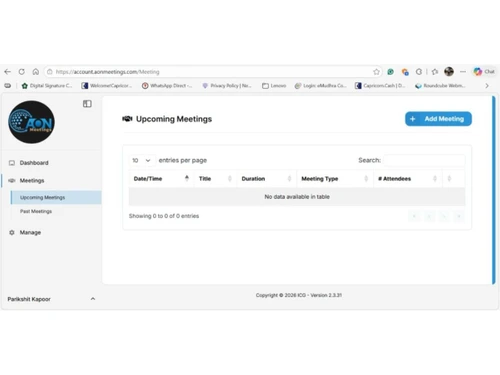
AONMeetings operates through a browser-based platform that enables users to host and join meetings, webinars, and virtual events online.
AONMeetings is used by businesses, educators, healthcare professionals, and organizations for virtual communication.
Yes, AONMeetings provides a free demo to help users understand the platform.
AONMeetings offers a free version with limited features along with paid plans for advanced capabilities.
20,000+ Software Listed
Best Price Guranteed
Free Expert Consultation
2M+ Happy Customers
Terms and Condtions

Users with registered businesses can purchase goods from merchants on the platform to satisfy their business needs. Users are not permitted to utilize any products acquired through the platform for resale, advertising, business, or further distribution.
For each purchase made, users will receive a Tax Invoice (or 'GST invoice') that includes specific details such as:
the GSTIN of the user associated with their registered business, and
the specified Entity Name for their business.
It should be noted that not all products are eligible for GST Invoice. Only the products displayed by participating sellers with the 'GST-based Invoice Available' callout on the product description page would qualify.
Certain goods and services are not eligible to get a GST Invoice, including items with VAS, i.e., Value Added Services (e.g., Total Mobile Protection/Assured Buyback) and those involving an exchange offer at the time of purchase.
Users must ensure the accuracy of the GSTIN, and business entity name provided for the GST Invoice. Requests for corrections into GST Invoice would not be accommodated by Techjockey.com or any Seller, and any issues arising from user-provided information are the sole responsibility of users.
Techjockey.com is not liable for the GST Invoice or any associated input tax credit. To efficiently claim an input tax credit, users should select the registered place of business address as per the GST authority's data and follow the provisions of the GST Act and rules.
To claim an input tax credit, the delivery and billing addresses must match. Furthermore, input tax credits will not be granted if the delivery address and GSTIN on the invoice are from different states. In case of incorrect GST details provided during the order placement, the order will be canceled automatically.