linkedin
VidyoConnect logo
play VidyoConnect for Meeting Guests
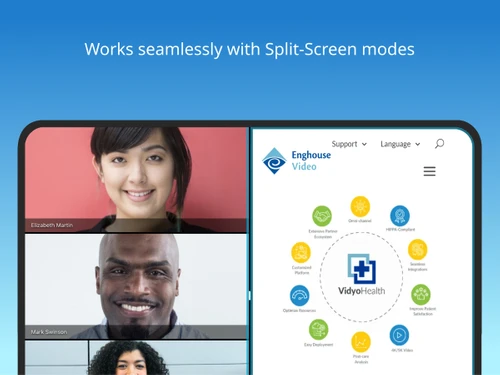
VidyoConnect-split screen
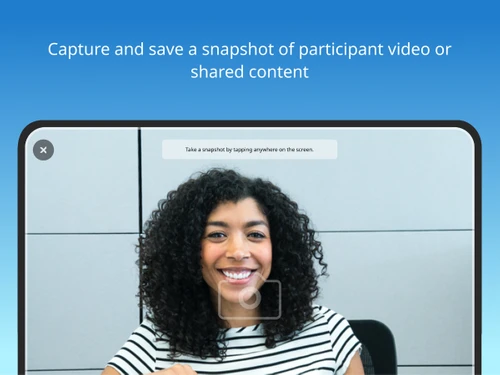
VidyoConnect-snapshot

VidyoConnect

Brand: VIDYOCONFERENCING

  • 4.6

  • 5 Ratings

VidyoConnect offers smart, secure, and flexible video solutions to seamlessly boost collaboration, communication, and engagement, your ultimate enterprise tool.

See More

Have you used VidyoConnect before?

Share your insights for better experience

Add a Review

Price Available on Request

Questions about pricing or customization? We’re here to help, just a click away.

100% Genuine
Products
Best Price
Guaranteed
Safe & Secure
Payment
  • Description

  • Pricing

  • Features

  • Specification

  • Review

  • Compare

  • Alternatives

  • FAQ

VidyoConnect Software Overview

What is VidyoConnect?

VidyoConnect is an enterprise-grade video conferencing solution developed by Vidyo, Inc., which now operates as Enghouse Video. It is designed to facilitate high-quality, reliable visual communication for businesses of all sizes, serving as a comprehensive platform for a wide range of collaborative activities, from internal team meetings and client consultations to large-scale virtual events and telehealth sessions. Engineered for performance, VidyoConnect can be deployed either on-premise for maximum control or in the cloud for enhanced flexibility and scalability.

The platform is particularly recognized for its robust performance in specialized industries requiring secure and stable connections, such as telehealth, financial services, education, government, judiciary, field services, technology, and retail. It provides a secure, scalable technology framework that enables organizations to integrate high-definition video into their daily workflows, ensuring seamless communication across geographically dispersed teams and stakeholders.

Why Choose VidyoConnect?

  • Superior Video Quality: VidyoConnect dynamically adapts to fluctuating network conditions using adaptive video layering technology (Scalable Video Coding and Simulcast). This ensures a consistently clear, stable video and audio experience, even over low-bandwidth or unreliable internet connections.
  • Enterprise-Grade Scalability: The architecture is built to scale, capable of supporting everything from small team huddles to large enterprise-wide broadcasts with thousands of concurrent users without compromising performance.
  • Robust Security: Security is a cornerstone of the platform, featuring AES encryption over TLS and SRTP for all audio, video, and shared content in transit, along with FIPS 140-2 certified libraries and encrypted token-based session security. It is designed to meet stringent compliance standards, including HIPAA, VidyoConnect is certified by Quebec's Ministry of Health and Social Services and verified by Ontario Health for virtual care, making it a trusted choice for industries that handle sensitive data.
  • Deep Customization and Integration: VidyoConnect offers powerful APIs and SDKs, allowing businesses to embed video communication directly into their proprietary applications, CRM systems, EHR platforms, and other business workflows for a fully integrated experience.
  • Cross-Platform Compatibility: Users can connect from anywhere on any device. The solution provides a consistent experience across Windows and macOS desktops, iOS and Android mobile devices, and dedicated conference room systems.

Advanced Features of VidyoConnect

  • Multipoint Video Conferencing: Host meetings with numerous participants in a single virtual room, with flexible layouts to manage the viewing experience.
  • Content and Screen Sharing: Share your entire desktop, a specific application, or presentation slides with meeting participants in high resolution for effective collaboration.
  • Meeting Recording and Playback: Securely record meetings for those who couldn't attend, for compliance and archival purposes, or for creating a library of training content.
  • Seamless Calendar Integration: Schedule, manage, and join meetings directly from Microsoft Outlook and Google Calendar, streamlining the meeting workflow.
  • Effortless Guest Access: External participants can join meetings easily through a web browser with a single click, without needing to download or install any software.
  • In-Meeting Collaboration Tools: Utilize integrated text chat for side conversations, sharing links, or asking questions without interrupting the speaker.
  • Customizable Viewing Layouts: Participants can toggle between different views, such as active speaker, gallery view, or content-focused layouts, to suit their preferences.
  • Built-In Accessibility Tools: Includes multilingual captions, transcripts, and audio descriptions, OCR-based transcript search, keyboard shortcuts and QR code navigation, customizable UI themes, and dyslexia-friendly fonts.

Key Capabilities of VidyoConnect

  • Unified Conferencing: The platform unifies the meeting experience across all endpoints. Whether a user is joining from a desktop client, a mobile app, or a fully equipped conference room system, the interface and functionality remain consistent and intuitive.
  • Interactive Collaboration: Beyond face-to-face video, VidyoConnect provides essential tools for real-time teamwork. This includes high-frame-rate application sharing for smooth demonstrations and in-meeting chat for parallel communication channels.
  • Platform Extensibility (VPaaS): A key differentiator is its Video Platform as a Service (VPaaS) capability. Using robust APIs, organizations can deeply embed Vidyo's technology into their own applications, creating custom-branded solutions for telehealth, customer service, or online learning.
  • Secure Enterprise Video Management: The platform ensures that all video assets, from live meetings to recorded content, are managed securely. It provides tools to organize, access, and share video content efficiently across the organization while maintaining strict access controls.

How to Use VidyoConnect?

  1. Installation and Setup: Begin by downloading the VidyoConnect application for your desktop (Windows/macOS) or mobile device (iOS/Android) from the official website or respective app store. Log in with your corporate credentials to sync your account.
  2. Hosting a Meeting: To host a meeting, you can either start an instant meeting from the application or schedule one for the future. Use the calendar plugin for Outlook or Google Calendar to seamlessly create invites and add them to your schedule.
  3. Joining a Meeting: Participants can join a meeting in several ways: by clicking the meeting link in an invitation, by opening the VidyoConnect app and entering the meeting ID, or by joining directly from a calendar reminder.
  4. Engaging in the Meeting: Once in the meeting, you have full control over your experience. Use the on-screen controls to mute/unmute your microphone, start/stop your video, share your screen or an application, and start a recording if you are the host.

VidyoConnect Pricing

VidyoConnect price starts at INR 1329 at techjockey.com.

The pricing model is based on different parameters, including extra features, deployment type, and the total number of users. For further queries related to the product, you can contact our product team and learn more about the pricing and offers.

Read more

VIDYOCONFERENCING Company Details

Founded Year:  2005

Named a Leader and Visionary by Gartner, Vidyo has been awarded more than 170 video communications technology patents.

Director/Founders Jeff Smith
Company Size 101-500 Employees

VidyoConnect Pricing & Plans

Looking for The Right Pricing?

Share your requirements and get a plan built around your business.

  • Define your business needs
  • Get customised pricing
  • Choose features that fit your workflow

Price Available on Request

Get personalised VidyoConnect pricing that fits your needs. Our team will connect with you.

VidyoConnect Features

  • icon_check Multi-Participant Meetings
    Display up to 16 participants on a screen with flexible layouts for natural and engaging group collaboration.
  • icon_check Screen Sharing
    Share applications or entire screens from desktop, browser, and mobile devices during meetings and presentations.
  • icon_check Content Sharing
    Share meeting content with participants while switching between different presenters and shared content easily.
  • icon_check Calendar Integration
    Integrate with Microsoft Exchange and Google Calendar to provide convenient one-click access to scheduled meetings.
  • icon_check Cross-Platform Access
    Join meetings from desktops, laptops, tablets, mobile devices, and supported web browsers from different locations.
  • icon_check Chat Messaging
    Exchange group or one-to-one text messages during meetings to share information, questions, links, and collaboration notes.
  • icon_check Whiteboarding
    Collaborate visually with participants using digital whiteboarding capabilities for ideas, discussions, and explanations.
  • icon_check Virtual Backgrounds
    Use blurred or virtual backgrounds during meetings to maintain privacy and create a consistent professional environment.
  • icon_check Audio Conferencing
    Allow participants to join meetings by telephone using dial-in capabilities when video or internet access is unavailable.
  • icon_check Single sign-on
    Support centralized authentication through single sign-on to simplify secure access for users across enterprise environments.
  • icon_check PTZ Camera Control
    Control compatible pan-tilt-zoom cameras in connected meeting rooms directly from supported desktop or mobile clients.
  • icon_check Meeting Recording
    Record meetings for later access and sharing, with cloud recording storage available in supported service plans.
VidyoConnect Demo Video play icon

Get VidyoConnect Demo

Watch the demo video to explore key features, real workflows, and how the software fits your business needs.

Understand
Key Features
Personal
Demo Insights
Interactive
Demo Support

VidyoConnect Specifications

Supported Platforms
Windows Windows iOS iOS Android Android MacOS MacOS
Devices
Desktop Desktop Mobile Mobile Tablet Tablet iPad iPad
Deployment
Cloud-Based Cloud-Based
Suitable For
Media House
Business Specific
All Businesses
Business Size
Small Business Startups Medium Business Enterprises
Customer Support
Phone Email Communities
Language
English
Training Resources
Videos

Explore the Best Alternative Solutions Similar to Your Business Size and Needs

VidyoConnect Review

4.6

Out of 5

img

Overall Rating

Based on
5 Verified Ratings

Rating Breakdown

  • Features 4.6
  • Value for Money 4.7
  • Ease of Use 4.6
  • Customer Support 4.8

84% Recommend this Product

Add Review

Techjockey Trusted Reviews from Verified Users

No reviews are currently available for VidyoConnect. Discover similar Video Conferencing Software reviews

  • AONMeetings

    4.8

    Whats great - AONMeetings is easy to use, affordable, and straightforward for regular online meetings. Its simple interface makes joining a... read more
  • Bluejeans Network

    4.7

    Whats great - Overall, the experience with this software is superb. As a frequent user of the program myself, I’ve found that it actually m... read more

  • Uberconference

    4.5

    Whats great - I love the software as it comes with a friendly user interface. It supports both audio and video calling. UberConference is c... read more
Compare VidyoConnect With other Video Conferencing Software

Products
Ratings
Pricing
Device Supported
Deployment
Supported Platforms
  • img

    VidyoConnect

  • 4.6

  • Price On Request

  • Desktop

    Mobile

  • Web based

    On Premises

  • Windows

    Mac OS

  • img

    Cisco Webex

  • 4.6

  • ₹ 950

  • Desktop

    Mobile

  • Web based

    On Premises

  • Windows

    Mac OS

  • img

    Tencent RTC

  • 4.0

  • Price On Request

  • Desktop

    Mobile

  • Web based

    On Premises

  • Windows

    Mac OS

  • img

    Interactio

  • 4.5

  • Price On Request

  • Desktop

    Mobile

  • Web based

    On Premises

  • Windows

    Mac OS

  • img

    AONMeetings

  • 4.7

  • ₹ 152

  • Desktop

    Mobile

  • Web based

    On Premises

  • Windows

    Mac OS

  • img

    Pexip

  • 4.2

  • Price On Request

  • Desktop

    Mobile

  • Web based

    On Premises

  • Windows

    Mac OS

  • img

    VideoMeet

  • 4.5

  • ₹ 499

  • Desktop

    Mobile

  • Web based

    On Premises

  • Windows

    Mac OS

  • img

    JioMeet

  • 3.6

  • Price On Request

  • Desktop

    Mobile

  • Web based

    On Premises

  • Windows

    Mac OS

  • img

    GoToMeeting

  • 4.1

  • Price On Request

  • Desktop

    Mobile

  • Web based

    On Premises

  • Windows

    Mac OS

  • img

    xpression camera

  • 4.4

  • Price On Request

  • Desktop

    Mobile

  • Web based

    On Premises

  • Windows

    Mac OS

  • img

    Vidyo

  • 4.4

  • Price On Request

  • Desktop

    Mobile

  • Web based

    On Premises

  • Windows

    Mac OS

(2) Product(s) selected

VidyoConnect Alternatives

See All VidyoConnect Alternatives

Available

Price on Request

Available

Price on Request

Starting Price:

₹1,299 /Month

Starting Price:

$849 /Month

Starting Price:

$20

Starting Price:

$99 /Month

Available

Price on Request

Starting Price:

$7 /Month

Articles for VidyoConnect

See All Related Articles

Which operating system does VidyoConnect support?

VidyoConnect Collaboration Software is compatible with Windows, IOS and Android operating systems.

Is there any VidyoConnect app?

VidyoConnect Collaboration Software app is available for and Mobile.

What is deployment type of VidyoConnect?

VidyoConnect Collaboration Software supports Web-Based.

How much does VidyoConnect cost?

VidyoConnect Collaboration Software pricing starts at Rs.1329.00.

Who are the potential users of VidyoConnect?

VidyoConnect Collaboration Software is typically used in Media House.

Is there any free trial or demo for VidyoConnect?

VidyoConnect Collaboration Software demo is available for free at Techjockey.

Is VidyoConnect free?

VidyoConnect Collaboration Software offers a free trial. However, the premium plan with advanced features available at Techjockey.

How can you download VidyoConnect?

For VidyoConnect Collaboration Software installation, insert the given CD/USB flash storage in your system and open the Setup Wizard to get started.

How does VidyoConnect work?

VidyoConnect Collaboration Software helps with Meeting,Performance Management,Dashboard and Account Management. It's a complete solution for Personalization,Electronic Data Processing,Scheduled Recording and Integration.

What is VidyoConnect used for?

VidyoConnect, as part of Vidyo's comprehensive offerings, is used for smart, secure, and flexible video conferencing and collaboration, enabling remote communication, education, and various industry-specific applications like telehealth and financial services.

How much does VidyoConnect cost?

VidyoConnect price starts at INR 1329 at techjockey.com.

Is VidyoConnect still available?

Yes, VidyoConnect is still available as part of Enghouse Video's comprehensive suite of smart, secure, and flexible video conferencing and collaboration solutions, connecting millions visually every day.

How do I join a VidyoConnect meeting?

The specific steps for joining a VidyoConnect meeting are not detailed on the public website, but typically involve receiving an invitation link or meeting ID from the host.

Who can use VidyoConnect?

VidyoConnect is designed for a wide range of users and organizations, including those in telehealth, financial services, education, judiciary, field services, government, and military sectors, seeking secure enterprise video solutions.

What are some key features of Vidyo's enterprise video solutions?

Vidyo's enterprise video solutions offer features such as advanced video conferencing, live event broadcasting, AI-driven smart videos, enterprise video management, and seamless integration with LMS and EHR systems.

How does Vidyo support the healthcare industry?

Vidyo supports the healthcare industry by providing reliable, interoperable, and scalable telehealth solutions that integrate with EHR systems, medical devices, and endpoints for various virtual care use cases.

Can Vidyo's solutions be integrated with other platforms?

Yes, Vidyo's solutions are designed for integration, specifically mentioning compatibility with EHR systems, medical devices, endpoints, and Learning Management Systems (LMS) for a seamless user experience.

20,000+ Software Listed

Best Price Guranteed

Free Expert Consultation

2M+ Happy Customers

Terms and Condtions

close

Users with registered businesses can purchase goods from merchants on the platform to satisfy their business needs. Users are not permitted to utilize any products acquired through the platform for resale, advertising, business, or further distribution.

For each purchase made, users will receive a Tax Invoice (or 'GST invoice') that includes specific details such as:

  • the GSTIN of the user associated with their registered business, and

  • the specified Entity Name for their business.

It should be noted that not all products are eligible for GST Invoice. Only the products displayed by participating sellers with the 'GST-based Invoice Available' callout on the product description page would qualify.

Certain goods and services are not eligible to get a GST Invoice, including items with VAS, i.e., Value Added Services (e.g., Total Mobile Protection/Assured Buyback) and those involving an exchange offer at the time of purchase.

Users must ensure the accuracy of the GSTIN, and business entity name provided for the GST Invoice. Requests for corrections into GST Invoice would not be accommodated by Techjockey.com or any Seller, and any issues arising from user-provided information are the sole responsibility of users.

Techjockey.com is not liable for the GST Invoice or any associated input tax credit. To efficiently claim an input tax credit, users should select the registered place of business address as per the GST authority's data and follow the provisions of the GST Act and rules.

To claim an input tax credit, the delivery and billing addresses must match. Furthermore, input tax credits will not be granted if the delivery address and GSTIN on the invoice are from different states. In case of incorrect GST details provided during the order placement, the order will be canceled automatically.