linkedin
O-Connect logo
play Say hello to the future of digital communication — O-Connect!
o-connect WhiteBoard
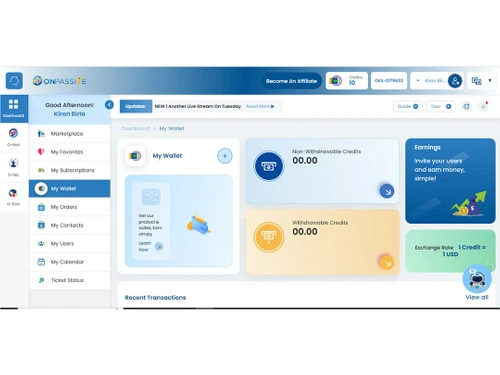
o-connect Wallet

O-Connect

Brand: ONPASSIVE Technologies Pvt. Ltd.

  • 5

  • 1 Rating & 1 Review

A powerful video conferencing software that connects teams worldwide, offering crystal-clear audio and high-definition video for productive virtual meetings.

See More

Have you used O-Connect before?

Share your insights for better experience

Add a Review

Price Available on Request

Questions about pricing or customization? We’re here to help, just a click away.

100% Genuine
Products
Best Price
Guaranteed
Safe & Secure
Payment
  • Description

  • Pricing

  • Features

  • Specification

  • Review

  • Compare

  • Alternatives

  • FAQ

O-Connect Software Overview

What is O-Connect Video Conferencing Software?

O-Connect is an innovative audio and video conferencing software brought to you by ONPASSIVE. O-Connect provides a powerful platform that helps you instantly connect with the world. With O-Connect, you can enjoy high-definition audio and video quality, ensuring every virtual meeting, online course, or hybrid event is delivered with unmatched clarity. Say goodbye to choppy connections and hello to a truly immersive virtual experience.

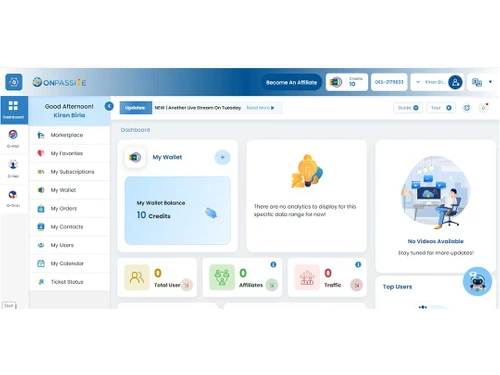
You can easily take control of your meetings with a comprehensive dashboard that easily manages follow-ups, attendance, and meeting chat features. The software will allow you to share your screen effortlessly and engage in real-time collaboration, making your virtual interactions more effective.

One-click upload and on-demand viewing capabilities are one of the USPs that sets O-Connect apart from the competition. Users can capture important moments and ideas using the screenshot option, ensuring nothing is missed during your virtual sessions.

With O-Connect's automatic voice and text services in various languages, you don't have to worry about the language barrier. You can easily communicate with participants from different regions seamlessly and effortlessly, fostering a truly global connectedness. O-Connect also seamlessly integrates with popular social media platforms such as YouTube and Facebook, allowing you to reach a wider audience and extend your virtual events beyond the confines of the conferencing tool.

The software is powered by WebRTC and HTML5 technology, O-Connect guarantees a reliable and uninterrupted connection between your browser and the platform. This cutting-edge technology delivers razor-sharp audio and video quality, creating an immersive experience for presenters and attendees.

Why Choose O-Connect Video Conferencing Software?

Whether hosting a small meeting or planning hundreds of events, O-Connect offers you the flexibility to create and schedule as many events as needed. The intuitive dashboard keeps all your events organized and easily accessible, ensuring a smooth and efficient planning process.

Benefits of O-Connect Video Calling System

  • O-Connect offers high-definition audio and video conferencing technology, providing unmatched clarity and quality for virtual meetings and courses.
  • It allows real-time collaboration with dual-screen sharing, and the speech-to-text feature converts speech to text through its application programming interface.
  • The comprehensive dashboard enables easy access and control of various features such as follow-up, attendance, and meeting chat.
  • The automatic language translation feature allows users of regional languages to better understand foreign languages, eliminating language barriers during virtual meetings.
  • This platform can be integrated with other ONPASSIVE ecosystem tools, such as OCademy and OMail, making managing and coordinating virtual communication and collaborations easier.

Pricing of O-Connect Video Conferencing Management Solution

O-Connect pricing is available on request at techjockey.com.

The overall pricing model is based on different factors such as personalization, extra features required, total users, and deployment type. Please feel free to request a call from our product experts if you want to learn more about our subscription plans or premium package deals.

Read more

O-Connect Pricing & Plans

Looking for The Right Pricing?

Share your requirements and get a plan built around your business.

  • Define your business needs
  • Get customised pricing
  • Choose features that fit your workflow

Price Available on Request

Get personalised O-Connect pricing that fits your needs. Our team will connect with you.

O-Connect Features

  • icon_check Audio / Video Conferencing
    Connect and communicate seamlessly through high-quality audio and video.
  • icon_check Resounds
    Enhance your virtual meetings with crystal-clear sound quality.
  • icon_check Ticker
    Keep your attendees informed with real-time updates and announcements.
  • icon_check Background Music
    Set the perfect ambiance with customizable background music during your virtual sessions.
  • icon_check Calculators
    Perform quick calculations without leaving the conferencing platform.
  • icon_check Screen Capture
    Capture and easily share important moments and content.
  • icon_check Timer
    Keep track of time and ensure a smooth meeting flow with a built-in timer.
  • icon_check Reactions
    Express yourself and engage with participants using a range of interactive reactions.
  • icon_check Whiteboard
    Collaborate and visualize ideas in real-time with an interactive whiteboard feature.
O-Connect Demo Video play icon

Get O-Connect Demo

Watch the demo video to explore key features, real workflows, and how the software fits your business needs.

Understand
Key Features
Personal
Demo Insights
Interactive
Demo Support

O-Connect Specifications

Supported Platforms
Windows Windows MacOS MacOS
Devices
Desktop Desktop
Deployment
Cloud-Based Cloud-Based
Suitable For
All Industries
Business Specific
All Businesses
Business Size
Startups Medium Business SMBs SMEs
Language
English

Explore the Best Alternative Solutions Similar to Your Business Size and Needs

O-Connect Review

5

Out of 5

img

Overall Rating

Based on
1 Verified Review

Rating Breakdown

  • Features 5
  • Value for Money 5
  • Ease of Use 5
  • Customer Support 5

100% Recommend this Product

Add Review

Mahantesh

Founder

Industry: Education

5

Reviewed on: Mar 15, 2024

Techjockey Verified

“The Best in the World”

Pros

Best tool I ever seen before. It is the best video conferencing tool in the world , I m very happy to Meeting with this tool

Cons

It needs high internet connection

Switched from Zoom Meetings

Reason to switch

No other choice

Compare O-Connect With other Video Conferencing Software

Products
Ratings
Pricing
Device Supported
Deployment
Supported Platforms
  • img

    O-Connect

  • 5

  • Price On Request

  • Desktop

    Mobile

  • Web based

    On Premises

  • Windows

    Mac OS

  • img

    Cisco Webex

  • 4.6

  • ₹ 950

  • Desktop

    Mobile

  • Web based

    On Premises

  • Windows

    Mac OS

  • img

    Tencent RTC

  • 4.0

  • Price On Request

  • Desktop

    Mobile

  • Web based

    On Premises

  • Windows

    Mac OS

  • img

    Interactio

  • 4.5

  • Price On Request

  • Desktop

    Mobile

  • Web based

    On Premises

  • Windows

    Mac OS

  • img

    AONMeetings

  • 4.7

  • ₹ 152

  • Desktop

    Mobile

  • Web based

    On Premises

  • Windows

    Mac OS

  • img

    Pexip

  • 4.2

  • Price On Request

  • Desktop

    Mobile

  • Web based

    On Premises

  • Windows

    Mac OS

  • img

    VideoMeet

  • 4.5

  • ₹ 499

  • Desktop

    Mobile

  • Web based

    On Premises

  • Windows

    Mac OS

  • img

    JioMeet

  • 3.6

  • Price On Request

  • Desktop

    Mobile

  • Web based

    On Premises

  • Windows

    Mac OS

  • img

    GoToMeeting

  • 4.1

  • Price On Request

  • Desktop

    Mobile

  • Web based

    On Premises

  • Windows

    Mac OS

  • img

    xpression camera

  • 4.4

  • Price On Request

  • Desktop

    Mobile

  • Web based

    On Premises

  • Windows

    Mac OS

  • img

    Vidyo

  • 4.4

  • Price On Request

  • Desktop

    Mobile

  • Web based

    On Premises

  • Windows

    Mac OS

(0) Product(s) selected

O-Connect Alternatives

See All O-Connect Alternatives

Starting Price:

$125 /Month

Available

Price on Request

Starting Price:

₹1,299 /Month

Starting Price:

$849 /Month

Starting Price:

$20

Starting Price:

$99 /Month

Available

Price on Request

Available

Price on Request

Available

Price on Request

Articles for O-Connect

See All Related Articles

Which operating system does O-Connect Software support?

O-Connect software is compatible with Android, iOS, Windows, Linux and macOS operating systems.

Is there any O-Connect app?

The O-Connect app is not available for Android and iOS devices.

What is the deployment type of O-Connect System?

O-Connect system supports cloud-based deployment.

How much does O-Connect Software Solution cost?

O-Connect software solution pricing is available on request at techjockey.com.

Who are the potential users of O-Connect Video Conferencing Software?

O-Connect video conferencing software is a versatile video conferencing tool for professionals across various industries, including remote teams, educators, healthcare providers, and business executives.

Is there any free trial or demo for O-Connect?

O-Connect demo is available for free with techjockey.com.

Is O-Connect System free?

O-Connect software offers a free trial. Please request a callback for subscription-related details and to avail offers on premium packages.

How can you download O-Connect Video Conferencing Software Solution?

O-Connect system is a cloud-based platform. So, you don?t have to download any software or app to use it.

How does O-Connect work?

O-Connect is an easy-to-handle video conferencing tool that enables seamless communication through its intuitive interface. It allows users to connect via high-quality video and audio, share screens, collaborate on documents, and conduct virtual meetings effortlessly.

20,000+ Software Listed

Best Price Guranteed

Free Expert Consultation

2M+ Happy Customers

Terms and Condtions

close

Users with registered businesses can purchase goods from merchants on the platform to satisfy their business needs. Users are not permitted to utilize any products acquired through the platform for resale, advertising, business, or further distribution.

For each purchase made, users will receive a Tax Invoice (or 'GST invoice') that includes specific details such as:

  • the GSTIN of the user associated with their registered business, and

  • the specified Entity Name for their business.

It should be noted that not all products are eligible for GST Invoice. Only the products displayed by participating sellers with the 'GST-based Invoice Available' callout on the product description page would qualify.

Certain goods and services are not eligible to get a GST Invoice, including items with VAS, i.e., Value Added Services (e.g., Total Mobile Protection/Assured Buyback) and those involving an exchange offer at the time of purchase.

Users must ensure the accuracy of the GSTIN, and business entity name provided for the GST Invoice. Requests for corrections into GST Invoice would not be accommodated by Techjockey.com or any Seller, and any issues arising from user-provided information are the sole responsibility of users.

Techjockey.com is not liable for the GST Invoice or any associated input tax credit. To efficiently claim an input tax credit, users should select the registered place of business address as per the GST authority's data and follow the provisions of the GST Act and rules.

To claim an input tax credit, the delivery and billing addresses must match. Furthermore, input tax credits will not be granted if the delivery address and GSTIN on the invoice are from different states. In case of incorrect GST details provided during the order placement, the order will be canceled automatically.