linkedin
eSmartGuard logo
play eSmartGuard | School Visitor and Child Pick-up Management System demo
e smart employee app
e smart employee

eSmartGuard

Brand: eSmartGuard

  • 4.5

  • 4 Ratings

eSmartGuard is a comprehensive visitor management and staff attendance management system used by corporate organizations and schools for digital visitor check-ins and contactless employee attendance. The attendance software has been helping organizations manage visitors to ensure the safety of their premises. The visitor management software thus gives access to modules like temperature screening,...

See More

Have you used eSmartGuard before?

Share your insights for better experience

Add a Review
Starting Price
₹6,200 excl.GST
₹ 7,316 incl. GST

View plans

100% Genuine
Products
Best Price
Guaranteed
Safe & Secure
Payment
  • Description

  • Pricing

  • Features

  • Specification

  • Review

  • Compare

  • Alternatives

  • FAQ

Starting at ₹6,200

eSmartGuard Software Overview

What is eSmartGuard?

eSmartGuard is a comprehensive visitor management and staff attendance management system used by corporate organizations and schools for digital visitor check-ins and contactless employee attendance. The attendance software has been helping organizations manage visitors to ensure the safety of their premises. The visitor management software thus gives access to modules like temperature screening, mask compliance, contactless attendance, and Aarogya Setu integration.

Why Use eSmartGuard?

The visitor management attendance management system provides reliable support against the pandemic. eSmartGuard has been built on powerful Geofencing technology for contactless attendances and touchless visitor registrations. The visitor management software also maintains visitor records, creates real-time alerts for situation updates, uses a Guard app to collect safety data from security personnel.  Organizations should use eSmartGuard to regulate and secure premises in a systematic way.

Deliverables by eSmartGuard Visitor Attendance Management System

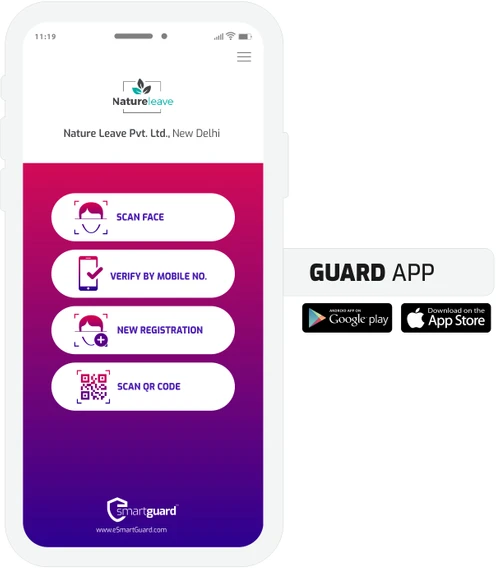
  • Guard App for security personnel to check visitor check-ins, masks, sanitization more
  • Master Admin Panel for storing employee data, visitor records, etc.
  • Guard App with face recognition for employee/visitor appointment management
  • Mobile App support to help visitors pre-register for events do contactless check-ins
  • QR Code System to let visitors do contactless self-registration
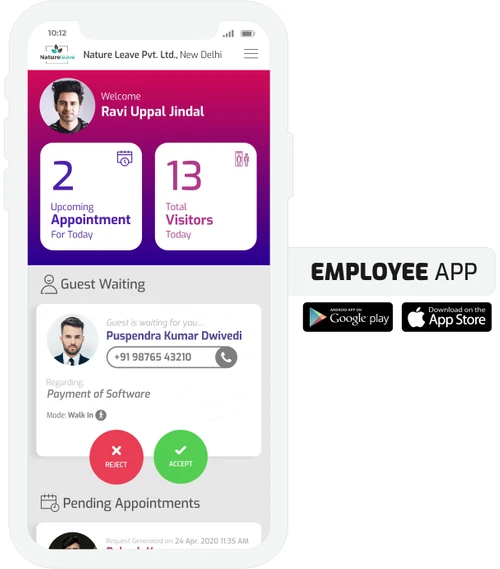
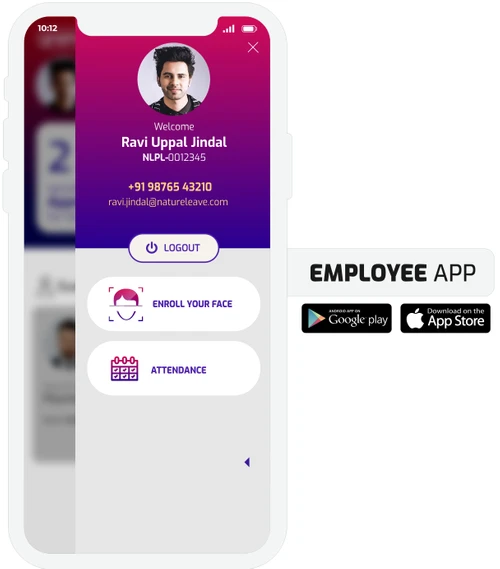
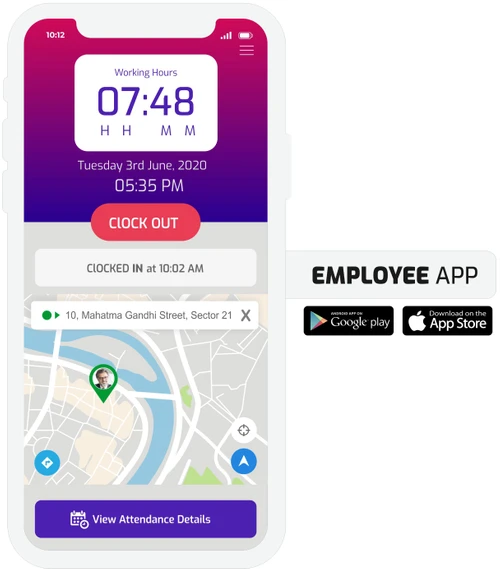
  • Employee App with Geofencing Technology for marking the attendance digitally

Powerful Face Recognition Technology in eSmartGuard

  • Well researched and tested algorithm deployed for facial recognition
  • Accurate face detection within microseconds
  • 68-point coordinates for face extraction templates
  • Accurate determining of basic emotions and gender from the image itself
  • Powerful identification system immune to changes made in physical appearance

How eSmartGuard Ensures Contactless Visitor Attendance Management?

  • Step 1: Pre-registrations through links, websites, OTP, or face registration
  • Step 2: Device/Smart Dispenser for auto temperature screening with real-time alerts
  • Step 3: Guard Declaration on status of hand sanitization, mask Aarogya Setu integration
  • Step 4: Fast check-ins for letting visitors enter the premises

Who Can Use eSmartGuard?

  • Schools and Educational Institutions: Parents/ visitors can use the visitor management software remote/contactless QR code registrations and child-pickup/attendance/check-in management
  • Corporates: Organizations should use eSmartGuard app for maintaining visitor records digitally and contactless visitor registrations employee attendance.
  • Shopping Malls: Malls and amusement parks can use this visitor tracking software to regulate the flow of shoppers and guests
  • Hotels Restaurants: eSmartGuard can be used as a visitor management app for guests and a contactless attendance tracker.
  • Public Attractions: It can be used for visitor management, contactless attendance tracking appointment scheduling.
  • Government Offices: Agencies can use this visitor management software for contactless or QR code registrations, appointment scheduling, and employee attendance tracking

Modules Offered by eSmartGuard

Digital Visitor Log Management: The software helps visitors do contactless check-ins and stores all visitor information, for future reference. It allows the organization to verify the details for exposure to SARS-CoV-2

Onsite/Remote Self-Registration: Visit requests can be generated using browser remotely or through on-site devices for contactless self-registrations. Highly beneficial for service centres and workshops.

AI-Powered Contactless Check-In:Powerful facial recognition for speedy, contactless, and secured check-ins.

Verifying Unexpected Visitors: The visitor management system sends an update to the host for unregistered visitors. The host, in turn, gets access to a one-click button on their mobile app for accepting or denying the entry of this visitor.

Invites By the Host: The attendance management system lets hosts send invites to the guest through their mobile app. The guest, in turn, gets immediately notified of these requests.

Temperature Scanning: The feature works with the help of an external or inbuilt thermometer for checking temperatures. If the temperature is out of the permissible range, there are instant alerts.

Aarogya App Push-Start: The Push notification accepts entries only if the entrant has the Aaorgya Setu app installed and their location and Bluetooth tab.

Employee touchless attendance: The attendance management software uses face recognition and geofencing technology allowing employees to mark attendances digitally.

Hand sanitization mask alerts: The software auto rejects those entrants who aren't wearing masks or haven't sanitized their hands.

How Does eSmartGuard Work?

The latest version of eSmartGuard is primarily used for contactless attendance management. It has an intuitive interface and is simple to use. eSmartGuard can be easily integrated with your existing systems to ensure a smooth workflow. For more information, you can also refer to user manuals and take an online eSmartGuard demo at Techjockey.com.

How to Use eSmartGuard? 

Get started with eSmartGuard in 5 simple steps:

  • Step 1: Buy eSmartGuard installation key from techjockey.com
  • Step 2: Directly login through the official website 
  • Step 3: Sign up create your account 
  • Step 4: Add users assign permissions 
  • Step 5: Get started with eSmartGuard  

What is the Price of eSmartGuard? 

eSmartGuard price in India starts at ₹ 7316. eSmartGuard comes with multiple pricing plans and caters to a diverse customer base: 

eSmartGuard Price ranges (annum): 

  • Schools: ₹ 12390/annum
  • Commercial: ₹ 10856/annum

The price may vary based on factors like customization, additional features required, number of users, and the deployment type. For subscription-related details and offers on premium packages, please request a call back from our product experts. 

Read more

eSmartGuard Pricing & Plans

eSmartGuard For Commercial

Calculated Price

9200 Exclusive of all taxes
  • Options

    • Employees (1-10)

      Employees (1-10)
      Employees (1-10)
    • Yearly

      Yearly
      Yearly
One Time Installation (Price: ₹ 3000)
  • Quantity
    1
eSmartGuard For Schools

Calculated Price

10500 Exclusive of all taxes
  • Options

    • Student (1-100)

      Student (1-100)
      Student (1-100)
    • Yearly

      Yearly
      Yearly
One Time Installation (Price: ₹ 3000)
  • Quantity
    1

eSmartGuard Features

  • icon_check Visitor Logs
    The software stores all visitor information to help organizations verify the details of their exposure to SARS-CoV-2.
  • icon_check Remote/Onsite Self-Registration
    Check-in requests can be generated using QR codes/online links for remote and contactless self-registrations.
  • icon_check Contactless Check-in
    Powerful facial recognition & QR code system for speedy, contactless, and secured check-ins.
  • icon_check Visitor Identification
    Allows to send update to the host about unregistered visitors.
  • icon_check Temperature Scanning
    Could use External/inbuilt thermometer and share alerts if the temperature is beyond permissible range.
  • icon_check Aarogya Setu App
    Aarogya Setu app integration to comply with the government's effort to contain the pandemic's spread.
  • icon_check Employee Touchless Attendance
    Powerful face recognition and geofencing technology to mark attendances digitally.
  • icon_check Geo fence
    Inbuilt geofencing technology supports contactless attendance and touchless visitor registrations.
eSmartGuard Demo Video play icon

Get eSmartGuard Demo

Watch the demo video to explore key features, real workflows, and how the software fits your business needs.

Understand
Key Features
Personal
Demo Insights
Interactive
Demo Support

eSmartGuard Specifications

Supported Platforms
Ubuntu Ubuntu Windows Windows iOS iOS Android Android MacOS MacOS Linux Linux
Devices
Desktop Desktop Mobile Mobile Tablet Tablet iPad iPad
Deployment
Cloud-Based Cloud-Based
Suitable For
All Industries
Business Specific
All Businesses
Business Size
Small Business Startups Medium Business Enterprises
Customer Support
Email Communities
Language
English
Training Resources
Videos

Explore the Best Alternative Solutions Similar to Your Business Size and Needs

eSmartGuard Review

4.5

Out of 5

img

Overall Rating

Based on
4 Verified Ratings

Rating Breakdown

  • Features 4.5
  • Value for Money 4.1
  • Ease of Use 4.3
  • Customer Support 5

90% Recommend this Product

Add Review

Techjockey Trusted Reviews from Verified Users

No reviews are currently available for eSmartGuard. Discover similar Attendance Management Software reviews

  • Kent CamAttendance

    4.4

    Whats great - Affordable pricing, robust features, excellent customer support. read more

  • truMe Attendance Management

    4.9

    Whats great - Rule based configuration help you apply your policy on need basis read more

  • RollCall Attendance

    4.4

    Whats great - Techjockey was very helpful in taking my listed requirements and narrowing my search to a usable list of providers. Techjocke... read more

Compare eSmartGuard With other Attendance Management Software

Products
Ratings
Pricing
Device Supported
Deployment
Supported Platforms
  • img

    eSmartGuard

  • 4.5

  • ₹ 6200.00 excl. GST

  • Desktop

    Mobile

  • Web based

    On Premises

  • Windows

    Mac OS

  • img

    Nialabs

  • 5

  • Price On Request

  • Desktop

    Mobile

  • Web based

    On Premises

  • Windows

    Mac OS

  • img

    PagarGuru

  • 4.3

  • ₹ 500

  • Desktop

    Mobile

  • Web based

    On Premises

  • Windows

    Mac OS

  • img

    Spryple

  • 4.2

  • Price On Request

  • Desktop

    Mobile

  • Web based

    On Premises

  • Windows

    Mac OS

  • img

    Hajiri

  • 4.3

  • ₹ 69

  • Desktop

    Mobile

  • Web based

    On Premises

  • Windows

    Mac OS

  • img

    Tempus Central

  • 4.3

  • Price On Request

  • Desktop

    Mobile

  • Web based

    On Premises

  • Windows

    Mac OS

  • img

    NoQu TAM

  • 4.1

  • Price On Request

  • Desktop

    Mobile

  • Web based

    On Premises

  • Windows

    Mac OS

(2) Product(s) selected

eSmartGuard Alternatives

See All eSmartGuard Alternatives

Available

Price on Request

Starting Price:

₹600 /Month

Starting Price:

₹69 /Month

Available

Price on Request

Starting Price:

₹200 /Month

Available

Price on Request

FRAS

4.0

Available

Price on Request

Starting Price:

$500 /Month
Articles for eSmartGuard

See All Related Articles

Which operating system does eSmartGuard support?

eSmartGuard?is compatible with all operating systems as it is a cloud-based software accessible through browsers.

Is there any eSmartGuard app?

eSmartGuard app is available for Android and iOS devices.

What is the deployment type of eSmartGuard?

eSmartGuard supports web-based deployment.

How much does eSmartGuard cost?

eSmartGuard pricing starts at ? 7316 for the starter plan name. Contact Techjockey team for personalized quotations.

Who are the potential users of eSmartGuard?

eSmartGuard is typically used in schools, corporates, airports, hotels and more.

Is eSmartGuard free?

eSmartGuard Visitor Management Software offers a free trial. However, the premium plan with advanced features available at Techjockey .

Is there any free trial or demo for eSmartGuard?

eSmartGuard demo is available for free with techjockey.com.?

How can you download eSmartGuard?

eSmartGuard installation is not required, as it is web-based.?Just log in through the official website to get started.?

How does eSmartGuard work?

eSmartGuard helps with contactless visitor and employee attendance management. It's a complete solution for complying with COVID regulation and securing the office premises.

20,000+ Software Listed

Best Price Guranteed

Free Expert Consultation

2M+ Happy Customers

Terms and Condtions

close

Users with registered businesses can purchase goods from merchants on the platform to satisfy their business needs. Users are not permitted to utilize any products acquired through the platform for resale, advertising, business, or further distribution.

For each purchase made, users will receive a Tax Invoice (or 'GST invoice') that includes specific details such as:

  • the GSTIN of the user associated with their registered business, and

  • the specified Entity Name for their business.

It should be noted that not all products are eligible for GST Invoice. Only the products displayed by participating sellers with the 'GST-based Invoice Available' callout on the product description page would qualify.

Certain goods and services are not eligible to get a GST Invoice, including items with VAS, i.e., Value Added Services (e.g., Total Mobile Protection/Assured Buyback) and those involving an exchange offer at the time of purchase.

Users must ensure the accuracy of the GSTIN, and business entity name provided for the GST Invoice. Requests for corrections into GST Invoice would not be accommodated by Techjockey.com or any Seller, and any issues arising from user-provided information are the sole responsibility of users.

Techjockey.com is not liable for the GST Invoice or any associated input tax credit. To efficiently claim an input tax credit, users should select the registered place of business address as per the GST authority's data and follow the provisions of the GST Act and rules.

To claim an input tax credit, the delivery and billing addresses must match. Furthermore, input tax credits will not be granted if the delivery address and GSTIN on the invoice are from different states. In case of incorrect GST details provided during the order placement, the order will be canceled automatically.