 USA
USA UAE
UAESmall Business
Designed for startups and growing businesses


See More


Brand: Flow
Helps teams collaborate, plan tasks, track progress, and manage workflows efficiently. It offers tools for task delegation, scheduling, and team communication.
See MoreHave you used Flow before?
Share your insights for better experience
Brand: Flow
Founded Year: 2010
Flow is modern task and project management software for teams.
Core Functionalities
 Workflow Management Resource Management Risk Management Task Management Backlog Management Pipeline Management Sprint Management Workforce Management Incident Management Issue Management
 Task & Workflow Management
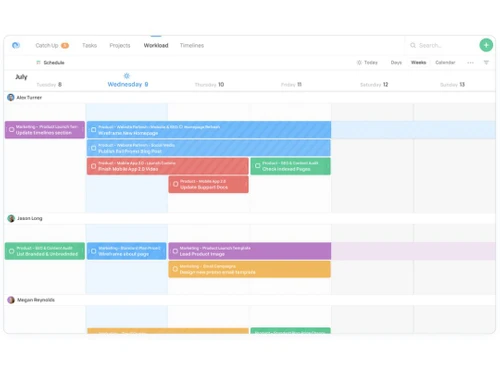
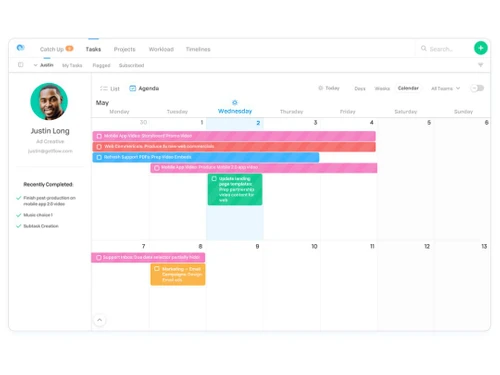
Workflow Automation Recurring Tasks Task Creation & Assignment Task Prioritization Sub-Task Creation Task Dependencies Notifications/Reminders Automated Task Assignment Task Views
Gantt Chart Kanban Boards Task List Calendar View Timeline View Spreadsheet View Mind Map Progress & Performance Tracking
Time Tracking Milestone Tracking Team Capacity Tracking Resource & Budget Management
Workload Distribution Automated Resource Allocation Budget Planning Dynamic Budgeting Risk Scoring System Auto Scaling Collaboration & Communication
Version Control Integrated Chat & Messaging File Sharing & Document Collaboration Real-Time Collaboration Access Control & Security
User Access Management Activity Logs Data Backup and Disaster Recovery Compliance Tracking Multi-Factor Authentication (MFA) Customization
Templates Custom Fields Task Customization Custom Views Custom Layouts Integrations
API Integration Communication and Collaboration Tools File Storage and Sharing Time Tracking Tools Automation Tools CRM Integration Issue Tracking Tools AI-Based Integrations ERP Integration Third Party Integrations Reporting & Analytics
Dashboards Project Progress Reports Workload Reports Timesheet Reports Real-Time Reporting Resource Reports Risk Reports Benchmarking Sprint Reports Burndown & Burnup Charts Bottleneck Reports Predictive Analytics Automated Reports Report Customization  Ubuntu
  Windows
  MacOS
MacOS  Linux
Linux  Desktop
  Cloud-Based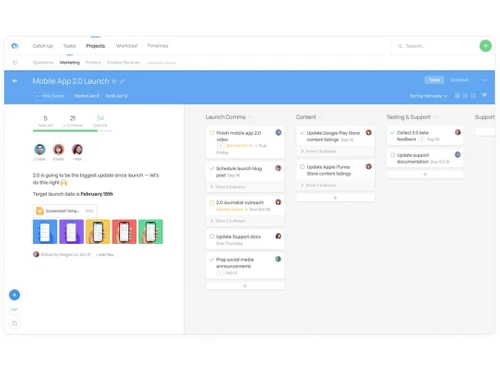
Small Business
Designed for startups and growing businesses
Medium Business
Built for business growth and flexibility
Enterprises
Designed for complex and large-scale business needs
4.3
Out of 5

Overall Rating
Based on
10 Verified Reviews
Rating Breakdown
88% Recommend this Product
Add ReviewOverall, users express high satisfaction with Flow, particularly appreciating its straightforward pricing, seamless onboarding, and effective collaboration features like live commenting and calendar integration. Many find it excels in managing multiple projects and tasks, contributing to improved organization and clarity. However, common limitations include a lack of advanced automation features, offline access, and deeper reporting capabilities. Users also note performance issues with larger boards and the absence of a free tier, which some would prefer.

Feb 10, 2025
Techjockey Verified
“Pricing Makes Sense For Us”
I came from Freedcamp’s free tier and started Flow—it’s $8/user/month and straightforward. We get unlimited tasks, but I do miss having a trial or free basic level.
Pros
$8/user/month is clear, unlimited tasks
Cons
No free or lower-tier plan
Reason to switch
Freedcamp was not as good as Flow.
May 9, 2025
Techjockey Verified
“Scaling Means Flow Still Performs”
I switched from Airtable for its ability to handle multiple complex projects cleanly. So far, Flow scales—but when boards get huge, loading slows. Still better than cluttered sheets.
Pros
Handles multiple projects and teams well
Cons
Speed slows with very large boards
Reason to switch
Needed professional project structure without Excel chaos.
Jul 8, 2025
Techjockey Verified
“Onboarding Was Fast—I’m Up & Running!”
I moved from Jira because Flow required zero onboarding—my team got it in minutes. Bare bones, but enough. I do miss automation features like triggers or conditional workflows.
Pros
Easy setup, no training needed
Cons
Missing advanced automation
Reason to switch
Wanted minimal training and fast adoption.

Flow
Price On Request
Desktop
Mobile
Web based
On Premises
Windows
Mac OS

Jira
Price On Request
Desktop
Mobile
Web based
On Premises
Windows
Mac OS
TrackPM
Price On Request
Desktop
Mobile
Web based
On Premises
Windows
Mac OS

Swatle
Price On Request
Desktop
Mobile
Web based
On Premises
Windows
Mac OS

Birdview PMS
Price On Request
Desktop
Mobile
Web based
On Premises
Windows
Mac OS

Forecast
Price On Request
Desktop
Mobile
Web based
On Premises
Windows
Mac OS

Favro
Price On Request
Desktop
Mobile
Web based
On Premises
Windows
Mac OS

Zoho Projects
₹ 3360
Desktop
Mobile
Web based
On Premises
Windows
Mac OS

Clickup
Price On Request
Desktop
Mobile
Web based
On Premises
Windows
Mac OS

SmartSuite
Price On Request
Desktop
Mobile
Web based
On Premises
Windows
Mac OS

Dart
Price On Request
Desktop
Mobile
Web based
On Premises
Windows
Mac OS
(0) Product(s) selected
Starting Price:
$9 /User/Month
Available
Price on Request
Starting Price:
$12 /Month
Starting Price:
$10 /User/Month
Starting Price:
$10 /User/Month

Starting Price:
$19 /Month

Starting Price:
$13 /Month

Starting Price:
$179 /Month

Starting Price:
$35 /Month

Starting Price:
$10 /User/Month

Starting Price:
$2 /Monthly





The price of Flow in India starts at $8, as listed on techjockey.com.
No, Flow Software has no mobile app available for iOS bothand Android devices.
Flow Software is compatible with Ubuntu, Windows, MacOS, and Linux.
Yes, Flow Software offers a free trial.
Flow Software facilitates project management through task tracking, collaboration, and performance analytics.
Teams of all sizes across various industries can benefit from using Flow Software for project management.
Yes, Flow Software offers a free demo.
No, Flow Software is not free; it requires a subscription for access to its features.
20,000+ Software Listed
Best Price Guranteed
Free Expert Consultation
2M+ Happy Customers
Terms and Condtions

Users with registered businesses can purchase goods from merchants on the platform to satisfy their business needs. Users are not permitted to utilize any products acquired through the platform for resale, advertising, business, or further distribution.
For each purchase made, users will receive a Tax Invoice (or 'GST invoice') that includes specific details such as:
the GSTIN of the user associated with their registered business, and
the specified Entity Name for their business.
It should be noted that not all products are eligible for GST Invoice. Only the products displayed by participating sellers with the 'GST-based Invoice Available' callout on the product description page would qualify.
Certain goods and services are not eligible to get a GST Invoice, including items with VAS, i.e., Value Added Services (e.g., Total Mobile Protection/Assured Buyback) and those involving an exchange offer at the time of purchase.
Users must ensure the accuracy of the GSTIN, and business entity name provided for the GST Invoice. Requests for corrections into GST Invoice would not be accommodated by Techjockey.com or any Seller, and any issues arising from user-provided information are the sole responsibility of users.
Techjockey.com is not liable for the GST Invoice or any associated input tax credit. To efficiently claim an input tax credit, users should select the registered place of business address as per the GST authority's data and follow the provisions of the GST Act and rules.
To claim an input tax credit, the delivery and billing addresses must match. Furthermore, input tax credits will not be granted if the delivery address and GSTIN on the invoice are from different states. In case of incorrect GST details provided during the order placement, the order will be canceled automatically.



