linkedin
GIMP logo
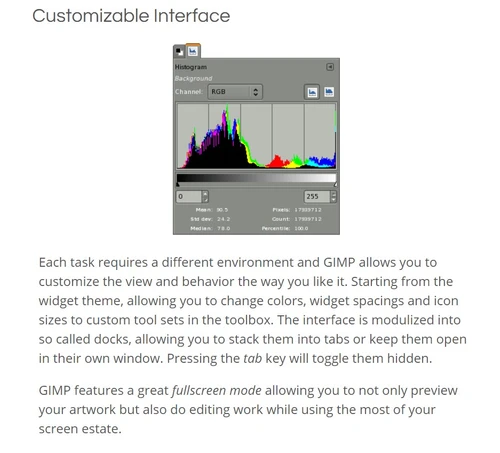
gimp customizable Interface
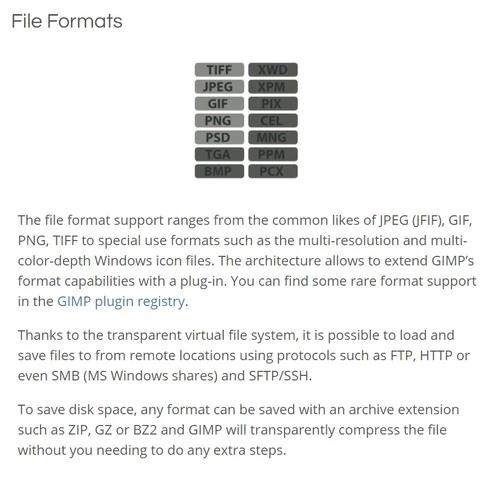
gimp file formats
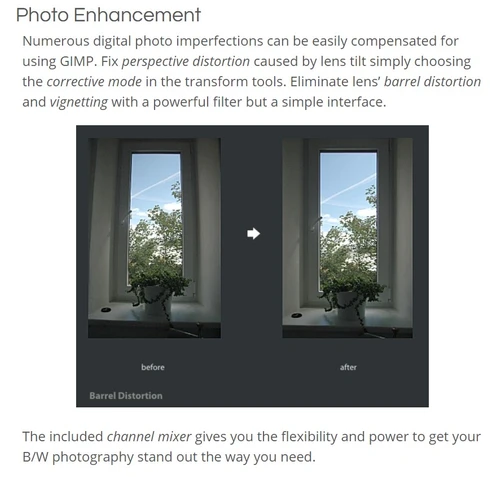
gimp photo enhancement

GIMP

Brand: GIMP

  • 4.2

  • 7 Ratings & 1 Review

GIMP is a free and open-source raster graphics editor used for tasks such as photo retouching, image composition, and graphic design.

See More

Have you used GIMP before?

Share your insights for better experience

Add a Review

Free Forever

Get started immediately at no cost. Upgrade anytime if your business demand more.

100% Genuine
Products
Best Price
Guaranteed
Safe & Secure
Payment
  • Description

  • Pricing

  • Features

  • Specification

  • Review

  • Compare

  • Alternatives

  • FAQ

  • Questions

GIMP Software Overview

What is GIMP?

GIMP (GNU Image Manipulation Program) is a powerful and free open-source raster graphic design software for tasks like photo editing, image composition, and graphic design. It provides advanced features such as layers, masks, filters, and scripting, making it a versatile tool for both beginner and professional users.

With support for various file formats and a customizable interface, GIMP offers flexibility and compatibility with different workflows. It is available for multiple operating systems, including Windows, macOS, and Linux, making it accessible to a wide range of users worldwide. GIMP is continually developed by a community of volunteers and contributors, ensuring regular updates and improvements to its functionality and performance.

Why Choose GIMP Software?

  • Free and Open-Source: It is freely available to download and use, accessible to users regardless of budget constraints. Being open-source, it allows users to contribute to its development and customize it according to their needs.
  • Powerful Features: Despite being free, it offers a wide range of powerful features comparable to premium graphic design software. These include advanced tools for image manipulation, graphic design, and photo editing, such as layers, masks, filters, and customizable brushes.
  • Cross-Platform Compatibility: It is available for multiple operating systems, including Windows, macOS, and Linux, ensuring users can access its features regardless of their preferred platform.
  • Extensibility: It supports a vast array of plugins and scripts that extend its functionality further. Users can enhance their workflow by installing additional plugins to add new features or automate repetitive tasks.
  • Community Support: It has a large and active community of users and developers who contribute to its development, provide support, and share resources like tutorials and plugins. This community-driven approach ensures users have access to help and resources whenever needed.
  • Continued Development: It undergoes continuous development and improvement, with regular updates and releases introducing new features, bug fixes, and performance enhancements. This ensures users benefit from ongoing improvements and stay up-to-date with the latest advancements in graphic design technology.

Benefits of GIMP Platform

  • Cost-Effective Solution: It provides a cost-effective alternative to expensive graphic design software, allowing users to create professional-quality designs without the need for a significant financial investment.
  • Flexibility and Customization: Users can customize it to suit their specific design needs by installing plugins, scripts, and extensions, enhancing its functionality, and adapting it to their workflow.
  • No Subscription Fees: Unlike many other graphic design software options that require a subscription-based model, it is completely free to use, saving users from recurring subscription fees.
  • Community Collaboration: It benefits from a collaborative community of users and developers who contribute to its improvement, providing a wealth of resources, tutorials, and support for users at all skill levels.
  • Creative Freedom: With its comprehensive feature set and user-friendly interface, it empowers users to unleash their creativity and express their ideas through digital art and design, without limitations or constraints.

Pricing of GIMP Graphic Design Software

GIMP is available for FREE.

Read more

GIMP Company Details

Founded Year:  1996

GIMP is a cross-platform image editor.

Director/Founders GIMP
Company Size 101-500 Employees

GIMP Pricing & Plans

This Product is Available Free Forever.

Start instantly with no fees, no subscriptions, and no commitments.

  • Full access to basic version available
  • No credit card or sign-up required

Free Forever Plan

Get started immediately at no cost. Upgrade anytime if your business demand more.

Free Forever

GIMP Features

  • icon_check Customizable Interface
    It allows users to tailor the interface to their preferences, optimizing the workspace for efficient workflow.
  • icon_check Photo Enhancement
    Offers tools and filters for enhancing photos, including color correction, exposure adjustment, and noise reduction.
  • icon_check Digital Retouching
    Provides tools like cloning and healing for the precise removal of imperfections from images.
  • icon_check Hardware Support
    Supports graphics tablets and styluses for improved digital drawing and painting.
  • icon_check Supports a variety of file formats
    Supports various file formats like JPEG, PNG, TIFF, and PSD for seamless import and export.
  • icon_check Photo Editing
    Edit and enhance photos using professional tools for retouching, color correction, composition, and image manipulation.
  • icon_check Photo Retouching
    Remove imperfections and enhance photographs using cloning, healing, blur, sharpen, smudge, and other editing tools.
  • icon_check Color Correction
    Adjust image colors, brightness, contrast, exposure, saturation, curves, and other tonal properties for better results.
  • icon_check Image Transformation
    Rotate, scale, shear, flip, crop, and transform image elements to achieve the required composition and dimensions.
  • icon_check Batch Processing
    Process multiple images through scripted workflows for repetitive editing, conversion, rendering, and image manipulation tasks.
  • icon_check Image Format Conversion
    Import and export images in numerous formats, allowing files to be converted between common graphics formats.
  • icon_check Undo & Redo
    Reverse or restore editing actions with multiple undo and redo operations to safely experiment with image changes.
  • icon_check Color Management
    Manage color reproduction for digital and print workflows using color profiles and high-fidelity color management tools.
  • icon_check Cross-Platform Support
    Use GIMP across GNU/Linux, Windows, macOS, and other supported operating systems with a consistent editing workflow.

GIMP Specifications

Supported Platforms
Windows Windows MacOS MacOS Linux Linux
Devices
Desktop Desktop
Deployment
Cloud-Based Cloud-Based
Suitable For
Photograpy
Business Specific
All Businesses
Business Size
Small Business Startups Medium Business SMEs MSMBs MSMEs
Customer Support
Forums
Language
English
Training Resources
Videos

Explore the Best Alternative Solutions Similar to Your Business Size and Needs

GIMP Review

4.2

Out of 5

img

Overall Rating

Based on
1 Verified Review

Rating Breakdown

  • Features 4.3
  • Value for Money 4.2
  • Ease of Use 4
  • Customer Support 4.4

91% Recommend this Product

Add Review

GIMP Video Review

youtubeVideoId

4.3

“I Tried GIMP for 30 Days and what i found while using it”

Review by: dekeNow

Compare GIMP With other Photo Editing Software

Products
Ratings
Pricing
Device Supported
Deployment
Supported Platforms
  • img

    GIMP

  • 4.2

  • FREE

  • Desktop

    Mobile

  • Web based

    On Premises

  • Windows

    Mac OS

  • img

    Adobe Photoshop

  • 4.5

  • Price On Request

  • Desktop

    Mobile

  • Web based

    On Premises

  • Windows

    Mac OS

  • img

    Karizma Album

  • 4.4

  • ₹ 3500

  • Desktop

    Mobile

  • Web based

    On Premises

  • Windows

    Mac OS

  • img

    Affinity Photo

  • 4.2

  • ₹ 619

  • Desktop

    Mobile

  • Web based

    On Premises

  • Windows

    Mac OS

  • img

    Luminar Neo

  • 4.7

  • ₹ 4999

  • Desktop

    Mobile

  • Web based

    On Premises

  • Windows

    Mac OS

  • img

    darktable

  • 4.0

  • Price On Request

  • Desktop

    Mobile

  • Web based

    On Premises

  • Windows

    Mac OS

  • img

    Cutout Pro

  • 4.8

  • ₹ 247

  • Desktop

    Mobile

  • Web based

    On Premises

  • Windows

    Mac OS

  • img

    AfterShot Pro 3

  • 4.5

  • ₹ 5966

  • Desktop

    Mobile

  • Web based

    On Premises

  • Windows

    Mac OS

  • img

    Lensa AI

  • 4.1

  • Price On Request

  • Desktop

    Mobile

  • Web based

    On Premises

  • Windows

    Mac OS

  • img

    Evoto AI

  • 4.6

  • Price On Request

  • Desktop

    Mobile

  • Web based

    On Premises

  • Windows

    Mac OS

(0) Product(s) selected

GIMP Alternatives

See All GIMP Alternatives

Available

Price on Request

Starting Price:

$36 /Year

Starting Price:

$80 /year

Starting Price:

$35 /Lifetime

Starting Price:

$10 /Month

Starting Price:

$8 /Month

Starting Price:

$15 /Month

Starting Price:

$810 /Year
Articles for GIMP

See All Related Articles

Which operating system does GIMP Software Support?

GIMP Software is compatible with Windows, Linux and MacOS.

Is there any GIMP Software App?

GIMP Software app is not available for Android and iOS app users.

What is the deployment type of GIMP Software?

It supports on-premises deployment.

How much does GIMP Software Cost?

GIMP is available for FREE.

Who are the potential users of GIMP Software?

GIMP Software is typically used by Photography for tasks such as photo retouching, image composition, and graphic design.

Is there any free demo for GIMP Software?

Yes, a demo of GIMP is available at techjockey.com.

Is GIMP Software Free?

GIMP Software is available for free.

Does this product offer a free trial?

No, it does not offer a free trial.

How can you download GIMP Software?

For GIMP software installation, you can go directly to Techjockey’s official website and buy this solution. Once purchased, you will receive a key to download the same via email.

How does GIMP Software Work?

GIMP software works by providing users with a comprehensive suite of tools and features for image editing, manipulation, and creation in a user-friendly interface.

GIMP Questions

Q:

How to create a banner in GIMP?

SANDEEP CHAVAN • Sep 23, 2025
A:

Here’s how you can create a banner in GIMP:

  • Set Up Your Canvas
  • Design the Background
  • Insert Text & Graphics
  • Apply Effects & Adjustments
  • Export Your Banner
Bhardwaj • Oct 4, 2025
Q:

How to create a poster in GIMP?

Anas Javed • Aug 15, 2025
A:

Steps to Create a Poster in GIMP

  • Set Up Your Canvas – Open GIMP and create a new file with A4 or custom dimensions.
  • Import Images – Open images as layers and adjust their size and position.
  • Erase Backgrounds – Use the eraser tool and alpha layer to remove unwanted backgrounds.
  • Add Text – Use the text tool to insert headlines, descriptions, and other details.
  • Customize Fonts & Colors – Adjust font size, color, and alignment for better readability.
  • Apply Effects & Filters – Enhance your poster with shadows, gradients, and overlays.
  • Save & Export – Save your work and export it in PNG, JPEG, or PDF format.
Wasim Shaikh • Aug 19, 2025
Q:

How do I find the dpi of an image using GIMP?

Ganesh Yadav • Apr 27, 2024
A:

To find the dpi of an image using GIMP, follow the steps given below:

  • Tap on Image from the menu bar
  • Click on Image Properties
  • Here you can view the DPI of the image.
Nilankur Das • Apr 27, 2024
Q:

How do you draw a perfect circle in GIMP?

Mohd. Imran • Apr 27, 2024
A:

To draw a perfect circle in GIMP, follow the steps given below:

  • Pick the Ellipse tool from the toolbar
  • Hold the Shift key
  • Drag the cursor and you will get a perfect circle.
Jitender Yadav • Apr 27, 2024
Q:

How to make a vector drawing in GIMP?

GAURAV • Apr 20, 2024
A:

To make a vector drawing in GIMP, follow the steps given below:

  • Open the image you wish to vectorize
  • Choose the Path tool from the toolbox
  • Zoom in the image to get a better perspective
  • Start creating a path by clicking at a different point
  • Continue tracing the object’s edges by adding new points
  • Once you are happy with the outcome move on with adding colors.
Ateeq ahmad • Apr 20, 2024
See All GIMP Questions

20,000+ Software Listed

Best Price Guranteed

Free Expert Consultation

2M+ Happy Customers

Terms and Condtions

close

Users with registered businesses can purchase goods from merchants on the platform to satisfy their business needs. Users are not permitted to utilize any products acquired through the platform for resale, advertising, business, or further distribution.

For each purchase made, users will receive a Tax Invoice (or 'GST invoice') that includes specific details such as:

  • the GSTIN of the user associated with their registered business, and

  • the specified Entity Name for their business.

It should be noted that not all products are eligible for GST Invoice. Only the products displayed by participating sellers with the 'GST-based Invoice Available' callout on the product description page would qualify.

Certain goods and services are not eligible to get a GST Invoice, including items with VAS, i.e., Value Added Services (e.g., Total Mobile Protection/Assured Buyback) and those involving an exchange offer at the time of purchase.

Users must ensure the accuracy of the GSTIN, and business entity name provided for the GST Invoice. Requests for corrections into GST Invoice would not be accommodated by Techjockey.com or any Seller, and any issues arising from user-provided information are the sole responsibility of users.

Techjockey.com is not liable for the GST Invoice or any associated input tax credit. To efficiently claim an input tax credit, users should select the registered place of business address as per the GST authority's data and follow the provisions of the GST Act and rules.

To claim an input tax credit, the delivery and billing addresses must match. Furthermore, input tax credits will not be granted if the delivery address and GSTIN on the invoice are from different states. In case of incorrect GST details provided during the order placement, the order will be canceled automatically.