
linkedin
HRMex logo
play HRMex Time and Attendance Software by Technotronics - Streamline Your Workforce Management
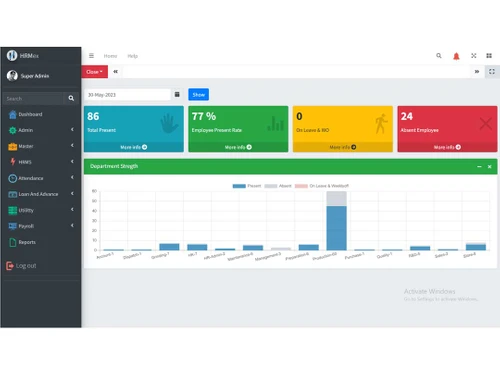
hrmex dashboard
hrmex attendance

HRMex

Brand: HRMex

  • 4.3

  • 5 Ratings & 1 Review

HRMex HR Software streamlines your HR processes, from recruitment to payroll, for efficient workforce management, all in one user-friendly platform.

See More

Have you used HRMex before?

Share your insights for better experience

Add a Review
Starting Price
₹10

View plans

100% Genuine
Products
Best Price
Guaranteed
Safe & Secure
Payment
  • Description

  • Pricing

  • Features

  • Specification

  • Review

  • Compare

  • Alternatives

  • FAQ

Starting at ₹10

HRMex Software Overview

What is HRMex Software?

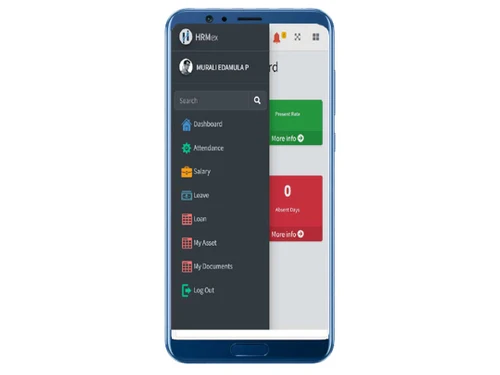
HRMex is a human resource solution designed specifically for the manufacturing industry. It is designed with an incredibly simple graphical interface for simplifying tasks of HR like attendance management, payroll management, and compliance. It is accessible via desktop, mobile, and web-based browsers on any internet-connected device. It manages various HR tasks, reduces errors, and provides employees with self-service options. It provides a dashboard for managers to get an overview of HR tasks, manage tasks, and generate reports on needs.

The solution is integrated into a manufacturing company's HR system. It centralizes the database and comes with an employee self-service portal. This employee self-portal allows employees to access information like schedules, apply for leave, communicate, and get updated information. For HR managers, it helps in tasks like shift management and shift scheduling based on workforce availability. It looks after leave management, leave approval, and attendance tracking. Based on the employee working hours, it calculates and manages overtime hours and compensation.

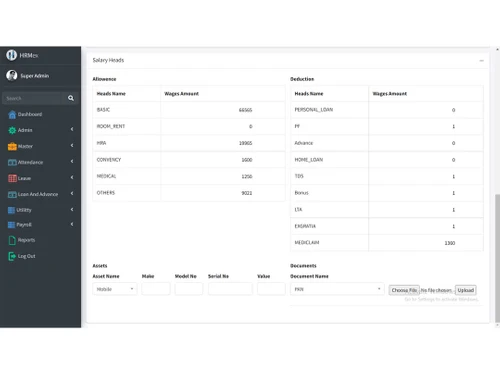
HRMex services use BioMetric attendance, which supports facial recognition, fingerprint biometrics, and RFID card-based attendance tracking. It helps the HR manager process salary by including allowances, deductions, and statutory compliance. It also provides services like printing salary slips and salary statements.

Why Choose HRMex System?

It provides the tools for simplifying and executing HR tasks like attendance tracking, payroll processing, and leave management for manufacturing companies. It automates numerous tasks and helps in reducing the manual workload of the HR and the risk of calculator and record errors. This results in accurate and efficient HR operations. It helps maintain the right records of employees and thus adhere to statutory compliance and helps manufacturing companies from risks of legal cases.

The software is a self-service portal for employees and helps them execute their tasks and get information from this interface immediately. It reduces the frequent meetings with HR and saves time for both employees and HR. Employees can apply for leave, get schedule details, communicate with HR, and get important updates. This makes healthy communication and increases transparency in the working environment, resulting in work productivity.

Benefits of HRMex HR Solution

  • Efficiency: It manages operations, increases transparency and communication, saving time and resources, resulting in improved productivity.
  • Accuracy: It reduces errors in payroll and attendance for better financial records and compliance.
  • User-Friendly interface: It offers an intuitive interface, making it easy for employees to access and use.
  • Cost-Effective: It reduces the need for additional hardware, software, and other HR tools, reducing costs for purchases and maintenance.
  • Legal compliance: It adheres to labor laws and helps companies avoid penalties and legal disputes, protecting their reputation.

Pricing of HRMex HR Software

HRMex HR software pricing is available on request at techjockey.com.

The pricing model is based on different parameters, including extra features, deployment type, and total users. For further queries related to the product, you can contact our product team and learn more about the pricing and offers.

Read more

HRMex Company Details

Founded Year:  2016

At HRMex, we strongly believe in customer-centricity and designing affordable business solutions that speak for themselves. Every single product in our toolkit is engineered to make your life as a business leader/HR easier so that you can focus on the big picture and that’s what HRMex Payroll Manage

Director/Founders N/A
Company Size 1-100 Employees

HRMex Pricing & Plans

Silver
Key Features
  • One Admin User
  • Attendance
  • Payroll
Starting at ₹10
    • Monthly

      Monthly
      Monthly

Key Features

  • One Admin User

  • Attendance

  • Payroll

HRMex Features

  • icon_check Attendance Management
    It tracks employee attendance, enhancing punctuality and work-hour accuracy.
  • icon_check Payroll Management
    It automates payroll processing for accurate and timely salary disbursements.
  • icon_check Leave Management
    It manages leave requests, approvals, planning, and workflows.
  • icon_check Complience
    It maintains legal compliance to save companies from penalties and legal issues.
  • icon_check Employee Self service
    It allows employees to get information, communicate and execute tasks.
  • icon_check Workforce Management
    It optimizes workforce allocation without conflicts, boosting productivity.
  • icon_check Statutory
    It manages statutory requirements to help reduce the risk of legal non-compliance.
  • icon_check Dashboards
    It offers a dashboard for getting quick insights into HR data and performance.
  • icon_check Reports
    It generates detailed reports to help in data-driven decision-making and strategic planning.
  • icon_check Shift Management
    It simplifies employee shift scheduling and ensures no conflict among tasks.
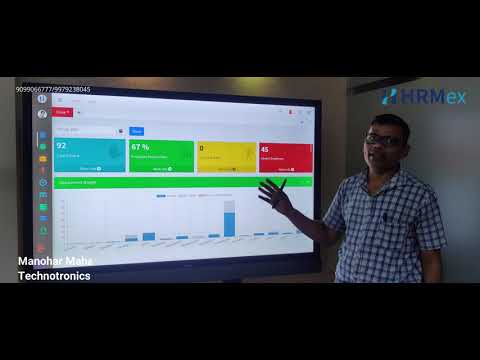
HRMex Demo Video play icon

Get HRMex Demo

Watch the demo video to explore key features, real workflows, and how the software fits your business needs.

Understand
Key Features
Personal
Demo Insights
Interactive
Demo Support

HRMex Specifications

Supported Platforms
Windows Windows iOS iOS Android Android MacOS MacOS Windows(Phone) Windows(Phone)
Devices
Desktop Desktop Mobile Mobile Tablet Tablet iPad iPad
Deployment
Cloud-Based Cloud-Based Perpetual Perpetual
Suitable For
All Industries
Business Specific
All Businesses
Business Size
Small Business Startups Medium Business Enterprises SMBs SMEs MSMBs MSMEs
Customer Support
Phone Email Communities
Language
English
Training Resources
Videos
AI Features
AI Integrated

Explore the Best Alternative Solutions Similar to Your Business Size and Needs

HRMex Review

4.3

Out of 5

img

Overall Rating

Based on
1 Verified Review

Rating Breakdown

  • Features 4.4
  • Value for Money 4.2
  • Ease of Use 4
  • Customer Support 4.8

72% Recommend this Product

Add Review

Ankita Singh

Human Resources

Industry: Manufacturing

3.7

Reviewed on: Aug 18, 2026

Techjockey Verified

“Easy-to-Use Attendance and Payroll Software with Biometric Support”

The software is easy to use and offers useful features for attendance, payroll, and leave management. It has helped simplify our HR processes and save time, although finding some employee data can occasionally be challenging.

Pros

The software makes payroll processing, attendance, and leave management simple and efficient. It saves time for the HR team, while the responsive support team is helpful whenever assistance is needed.

Cons

Finding specific employee data can sometimes be difficult, and certain features may occasionally be confusing or require improvements. However, the support team is helpful in resolving such issues.

Reason to switch

Correct timing and calculation,

Compare HRMex With other HR Software

Products
Ratings
Pricing
Device Supported
Deployment
Supported Platforms
  • img

    HRMex

  • 4.3

  • Price On Request

  • Desktop

    Mobile

  • Web based

    On Premises

  • Windows

    Mac OS

  • img

    Spine HR

  • 4.3

  • Price On Request

  • Desktop

    Mobile

  • Web based

    On Premises

  • Windows

    Mac OS

  • img

    ClusterHR

  • 5

  • ₹ 40

  • Desktop

    Mobile

  • Web based

    On Premises

  • Windows

    Mac OS

  • img

    Fix HR

  • 4.9

  • ₹ 600

  • Desktop

    Mobile

  • Web based

    On Premises

  • Windows

    Mac OS

  • img

    Zfour HRMS

  • 4.9

  • ₹ 45

  • Desktop

    Mobile

  • Web based

    On Premises

  • Windows

    Mac OS

  • img

    WeekMate

  • 4.7

  • ₹ 3999

  • Desktop

    Mobile

  • Web based

    On Premises

  • Windows

    Mac OS

  • img

    SignalHRM

  • 4.6

  • ₹ 648

  • Desktop

    Mobile

  • Web based

    On Premises

  • Windows

    Mac OS

  • img

    WoCo

  • 4.8

  • ₹ 50

  • Desktop

    Mobile

  • Web based

    On Premises

  • Windows

    Mac OS

  • img

    Presence360

  • 4.9

  • ₹ 2999

  • Desktop

    Mobile

  • Web based

    On Premises

  • Windows

    Mac OS

  • img

    TruHR

  • 4.9

  • ₹ 2200

  • Desktop

    Mobile

  • Web based

    On Premises

  • Windows

    Mac OS

  • img

    Keka HR

  • 4.4

  • Price On Request

  • Desktop

    Mobile

  • Web based

    On Premises

  • Windows

    Mac OS

(2) Product(s) selected

HRMex Alternatives

See All HRMex Alternatives

Starting Price:

₹600 /Month ₹900

SAVE UPTO 33%

Starting Price:

₹2,200 /Month

Starting Price:

₹49 /Month

Starting Price:

₹890 /Month
Starting Price:

₹1,499 /Month

Starting Price:

$49 /Month

Available

Price on Request

Starting Price:

₹5,000 /Month

Articles for HRMex

See All Related Articles

Which operating system does the HRMex Software Support?

HRMex software is compatible with Windows and macOS device systems.

Is there any HRMex App?

The HRMex HR app is unavailable on Android and iOS devices.

What is the deployment type of the HRMex System?

The HRMex system supports cloud-based deployment.

How much does HRMex Cost?

HRMex pricing is available on request at techjockey.com.

Who are the potential users of HRMex?

HRMex can be used by HR professionals, administrators, and recruiters to streamline their hiring process.

Is there any free trial or demo for HRMex?

The HRMex demo is available for free with techjockey.com.

Is the HRMex Platform free?

The HRMex system does not offer a free trial.

How can you download HRMex?

HRMex Software installation is not required, as it is cloud-based. Just open the Setup Wizard to get started.

How does HRMex Work?

HRMex is a robust HR solution that optimizes workforce allocation without conflicts, boosting productivity. It generates detailed reports to help in data-driven decision-making and strategic planning. In addition, it maintains legal compliance to save companies from penalties and legal issues.

20,000+ Software Listed

Best Price Guranteed

Free Expert Consultation

2M+ Happy Customers

Terms and Condtions

close

Users with registered businesses can purchase goods from merchants on the platform to satisfy their business needs. Users are not permitted to utilize any products acquired through the platform for resale, advertising, business, or further distribution.

For each purchase made, users will receive a Tax Invoice (or 'GST invoice') that includes specific details such as:

  • the GSTIN of the user associated with their registered business, and

  • the specified Entity Name for their business.

It should be noted that not all products are eligible for GST Invoice. Only the products displayed by participating sellers with the 'GST-based Invoice Available' callout on the product description page would qualify.

Certain goods and services are not eligible to get a GST Invoice, including items with VAS, i.e., Value Added Services (e.g., Total Mobile Protection/Assured Buyback) and those involving an exchange offer at the time of purchase.

Users must ensure the accuracy of the GSTIN, and business entity name provided for the GST Invoice. Requests for corrections into GST Invoice would not be accommodated by Techjockey.com or any Seller, and any issues arising from user-provided information are the sole responsibility of users.

Techjockey.com is not liable for the GST Invoice or any associated input tax credit. To efficiently claim an input tax credit, users should select the registered place of business address as per the GST authority's data and follow the provisions of the GST Act and rules.

To claim an input tax credit, the delivery and billing addresses must match. Furthermore, input tax credits will not be granted if the delivery address and GSTIN on the invoice are from different states. In case of incorrect GST details provided during the order placement, the order will be canceled automatically.