 USA
USA UAE
UAESmall Business
Designed for startups and growing businesses
See More


Brand: Diyos Infotech
TruHR is an AI-powered human resources (HR) software that helps small and medium-sized businesses manage employee onboarding, payroll, HR administration, and other workforce management processes.
See MoreHave you used TruHR before?
Share your insights for better experience
Brand: Diyos Infotech
Founded Year: 2011
DIYOS Infotech Pvt. Ltd. is one of the competent solution providers in the field of Web Application Development.
 Employee Management Shift Management Attendance Management Leave Management Reports & Analytics Payroll Management Compliance Management Employee Self Service Payroll Integration Role-Based Access Control (RBAC) Document Management Multi-Location Support Overtime Tracking Alerts & Notifications Dashboards
  Windows
  iOS
iOS  Android MacOS
  Desktop
  Mobile
  Tablet
  iPad
iPad  Cloud-Based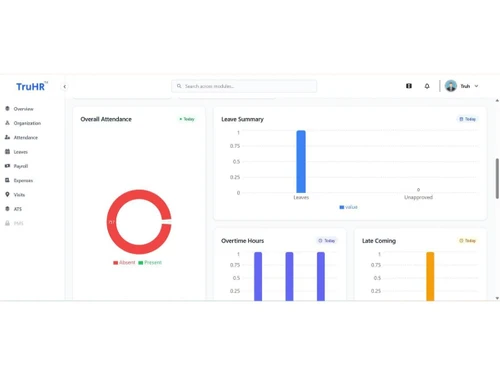
Small Business
Designed for startups and growing businesses
Medium Business
Built for business growth and flexibility
Enterprises
Designed for complex and large-scale business needs
4.9
Out of 5

Overall Rating
Based on
10 Verified Reviews
Rating Breakdown
99% Recommend this Product
Add ReviewCustomers generally express high satisfaction with TruHR, praising its user-friendly interface and effective GPS-based attendance tracking, which enhances visibility for field teams. The responsive support team is frequently highlighted as a significant benefit during setup and ongoing use. However, some users note that the initial configuration can be time-consuming and may require employees to adjust to the system. A few reviews mention the need for more customization options and occasional performance issues, but overall, TruHR is regarded as a reliable HR management solution.
Pros
"TruHR brings employee information, attendance, leave, and payroll into one system, reducing manual Excel-based work and making everyday HR processes more organized and efficient."
"TruHR makes attendance and leave management simple, keeps payroll processes organized, and provides responsive support when assistance is needed."
"TruHR offers quick implementation, easy payroll setup, facial recognition attendance, and responsive support tailored to healthcare operations."
Cons
"The initial implementation can take some time, and teams transitioning from Excel may need a short period to get familiar with the system and its features."
"Some features may take time to understand, while reports could offer more customization. The initial configuration also requires proper setup to match organizational requirements."
"The initial setup can take some time, and employees may need a short adjustment period. Additional customization options would also be useful."

Sep 3, 2026
Techjockey Verified
“TruHR Made Our HR Processes More Organized”
We previously managed our HR processes through Excel, which involved a lot of manual work. After moving to TruHR, attendance, leave, employee information, and payroll are easier to manage in one place.The platform has reduced manual effort, and the responsive support team has been helpful whenever assistance was needed.
Pros
TruHR brings employee information, attendance, leave, and payroll into one system, reducing manual Excel-based work and making everyday HR processes more organized and efficient.
Cons
The initial implementation can take some time, and teams transitioning from Excel may need a short period to get familiar with the system and its features.
Aug 22, 2026
Techjockey Verified
“A Reliable Solution for Managing Employees and HR Processes”
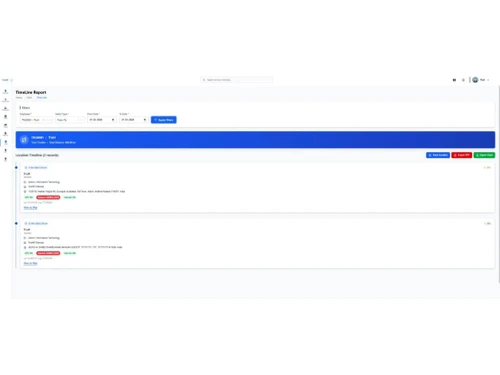
Using TruHR for our field sales and site-visit team, and the GPS-based attendance has been a game changer for us. We finally have visibility into actual site visits instead of relying on verbal updates. Reporting to management is much easier now with real data backing it. Support team has been responsive whenever we needed help setting things up.
Pros
TruHR reduces manual HR work and provides better visibility into employee attendance through a simple, user-friendly platform. Its GPS-based tracking is especially useful for monitoring field teams and supporting accurate reporting.
Cons
Some features may take time to understand, while reports could offer more customization. The initial configuration also requires proper setup to match organizational requirements.
Reason to switch
Using TruHR for our field sales and site-visit team, and the GPS-based attendance has been a game changer for us. We finally have visibility into actual site visits instead of relying on verbal updates. Reporting to management is much easier now with real data backing it. Support team has been responsive whenever we needed help setting things up.
Aug 22, 2026
Techjockey Verified
“TruHR Helps Us Manage Our Field Operations More Efficiently”
TruHR has been really helpful for tracking our field team's site visits and attendance. The GPS check-in feature gives us real visibility we didn't have before. Support was helpful getting everything set up. Recommend it for teams that are constantly out in the field.
Pros
TruHR makes attendance and leave management simple, keeps payroll processes organized, and provides responsive support when assistance is needed.
Cons
The initial setup can take some time, and employees may need a short adjustment period. Additional customization options would also be useful.
Reason to switch
Our team spends a lot of time visiting sites, meeting clients & working across locations, so managing attendance and daily activities was challenging. TruHR helped us centralize this through Pin My Visit feature. We now have better records of attendance, locations, site visits & work activity without having to depend entirely on manual follow-ups. The system has been useful for our day-to-day operation

TruHR
₹ 2200.00 excl. GST
Desktop
Mobile
Web based
On Premises
Windows
Mac OS

ClusterHR
₹ 40
Desktop
Mobile
Web based
On Premises
Windows
Mac OS

Fix HR
₹ 600
Desktop
Mobile
Web based
On Premises
Windows
Mac OS

SignalHRM
₹ 648
Desktop
Mobile
Web based
On Premises
Windows
Mac OS

WeekMate
₹ 3999
Desktop
Mobile
Web based
On Premises
Windows
Mac OS

Spine HR
Price On Request
Desktop
Mobile
Web based
On Premises
Windows
Mac OS

WoCo
₹ 50
Desktop
Mobile
Web based
On Premises
Windows
Mac OS

Zfour HRMS
₹ 45
Desktop
Mobile
Web based
On Premises
Windows
Mac OS

Presence360
₹ 2999
Desktop
Mobile
Web based
On Premises
Windows
Mac OS

Keka HR
Price On Request
Desktop
Mobile
Web based
On Premises
Windows
Mac OS

RGrowth HCM
₹ 4250
Desktop
Mobile
Web based
On Premises
Windows
Mac OS
(0) Product(s) selected
Starting Price:
₹40 /Month
Starting Price:
₹600 /Month ₹900
Starting Price:
₹3,999

Starting Price:
₹49 /Month

Starting Price:
₹890 /Month

Available
Price on Request

Starting Price:
₹1,499 /Month

Starting Price:
$49 /Month
Starting Price:
₹5,000 /Month

Available
Price on Request

Starting Price:
₹5,000 /Month










TruHR is an AI-powered, comprehensive HR software solution designed for small and medium businesses. It acts as a Swiss Knife for HR by automating essential tasks such as onboarding, payroll management, expense management, employee tracking, leave management, and attendance tracking. It is cloud and mobile-ready, offering a simple, intuitive, and mobile-friendly interface built on the latest technologies, all while providing value for money.
TruHR is accessible through its simple, intuitive, and mobile-friendly interface, which is cloud-ready. Employees can also access a user-friendly self-service portal or utilize mobile apps for specific functions like marking attendance. While the exact login steps are not detailed, access is provided via these digital platforms.
TruHR offers a wide range of features to streamline HR operations, including: onboarding, payroll management, expense management, employee tracking, leave management, attendance tracking, employee records management, shift management, compliance management, employee self-service, payroll integration, role-based access control (RBAC), document management, multi-location support, overtime tracking, and alerts & notifications. It also provides AI-driven HR workflows, real-time feedback, and analytics.
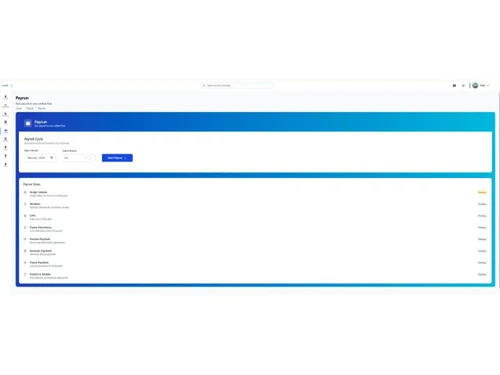
Yes, TruHR offers powerful payroll management capabilities. It automates payroll calculations, generates pay slips, and helps manage employee benefits, aiming to reduce payroll errors significantly. The system supports highly customizable salary structures and allows for unlimited salary components to match an organization's specific requirements.
Employees can access their TruHR employee portal, referred to as a user-friendly self-service portal, to manage various HR-related tasks. Through this portal, employees can seamlessly oversee their payslips, contracts, and onboarding letters, submit leave requests, view their leave balances, and track their leave history. The portal is designed to be mobile-friendly, allowing access from any mobile device.
TruHR is specifically designed as an AI-powered HR software solution for small and medium businesses, aiming to transform their traditional HR management processes.
TruHR price starts at INR 2,200 at techjockey.com.
Yes, TruHR includes a robust expense management system. It allows businesses to effortlessly capture expense details, automate approval processes, and streamline reimbursements, which reduces manual effort and eliminates delays. The system also provides real-time insights into expense trends, tracks spending patterns, and helps optimize budgets through intelligent expense analysis.
Absolutely. TruHR is designed to be HR on the Go, offering cloud and mobile readiness. It provides a simple, intuitive, and mobile-friendly interface, allowing users to manage HR tasks efficiently on any mobile device. Employees can even mark attendance using mobile apps.
TruHR offers a streamlined digital solution for attendance tracking, moving away from manual registers. Employees can mark their attendance using biometric devices or mobile apps, which helps eliminate issues like time theft, buddy punching, and human error. The system provides accurate attendance reports, tracks tardiness, and allows for effortless shift management, leading to improved workforce management.
TruHR is ideal for small and medium-sized businesses (SMBs), scaling startups, HR managers, and HR administrators that need to automate and manage employee onboarding, payroll, and other core HR processes.
20,000+ Software Listed
Best Price Guranteed
Free Expert Consultation
2M+ Happy Customers
Terms and Condtions

Users with registered businesses can purchase goods from merchants on the platform to satisfy their business needs. Users are not permitted to utilize any products acquired through the platform for resale, advertising, business, or further distribution.
For each purchase made, users will receive a Tax Invoice (or 'GST invoice') that includes specific details such as:
the GSTIN of the user associated with their registered business, and
the specified Entity Name for their business.
It should be noted that not all products are eligible for GST Invoice. Only the products displayed by participating sellers with the 'GST-based Invoice Available' callout on the product description page would qualify.
Certain goods and services are not eligible to get a GST Invoice, including items with VAS, i.e., Value Added Services (e.g., Total Mobile Protection/Assured Buyback) and those involving an exchange offer at the time of purchase.
Users must ensure the accuracy of the GSTIN, and business entity name provided for the GST Invoice. Requests for corrections into GST Invoice would not be accommodated by Techjockey.com or any Seller, and any issues arising from user-provided information are the sole responsibility of users.
Techjockey.com is not liable for the GST Invoice or any associated input tax credit. To efficiently claim an input tax credit, users should select the registered place of business address as per the GST authority's data and follow the provisions of the GST Act and rules.
To claim an input tax credit, the delivery and billing addresses must match. Furthermore, input tax credits will not be granted if the delivery address and GSTIN on the invoice are from different states. In case of incorrect GST details provided during the order placement, the order will be canceled automatically.



