 USA
USA UAE
UAESmall Business
Designed for startups and growing businesses

See More





Brand: Keka
Streamline your workforce with easy-to-use HR management software. Manage attendance, payroll, and more in one powerful platform!
See MoreHave you used Keka HR before?
Share your insights for better experience
Summary
Keka HR is a comprehensive HR software that streamlines payroll, recruitment, performance management, and attendance tracking for organizations of all sizes.
Key Capabilities
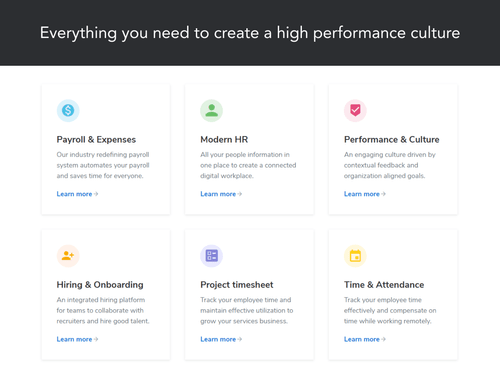
Payroll Management, Recruitment Management, Performance Management, Attendance Management, Employee Self Service, Document Management, Mobile Support.
Best Suited For
Ideal for small to medium businesses across various industries looking to enhance HR operations.
Deployment & Access
Web-based deployment accessible on Ubuntu, Windows, iOS, Android, MacOS, and Linux devices.
4.4
Out of 5

87% Users Recommend this Product
Brand: Keka
Founded Year: 2015
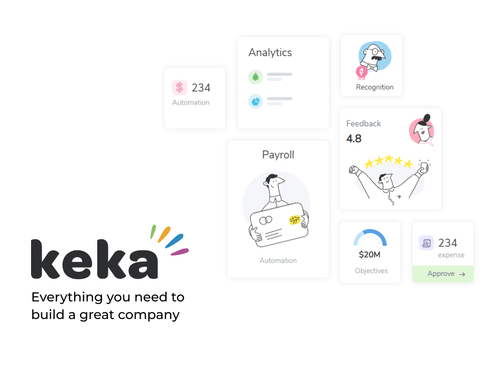
Keka is a Modern day HR & Payroll software. Unlike traditional software Keka focuses on User Experience and simplifying complex workforce
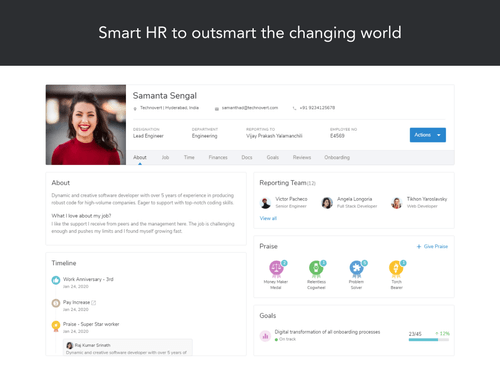
 Taxation Management Recruitment Management Performance Management Shift Management Document Management Asset Management Workflow Monitoring Payroll Management Expense Management HRM Employee Self Service Mobile Support Leave Management Attendance Management Announcements Time & Attendance Tracking Advances and Expense Claims API Access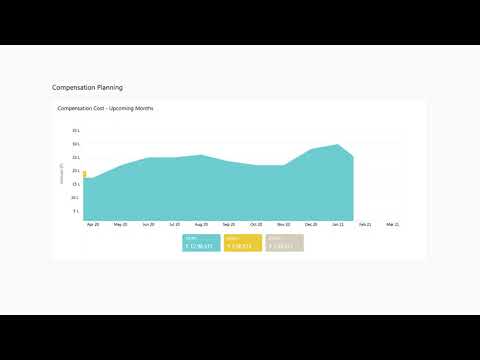

Watch the demo video to explore key features, real workflows, and how the software fits your business needs.


 Ubuntu
  Windows
  iOS
iOS  Android MacOS
  Linux
Linux  Desktop
  Mobile
  Tablet
  iPad
iPad  Cloud-Based

Small Business
Designed for startups and growing businesses
Medium Business
Built for business growth and flexibility
Enterprises
Designed for complex and large-scale business needs
4.4
Out of 5
Overall Rating
Based on
78 Verified Reviews
Rating Breakdown
87% Recommend this Product
Add ReviewKeka HR has garnered a generally positive reception among users, who appreciate its user-friendly interface and ability to streamline HR processes like payroll and attendance management. Many users highlight the software's efficiency in handling administrative tasks and its comprehensive features. However, some concerns have been raised regarding the reliability of customer support and certain functionalities, such as geofencing and analytics, which could benefit from improvements. Overall, Keka HR is seen as a valuable tool for managing HR tasks, though some users suggest that enhancements in specific areas would elevate the experience further.
Pros
"Keka makes everyday HR tasks simple and hassle-free with its easy-to-use interface."
"I save a ton of time on administrative duties thanks to Keka HR's user-friendly interface, which makes managing payroll, attendance, and personnel records quite simple."
"Nice HRMS tool and suggestable platform. It was a great product overall experience was very nice."
Cons
"The geofencing service doesn't work sometimes, other than that everything else is good"
"One drawback of Keka HR is that it may initially seem overwhelming. Getting familiar with the features offered took some time."
"Have purchased the software for 1 month No one from the team responded properly their service is very bad anyone who is thinking of purchasing this software, never purchase it."


Jan 24, 2023
Techjockey Verified
“Simple navigation and uncomplicated features”
Pros
We were a small sized business but grew rapidly in the pandemic. We had been using biometric devices before the pandemic and desperately needed something that would track attendance when working from home, process payroll as well as performance. Other software on the market had been way too pricey, and their fully packed features were too complicated to understand. We needed something that would be easy to understand and had the features that we needed. Thankfully, we were able to track attendance and process payroll smoothly.
Cons
Had an issue but they’ve solved it.
Reason to switch
No, as we were a small-sized business we could not afford it. As our food chain business grew rapidly in the pandemic, we needed something else.
Jan 29, 2023
Techjockey Verified
“User-friendly and straightforward interface”
Pros
Keka’s integrations are amazing! We were in search of software that would track how many hours employees had worked. We needed specific features to track the hours so that we could bill our clients accurately. Other software in the market had tons of features but we didn’t want to consider paying so much for features that we were not even going to use. After finding out about Keka’s easy navigation and simple interface, we decided to check it out and are considering their other subscriptions as well!
Cons
We have not encountered any problems yet.
Chris Lenderborg 
Project Manager
May 23, 2023
Techjockey Verified
“"Keka HRMS: Advantages and challenges of a comprehensive human resources management solution"”
Pros
As a Keka HRMS user, you will have access to an easy-to-use platform that will allow you to efficiently manage your HR-related tasks and responsibilities. When you log in to your account, you'll find a personalized dashboard that displays relevant information about your team, such as attendance status, time off requests, and pending performance reviews. To manage payroll, you'll simply navigate to the payroll section, where you can review and approve employee salary calculations, manage deductions, and issue pay stubs. In addition, the attendance tracking system will allow you to review and approve time off requests and keep an accurate record of the hours worked by each employee. When it's necessary to evaluate employee performance, you'll use the evaluation module to set goals, assign tasks, and provide feedback. You'll be able to schedule regular performance reviews and track each employee's progress over time.
Cons
Keka HRMS may have some not so favorable aspects, such as an initial learning curve for less experienced HR software users. In addition, some features could be more customizable and its integration with other systems could be limited in certain cases.
Reason to switch
The main reason for choosing Keka HRMS over eazeHR lies in its richer functionalities and user-centric approach. Keka HRMS offers a wide range of tools for managing payroll, attendance tracking, performance appraisal and recruiting, all within an intuitive and friendly interface. In addition, Keka HRMS encourages communication and collaboration between employees, which contributes to greater job satisfaction and organizational efficiency. In contrast, eazeHR may have more limited functionality and a less attractive interface for some users.

Keka HR
Price On Request
Desktop
Mobile
Web based
On Premises
Windows
Mac OS

ClusterHR
₹ 40
Desktop
Mobile
Web based
On Premises
Windows
Mac OS

Fix HR
₹ 600
Desktop
Mobile
Web based
On Premises
Windows
Mac OS

Zfour HRMS
₹ 45
Desktop
Mobile
Web based
On Premises
Windows
Mac OS

SignalHRM
₹ 648
Desktop
Mobile
Web based
On Premises
Windows
Mac OS

WeekMate
₹ 3999
Desktop
Mobile
Web based
On Premises
Windows
Mac OS

Spine HR
Price On Request
Desktop
Mobile
Web based
On Premises
Windows
Mac OS

WoCo
₹ 50
Desktop
Mobile
Web based
On Premises
Windows
Mac OS

Zimyo HRMS
₹ 4000
Desktop
Mobile
Web based
On Premises
Windows
Mac OS

Presence360
₹ 2999
Desktop
Mobile
Web based
On Premises
Windows
Mac OS

TruHR
₹ 2200
Desktop
Mobile
Web based
On Premises
Windows
Mac OS
(0) Product(s) selected
Starting Price:
₹40 /Month
Starting Price:
₹600 /Month ₹900
Starting Price:
₹3,999
Starting Price:
₹2,200 /Month

Starting Price:
₹49 /Month

Starting Price:
₹890 /Month

Available
Price on Request

Starting Price:
₹1,499 /Month

Starting Price:
$49 /Month

Available
Price on Request

Starting Price:
₹5,000 /Month










Yes, Keka does have discounts for half yearly & yearly plans.
Keka HRIS when locked, cannot be accessed by your employees to any of your payroll or personal information. Only the authorised users can access it providing complete data security.
Yes, Keka is scalable in all terms, whether it is database, licensed user or features.
Yes, you can get a demo of Keka HRIS.
KekaHR portal provides you the access to a host of HR and payroll management functionalities along with expense tracking, performance management, project handling, time tracking and workforce management functions. KekaHR app and software also streamlines hiring & onboarding functions.
Keka app for human resource management provides all the features like hiring & onboarding, performance management, analytics, expense & payroll. Additionally, KekaHR app login takes you to an intuitive user experience with faster service.
Keka app is available for android 5.0 and recent devices. You can also download Keka HRMS software on your desktop and Mac devices.
Keka HRMS software helps employees grope information. It provides access to every action from leave approvals, employee onboarding tasks, expense approvals, etc. This can all be accessed from an intuitive Inbox. This application is available on web and mobile app.
To mark attendance in Keka go to Attendance Section. In the attendance section go to My Time. Then click on Attendance and view 'Web Clock-in' option under 'Actions' section to and click on the desired button to mark attendance.
Steps to download attendance report in keka are:
0 0
There are a few steps to access payslips in Keka:
0 0
Keka's GPS attendance system allows users to mark their attendance from any device, including the employees who work in the office or on-site or both. The system also has an inbuilt touch ID and passcode; that enables users for device authentication as well.
0 0
To download attendance in Keka software go to Time & Attendance. Under Time & Attendance find Leaves Reports. Lastly, download the data.
1 0
To insert data in Keka attendance system go to My Time. Then go to Attendance and view Work from Home option under Actions section. Lastly fill out the note and insert data.
0 0
20,000+ Software Listed
Best Price Guranteed
Free Expert Consultation
2M+ Happy Customers
Terms and Condtions

Users with registered businesses can purchase goods from merchants on the platform to satisfy their business needs. Users are not permitted to utilize any products acquired through the platform for resale, advertising, business, or further distribution.
For each purchase made, users will receive a Tax Invoice (or 'GST invoice') that includes specific details such as:
the GSTIN of the user associated with their registered business, and
the specified Entity Name for their business.
It should be noted that not all products are eligible for GST Invoice. Only the products displayed by participating sellers with the 'GST-based Invoice Available' callout on the product description page would qualify.
Certain goods and services are not eligible to get a GST Invoice, including items with VAS, i.e., Value Added Services (e.g., Total Mobile Protection/Assured Buyback) and those involving an exchange offer at the time of purchase.
Users must ensure the accuracy of the GSTIN, and business entity name provided for the GST Invoice. Requests for corrections into GST Invoice would not be accommodated by Techjockey.com or any Seller, and any issues arising from user-provided information are the sole responsibility of users.
Techjockey.com is not liable for the GST Invoice or any associated input tax credit. To efficiently claim an input tax credit, users should select the registered place of business address as per the GST authority's data and follow the provisions of the GST Act and rules.
To claim an input tax credit, the delivery and billing addresses must match. Furthermore, input tax credits will not be granted if the delivery address and GSTIN on the invoice are from different states. In case of incorrect GST details provided during the order placement, the order will be canceled automatically.



