linkedin
iClone logo
iclone-images
iclone-interface
iclone-dashboard

iClone

Brand: Reallusion

  • No Ratings & Reviews

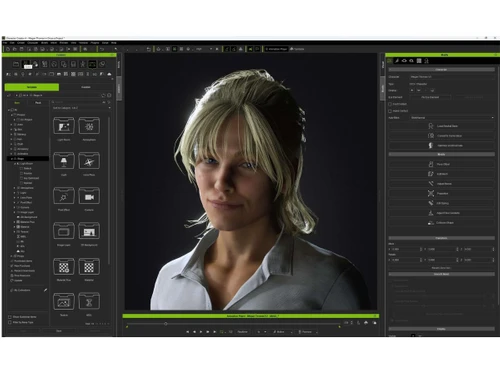
iClone is a real-time 3D animation software that helps users create, animate, and render professional-quality characters, scenes, and visual effects quickly.

See More

Have you used iClone before?

Share your insights for better experience

Add a Review
Starting Price 20% OFF
$479 $599

View plans

100% Genuine
Products
Best Price
Guaranteed
Safe & Secure
Payment
  • Description

  • Pricing

  • Features

  • Specification

  • Review

  • FAQ

Starting at $479

iClone Software Overview

What is iClone?

iClone is a real-time 3D animation software used to create professional animations for films, games, videos, and virtual productions. It allows users to design and animate 3D characters, scenes, and objects quickly without needing complex technical skills. The software provides tools for character animation, facial expressions, motion capture, lip-syncing, and camera control. Users can create realistic movements using motion libraries or connect motion-capture devices for live animation.

iClone supports real-time rendering, which lets creators see results instantly while working. It also integrates with popular 3D software and game engines such as Unreal Engine and Blender. The software includes lighting, physics, and visual effects tools to improve animation quality. Content creators, animators, filmmakers, game developers, and educators use iClone for their projects.

Why Choose iClone Software?

  • Real-Time Animation: Creates animations instantly without long rendering waits.
  • 3D Character Animation: Easily animate realistic 3D characters.
  • Motion Capture Support: Connects with motion capture devices for natural movements.
  • Facial Animation Tools: Produces realistic facial expressions and emotions.
  • Automatic Lip Syncing: Matches character mouth movements to audio.
  • Fast Rendering: Delivers high-quality visuals quickly.
  • User-Friendly Interface: Easy for beginners and professionals to use.
  • Realistic Character Movement: Generates smooth and lifelike animations.
  • Extensive Motion Library: Provides ready-made animations and motions.
  • Advanced Camera Controls: Creates cinematic shots and camera movements.
  • Professional Visual Effects: Adds effects to improve animation quality.
  • Dynamic Lighting System: Enhances scenes with realistic lighting.
  • Physics Simulation: Supports natural object and character interactions.
  • Virtual Production Tools: Suitable for modern filmmaking workflows.
  • Game Development Support: Helps create assets for video games.
  • Unreal Engine Integration: Works seamlessly with Unreal Engine.

Benefits of iClone Software

  • Blender Compatibility: Allows easy workflow with Blender projects.
  • Custom Character Creation: Supports personalized character designs.
  • Scene Building Tools: Helps create detailed 3D environments.
  • Real-Time Preview: View changes immediately while editing.
  • Multi-Format Export: Exports projects in various formats.
  • Content Creation Efficiency: Speeds up animation production.
  • High-Quality Graphics: Produces professional-grade visual results.
  • Animation Editing Tools: Fine-tunes character motions and actions.
  • Voice Animation Features: Synchronizes speech and character performance.
  • Large Asset Ecosystem: Accesses a wide range of content resources.
  • Collaboration-Friendly Workflow: Supports team-based creative projects.
  • Complete 3D Animation Solution: Combines animation, rendering, effects, and production tools in one platform.

iClone Pricing

iClone price starts at USD 479 at techjockey.com.

The pricing model is based on different parameters, including extra features, deployment type, and the total number of users. For further queries related to the product, you can contact our product team and learn more about the pricing and offers.

Read more

Reallusion Company Details

Founded Year:  2000

Reallusion Inc. is a 2D and 3D animation software and content developer. Headquartered in Silicon Valley, with R&D centers in Taiwan, and offices and training centers in Canada, Germany and Japan.

Director/Founders Charles Chen
Company Size 101-500 Employees

iClone Pricing & Plans

iClone 8
Key Features
  • Interactive Motion Director
  • Advanced HumanIK Control
  • Multi Layer Motion Editing
  • Skeletal Mesh Morphing
  • Real Camera System
  • Global Illumination Rendering
  • Volumetric Lighting Effects
  • Free Bonus: Cartoon Animator Motion Link Plug-in
Starting at $479 $599 SAVE UPTO 20%
    • Licenses (Perpetual)

      Licenses (Perpetual)
      Licenses (Perpetual)

Key Features

  • Interactive Motion Director

  • Advanced HumanIK Control

  • Multi Layer Motion Editing

  • Skeletal Mesh Morphing

  • Real Camera System

  • Global Illumination Rendering

  • Volumetric Lighting Effects

  • Free Bonus: Cartoon Animator Motion Link Plug-in

iClone Features

  • icon_check Interactive Motion Director
    Utilize a real-time system to drive 3D characters using game-like controls, keyboard hotkeys, or various external game
  • icon_check Advanced HumanIK Control
    Implement industry-standard IK and FK rigging systems to ensure precise skeletal manipulation and accurate anatomical posing data.
  • icon_check Multi Layer Motion Editing
    Apply a non-destructive workflow to stack, blend, and manage multiple animation layers for complex character performance
  • icon_check Skeletal Mesh Morphing
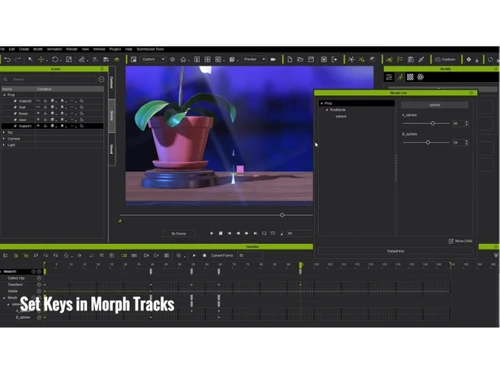
    Import and manage hierarchical blendshapes to execute organic deformations on characters or props via an integrated morph manager.
  • icon_check Real Camera System
    Simulate professional cinematography using customizable lenses, focal lengths, and sensor sizes based on real-world camera optics.
  • icon_check Global Illumination Rendering
    Achieve high-fidelity lighting environments using voxel-based global illumination to simulate realistic light bounce and shadows.
  • icon_check Volumetric Lighting Effects
    Enhance atmospheric depth by adding visible light beams and fog interactions to directional, spot, and point light sources in-app.
  • icon_check Dynamic Crowd Simulation
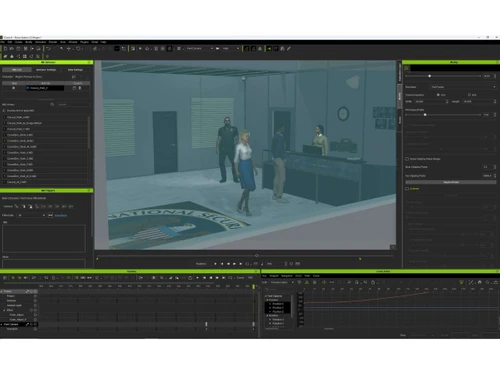
    Generate large-scale virtual populations with autonomous navigation, obstacle avoidance, and randomized motion matching logic.
  • icon_check Reach Target Interaction
    Define specific contact points for hands and feet to ensure precise alignment between characters and various interactive 3D props.
  • icon_check Import/Export Management
    Transfer complex vertex animations and baked physics simulations to external high-end production pipelines using Alembic files.
  • icon_check Live Link Connection
    Synchronize animation data in real time between iClone and Unreal Engine to facilitate efficient virtual production workflows.
  • icon_check Pose to Pose Rotoscoping
    Create accurate keyframe sequences by using external video files as a visual reference layer directly within the 3D environment.
  • icon_check Motion Capture Integration
    Connect various professional hardware devices to stream and record facial, body, and hand performances directly into the scene.
  • icon_check Content Management
    Categorize and search internal assets efficiently using a centralized database that tracks metadata, versions, and dependencies.

iClone Specifications

Supported Platforms
Windows Windows
Devices
Desktop Desktop
Deployment
Perpetual Perpetual
Suitable For
All Industries
Business Specific
All Businesses
Business Size
Individual Small Business Medium Business SMBs MSMBs MSMEs Freelancers
Customer Support
Email Communities
Language
English
Integration
API Integration
Training Resources
Webinars Videos
AI Features
AI Integrated

iClone Review

Techjockey Trusted Reviews from Verified Users

No reviews are currently available for iClone. Discover similar Animation Software reviews

  • Animaker

    4.5

    Whats great - I started using Animaker because of a sudden influx of assignments during my career’s initial video editing career. Today, th... read more
  • VideoScribe

    4.4

    Whats great - First of all, Videoscribe is great for making animated presentations. Just in case, you forgot to save the recent changes, wo... read more
  • Autodesk Maya

    4.8

    Whats great - Autodesk Maya is the best tool to convert your ideas into reality. You have a lot of possibilies with this software. If you w... read more
Articles for iClone

See All Related Articles

How much does iClone Software cost?

iClone price starts at USD 479 on techjockey.com.

Is there a mobile app available for iClone Software?

No, iClone does not have a dedicated mobile app, it runs through a web browser.

Which operating systems are compatible with iClone Software?

iClone is compatible with Windows as it is browser-based.

Does iClone Software offer a free trial?

Yes, iClone offers a free trial version that allows users to explore its features before purchasing.

How does iClone Software function?

iClone enables users to create, animate, and render 3D characters, scenes, and visual effects in real time.

Who uses iClone Software?

Animators, filmmakers, game developers, content creators, educators, and 3D artists use iClone.

Is a free demo available for iClone Software?

Yes, Reallusion provides free trial downloads, demos, and tutorials for iClone.

Is iClone Software available for free?

No, iClone is a paid software, although a free trial version is available for evaluation.

20,000+ Software Listed

Best Price Guranteed

Free Expert Consultation

2M+ Happy Customers

Terms and Condtions

close

Users with registered businesses can purchase goods from merchants on the platform to satisfy their business needs. Users are not permitted to utilize any products acquired through the platform for resale, advertising, business, or further distribution.

For each purchase made, users will receive a Tax Invoice (or 'GST invoice') that includes specific details such as:

  • the GSTIN of the user associated with their registered business, and

  • the specified Entity Name for their business.

It should be noted that not all products are eligible for GST Invoice. Only the products displayed by participating sellers with the 'GST-based Invoice Available' callout on the product description page would qualify.

Certain goods and services are not eligible to get a GST Invoice, including items with VAS, i.e., Value Added Services (e.g., Total Mobile Protection/Assured Buyback) and those involving an exchange offer at the time of purchase.

Users must ensure the accuracy of the GSTIN, and business entity name provided for the GST Invoice. Requests for corrections into GST Invoice would not be accommodated by Techjockey.com or any Seller, and any issues arising from user-provided information are the sole responsibility of users.

Techjockey.com is not liable for the GST Invoice or any associated input tax credit. To efficiently claim an input tax credit, users should select the registered place of business address as per the GST authority's data and follow the provisions of the GST Act and rules.

To claim an input tax credit, the delivery and billing addresses must match. Furthermore, input tax credits will not be granted if the delivery address and GSTIN on the invoice are from different states. In case of incorrect GST details provided during the order placement, the order will be canceled automatically.