linkedin
Insyspay logo
play Introduction InSysPay - A Web Based Payroll Software in India
play How to Generate Salary in InSysPay Software? Demo
Insyspay

Insyspay

Brand: Insyspay

  • 5

  • 1 Rating & 1 Review

Insyspay is a web-based HR and payroll management software for enterprises, offering a wide variety of modules like attendance management, leave management, travel, appraisal and training, ensuring proper functioning. The software helps organizations in magnifying their recruitment capabilities bringing in multiple candidates on board in a hassle-free manner. It can be used to monitor daily atte...

See More

Have you used Insyspay before?

Share your insights for better experience

Add a Review

Price Available on Request

Questions about pricing or customization? We’re here to help, just a click away.

100% Genuine
Products
Best Price
Guaranteed
Safe & Secure
Payment
  • Description

  • Pricing

  • Features

  • Specification

  • Review

  • Compare

  • Alternatives

  • FAQ

Insyspay Software Overview

What is Insyspay?

Insyspay is a web-based HR and payroll management software for enterprises, offering a wide variety of modules like attendance management, leave management, travel, appraisal and training, ensuring proper functioning. The software helps organizations in magnifying their recruitment capabilities bringing in multiple candidates on board in a hassle-free manner. 

It can be used to monitor daily attendance and leave schedules of individual employees, track the performance levels showcased by them and plan their appraisals accordingly. Further, managers can schedule travel expenses for individual employees. Monitor their requests, approve/reject them directly from the software.  

How does the attendance management system offered by Insyspay facilitate detailed employee monitoring?

  1. Detailed Data: All the attendance related data gets stored within the software’s database in an accurate manner. Employees can view their daily attendance and make applications for leave as per their requirements.
  2. Shift Allocation: HRs can allocate employees for multiple shifts and monitor their attendance from time-to-time.
  3. Generate Attendance: Staff can check their monthly attendance by entering the specific employee number assigned to them along with the latest date. 
  4. GPS Tracking: Organisations can track the location of their field employees using the GPS tracking feature offered by Insyspay. 
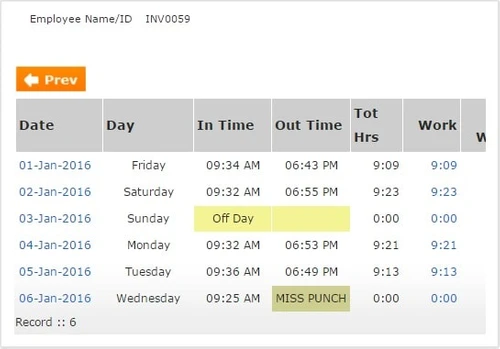
  5. Attendance and Overtime Report: Along with attendance, Insyspay also keeps track of the total working hours, day-offs, missed punches and half-days, presenting them in the form of detailed reports. 

Pricing of Insyspay

The pricing Insyspay is available on request. In case you want to know more about the particular product send us a callback request. Our technical experts will get back to you in real-time. 

Benefits of Insyspay

  1. Organogram Chart: With Insyspay, organizations get access to an organogram chart showcasing a detailed overview of all the available posts, occupied posts, including the total number of people working under them. 
  2. Goal-based incentive: Organisations can schedule incentive amounts for individual performances. Employees can check the total incentive amount they are assigned directly from the software.
Read more

Insyspay Company Details

Founded Year:  2012

Insyspay is an HR and payroll management solution offered as cloud based and on-premises model. The application provides for attendance, attendance, payroll, recruitment, training, travel and other aspects of human resource management.

Director/Founders Insyspay
Company Size 1-100 Employees

Insyspay Pricing & Plans

Looking for The Right Pricing?

Share your requirements and get a plan built around your business.

  • Define your business needs
  • Get customised pricing
  • Choose features that fit your workflow

Price Available on Request

Get personalised Insyspay pricing that fits your needs. Our team will connect with you.

Insyspay Features

  • icon_check HR & Payroll
    Insyspay can be used to streamline all the HR and payroll related activities within an enterprise in an organized manner. 
  • icon_check Leave Management
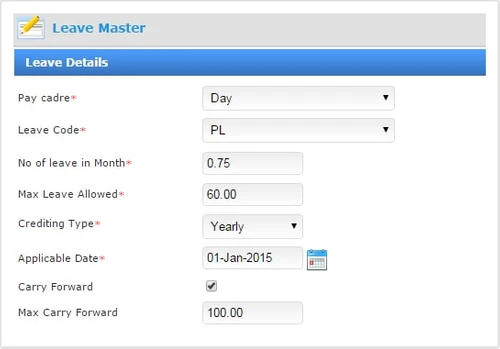
    Employees get access to leave related information in detail. They can make applications for sick leave, paid leave, comp-offs and
  • icon_check Attendance Management
    Enterprises can monitor attendance by integrating the software with biometric devices. HRs can allocate shifts, track overtime,
  • icon_check Statutory
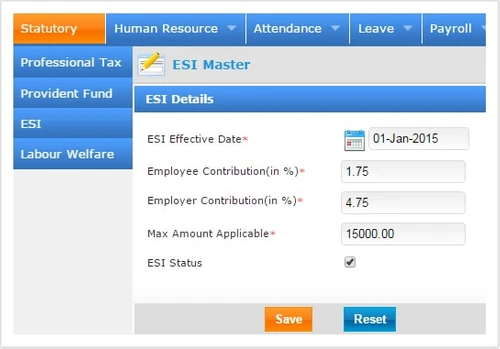
    The software can be used to calculate ESI, PT and PF in detail. Employees can also get an accurate view of the calculations
  • icon_check Payroll Management
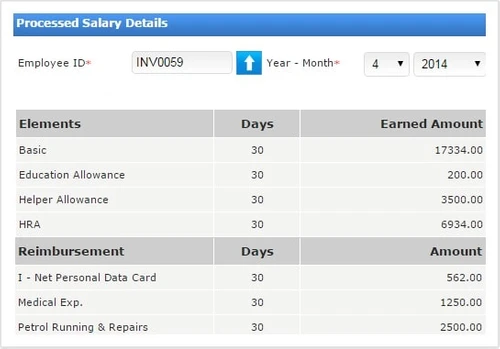
    The software can be used to calculate monthly payrolls, arrears, reimbursement, TDS, full and final settlement, bonuses and
  • icon_check Recruitment Management
    Insyspay can be used to streamline the entire recruitment process. Enterprises can specify designation, add in advertisements,
  • icon_check Training Management
    HRs can use Insyspay to determine the budget of a training program, generate a list of candidates for particular training,
  • icon_check Appraisal Management
    All the performance-related data gets stored within Insyspay’s cloud database. Employees and HRs can check individual ratings
  • icon_check Travel Expense
    With Insyspay, enterprises can schedule travel allowance, manage approvals and speed up the reimbursement process, enhancing the
  • icon_check Human Resource Management
    Enterprises can streamline their entire HR management program with Insysay, starting from recruitment, payroll, travel, leave,
  • icon_check Bonus, Loan & Advances Management
    With Insyspay, the accounts department can keep track of the bonus, loans and gratuity scheduled to an individual employee.
  • icon_check Employee Scheduling
    Management can generate comprehensive work schedules and monitor attendance, time-offs, leaves and payroll calculations within
  • icon_check Mobile Application
    Insyspay has a dedicated mobile app of its own, facilitating attendance management, employee self-service and leave generation
  • icon_check Employee Self Service
    Employees can view their individual profiles, punch-in their login and log out timings, check leave balance, keep track of
Insyspay Demo Video play icon

Get Insyspay Demo

Watch the demo video to explore key features, real workflows, and how the software fits your business needs.

Understand
Key Features
Personal
Demo Insights
Interactive
Demo Support

Insyspay Specifications

Supported Platforms
Windows Windows Android Android
Devices
Desktop Desktop Mobile Mobile
Deployment
Cloud-Based Cloud-Based
Suitable For
All Industries
Business Specific
All Businesses
Language
English

Explore the Best Alternative Solutions Similar to Your Business Size and Needs

Insyspay Review

5

Out of 5

img

Overall Rating

Based on
1 Verified Review

Rating Breakdown

  • Features 5
  • Value for Money 5
  • Ease of Use 5
  • Customer Support 5

90% Recommend this Product

Add Review

Jitendra

Administrator

5

Reviewed on: May 25, 2021

Techjockey Verified

“Insyspay is a very good hr software.”

Pros

This is very good & easy to use software. Features are truly great.

Cons

Price is little high.

Compare Insyspay With other HR Software

Products
Ratings
Pricing
Device Supported
Deployment
Supported Platforms
  • img

    Insyspay

  • 5

  • Price On Request

  • Desktop

    Mobile

  • Web based

    On Premises

  • Windows

    Mac OS

  • img

    Spine HR

  • 4.3

  • Price On Request

  • Desktop

    Mobile

  • Web based

    On Premises

  • Windows

    Mac OS

  • img

    ClusterHR

  • 5

  • ₹ 40

  • Desktop

    Mobile

  • Web based

    On Premises

  • Windows

    Mac OS

  • img

    Fix HR

  • 4.9

  • ₹ 600

  • Desktop

    Mobile

  • Web based

    On Premises

  • Windows

    Mac OS

  • img

    Zfour HRMS

  • 4.9

  • ₹ 45

  • Desktop

    Mobile

  • Web based

    On Premises

  • Windows

    Mac OS

  • img

    WeekMate

  • 4.7

  • ₹ 3999

  • Desktop

    Mobile

  • Web based

    On Premises

  • Windows

    Mac OS

  • img

    SignalHRM

  • 4.6

  • ₹ 648

  • Desktop

    Mobile

  • Web based

    On Premises

  • Windows

    Mac OS

  • img

    WoCo

  • 4.8

  • ₹ 50

  • Desktop

    Mobile

  • Web based

    On Premises

  • Windows

    Mac OS

  • img

    Presence360

  • 4.9

  • ₹ 2999

  • Desktop

    Mobile

  • Web based

    On Premises

  • Windows

    Mac OS

  • img

    TruHR

  • 4.9

  • ₹ 2200

  • Desktop

    Mobile

  • Web based

    On Premises

  • Windows

    Mac OS

  • img

    Keka HR

  • 4.4

  • Price On Request

  • Desktop

    Mobile

  • Web based

    On Premises

  • Windows

    Mac OS

(0) Product(s) selected

Insyspay Alternatives

See All Insyspay Alternatives

Starting Price:

₹600 /Month ₹900

SAVE UPTO 33%

Starting Price:

₹2,200 /Month

Starting Price:

₹49 /Month

Starting Price:

₹890 /Month
Starting Price:

₹1,499 /Month

Starting Price:

$49 /Month

Available

Price on Request

Starting Price:

₹5,000 /Month

Articles for Insyspay

See All Related Articles

Is it possible to configure the entire training program with Insyspay?

Yes, Insyspay offers an intuitive interface displaying options like description, course name, concerned designation and more, enabling HRs to configure the training courses as per their business needs.

How useful is the interview result scoring feature of Insyspay?

The software offers a detailed overview of the organized interviews along with their date and time besides showcasing the name of the candidate and the score gathered by them.

Is Insyspay available for an online demo?

Yes, you can request an online demo of Insyspay. Our technical experts will get back to you as per the date and time scheduled within your demo request.

Are the reports offered by Insyspay accurate?

The software offers detailed reports, ensuring 100% accuracy based on multiple business proceedings. Enterprises can also configure the reports as per their individual needs.

Is there a dedicated mobile app for Insyspay?

Yes, the software has a dedicated mobile application of its pwn compatible with Android and iOS devices.

20,000+ Software Listed

Best Price Guranteed

Free Expert Consultation

2M+ Happy Customers

Terms and Condtions

close

Users with registered businesses can purchase goods from merchants on the platform to satisfy their business needs. Users are not permitted to utilize any products acquired through the platform for resale, advertising, business, or further distribution.

For each purchase made, users will receive a Tax Invoice (or 'GST invoice') that includes specific details such as:

  • the GSTIN of the user associated with their registered business, and

  • the specified Entity Name for their business.

It should be noted that not all products are eligible for GST Invoice. Only the products displayed by participating sellers with the 'GST-based Invoice Available' callout on the product description page would qualify.

Certain goods and services are not eligible to get a GST Invoice, including items with VAS, i.e., Value Added Services (e.g., Total Mobile Protection/Assured Buyback) and those involving an exchange offer at the time of purchase.

Users must ensure the accuracy of the GSTIN, and business entity name provided for the GST Invoice. Requests for corrections into GST Invoice would not be accommodated by Techjockey.com or any Seller, and any issues arising from user-provided information are the sole responsibility of users.

Techjockey.com is not liable for the GST Invoice or any associated input tax credit. To efficiently claim an input tax credit, users should select the registered place of business address as per the GST authority's data and follow the provisions of the GST Act and rules.

To claim an input tax credit, the delivery and billing addresses must match. Furthermore, input tax credits will not be granted if the delivery address and GSTIN on the invoice are from different states. In case of incorrect GST details provided during the order placement, the order will be canceled automatically.