USA
USA UAE
UAESmall Business
Designed for startups and growing businesses

See More





Brand: Invoice Ninja
Invoice Ninja is a comprehensive invoicing and billing platform for freelancers and small businesses. It offers a range of tools that make managing finances easier and more efficient.
See MoreHave you used Invoice Ninja before?
Share your insights for better experience
Brand: Invoice Ninja
Founded Year: 2014
Invoice Ninja is a leading source-code available suite of apps focusing on SMB invoicing & payments.
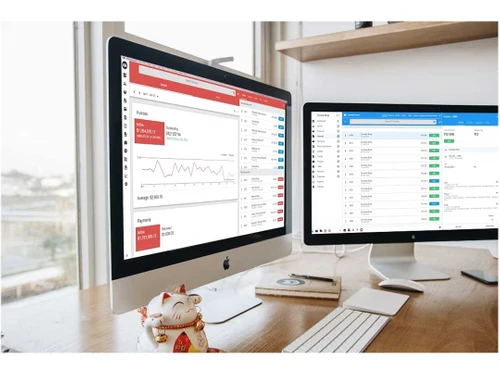
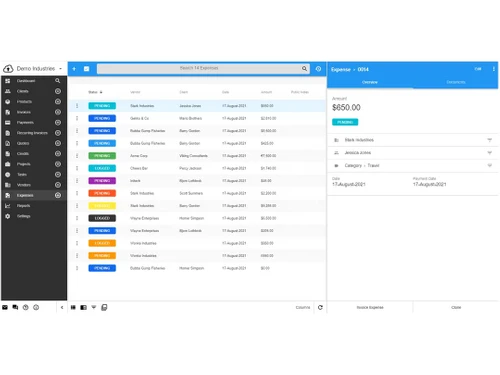
 Create & Email Invoices & Quotes in Real-Time Online Payment Gateways Dashboard Invoice Template Track Inventory Levels Recurring Invoicing & Auto-Billing Clients Client-Side Portal & Invoices/Payments History Accept Deposits & Partial Payments Projects, Tasks & Track Time Multi-currency Kanban Boards

Watch the demo video to explore key features, real workflows, and how the software fits your business needs.
 Ubuntu
  Windows
  iOS
iOS  Android MacOS
  Linux
Linux  Desktop
  Mobile
  Tablet
  iPad
iPad  Cloud-Based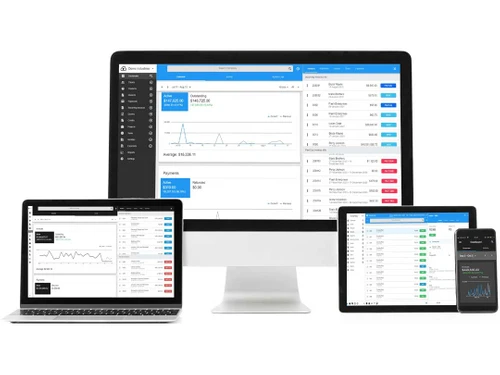
Small Business
Designed for startups and growing businesses
Medium Business
Built for business growth and flexibility
Enterprises
Designed for complex and large-scale business needs
4
Out of 5

Overall Rating
Based on
12 Verified Reviews
Rating Breakdown
85% Recommend this Product
Add ReviewInvoice Ninja is generally well-received by users, particularly for its affordability and flexibility, making it a popular choice among freelancers and small business owners. Users appreciate the extensive customization options and the ability to manage invoices efficiently, often highlighting the time-saving features. However, some users note that the complexity of advanced features can be challenging to navigate, and there are occasional concerns about the design and functionality of the Docker image. Overall, it serves as a reliable invoicing solution for various business sizes.
Pros
"Invoice Ninja is an open-source, and you can customize your PDFs and have a customer portal."
"Invoice Ninja is an open source, meaning I can host it myself and have full control. The fact that it's transparent and secure adds to the confidence I have in using it."
"As a developer, I like that Invoice Ninja is open source. This means I can host it myself and make any changes I need to suit my business."
Cons
"On the downside, Invoice Ninja has so many features that it can be difficult to understand."
"Sometimes the design can feel a bit outdated, but this was mostly fixed with the new version."
"However, there are some issues with the Docker image, which can be a bit buggy."



Jul 3, 2024
Techjockey Verified
“Invoice Ninja: Perfect for people like me who has limited budget”
Invoice Ninja is an excellent choice for freelancers who are just starting out. The free version is more than sufficient for basic invoicing needs, allowing you to send unlimited invoices without any cost.
Pros
As a freelancer, the best thing about Invoice Ninja is its affordability. The free version offers more than enough for my needs, and I can always upgrade if I need more features. Further, it provides the ability to send unlimited invoices without paying anything.
Cons
No cons
Reason to switch
I chose Invoice Ninja because it provided more flexibility and features in the free version.
Jun 18, 2024
Techjockey Verified
“A Powerful Invoicing Solution with Minor Flaws”
Invoice Ninja is a good invoicing solution that offers a high degree of customization.
Pros
Invoice Ninja has everything for my business. It’s great and lets you customize just about everything. From the invoice templates to the payment gateway integrations, it offers a level of customization that other tools don’t.
Cons
The main drawback is that setting up some of the more advanced features are difficult to understand.
Reason to switch
I needed a more customizable invoicing solution to better fit the needs of my business.
Aug 5, 2024
Techjockey Verified
“Helps in Managing Projects and Invoices with Ease”
This software is easy to integrate tasks and projects, and the reporting features help you stay on top of everything.
Pros
The way it integrates with tasks and projects is really smooth, and it’s easy to see where your time is going. It’s great for keeping everything organized in one place, and the reporting features are useful for keeping tabs on all your projects.
Cons
Great software, having a smooth experience.
Reason to switch
I switched to Invoice Ninja because I needed a tool that could handle both time tracking and project management in one place.

Invoice Ninja
Price On Request
Desktop
Mobile
Web based
On Premises
Windows
Mac OS

Vyapar Billing Software
Price On Request
Desktop
Mobile
Web based
On Premises
Windows
Mac OS
Raseed
Price On Request
Desktop
Mobile
Web based
On Premises
Windows
Mac OS
InvoiceZy
₹ 99
Desktop
Mobile
Web based
On Premises
Windows
Mac OS

KaroSauda
₹ 1999
Desktop
Mobile
Web based
On Premises
Windows
Mac OS

Billing Fast
₹ 3588
Desktop
Mobile
Web based
On Premises
Windows
Mac OS

Apna Billbook
₹ 6998
Desktop
Mobile
Web based
On Premises
Windows
Mac OS

Swipe - Billing Software
₹ 2796
Desktop
Mobile
Web based
On Premises
Windows
Mac OS

Petpooja Invoice
₹ 5000
Desktop
Mobile
Web based
On Premises
Windows
Mac OS

Billing Buddy
₹ 5000
Desktop
Mobile
Web based
On Premises
Windows
Mac OS

Asli Bill
₹ 7000
Desktop
Mobile
Web based
On Premises
Windows
Mac OS
(0) Product(s) selected


Invoice Ninja is primarily designed for freelancers and small to medium-sized businesses. However, its scalability and comprehensive feature set make it a viable option for larger businesses.
Yes, Invoice Ninja offers a free plan with basic features. For advanced features, you can upgrade to one of their paid plans.
Invoice Ninja uses industry-standard security measures to protect your data. These include data encryption, secure servers, and regular security audits.
Invoice Ninja supports integrations with various third-party apps, including accounting software, payment gateways, and CRM tools.
Yes, Invoice Ninja provides customer support via email and an extensive online knowledge base.
There is no native support for custom field validation for duplicates in InvoiceNinja. However, this type of validation for product entries can be added using scripts or the API.
0 0
To customize your invoice or quote design in InvoiceNinja, follow the steps given below:
0 1
To change which columns show in the different modules in InvoiceNinja, follow the steps given below:
0 0
To make the invoice always included as a PDF attachment in the email in InvoiceNinja, follow the steps given below:
0 0
To charge late fees or percentages for overdue invoices in InvoiceNinja, follow the steps given below:
0 0
20,000+ Software Listed
Best Price Guranteed
Free Expert Consultation
2M+ Happy Customers
Terms and Condtions

Users with registered businesses can purchase goods from merchants on the platform to satisfy their business needs. Users are not permitted to utilize any products acquired through the platform for resale, advertising, business, or further distribution.
For each purchase made, users will receive a Tax Invoice (or 'GST invoice') that includes specific details such as:
the GSTIN of the user associated with their registered business, and
the specified Entity Name for their business.
It should be noted that not all products are eligible for GST Invoice. Only the products displayed by participating sellers with the 'GST-based Invoice Available' callout on the product description page would qualify.
Certain goods and services are not eligible to get a GST Invoice, including items with VAS, i.e., Value Added Services (e.g., Total Mobile Protection/Assured Buyback) and those involving an exchange offer at the time of purchase.
Users must ensure the accuracy of the GSTIN, and business entity name provided for the GST Invoice. Requests for corrections into GST Invoice would not be accommodated by Techjockey.com or any Seller, and any issues arising from user-provided information are the sole responsibility of users.
Techjockey.com is not liable for the GST Invoice or any associated input tax credit. To efficiently claim an input tax credit, users should select the registered place of business address as per the GST authority's data and follow the provisions of the GST Act and rules.
To claim an input tax credit, the delivery and billing addresses must match. Furthermore, input tax credits will not be granted if the delivery address and GSTIN on the invoice are from different states. In case of incorrect GST details provided during the order placement, the order will be canceled automatically.