linkedin
Labra Automation Builder logo
play Automation Builder | Labra.io
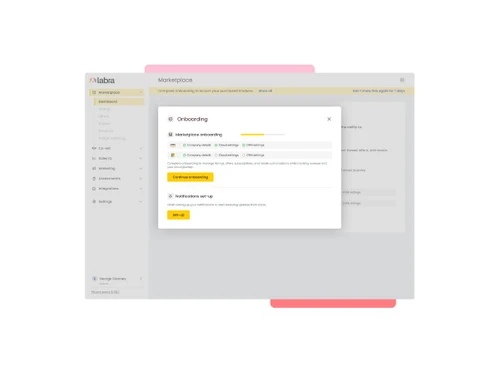
Labra pipeline management
Labra integrations

Labra Automation Builder

Brand: Labra

  • No Ratings & Reviews

Have you used Labra Automation Builder before?

Share your insights for better experience

Add a Review

Price Available on Request

Questions about pricing or customization? We’re here to help, just a click away.

100% Genuine
Products
Best Price
Guaranteed
Safe & Secure
Payment
  • Pricing

  • Features

  • Specification

  • Review

Labra Automation Builder Pricing & Plans

Looking for The Right Pricing?

Share your requirements and get a plan built around your business.

  • Define your business needs
  • Get customised pricing
  • Choose features that fit your workflow

Price Available on Request

Get personalised Labra Automation Builder pricing that fits your needs. Our team will connect with you.

Labra Automation Builder Features

Core Functionalities

  • icon_check Compliance Management
    Built-in data alignment checking for rigorous cloud marketplace and SOC 1 & SOC 2 security.
  • icon_check Contact Management
    Tracks stakeholder details and aligns buyer profiles directly within connected environments.
  • icon_check Templates
    Offers pre-configured mapping recipes to automate routine co-sell and marketplace workflows.
  • icon_check Automated Workflow Optimization
    Streamlines RevOps by cutting co-sell lifecycle times through autonomous data syncing.
  • icon_check User Access Management
    Restricts administrative workflows and configurations safely with SSO and OAuth 2.0.
  • icon_check Visual Editor
    Provides an intuitive, drag-and-drop builder canvas to configure recipes visually without code.
  • icon_check Custom Workflows
    Creates customized step recipes triggered by specified marketplace or co-sell actions.
  • icon_check Customer Journey Mapping
    Tracks the absolute complete lifecycle of cloud transactions from referral to disbursal.
  • icon_check A/B Testing
    Enables you to compare two versions of your page using the same URL making it easier for you to select the superior version.
  • icon_check Behavioral Targeting
    Delivers messages and advertisements based on the users' activity.
  • icon_check Behaviour Management
    A marketing technique that targets consumers with personalized content based on their past activity.
  • icon_check Cart Recovery Automation
    A tactic that sends automated messages to users who abandon their online shopping carts.
  • icon_check Content Marketing Automation
    Automate content creation, scheduling, and distribution to engage audiences across channels.
  • icon_check Dynamic Content
    Produces personalized campaigns as per users' interests, behavior, and preferences.
  • icon_check Landing Page / Web Forms
    Helps the user create attractive landing pages which further helps them attract new customers.
  • icon_check Loyalty Management
    Allows the users to strategize design patterns, manage, and analyze loyalty programs.
  • icon_check Progressive Profiling
    It collects the information from the user over time to create efficient consumer profiles.
  • icon_check SMS Marketing
    Facilitates the users with a strategy that uses text messages to engage customers and generate sales.
  • icon_check Social Media Automation
    Process via which content gets scheduled on social media in an automated manner.
  • icon_check Through Channel Marketing Automation (TCMA)
    Helps companies with automated marketing activities across various channels.

Campaign Management

  • icon_check Channel Management
    Automates Channel Partner Private Offers (CPPOs) to scale partner-led marketplace deals smoothly.
  • icon_check Omnichannel
    Schedules background activities and task prompts to follow up on cloud pipeline opportunities.
  • icon_check Performance Analytics
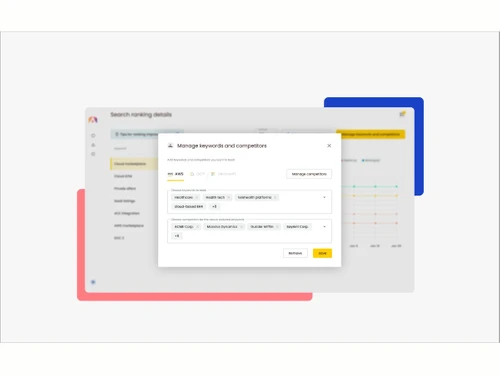
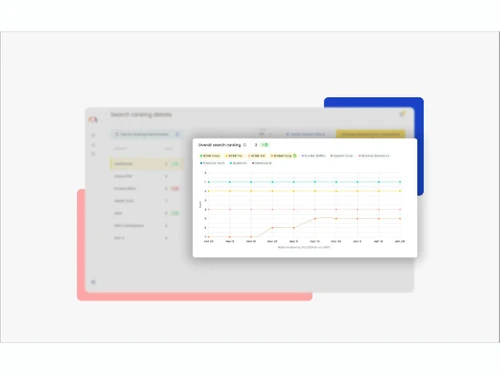
    Evaluates your overall Cloud GTM revenue outcome metrics and search ranking trends.
  • icon_check Multichannel
    Operates workflows simultaneously across AWS, Microsoft Azure, and Google Cloud networks.
  • icon_check Channel Optimization
    Elevates partner incentives and automates data synchronization across co-sell channels.
  • icon_check Data Driven Optimization
    Utilizes search ranking trends and buyer intent charts to refine marketplace strategies.
  • icon_check Campaign Optimization
    Improve conversion rates, enhance user engagement and increase ROI.
  • icon_check Conversion Rate Optimization (CRO)
    Boost conversions by automating A/B testing, user behavior analysis, and performance improvements.
  • icon_check Advertising Management
    Process that involves planning and executing campaigns to promote a product or service
  • icon_check Landing Page Optimization
    It assists the users with improving the design and layout of web pages and increases conversions.

Lead Management

  • icon_check Lead Scoring
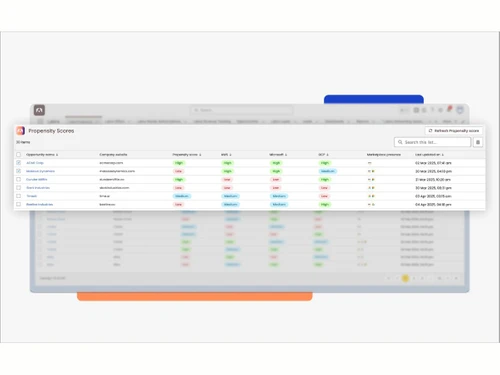
    Ranks prospective buyer accounts based on intent markers and cloud marketplace trends.
  • icon_check List Management
    Manages targeted databases of cloud co-sell contacts and active account targets.
  • icon_check Lead Generation
    Captures co-sell referrals from cloud providers and syncs them automatically into CRMs.
  • icon_check Lead Nurturing
    Schedules background activities and task prompts to follow up on cloud pipeline opportunities.
  • icon_check Lead Qualification
    Surfaces highly qualified pipeline opportunities through AI propensity-to-buy scores.
  • icon_check Leads Conversion
    Minimizes drop-offs and manual delay bottlenecks to accelerate closing speeds.
  • icon_check Segmentation
    Categorizes active enterprise accounts into distinct cloud co-investment target files.

Email Marketing

  • icon_check Auto - Responders
    Fires automated responses or multi-system updates immediately when cloud GTM events occur.
  • icon_check Behavioral Targeting
    Delivers messages and advertisements based on the users' activity.
  • icon_check Cart Recovery Automation
    A tactic that sends automated messages to users who abandon their online shopping carts.
  • icon_check Drip Campaigns
    Sends personalized promotional emails at predetermined intervals, as per the user's demographic
  • icon_check Email Optimization
    Segments your email in an optimal manner

WhatsApp Marketing

  • icon_check Auto - Responders
    Fires automated responses or multi-system updates immediately when cloud GTM events occur.
  • icon_check Segmentation
    Categorizes active enterprise accounts into distinct cloud co-investment target files.
  • icon_check Behavioral Targeting
    Delivers messages and advertisements based on the users' activity.
  • icon_check Cart Recovery Automation
    A tactic that sends automated messages to users who abandon their online shopping carts.
  • icon_check Drip Campaigns
    Sends personalized promotional emails at predetermined intervals, as per the user's demographic
  • icon_check Bulk Messaging
    Facilitating the user with the feature of sending a huge number of text messages on multiple channels and individuals in one go.

Integrations Supported

  • icon_check CRM Integration
    Syncs marketplace events and customer states natively inside Salesforce and HubSpot.
  • icon_check API Integration
    Provides robust, api-driven pathways to securely link with over 1,000 corporate software tools.
  • icon_check Third Party Integration
    Connects cloud marketplace triggers with over 1,000 platforms like QuickBooks or Slack.
  • icon_check Webhooks
    Evaluates incoming external events recognized through target custom API endpoint structures.
  • icon_check Barcode Integration
    Deliver clients prewritten messages depending on specified triggers.
  • icon_check Event Marketing
    Method via which particular behaviours or occurrences cause an automated reaction
  • icon_check Influencer Marketing
    It helps in building a partnership between influencers and brands that benefits both parties
  • icon_check Project Management
    With the help of AI, organizations can manage thier projects with utmost efficiency.

Analytics and Reporting

  • icon_check Predictive Analytics
    Employs AI-driven data intelligence to identify buyer intent signals and Propensity to Buy.
  • icon_check Dashboards
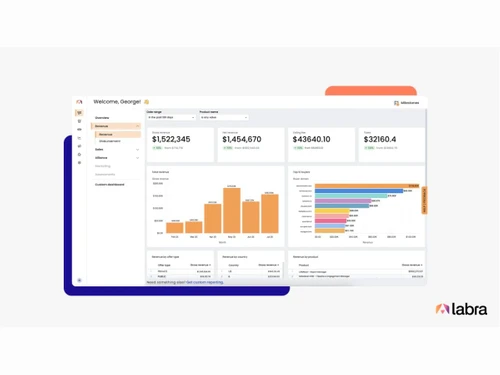
    Offers a dedicated visual console tracking running integration recipes and completed jobs.
  • icon_check Real-Time & Actionable Insights
    Delivers immediate pipeline metrics and real-time cross-cloud revenue summaries.
  • icon_check Live View
    Interactive visual Dependency Graph illustrating real-time connections across recipes.
  • icon_check PDF Report
    Renders structural revenue, contract, and metering logs into analytical report formats.
  • icon_check Heatmaps
    Helps marketers spectate their visitor's activity on their page.
  • icon_check Session Recording
    Records visitor's interaction with the platform (including mouse movement as well)
  • icon_check Visitor Tracking
    Users can analyze and track customer's activity over the platform.
  • icon_check Web Form Tracking
    Allows the user to track the activities of the users once they submit the form.

Alerts & Notifications

  • icon_check SMS Notification
    Triggers third-party text message pings to alerts staff when deals close or mutate.
  • icon_check Email Notifications
    Generates alerts automatically when contracts near expiration or private offers change.
  • icon_check Real-Time Alerts
    Dispatches instant alerts before funding opportunities lapse or errors occur in execution.
  • icon_check Desktop Notification
    Delivers system status and exception alerts directly onto active client workstation screens.
  • icon_check In-App Notifications
    Displays real-time task alerts and execution tracking updates directly inside the system portal.
  • icon_check Push Notifications
    A powerful tool that helps in converting clients to prominent customers

AI Capabilities

  • icon_check Predictive Analytics
    Employs AI-driven data intelligence to identify buyer intent signals and Propensity to Buy.
  • icon_check Customer Journey Mapping
    Tracks the absolute complete lifecycle of cloud transactions from referral to disbursal.
  • icon_check Generative AI
    Features purpose-built AI agents capable of answering conversational data queries instantly.
  • icon_check Smart Recommendations
    Automatically flags high-value accounts that qualify for specific cloud partner funding.
  • icon_check Subject Line Helper
    Assists the users with engaging email subjet lines
Labra Automation Builder Demo Video play icon

Get Labra Automation Builder Demo

Watch the demo video to explore key features, real workflows, and how the software fits your business needs.

Understand
Key Features
Personal
Demo Insights
Interactive
Demo Support

Labra Automation Builder Specifications

Supported Platforms
Windows Windows MacOS MacOS
Devices
Desktop Desktop
Deployment
Cloud-Based Cloud-Based
Suitable For
All Industries
Business Specific
All Businesses
Business Size
Small Business Medium Business Enterprises SMBs SMEs MSMBs MSMEs
Customer Support
Email Live Chat Forums
Language
English
Integration
API Integration
Training Resources
Live Online Documentation Videos

Labra Automation Builder Review

Be the First to Review

This product has no reviews yet. Be the first to leave your feedback.

Add Review

Articles for Labra Automation Builder

See All Related Articles

20,000+ Software Listed

Best Price Guranteed

Free Expert Consultation

2M+ Happy Customers

Terms and Condtions

close

Users with registered businesses can purchase goods from merchants on the platform to satisfy their business needs. Users are not permitted to utilize any products acquired through the platform for resale, advertising, business, or further distribution.

For each purchase made, users will receive a Tax Invoice (or 'GST invoice') that includes specific details such as:

  • the GSTIN of the user associated with their registered business, and

  • the specified Entity Name for their business.

It should be noted that not all products are eligible for GST Invoice. Only the products displayed by participating sellers with the 'GST-based Invoice Available' callout on the product description page would qualify.

Certain goods and services are not eligible to get a GST Invoice, including items with VAS, i.e., Value Added Services (e.g., Total Mobile Protection/Assured Buyback) and those involving an exchange offer at the time of purchase.

Users must ensure the accuracy of the GSTIN, and business entity name provided for the GST Invoice. Requests for corrections into GST Invoice would not be accommodated by Techjockey.com or any Seller, and any issues arising from user-provided information are the sole responsibility of users.

Techjockey.com is not liable for the GST Invoice or any associated input tax credit. To efficiently claim an input tax credit, users should select the registered place of business address as per the GST authority's data and follow the provisions of the GST Act and rules.

To claim an input tax credit, the delivery and billing addresses must match. Furthermore, input tax credits will not be granted if the delivery address and GSTIN on the invoice are from different states. In case of incorrect GST details provided during the order placement, the order will be canceled automatically.