linkedin
Make My Office logo
play Manage Employee demo
make my office
make my office

Make My Office

Brand: Makemyoffice

  • 4.3

  • 5 Ratings

Make My Office is an advanced payroll management system that features a friendly user interface with multiple graphical indications and popups. The payroll software makes it convenient for users to get a hold of their business processes. Whether their business is big or small, they are a service provider or manufacturer, Make My Office offers a paperless solution to make office management easier....

See More

Have you used Make My Office before?

Share your insights for better experience

Add a Review

Price Available on Request

Questions about pricing or customization? We’re here to help, just a click away.

100% Genuine
Products
Best Price
Guaranteed
Safe & Secure
Payment
  • Description

  • Pricing

  • Features

  • Specification

  • Review

  • Compare

  • Alternatives

  • FAQ

Make My Office Software Overview

What is Make My Office?

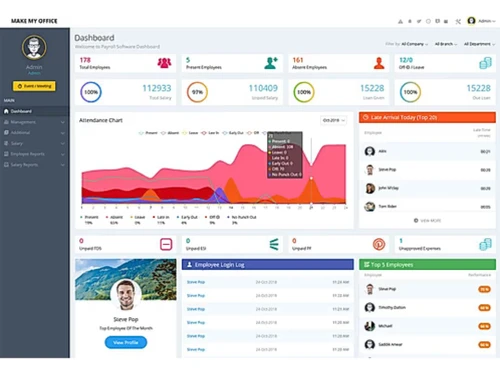
Make My Office is an advanced payroll management system that features a friendly user interface with multiple graphical indications and popups. The payroll software makes it convenient for users to get a hold of their business processes. Whether their business is big or small, they are a service provider or manufacturer, Make My Office offers a paperless solution to make office management easier. Most importantly, users can manage it all within a single software, from checking the daily performance of their employees to monitoring their current projects. It offers a timely analysis based on various business parameters. Further, users also get to categorize multiple screens as per their departments on the dashboard and check their progress.  

How does Make My Office help manage payroll related processes?

  1. Manual Payroll Processor: Users can review all payroll related data in a manual way with the help of Make My Office.
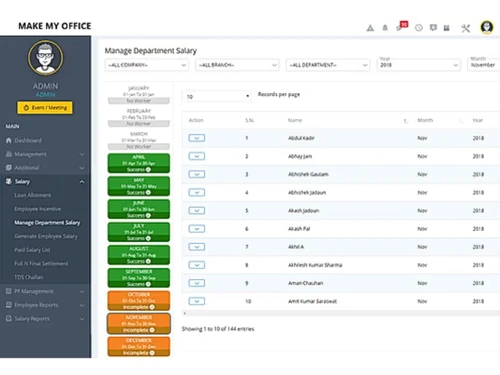
  2. Automatic Salary Calculator: With Make My Office, users can calculate their employee salaries in a meticulous manner along with all the statutory deductions including ESI, TDS, PF and PT. 
  3. Customizable Platform: Make My Office helps generate payroll statements and customize them as per their business needs, statutory regulations and industry norms.
  4. Email Notifications: Users can send payslips of individual employees via email in the form of downloadable PDF files.

Pricing of Make My Office Management System

Make My Office is available as per the following pricing plans:

  1. Free Window Software Package: Free
  2. Window Software Package: The plan is available at a price of ₹ 10,500 for a lifetime.
  3. Regular Package: The plan is available at a price of ₹ 1800 on a monthly basis.
  4. Premium Package: The plan is available at a price of ₹ 3000 on a monthly basis.

Compatible Platforms for Make My Office

Make My Office is a cloud-based office management system that can be accessed from any device as per its user’s needs and requirements.

What are the benefits of using Make My Office Management Software?

  1. Intuitive Asset Monitor: With Make My Office, users can keep track of their company-related assets in an accurate manner. It maintains a detailed list of all the fixed assets along with their present location. Thus, helping users to reclaim their assets when an employee resigns from their position.
  2. Dashboard: Users can design their dashboard as per their individual choices and company needs. They can create multiple categories and monitor them at regular intervals. 
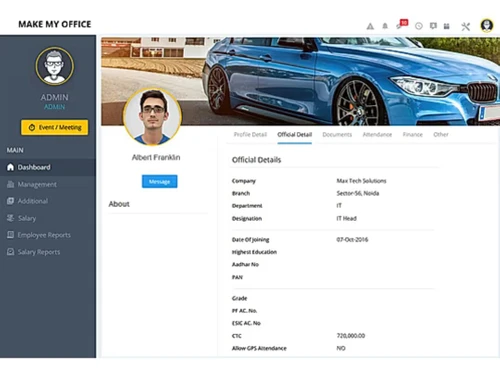
  3. Identity Manager: Users can collect all employee-related data (Aadhar and PAN) from the virtual environment and update them on their database in real-time. 
  4. Alerts and Reminders: Make My Office includes more than 30 employee events and message templates. It also allows users to send in customized messages to their employees along with a greeting card, wishing them on their birthdays or inviting them to any company-related events.
  5. Multiple Leave Types: Employees can apply for leaves across different categories including casual leaves, sick leaves, maternity and paternity leaves and more.
  6. Leave based Reports: By using Make My Office, managers can monitor and approve all leave reports in real-time. They get to view the leaves availed, leave encashment data and negative leave balance of individual employees.  
Read more

Make My Office Pricing & Plans

Looking for The Right Pricing?

Share your requirements and get a plan built around your business.

  • Define your business needs
  • Get customised pricing
  • Choose features that fit your workflow

Price Available on Request

Get personalised Make My Office pricing that fits your needs. Our team will connect with you.

Make My Office Features

  • icon_check Employee Information System
    Users can manage employee-related databases, fixed assets used by them and store every detail in the directory.
  • icon_check Employee Communication
    With Make My Office, you can ensure multi-level communication in your company in a hassle-free manner.
  • icon_check Time & Attendance Tracking
    Make My Office helps keep track of employee attendance in and sync the attendance data with payroll processes.
  • icon_check Biometric Intergration
    The software can be integrated with external biometric devices to track the login and logout time of employees on a daily basis.
  • icon_check Salary Calculations
    Calculate employee salaries with IT, LOP, arrears & statutory deductions using Make My Office payroll features.
  • icon_check Employee Data Base
    Collect, verify & organize employee info efficiently using the software’s employee database module.
  • icon_check Customer Support
    Users can resolve all software related problems in real-time by consulting the customer support team of Make My Office.
  • icon_check Custom HR Policy
    The software helps update and publish employee-related forms, handbooks, templates, company policies and more.
  • icon_check Employee Document
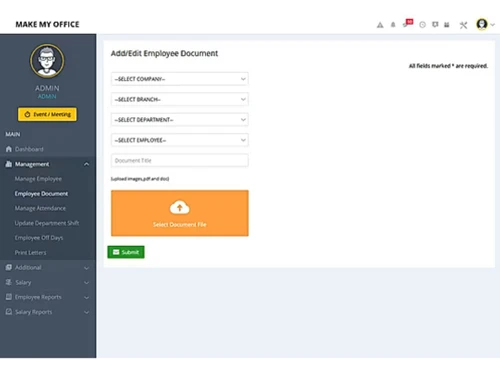
    Users get to manage all employee-related databases, store their documents as scanned or digital versions.   
Make My Office Demo Video play icon

Get Make My Office Demo

Watch the demo video to explore key features, real workflows, and how the software fits your business needs.

Understand
Key Features
Personal
Demo Insights
Interactive
Demo Support

Make My Office Specifications

Supported Platforms
Windows Windows
Devices
Desktop Desktop
Deployment
Cloud-Based Cloud-Based
Suitable For
All Industries
Business Specific
All Businesses
Business Size
Small Business Startups Medium Business SMBs
Customer Support
Phone Email
Language
English
Training Resources
Documentation Videos

Explore the Best Alternative Solutions Similar to Your Business Size and Needs

Make My Office Review

4.3

Out of 5

img

Overall Rating

Based on
5 Verified Ratings

Rating Breakdown

  • Features 4.6
  • Value for Money 4.2
  • Ease of Use 4
  • Customer Support 4.6

94% Recommend this Product

Add Review

Techjockey Trusted Reviews from Verified Users

No reviews are currently available for Make My Office. Discover similar Payroll Software reviews

  • Spine Payroll Software

    4.4

    Whats great - Pay Slip Employee Muster read more

  • UnboxPayroll

    4.9

    Whats great - Easy to use and understand. read more

  • Paysquare

    4.3

    Whats great - I’ve been very happy with Paysquare because it takes care of payroll in a reliable way. read more

Compare Make My Office With other Payroll Software

Products
Ratings
Pricing
Device Supported
Deployment
Supported Platforms
  • img

    Make My Office

  • 4.3

  • Price On Request

  • Desktop

    Mobile

  • Web based

    On Premises

  • Windows

    Mac OS

  • img

    PagarBook

  • 4.2

  • ₹ 499

  • Desktop

    Mobile

  • Web based

    On Premises

  • Windows

    Mac OS

  • img

    TankhaPay

  • 4.9

  • ₹ 40

  • Desktop

    Mobile

  • Web based

    On Premises

  • Windows

    Mac OS

  • img

    PayWise

  • 4.5

  • ₹ 300

  • Desktop

    Mobile

  • Web based

    On Premises

  • Windows

    Mac OS

  • img

    Zoho Payroll

  • 3.8

  • ₹ 1250

  • Desktop

    Mobile

  • Web based

    On Premises

  • Windows

    Mac OS

  • img

    ADP Vista

  • 4.2

  • Price On Request

  • Desktop

    Mobile

  • Web based

    On Premises

  • Windows

    Mac OS

  • img

    RazorpayX Payroll

  • 3.9

  • ₹ 29988

  • Desktop

    Mobile

  • Web based

    On Premises

  • Windows

    Mac OS

  • img

    QuickBooks Payroll

  • 4.2

  • Price On Request

  • Desktop

    Mobile

  • Web based

    On Premises

  • Windows

    Mac OS

  • img

    Papaya Global

  • 4.6

  • Price On Request

  • Desktop

    Mobile

  • Web based

    On Premises

  • Windows

    Mac OS

  • img

    UnboxPayroll

  • 4.8

  • ₹ 2000

  • Desktop

    Mobile

  • Web based

    On Premises

  • Windows

    Mac OS

  • img

    HivePayroll

  • 4.9

  • ₹ 1499

  • Desktop

    Mobile

  • Web based

    On Premises

  • Windows

    Mac OS

(2) Product(s) selected

Make My Office Alternatives

See All Make My Office Alternatives

Available

Price on Request

Available

Price on Request
Starting Price:

₹10 /Month

Warp

4.3

Starting Price:

$25 /Employee/Month

Articles for Make My Office

See All Related Articles

Can I manage complete employee work history with Make My Office?

Yes! You can manage complete employee work history including, employee-related transactions, work incident-based reports and promotions with the help of the software.

Can I manage employee shifts with Make My Office?

The software facilitates multiple shift management along with exception, rotation and weekend policies for individual employees in a detailed manner.

Can I get a demo of Make My Office?

Yes, Techjockey provides an online demo for Make My Office to help interested buyers make the right decision.

Does Make My Office help to calculate employee leaves?

The software keeps track of all leaves taken by the employees and updates their leave balances in an automatic manner.

Does Make My Office have a mobile app?

The software has a dedicated mobile app for Android devices.

20,000+ Software Listed

Best Price Guranteed

Free Expert Consultation

2M+ Happy Customers

Terms and Condtions

close

Users with registered businesses can purchase goods from merchants on the platform to satisfy their business needs. Users are not permitted to utilize any products acquired through the platform for resale, advertising, business, or further distribution.

For each purchase made, users will receive a Tax Invoice (or 'GST invoice') that includes specific details such as:

  • the GSTIN of the user associated with their registered business, and

  • the specified Entity Name for their business.

It should be noted that not all products are eligible for GST Invoice. Only the products displayed by participating sellers with the 'GST-based Invoice Available' callout on the product description page would qualify.

Certain goods and services are not eligible to get a GST Invoice, including items with VAS, i.e., Value Added Services (e.g., Total Mobile Protection/Assured Buyback) and those involving an exchange offer at the time of purchase.

Users must ensure the accuracy of the GSTIN, and business entity name provided for the GST Invoice. Requests for corrections into GST Invoice would not be accommodated by Techjockey.com or any Seller, and any issues arising from user-provided information are the sole responsibility of users.

Techjockey.com is not liable for the GST Invoice or any associated input tax credit. To efficiently claim an input tax credit, users should select the registered place of business address as per the GST authority's data and follow the provisions of the GST Act and rules.

To claim an input tax credit, the delivery and billing addresses must match. Furthermore, input tax credits will not be granted if the delivery address and GSTIN on the invoice are from different states. In case of incorrect GST details provided during the order placement, the order will be canceled automatically.