linkedin
Nostalgia Photo logo
Nostalgia Photo Resolution
Nostalgia Photo Restoration
Nostalgia Photo Enhanced

Nostalgia Photo

Brand: Nostalgia Photo

  • 4.2

  • 6 Ratings

Nostalgia Photos is a powerful and user-friendly photo editing software that caters to the growing demand for nostalgia and vintage-inspired imagery.

See More

Have you used Nostalgia Photo before?

Share your insights for better experience

Add a Review

Price Available on Request

Questions about pricing or customization? We’re here to help, just a click away.

100% Genuine
Products
Best Price
Guaranteed
Safe & Secure
Payment
  • Description

  • Pricing

  • Features

  • Specification

  • Review

  • Compare

  • Alternatives

  • FAQ

Nostalgia Photo Software Overview

What is Nostalgia Photo Software?

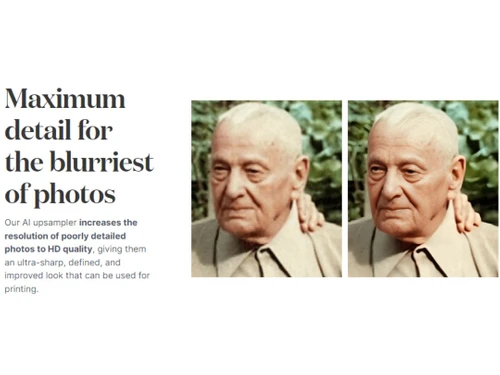
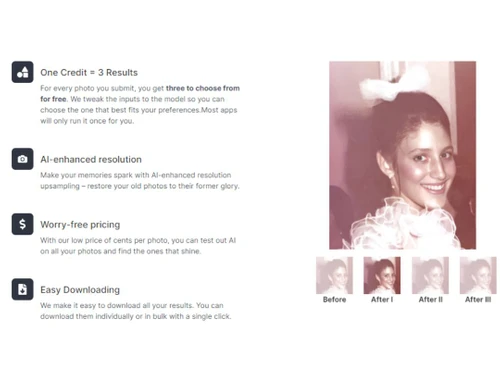
Nostalgia Photo is an AI photo editing software to restore old photos instantly. This software has tools that will remove dirt and dust and sharpen faded colours to look like new pictures. Save unlimited time and money for restoring old photos. In a few clicks, increase the resolution of photos, add ultra-sharp details, and download them in HD formats.

Nostalgia is an easy-to-use software for every editor or individual looking to restore old photos. Users can easily adjust photos' tone, colour, contrast and resolution to make old memories special. Nostalgia empowers old memories by enhancing the photos.

This software captures the essence of nostalgia and vintage aesthetics, allowing users to transform their modern digital images into timeless masterpieces reminiscent of the past.

One of the standout features of Nostalgia Photos is its extensive collection of filters and presets. These filters are designed to emulate analog film types, such as black and white, sepia, and faded colours, bringing back the charm and character of old photographs. Users can experiment with different combinations and adjustments to achieve the desired vintage effect, whether they are looking to recreate the look of classic Polaroids or the soft hues of old family albums.

The software also provides options for adding scratches, dust, and vignettes, replicating the imperfections commonly found in vintage photographs and adding an extra layer of authenticity.

Why Choose Nostalgia Photos System?

Nostalgia Photos is a popular photo editing software with a significant following among photography enthusiasts and professionals. Beyond filters, Nostalgia Photos offers a range of editing tools to further enhance and customize images. Users can adjust brightness, contrast, saturation, and other parameters to fine-tune their photos and create a nostalgic atmosphere. The software is designed to be intuitive and accessible, allowing beginners and experienced users to easily navigate its features. Its simple layout and straightforward editing tools make it a great choice for those who want to achieve stunning vintage effects without spending hours learning complex techniques. In addition to its editing capabilities, Nostalgia Photos also offers convenient sharing options. Users can directly export their edited images to social media platforms or save them in various file formats for printing and archiving.

Benefits of Nostalgia Photos Editing System

  • You can easily restore old photographs and preserve them.
  • The software will allow you to give a fresh loop to old photographs by sharpening faded colours.
  • The software will help in improving the quality of old photographs.?
  • With the feature to control the tonality of your pictures, you can easily get creative with restoring old photographs

Pricing of Nostalgia Photos Photo Editing Software

Nostalgia Photos editing software pricing is available on request at techjockey.com.

The overall pricing model is based on different factors such as personalization, extra features required, total users, and deployment type. Please feel free to request a call from our product experts if you want to learn more about our subscription plans or premium package deals.

Read more

Nostalgia Photo Pricing & Plans

Looking for The Right Pricing?

Share your requirements and get a plan built around your business.

  • Define your business needs
  • Get customised pricing
  • Choose features that fit your workflow

Price Available on Request

Get personalised Nostalgia Photo pricing that fits your needs. Our team will connect with you.

Nostalgia Photo Features

  • icon_check Image Library
    Restore old images and store them in a centralized repository to download them individually or in bulk.
  • icon_check Photo Editing
    Restore maximum details from old images and edit them with the required style and colours.
  • icon_check Photo Enhancement
    Enhance the quality, colours, and other details of the old photos using the cutting-edge AI solution.
  • icon_check AI Restoration
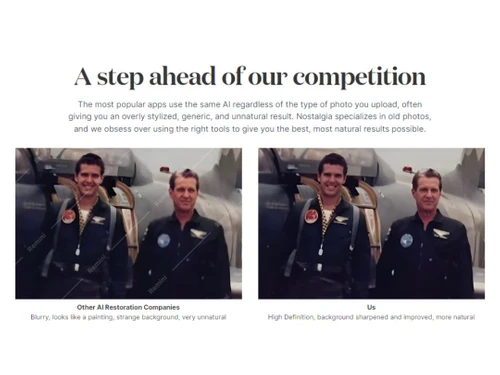
    Restore old images for their quality and colours and bring them back to their glory days using AI-restoration.
  • icon_check Background Sharpened
    Like no other AI-enhancement software, use Nostalgia to sharpen faded background colours easily.
  • icon_check Maximum Resolution
    Give the old images an improved look with high resolution by offering ultra-sharp and defined details for printing.
  • icon_check Image Resize
    The advanced AI image editor gives a precise solution to resize old images easily.
  • icon_check AI Upsampler
    The AI upsampler of Nostalgia photo adds details by increasing the resolution and turning them into HD.
  • icon_check High Definition
    The Upsampler works on the old images and increases resolution and turns the old images into High definition.
  • icon_check Photo Restoration
    Restores old and damaged photos by improving clarity, repairing imperfections, and recovering missing visual details.
  • icon_check Color Enhancements
    Improves existing colors and contrast to make photographs appear more vivid while maintaining a natural look.
  • icon_check Noise Reduction
    Removes unwanted grain and digital noise from photographs while preserving important image details.
  • icon_check Background Enhancement
    Improves distracting or degraded background areas while keeping the main subject visually prominent.

Nostalgia Photo Specifications

Supported Platforms
Ubuntu Ubuntu Windows Windows MacOS MacOS Linux Linux
Devices
Desktop Desktop Mobile Mobile Tablet Tablet iPad iPad
Deployment
Cloud-Based Cloud-Based
Suitable For
All Industries
Business Specific
All Businesses
Business Size
Small Business Startups Medium Business Enterprises
Customer Support
Email Communities
Language
English
Training Resources
Videos
AI Features
AI Integrated

Explore the Best Alternative Solutions Similar to Your Business Size and Needs

Nostalgia Photo Review

4.2

Out of 5

img

Overall Rating

Based on
6 Verified Ratings

Rating Breakdown

  • Features 4.1
  • Value for Money 4.3
  • Ease of Use 4.5
  • Customer Support 4

86% Recommend this Product

Add Review

Techjockey Trusted Reviews from Verified Users

No reviews are currently available for Nostalgia Photo. Discover similar Photo Editing Software reviews

  • Canva

    4.3

    Whats great - I enjoy how quickly and simply one can choose the template and begin tweaking. read more

  • Adobe Photoshop

    4.6

    Whats great - What I love most about Adobe Photoshop is its amazing editing capabilities. It's versatile, not just for photos but also for ... read more

  • Luminar Neo

    4.9

    Whats great - The interface is clean and easy to get around, so I’m not wasting time looking for tools. Sky AI, Relight AI, and portrait to... read more

Compare Nostalgia Photo With other Photo Editing Software

Products
Ratings
Pricing
Device Supported
Deployment
Supported Platforms
  • img

    Nostalgia Photo

  • 4.2

  • Price On Request

  • Desktop

    Mobile

  • Web based

    On Premises

  • Windows

    Mac OS

  • img

    Adobe Photoshop

  • 4.5

  • Price On Request

  • Desktop

    Mobile

  • Web based

    On Premises

  • Windows

    Mac OS

  • img

    Karizma Album

  • 4.4

  • ₹ 3500

  • Desktop

    Mobile

  • Web based

    On Premises

  • Windows

    Mac OS

  • img

    Affinity Photo

  • 4.2

  • ₹ 619

  • Desktop

    Mobile

  • Web based

    On Premises

  • Windows

    Mac OS

  • img

    Luminar Neo

  • 4.7

  • ₹ 4999

  • Desktop

    Mobile

  • Web based

    On Premises

  • Windows

    Mac OS

  • img

    darktable

  • 4.0

  • Price On Request

  • Desktop

    Mobile

  • Web based

    On Premises

  • Windows

    Mac OS

  • img

    Cutout Pro

  • 4.8

  • ₹ 247

  • Desktop

    Mobile

  • Web based

    On Premises

  • Windows

    Mac OS

  • img

    Lensa AI

  • 4.1

  • Price On Request

  • Desktop

    Mobile

  • Web based

    On Premises

  • Windows

    Mac OS

  • img

    AfterShot Pro 3

  • 4.5

  • ₹ 5966

  • Desktop

    Mobile

  • Web based

    On Premises

  • Windows

    Mac OS

  • img

    Evoto AI

  • 4.6

  • Price On Request

  • Desktop

    Mobile

  • Web based

    On Premises

  • Windows

    Mac OS

(0) Product(s) selected

Nostalgia Photo Alternatives

See All Nostalgia Photo Alternatives

Available

Price on Request

Starting Price:

$36 /Year

Starting Price:

$80 /year

Starting Price:

$35 /Lifetime

Starting Price:

$10 /Month

Starting Price:

$8 /Month

Starting Price:

$15 /Month

Starting Price:

$810 /Year
Articles for Nostalgia Photo

See All Related Articles

Which operating system does the Nostalgia Photos Software Support?

Nostalgia Photo software is compatible with Windows operating systems.

Is there any Nostalgia Photo app?

Nostalgia Photo app is not available on Android and iOS devices.

What is the deployment type of the Nostalgia Photos System?

Nostalgia Photos system supports web-based deployment.

How much does the Nostalgia Photo Editing Software cost?

Nostalgia photo editing software pricing is available on request at techjockey.com.

Who are the potential users of the Nostalgia Photo Editing System?

Nostalgia Photo Editing system can be used by animators, photo editors and graphic designers. And individuals who need photo editing software.

Is there any free trial or demo for Nostalgia Photos?

Nostalgia Photos demo is available for free with techjockey.com.

Is the Nostalgia Photo Editing software free?

Nostalgia Photo Editing Software does not offer any free trial.

How can you download the Nostalgia Photo Editing System?

Nostalgia Photo editing system is a web-based platform. So, you need not download any software or app to use it.

How does the Nostalgia Photo Editing Platform work?

Nostalgia Photos software provides a user-friendly platform for video creators. It offers easy downloading, AI-enhanced resolutions, automated effects, and filters to enhance the user experience.

20,000+ Software Listed

Best Price Guranteed

Free Expert Consultation

2M+ Happy Customers

Terms and Condtions

close

Users with registered businesses can purchase goods from merchants on the platform to satisfy their business needs. Users are not permitted to utilize any products acquired through the platform for resale, advertising, business, or further distribution.

For each purchase made, users will receive a Tax Invoice (or 'GST invoice') that includes specific details such as:

  • the GSTIN of the user associated with their registered business, and

  • the specified Entity Name for their business.

It should be noted that not all products are eligible for GST Invoice. Only the products displayed by participating sellers with the 'GST-based Invoice Available' callout on the product description page would qualify.

Certain goods and services are not eligible to get a GST Invoice, including items with VAS, i.e., Value Added Services (e.g., Total Mobile Protection/Assured Buyback) and those involving an exchange offer at the time of purchase.

Users must ensure the accuracy of the GSTIN, and business entity name provided for the GST Invoice. Requests for corrections into GST Invoice would not be accommodated by Techjockey.com or any Seller, and any issues arising from user-provided information are the sole responsibility of users.

Techjockey.com is not liable for the GST Invoice or any associated input tax credit. To efficiently claim an input tax credit, users should select the registered place of business address as per the GST authority's data and follow the provisions of the GST Act and rules.

To claim an input tax credit, the delivery and billing addresses must match. Furthermore, input tax credits will not be granted if the delivery address and GSTIN on the invoice are from different states. In case of incorrect GST details provided during the order placement, the order will be canceled automatically.