linkedin
Ozonetel Cloudagent Lite logo
play Ozonetel`s Cloudagent App
Ozonetel Cloudagent Lite
Ozonetel Cloudagent calls

Ozonetel Cloudagent Lite

Brand: Ozonetel Systems

  • 4.2

  • 5 Ratings

What is Ozonetel Cloudagent Lite Ozonetel Cloudagent Lite is a cloud-based phone service solution provider that is predominantly used by SMEs. It is completely cost-effective and requires zero rental, which means that you get to enjoy full talktime value. The software allows users to integrate with ...

See More

Have you used Ozonetel Cloudagent Lite before?

Share your insights for better experience

Add a Review

Price Available on Request

Questions about pricing or customization? We’re here to help, just a click away.

100% Genuine
Products
Best Price
Guaranteed
Safe & Secure
Payment
  • Description

  • Pricing

  • Features

  • Specification

  • Review

  • Compare

  • Alternatives

  • FAQ

Ozonetel Cloudagent Lite Software Overview

What is Ozonetel Cloudagent Lite

Ozonetel Cloudagent Lite is a cloud-based phone service solution provider that is predominantly used by SMEs. It is completely cost-effective and requires zero rental, which means that you get to enjoy full talktime value. The software allows users to integrate with SMS and Email - the two most used tools for following up on calls. You can instantly organize your customer calls according to your business needs by using Ozonetel Cloudagent Lite PBX solution.

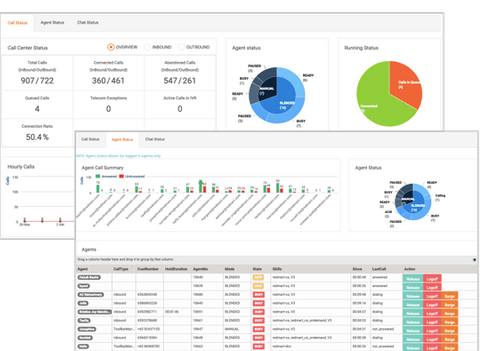
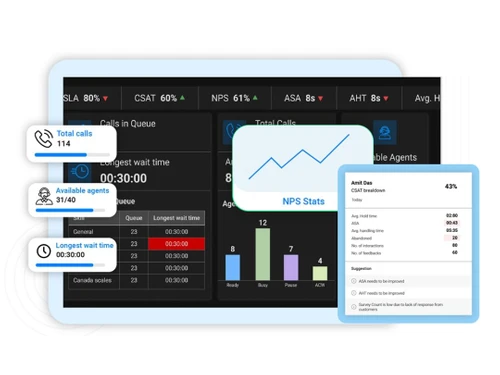
This IVR software is able to track and log every call for future references, store call recordings systematically and scale up or scale down operations easily as per your business needs. The software helps in optimizing the performance of your sales team, hence boosting customer satisfaction rates and the overall sales. Additionally, you can improve your performance by monitoring over 40 insightful analytics reports of agents’ call handling approaches.

How does Ozonetel Cloudagent Lite work?

Ozonetel Cloudagent Lite requires zero fixed costs and does not need any hardware or software. You can get started with it in a matter of minutes through the following steps:

  1. Choosing Your Phone Number: Users get the option to choose from a set of toll-free numbers present in the software or may opt for local phone numbers. You can also use an existing phone number for the purpose.
  2. Setup IVR: Next, the users can log in simply and set up their IVR within minutes. Henceforth, they can add a menu to route calls to the right callers and the right departments.
  3. Kickstart: Finally, users can answer the calls of their customers on mobile devices and login to Ozonetel Cloudagent Lite to view call reports and recordings, and analyze them accordingly.

Pricing of Ozonetel Cloudagent Lite

The pricing of Ozonetel Cloudagent Lite is exclusively available on the request of customers. You are requested to get in touch with our sales team through the “request a callback” option on our website. 

How can users grab more business opportunities by using Ozonetel Cloudagent Lite?

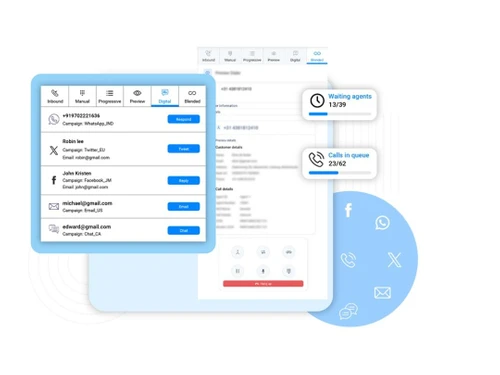
Ozonetel Cloudagent Lite comes equipped with readymade solutions that offer cost-effective calling solutions. With this IVR software solution, customers can connect with agents even if they are not at their desks. The software makes a queue for the customers if the lines are busy so that everyone gets a chance to speak to the customer support team. Since every call is logged, you can see the ones that got disconnected in the queue and get back to them accordingly. Using Ozonetel Cloudagent Lite, one can also get SMS alerts for the calls that remain unanswered.

Compatibility of Ozonetel Cloudagent Lite

Ozonetel Cloudagent Lite has both desktop as well as mobile versions. It runs exclusively on Windows desktops.

Read more

Ozonetel Systems Company Details

Founded Year:  2007

Ozonetel Systems is a pioneer and a leading provider of on-demand cloud communication services in India.

Director/Founders Atul Sharma, C Chaitanya, Murthy Chintalapati
Company Size 1-100 Employees

Ozonetel Cloudagent Lite Pricing & Plans

Looking for The Right Pricing?

Share your requirements and get a plan built around your business.

  • Define your business needs
  • Get customised pricing
  • Choose features that fit your workflow

Price Available on Request

Get personalised Ozonetel Cloudagent Lite pricing that fits your needs. Our team will connect with you.

Ozonetel Cloudagent Lite Features

  • icon_check CRM Integration
    The software provides integration with Zoho, Zendesk, Salesforce, and others, for smooth business functionalities and reduction
  • icon_check Banquet and conference Management
    Users can access advanced call controls such as mute or conference through Ozonetel. It also provides a call queuing feature for
  • icon_check Contact Management
    You can manage SLAs better by monitoring the call queues of customers in real-time, which ensures that you don’t miss out on
  • icon_check Internal Call Transfer
    The software has a special feature of Warm Transfer that is used to route calls to the supervisor or the appropriate department
  • icon_check Call Recording
    Users can easily record calls for future purposes and track call recordings to train the agents and monitor their performances.
  • icon_check Call Center Management
    Ozonetel uses AI-based speech analytics to extract information and gauge performances of agents in real-time. This helps in an
  • icon_check Outbound Reporting
    Ozonetel provides a robust and flexible outbound solution that helps in improving agents’ productivity and automating the tasks
  • icon_check IVR and Dial Groups
    This feature of the software helps collect feedback from employees, connect callers to the right agents for both inbound and
  • icon_check Lead Management
    Since the software comes equipped with a call queuing feature, it makes sure that you don’t miss out any call(s), which are
  • icon_check Call Routing
    Ozonetel Cloudagent Lite uses the Automatic Call Distribution Logic to perform call routing. This helps in the automatic routing
  • icon_check API Integration
    The open APIs of Ozonetel support integration with custom systems and self-service configuration.
  • icon_check Inbound Reporting
    This feature of the software helps in generating agent productivity reports, and depicting average talk times, first call
  • icon_check Outgoing Call Tracking
    The outgoing call tracking tool of Ozonetel Cloudagent Lite is essentially useful in calling prospective leads and recording the
Ozonetel Cloudagent Lite Demo Video play icon

Get Ozonetel Cloudagent Lite Demo

Watch the demo video to explore key features, real workflows, and how the software fits your business needs.

Understand
Key Features
Personal
Demo Insights
Interactive
Demo Support

Ozonetel Cloudagent Lite Specifications

Supported Platforms
Windows Windows iOS iOS Android Android
Devices
Desktop Desktop Mobile Mobile
Deployment
Cloud-Based Cloud-Based
Suitable For
Education Hospitality Retail Logistics E-Commerce Tours and Travels Finance Banking
Business Specific
All Businesses
Language
English
AI Features
AI Integrated

Explore the Best Alternative Solutions Similar to Your Business Size and Needs

Small Business

Designed for startups and growing businesses

VAANI

4.7

Alohaa

4.7

See More

Ozonetel Cloudagent Lite Review

4.2

Out of 5

img

Overall Rating

Based on
5 Verified Ratings

Rating Breakdown

  • Features 4.5
  • Value for Money 4.3
  • Ease of Use 4.2
  • Customer Support 4

94% Recommend this Product

Add Review

Techjockey Trusted Reviews from Verified Users

No reviews are currently available for Ozonetel Cloudagent Lite. Discover similar Cloud Telephony Solutions reviews

  • Office24By7

    5.0

    Whats great - It has in-built cloud telephony, which can be used to conduct voice, SMS, email campaigns, etc. I don't think any other CRM o... read more

  • VAANI

    4.8

    Whats great - VAANI offers features like predictive dialing, automatic call distribution, call recording, real-time analytics, and reportin... read more

  • Knowlarity

    4.3

    Whats great - Simple integration with other software and a fast response whenever additional response team working to resolve problems. read more

Compare Ozonetel Cloudagent Lite With other Cloud Telephony Solutions

Products
Ratings
Pricing
Device Supported
Deployment
Supported Platforms
  • img

    Ozonetel Cloudagent Lite

  • 4.2

  • Price On Request

  • Desktop

    Mobile

  • Web based

    On Premises

  • Windows

    Mac OS

  • img

    Knowlarity

  • 4.3

  • ₹ 1999

  • Desktop

    Mobile

  • Web based

    On Premises

  • Windows

    Mac OS

  • img

    Alohaa

  • 4.7

  • Price On Request

  • Desktop

    Mobile

  • Web based

    On Premises

  • Windows

    Mac OS

  • img

    VAANI

  • 4.7

  • ₹ 2220

  • Desktop

    Mobile

  • Web based

    On Premises

  • Windows

    Mac OS

  • img

    KrispCall

  • 4.4

  • Price On Request

  • Desktop

    Mobile

  • Web based

    On Premises

  • Windows

    Mac OS

  • img

    Mcube

  • 4.4

  • Price On Request

  • Desktop

    Mobile

  • Web based

    On Premises

  • Windows

    Mac OS

  • img

    Office24By7

  • 4.9

  • ₹ 1400

  • Desktop

    Mobile

  • Web based

    On Premises

  • Windows

    Mac OS

  • img

    Zoho Voice

  • 4.3

  • Price On Request

  • Desktop

    Mobile

  • Web based

    On Premises

  • Windows

    Mac OS

  • img

    Fonada

  • 4.2

  • Price On Request

  • Desktop

    Mobile

  • Web based

    On Premises

  • Windows

    Mac OS

  • img

    Zeotel

  • 4.3

  • ₹ 9999

  • Desktop

    Mobile

  • Web based

    On Premises

  • Windows

    Mac OS

(0) Product(s) selected

Ozonetel Cloudagent Lite Alternatives

See All Ozonetel Cloudagent Lite Alternatives

Starting Price:

$15 /Month

Starting Price:

$19 /Monthly

Starting Price:

$18

Available

Price on Request

Articles for Ozonetel Cloudagent Lite

See All Related Articles

What is the functionality of virtual receptionist feature in Ozonetel Cloudagent Lite?

This feature is used by call centre agents to greet customers and offer them menus, such as “Dial 1 for Sales”, etc.

What purpose do live monitoring tools serve in Ozonetel Cloudagent Lite?

The live monitoring tools present in Ozonetel Cloudagent Lite hels in the management of call queues and tracking of agent performances in real-time.

How can I monitor calls using Ozonetel Cloudagent Lite?

You can use pre-built insightful reports and live monitoring dashboards to ensure comprehensive call monitoring.

Is there a mobile app for Ozonetel Cloudagent Lite?

You can use the Ozonotel mobile app that is readily available to work from home uninterruptedly.

Can I get a live demo of Ozonetel Cloudagent Lite?

Yes, Techjockey provides live demo of Ozonetel Cloudagent Lite as per your chosen date and time.

20,000+ Software Listed

Best Price Guranteed

Free Expert Consultation

2M+ Happy Customers

Terms and Condtions

close

Users with registered businesses can purchase goods from merchants on the platform to satisfy their business needs. Users are not permitted to utilize any products acquired through the platform for resale, advertising, business, or further distribution.

For each purchase made, users will receive a Tax Invoice (or 'GST invoice') that includes specific details such as:

  • the GSTIN of the user associated with their registered business, and

  • the specified Entity Name for their business.

It should be noted that not all products are eligible for GST Invoice. Only the products displayed by participating sellers with the 'GST-based Invoice Available' callout on the product description page would qualify.

Certain goods and services are not eligible to get a GST Invoice, including items with VAS, i.e., Value Added Services (e.g., Total Mobile Protection/Assured Buyback) and those involving an exchange offer at the time of purchase.

Users must ensure the accuracy of the GSTIN, and business entity name provided for the GST Invoice. Requests for corrections into GST Invoice would not be accommodated by Techjockey.com or any Seller, and any issues arising from user-provided information are the sole responsibility of users.

Techjockey.com is not liable for the GST Invoice or any associated input tax credit. To efficiently claim an input tax credit, users should select the registered place of business address as per the GST authority's data and follow the provisions of the GST Act and rules.

To claim an input tax credit, the delivery and billing addresses must match. Furthermore, input tax credits will not be granted if the delivery address and GSTIN on the invoice are from different states. In case of incorrect GST details provided during the order placement, the order will be canceled automatically.