 USA
USA UAE
UAESmall Business
Designed for startups and growing businesses


See More





Brand: Paytabs
Boost your business with PayTabs Payment Gateway's simple and secure payment solutions, offering features like real-time onboarding, various payment methods, and powerful analytics.
See MoreHave you used Paytabs before?
Share your insights for better experience
Brand: Paytabs
Founded Year: 2014
PayTabs is an online, mobile, social & next generation payment processing powerhouse for merchants & super merchants to grow their business.
Looking for The Right Pricing?
Share your requirements and get a plan built around your business.
Price Available on Request
Get personalised Paytabs pricing that fits your needs. Our team will connect with you.
Core Functionalities
 Multi Currency Support Pre-onboarding Assistance Branding & Customization Currency Conversion Payment Links Split Payments Dedicated Account Manager Coupons and Offers Engine Mobile Responsiveness Dedicated POS Guest Checkout Multi-Language Checkout Store Creation Landing Page Creation Instant Settlements Automated Reconciliation Loyalty Management
 Payment Methods
QR Code Based Payments Digital Wallet Debit / Credit Cards Buy Now, Pay Later (BNPL) UPI Net Banking Cardless EMI Cryptocurrency ACH Payments Subscription Management
Reccuring Payments Proration Dunning Administrative Features
Invoice Generation Reporting & Analytics User Access Management Merchant Portal Tax Management Security Features
Risk Management PCI DSS Compliance Tokenization Two-Factor Authentication (2FA) Fraud Detection & Prevention Multi-Factor Authentication (MFA) Automatic Device Recognition Integrations Supported
API Integration Third Party Integration E-Commerce Integration SDK Integration CRM Integration Order Management POS Integration Alerts & Notifications
Transaction Notifications Security Alerts Downtime Alerts Discrepancy Alerts Custom Event Notifications 

Watch the demo video to explore key features, real workflows, and how the software fits your business needs.
 Ubuntu
  Windows
  iOS
iOS  Android MacOS
  Linux
Linux  Desktop
  Mobile
  Tablet
  Cloud-Based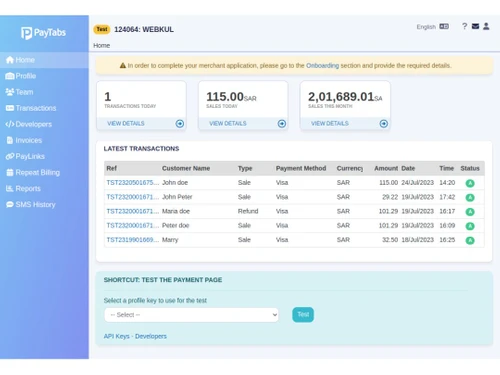
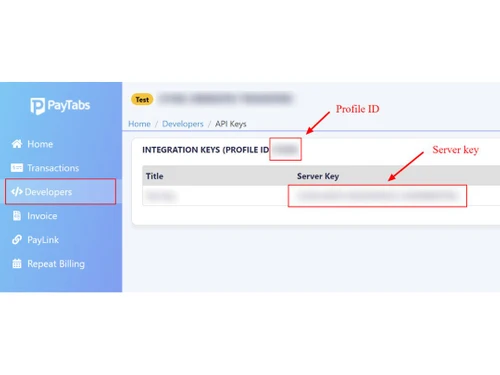
3.4
Out of 5

Overall Rating
Based on
10 Verified Reviews
Rating Breakdown
84% Recommend this Product
Add ReviewCustomers generally find PayTabs to be a reliable and secure payment processing solution, particularly for international transactions, with many appreciating its integration capabilities and variety of payment options. However, a common concern is the challenging initial setup and a steep learning curve, which can be frustrating for less tech-savvy users. Additionally, customer support has been frequently criticized for slow response times and unclear guidance, which detracts from the overall user experience.

Sep 2, 2024
Techjockey Verified
“Switching to PayTabs Has Made Handling Online Payments Easier for My Small Business”
PayTabs has helped my business by offering a simple way to handle online payments from multiple countries. It integrates with my website without much hassle, and the dashboard is straightforward enough for tracking transactions. Although there are fees involved, I find the overall service to be reliable.
Pros
One of the things I liked the most about PayTabs is how smoothly it integrated with my online store. It accepts a variety of payment methods, which is perfect because my customers come from different countries. The transaction speed is decent, and I find it convenient that I can track all payments in real-time. I also appreciate the customer support team, as they respond quickly when I have questions.
Cons
A drawback I noticed is that the fee structure isn’t the clearest. While it works well, I had to dig around to understand what charges applied to different payment methods.
Reason to switch
I made the switch because PayTabs offered better support for local and international payments specific to my region, which Stripe couldn’t match as easily. It was essential for me to have a service that caters to a global audience, especially for my international customers.
Aug 4, 2024
Techjockey Verified
“PayTabs: A Secure Choice for Global Payments, But Support Needs Improvement”
Overall, PayTabs has proven to be a reliable payment solution for my business needs. Once past the initial setup challenges, it’s been smooth sailing, and I appreciate the flexibility it offers in handling payments globally. If you prioritize security and can navigate through initial setup hurdles, PayTabs is worth considering for your business.
Pros
PayTabs has been instrumental in streamlining my payment processes. It supports multiple currencies and payment methods, catering well to my international customer base. Security features are robust, giving me peace of mind with every transaction. The fees are competitive, and the platform integrates seamlessly with my e-commerce site, enhancing user experience.
Cons
The downside has been the customer support experience. Responses are slow, and the support team doesn’t always provide clear solutions. This can be frustrating when dealing with urgent issues or complex setups. Additionally, while the platform is feature-rich, navigating through all its capabilities can be overwhelming at first.
Reason to switch
I opted for PayTabs to have better control over international payments and to benefit from its robust security features, which were lacking with Shopify Payments.
Jul 23, 2024
Techjockey Verified
“PayTabs: Reliable Payment Processing with a Learning Curve”
Despite the learning curve, PayTabs has become an invaluable asset for managing online payments in my business. It’s reliable, secure, and supports international transactions seamlessly. If you’re willing to invest time in setup and occasional self-learning, PayTabs is a solid choice for expanding your payment capabilities.
Pros
PayTabs has been crucial for my business, allowing me to accept payments globally with ease. The platform supports various payment methods, making it convenient for customers worldwide. Security is robust, ensuring safe transactions, and integration into my website was straightforward once I got the hang of it. The customer dashboard is intuitive, offering insights into sales and transactions.
Cons
The initial setup was challenging, requiring time to understand and configure. As someone not very tech-savvy, I struggled with some features and had to rely heavily on support resources. Speaking of which, customer support responses were slow, sometimes taking a couple of days to get a resolution.
Reason to switch
I switched to PayTabs because I needed a more versatile payment processor that could handle international transactions more effectively than Square.

Paytabs
Price On Request
Desktop
Mobile
Web based
On Premises
Windows
Mac OS

airpay
Price On Request
Desktop
Mobile
Web based
On Premises
Windows
Mac OS
Touras
Price On Request
Desktop
Mobile
Web based
On Premises
Windows
Mac OS

UnPay
Price On Request
Desktop
Mobile
Web based
On Premises
Windows
Mac OS

Razorpay
Price On Request
Desktop
Mobile
Web based
On Premises
Windows
Mac OS

Cashfree
Price On Request
Desktop
Mobile
Web based
On Premises
Windows
Mac OS

Paytm for Business
Price On Request
Desktop
Mobile
Web based
On Premises
Windows
Mac OS

PayU
Price On Request
Desktop
Mobile
Web based
On Premises
Windows
Mac OS

Verifone
Price On Request
Desktop
Mobile
Web based
On Premises
Windows
Mac OS

PayDollar
₹ 10000
Desktop
Mobile
Web based
On Premises
Windows
Mac OS

Worldline
Price On Request
Desktop
Mobile
Web based
On Premises
Windows
Mac OS
(0) Product(s) selected
Available
Price on Request
Available
Price on Request
Available
Price on Request
Available
Price on Request
Available
Price on Request

Available
Price on Request

Starting Price:
$25 /Month

Available
Price on Request

Available
Price on Request

Available
Price on Request
PayTabs supports credit cards, debit cards, digital wallets, and more.
Yes, PayTabs supports multiple currencies, allowing you to accept payments from customers worldwide.
Yes, you can set up automatic recurring payments for subscription services with PayTabs.
PayTabs can be accessed from both your website and mobile devices.
PayTabs offers competitive pricing plans. For detailed pricing information, visit the PayTabs website.
Yes, you can process refunds quickly and easily through the PayTabs dashboard.
PayTabs does not charge any setup fee. You only pay for the transactions you process.
Usually, the documents that are required to apply for a PayTabs account are a government-issued ID, proof of address, bank account details, and a commercial registration certificate (depending on your business structure). Depending on your region, additional KYC documents such as a tax card or MOA may also be required.
0 0
To start accepting credit cards on your website with PayTabs, follow the steps given below:
0 0
An electronic method of moving funds between bank accounts is called wire transfer. PayTabs provides round-the-clock real-time payments and money transfers, including quick bank account transfers.
0 0
You can accept a variety of debit and credit cards in Paytabs like American Express, Mastercard, Visa, RuPay, JCB, UnionPay depending on the region and specific payment methods supported in your area.
0 0
The PayTabs PT2 API documentation contains a full set of payment resource codes and methods. This covers all accepted payment options, including PayPal, Apple Pay, AMEX, Mada, credit cards, and more. You can get these details by visiting the PayTabs integration instructions or developer portal.
0 0
20,000+ Software Listed
Best Price Guranteed
Free Expert Consultation
2M+ Happy Customers
Terms and Condtions

Users with registered businesses can purchase goods from merchants on the platform to satisfy their business needs. Users are not permitted to utilize any products acquired through the platform for resale, advertising, business, or further distribution.
For each purchase made, users will receive a Tax Invoice (or 'GST invoice') that includes specific details such as:
the GSTIN of the user associated with their registered business, and
the specified Entity Name for their business.
It should be noted that not all products are eligible for GST Invoice. Only the products displayed by participating sellers with the 'GST-based Invoice Available' callout on the product description page would qualify.
Certain goods and services are not eligible to get a GST Invoice, including items with VAS, i.e., Value Added Services (e.g., Total Mobile Protection/Assured Buyback) and those involving an exchange offer at the time of purchase.
Users must ensure the accuracy of the GSTIN, and business entity name provided for the GST Invoice. Requests for corrections into GST Invoice would not be accommodated by Techjockey.com or any Seller, and any issues arising from user-provided information are the sole responsibility of users.
Techjockey.com is not liable for the GST Invoice or any associated input tax credit. To efficiently claim an input tax credit, users should select the registered place of business address as per the GST authority's data and follow the provisions of the GST Act and rules.
To claim an input tax credit, the delivery and billing addresses must match. Furthermore, input tax credits will not be granted if the delivery address and GSTIN on the invoice are from different states. In case of incorrect GST details provided during the order placement, the order will be canceled automatically.




