linkedin

Get Free Advice

Get Quote

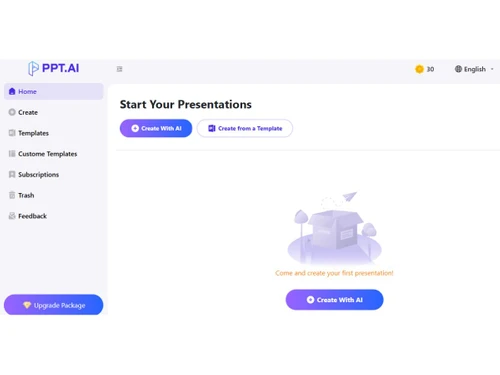
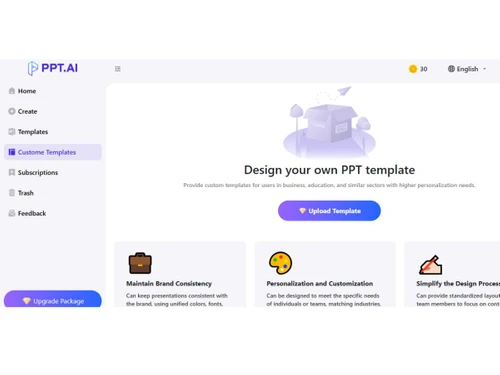
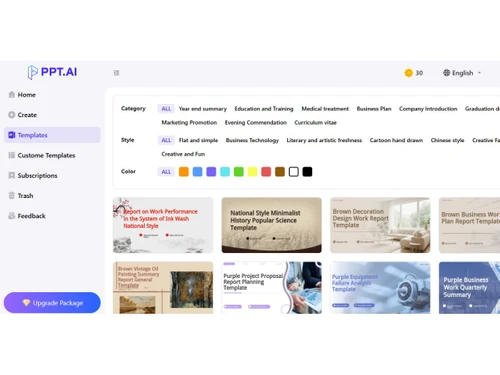
PPT AI logo ppt ai-dashboard ppt ai-customization ppt ai-templates
ppt ai-dashboard
ppt ai-customization
ppt ai-templates

PPT AI

Brand : PPT AI

Starting at

$ 10

Save Extra with 2 Offers

  • offer_icon Save upto 18%, Get GST Invoice on your business purchase |
  • offer_icon Buy Now & Pay Later, Check offer on payment page.

PPT AI is an AI-powered tool that automatically creates professional presentation slides from text, documents, or links in minutes. ...Read more

  • AdviceGet Instant Expert
    Advice
  • PaymentSafe & Secure
    Payment
  • GuaranteedAssured Best Price
    Guaranteed

PPT AI Software Pricing, Features & Reviews

What is PPT AI?

PPT AI is a presentation software that helps users create professional presentations quickly and easily. Instead of designing slides manually, users can simply provide text, documents, or links.

The software automatically converts this content into well-structured slides. It chooses suitable layouts, designs, and visuals on its own.

PPT AI saves a lot of time for students, teachers, and professionals. No design skills are needed to use the platform. It supports different content formats like PDFs, Word files, and web pages.

The tool improves clarity by organizing information clearly. Users can edit and customize slides after creation. Overall, PPT AI makes presentation creation fast, simple, and efficient.

Why Choose PPT AI Software?

  • AI Slide Generation: Automatically creates slides from text or content.
  • Fast Presentation Creation: Builds decks in minutes, not hours.
  • Smart Design Layouts: Uses professional layouts without manual formatting.
  • Automatic Visuals: Adds graphics and images to enhance slides.
  • Document Conversion: Turns Word or PDF files into slide decks.
  • Web Content Import: Converts webpages into presentations.
  • Time Savings: Saves hours of manual slide design work.
  • No Design Skills Needed: Works well for non-designers.
  • Customizable Slides: Users can edit slides after generation.
  • Consistent Branding: Maintains uniform style across slides.
  • Template Variety: Offers multiple design templates.
  • AI Content Summarization: Condenses information into key points.
  • Supports Multiple Formats: Accepts text, documents, and links.
  • Easy Collaboration: Share and co-edit with teams.
  • Cloud Access: Work on presentations online from anywhere.
  • Export Options: Download decks in PowerPoint or PDF.

Benefits of PPT AI Software

  • Professional Output: Creates polished, business-ready slides.
  • User-Friendly Interface: Simple interface for all skill levels.
  • Visual Data Support: Adds charts or graphs where needed.
  • AI Text Optimization: Improves slide wording automatically.
  • Consistent Formatting: Keeps fonts, colors, and layout uniform.
  • Presentation Preview: See results instantly before export.
  • Reusable Templates: Save and reuse your favorite designs.
  • Adaptable Styles: Change themes and visual styles easily.
  • Improved Clarity: Breaks down complex content into simple slides.
  • Automated Slide Sequencing: Orders slides logically.
  • Supports Multimedia: Insert images and media easily.
  • Ideal for Work and School: Useful for professionals and students.
  • Reduces Errors: Minimizes formatting and consistency mistakes.
  • Boosts Productivity: Helps complete presentations faster and smarter.

PPT AI Pricing

PPT AI price starts at $10 at techjockey.com.

The pricing model is based on different parameters, including extra features, deployment type, and the total number of users. For further queries related to the product, you can contact our product team and learn more about the pricing and offers.

PPT AI Pricing & Plans

Basic
  • Generate up to 50 PPTs per month
  • Full template library (800+ templates)
  • Maximum of 35 slides per PPT
  • Unlimited advanced editing and brand customization
  • Unlimited PPT exports, supporting PDF and PPT form
  • Customize templates
  • No watermark
    • Licenses
    • Monthly
Starting at $ 10
Unlimited
  • Unlimited PPT creation
  • Full template library (800+ templates)
  • Maximum of 35 slides per PPT
  • Unlimited advanced editing and brand customization
  • Unlimited PPT exports, supporting PDF and PPT form
  • Customize templates
  • No watermark
    • Licenses
    • Monthly
Starting at $ 20

PPT AI Features

  • icon_check Document to PPT Conversion Instantly transform DOC, DOCX, PDF, TXT, and XLS files into professional slide presentations.
  • icon_check Video to Slides Convert YouTube or uploaded videos into well-structured presentation slides automatically.
  • icon_check Website to PPT Transform URLs and website content into professional slides efficiently.
  • icon_check Multi-Model Support Choose between GPT-4o, Claude 3.5, and Gemini 2.0 for intelligent slide generation.
  • icon_check Multilingual Support Create presentations in multiple languages for global communication.
  • icon_check Audience Tailoring Adapt content and tone for students, professionals, superiors, or public audiences.
  • icon_check Tone Customization Adjust slide tone to be professional, persuasive, educational, humorous, or concise.
  • icon_check Templates Access pre-designed slide templates to save time and maintain visual appeal.
  • icon_check Content Structuring AI organizes text and visuals into coherent, logical slides for clarity.
  • icon_check Drag and Drop Functionality Simple interface allows uploading multiple file types under 10MB.
  • icon_check Layout Optimization Slides are automatically adjusted for spacing, fonts, and visual balance.
  • icon_check Data Import/Export Export generated presentations in PDF format for easy sharing and printing.
  • icon_check Custom Slide Editing Modify text, images, and colors directly within the AI-generated slides.
  • icon_check Multi Format Support Supports DOC, PDF, TXT, XLS, CSV, PPT, PPTX, HTML, EPUB, MOBI, XMIND, MM files.

PPT AI Specifications

  • Supported Platforms :
  • Device:
  • Deployment :
  • Suitable For :
  • Business Specific:
  • Business Size:
  • Customer Support:
  • Training:
  • Language:
  • AI Features:
  • Ubuntu Windows MacOS Linux
  • Desktop
  • Web-Based
  • All Industries
  • All Businesses
  • Individual, Small Business, Startups, Freelancers
  • Email, Communities
  • Videos
  • English, Deutsche, Italiano, 日本人, 한국어, Português, Español
  • AI Integrated

PPT AI Reviews and Ratings

banner

Would you like to review this product?

Submit Reviews

PPT AI FAQ

A PPT AI software pricing starts from $10 on techjockey.com.
A PPT AI primarily operates via the web, and no dedicated mobile app is available.
A PPT AI is compatible with major web browsers on Ubuntu, Windows, MacOS and Linux.
A Yes, PPT AI offers a free trial upon request.
A PPT AI uses AI to turn text, documents, or links into visually designed presentation slides automatically.
A Students, professionals, educators, and business teams use PPT AI to create presentations quickly.
A Yes, PPT AI offers a free trial that lets users start creating presentations immediately.
A Yes, PPT AI has a free tier with basic features and slide creation capabilities.

PPT AI Alternatives

See All
Why Choose Techjockey?

Software icon representing 20,000+ Software Listed 20,000+ Software Listed

Price tag icon for best price guarantee Best Price Guaranteed

Expert consultation icon Free Expert Consultation

Happy customer icon representing 2 million+ customers 2M+ Happy Customers