linkedin
Microsoft PowerPoint logo
play PowerPoint Tutorial for Beginners
microsoft powerpoint home
microsoft powerpoint interior

Microsoft PowerPoint

Brand: Microsoft Corporation

  • 4.2

  • 4 Ratings

PowerPoint is a presentation software program developed by Microsoft. It is used to create visually appealing slideshows that can be used in a variety of settings, such as business meetings, classrooms, or online presentations. PowerPoint is equipped with a wide range of design tools and features that allow users to create a variety of multimedia presentations, including text, graphics, audio, an...

See More

Have you used Microsoft PowerPoint before?

Share your insights for better experience

Add a Review
Starting Price 22% OFF
₹14,443 excl.GST  ₹18,443
₹ 17,043 incl. GST

View plans

offer Save upto 18%, Get GST Invoice on your business purchase T&C
offer Buy Now & Pay Later, Check offer on payment page.
Buy Now
100% Genuine
Products
Best Price
Guaranteed
Safe & Secure
Payment
  • Description

  • Pricing

  • Features

  • Specification

  • Review

  • Compare

  • Alternatives

  • FAQ

  • Questions

Starting at ₹14,443
Buy Now

Microsoft PowerPoint Software Overview

What is Microsoft PowerPoint?

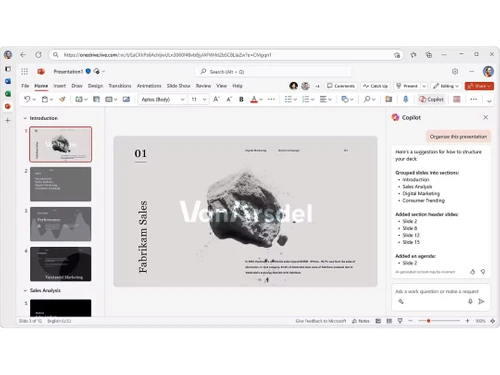
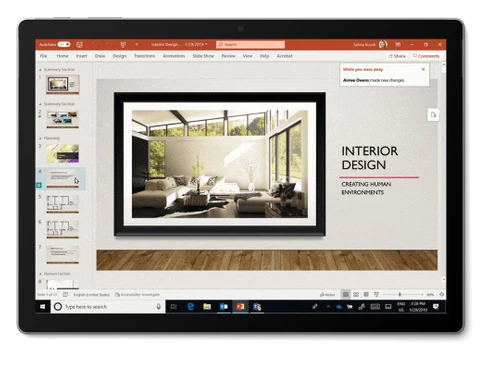
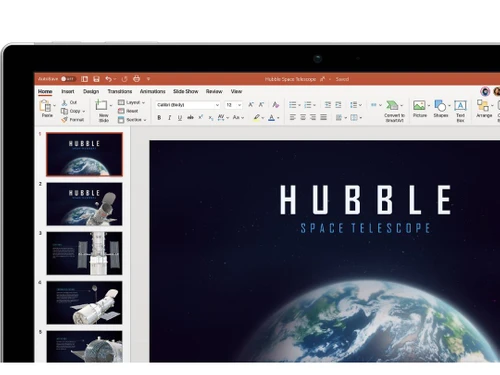
PowerPoint is a presentation software program developed by Microsoft. It is used to create visually appealing slideshows that can be used in a variety of settings, such as business meetings, classrooms, or online presentations.

PowerPoint is equipped with a wide range of design tools and features that allow users to create a variety of multimedia presentations, including text, graphics, audio, and video. It also supports collaboration, allowing users to work together on the same project. Moreover, you can save presentations in the cloud, and access your work from any device.

This presentation software is easy to use, and its user-friendly interface makes it accessible for anyone to create attractive and effective presentations. It is available as part of the Microsoft Office suite and is used by millions of users around the world.

Why Choose Microsoft PowerPoint

  • AI presentation coach: With an AI Presenter Coach, users can practice their speeches while getting recommendations on pacing, word choice, and more.
  • Presentation Tools: It includes tools such as Presenter View, which allows users to view their speaker notes with the current slide while the audience views the presentation on a different monitor.
  • Record Presentations: The slideshow software allows users to record narrations and timings to make your presentations more engaging.
  • Transition Effects: Users can add transition effects between slides to make their presentations more engaging.
  • SmartArt: The presentation software allows users to create diagrams, flowcharts, and other graphics to enhance presentations.

Benefits of Microsoft PowerPoint

  • Create handouts: The slideshow software allows users to create handouts of their presentations that can be printed or shared electronically.
  • Use the ink feature: Users can use the ink feature in PowerPoint to write and draw on slides during presentations.
  • Check accessibility: The presentation software has an accessibility checker that helps users ensure their presentations are accessible to people with disabilities.
  • Use the translate feature: This feature allows users to translate their presentations into other languages.
  • Get design ideas: The presentation software suggests design options for slides based on the content.

Microsoft PowerPoint Pricing

The price is available on Techjockey at INR 14443 / OneTime with us. For more details, please contact us.

Read more

Microsoft Corporation Company Details

Founded Year:  1975

Microsoft Corporation is an American multinational technology company with headquarters in Redmond, Washington.

Director/Founders Paul Allen , Bill Gates
Company Size 1000+ Employees

Microsoft PowerPoint Pricing & Plans

PowerPoint LTSC 2024

Calculated Price

14443 ₹18443
SAVE UPTO 22%
Exclusive of all taxes
    • Quantity

      Quantity
      Quantity
PowerPoint LTSC for Mac 2024

Calculated Price

14443 ₹18443
SAVE UPTO 22%
Exclusive of all taxes
    • Quantity

      Quantity
      Quantity

Microsoft PowerPoint Features

  • icon_check Presentation Tools
    Great presentation software that incorporates important tools like animations, transitions, insert, design, slide show etc.
  • icon_check Customizable Templates
    Browse PPT templates in over 40 categories & create your own design by customizing color, effect, background etc.
  • icon_check Media Library
    Add media like screenshot, pictures, music, video file, web video etc to a slide in your presentation.
  • icon_check Charts and tables
    Communicate data graphically using charts and tables & show comparison and trend with ease to your audience.
  • icon_check 3D Object Support
    Insert and animate 3D models directly in slides for more immersive and interactive presentations.
  • icon_check Animation
    Apply motion effects to text, images, and objects to enhance engagement and visual storytelling.
  • icon_check Real Time CoAuthoring
    Collaborate simultaneously with others on the same deck using Microsoft 365 cloud storage.
  • icon_check Version History
    Access and restore previous versions of your presentation saved automatically in OneDrive.
  • icon_check Data Import/Export
    Save or open presentations in PPTX, PDF, or ODP formats for flexible sharing.
  • icon_check OneDrive Integration
    Sync presentations to the cloud with autosave, enabling access from any device securely.
  • icon_check Link and Action Buttons
    Add interactive hyperlinks or buttons to navigate slides or trigger actions during playback.
  • icon_check Slideshow creation
  • icon_check Transition Effects
  • icon_check Image Formats
Microsoft PowerPoint Demo Video play icon

Get Microsoft PowerPoint Demo

Watch the demo video to explore key features, real workflows, and how the software fits your business needs.

Understand
Key Features
Personal
Demo Insights
Interactive
Demo Support

Microsoft PowerPoint Specifications

Supported Platforms
Ubuntu Ubuntu Windows Windows iOS iOS Android Android MacOS MacOS Linux Linux
Devices
Desktop Desktop Mobile Mobile Tablet Tablet iPad iPad
Deployment
Cloud-Based Cloud-Based
Suitable For
All Industries
Business Specific
All Businesses
Business Size
Small Business Startups Medium Business Enterprises
Customer Support
Email Communities
Language
English
Training Resources
Documentation Videos

Explore the Best Alternative Solutions Similar to Your Business Size and Needs

Microsoft PowerPoint Review

4.2

Out of 5

img

Overall Rating

Based on
4 Verified Ratings

Rating Breakdown

  • Features 4.2
  • Value for Money 4.5
  • Ease of Use 4.1
  • Customer Support 4.1

95% Recommend this Product

Add Review

Be the First to Review

This product has no reviews yet. Be the first to leave your feedback.

Add Review

Compare Microsoft PowerPoint With other Presentation Software

Products
Ratings
Pricing
Device Supported
Deployment
Supported Platforms
  • img

    Microsoft PowerPoint

  • 4.2

  • ₹ 14443.00 excl. GST

  • Desktop

    Mobile

  • Web based

    On Premises

  • Windows

    Mac OS

  • img

    Tome AI

  • 4.5

  • Price On Request

  • Desktop

    Mobile

  • Web based

    On Premises

  • Windows

    Mac OS

  • img

    Pop AI

  • 4.3

  • Price On Request

  • Desktop

    Mobile

  • Web based

    On Premises

  • Windows

    Mac OS

  • img

    Napkin AI

  • 4.3

  • Price On Request

  • Desktop

    Mobile

  • Web based

    On Premises

  • Windows

    Mac OS

  • img

    Plus AI

  • 4.3

  • Price On Request

  • Desktop

    Mobile

  • Web based

    On Premises

  • Windows

    Mac OS

  • img

    Slidesgo

  • 4.1

  • Price On Request

  • Desktop

    Mobile

  • Web based

    On Premises

  • Windows

    Mac OS

  • img

    Presentations AI

  • 4.1

  • Price On Request

  • Desktop

    Mobile

  • Web based

    On Premises

  • Windows

    Mac OS

  • img

    Prezi

  • 4.5

  • Price On Request

  • Desktop

    Mobile

  • Web based

    On Premises

  • Windows

    Mac OS

  • img

    PPT AI

  • 4.1

  • Price On Request

  • Desktop

    Mobile

  • Web based

    On Premises

  • Windows

    Mac OS

  • img

    Mentimeter

  • 4.7

  • Price On Request

  • Desktop

    Mobile

  • Web based

    On Premises

  • Windows

    Mac OS

  • img

    Zoho Show

  • 4.3

  • ₹ 140

  • Desktop

    Mobile

  • Web based

    On Premises

  • Windows

    Mac OS

(0) Product(s) selected

Microsoft PowerPoint Alternatives

See All Microsoft PowerPoint Alternatives

Starting Price:

$12 /User/Month

Starting Price:

$15 /Month

Starting Price:

₹189 /Month

SAVE UPTO 60%

Starting Price:

$10 /Month

Starting Price:

$29 /Month

Starting Price:

$3 /Month

Starting Price:

$12 /Month

Available

Price on Request

Starting Price:

$10 /Month

Articles for Microsoft PowerPoint

See All Related Articles

Which operating system does Microsoft PowerPoint support?

Microsoft PowerPoint is compatible with Windows, Android, iOS and Mac operating systems.

Is there any Microsoft PowerPoint app?

Microsoft PowerPoint app is available for Android & iOS mobile devices.

What is the deployment type of Microsoft PowerPoint?

Microsoft PowerPoint supports cloud-based deployment type.

How much does Microsoft PowerPoint cost?

Microsoft PowerPoint pricing is available at Techjockey for INR 14443 (One-Time) at techjockey.com.

Who are the potential users of Microsoft PowerPoint?

Microsoft PowerPoint is almost used in every field ranging from education, business, Government sector as well as by job seekers amongst others.

Is there any free trial or demo for Microsoft PowerPoint?

Microsoft PowerPoint demo is available for free with techjockey.com.

Is Microsoft PowerPoint free?

Microsoft PowerPoint offers a free trial. However, the premium plan with advanced features is available at techjockey.com with exciting deals.

How can you download Microsoft PowerPoint?

Microsoft PowerPoint installation is not required, as it is cloud-based. Just open the Setup Wizard to get started.

What is Microsoft PowerPoint used for?

Microsoft PowerPoint is used to create reliable slide show presentations either from scratch or pre-built templates. The software features tools that let you add text, art, image, etc to make presentations interactive.

Microsoft PowerPoint Questions

Q:

How to create a line chart in PowerPoint?

Anand Agrawal Oct 9, 2025
A:

Here’s how you can create a line chart in PowerPoint:

  • Insert a Line Chart
  • Enter Your Data
  • Customize the Chart
  • Format for a Professional Look
Pranav Joshi Oct 24, 2025
A:

Here’s how you can create a bubble chart in PowerPoint:

Method 1: Using Built-in Bubble Chart

  • Prepare Your Data – Arrange your data in Excel with three columns.
  • Insert a Chart – Open PowerPoint, go to Insert > Chart.
  • Select Bubble Chart – In the Insert Chart dialog, choose Bubble Chart.
  • Edit Data – Click on the chart, then Edit Data to modify values in Excel.
  • Customize the Chart – Adjust colors, labels, and bubble transparency.

Method 2: Using Shapes for a Custom Bubble Chart

  • Insert Circles – Use Insert > Shapes > Oval to create bubbles.
  • Adjust Sizes – Resize circles based on data values.
  • Position Bubbles – Place them according to X and Y values.
  • Add Labels – Insert text boxes for data points.
Rupesh kumar Sep 30, 2025
Q:

How to create a scatter plot in PowerPoint?

Rajesh Kumar Aug 24, 2025
A:

To create a scatter plot in PowerPoint you should:

  • Open your PowerPoint presentation and click the “Insert” icon.
  • Click “Chart” to select the XY(Scatter) from the given options.
  • Select the desired scatter plot style you want to use.
  • Press “OK” and the scatter plot will appear in the PowerPoint slide.
  • Edit the chart by changing data in excel worksheet.
  • Adjust the elements and format the chart and customize.
JOHN DENNIS . A Aug 25, 2025
Q:

How to rotate a shape in PowerPoint?

Mohd. Imran Apr 9, 2024
A:

To rotate a shape in PowerPoint, follow the steps given below:

  • Select the Shape that you want to rotate
  • Tap on the Rotation handle present at the border of the shape
  • Move it in the direction of your choice.
Yogesh Apr 9, 2024
Q:

How to make a text circle in Power Point?

Mohd. Imran Mar 21, 2024
A:

To make a text circle in Power Point, follow the steps given below:

  • Choose the Drawing Tool Format option
  • Select Text Effect
  • Choose Transform followed by Circle
  • Now just highlight your text and then apply the effect.
Mohd. Imran Mar 21, 2024
See All Microsoft PowerPoint Questions

20,000+ Software Listed

Best Price Guranteed

Free Expert Consultation

2M+ Happy Customers

Terms and Condtions

close

Users with registered businesses can purchase goods from merchants on the platform to satisfy their business needs. Users are not permitted to utilize any products acquired through the platform for resale, advertising, business, or further distribution.

For each purchase made, users will receive a Tax Invoice (or 'GST invoice') that includes specific details such as:

  • the GSTIN of the user associated with their registered business, and

  • the specified Entity Name for their business.

It should be noted that not all products are eligible for GST Invoice. Only the products displayed by participating sellers with the 'GST-based Invoice Available' callout on the product description page would qualify.

Certain goods and services are not eligible to get a GST Invoice, including items with VAS, i.e., Value Added Services (e.g., Total Mobile Protection/Assured Buyback) and those involving an exchange offer at the time of purchase.

Users must ensure the accuracy of the GSTIN, and business entity name provided for the GST Invoice. Requests for corrections into GST Invoice would not be accommodated by Techjockey.com or any Seller, and any issues arising from user-provided information are the sole responsibility of users.

Techjockey.com is not liable for the GST Invoice or any associated input tax credit. To efficiently claim an input tax credit, users should select the registered place of business address as per the GST authority's data and follow the provisions of the GST Act and rules.

To claim an input tax credit, the delivery and billing addresses must match. Furthermore, input tax credits will not be granted if the delivery address and GSTIN on the invoice are from different states. In case of incorrect GST details provided during the order placement, the order will be canceled automatically.