linkedin
Presentations AI logo
play Edit and Customize Your Slides with Presentations.AI!
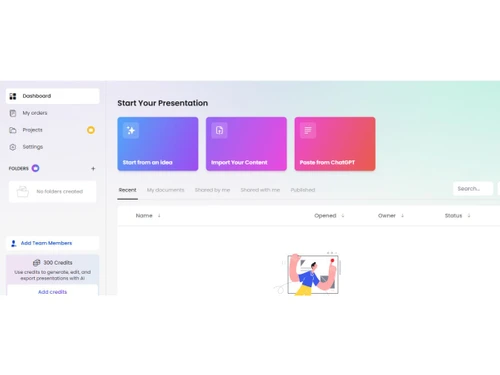
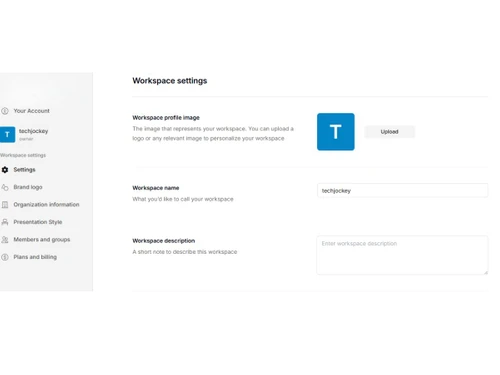
presentations ai-dashboard
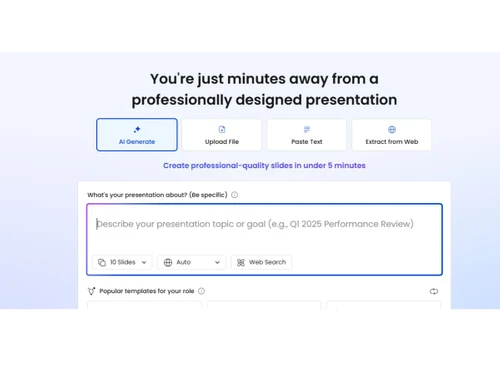
presentations ai-generate

Presentations AI

Brand: Presentations AI

  • 4.1

  • 5 Ratings & 1 Review

A presentation software that quickly converts your ideas or text into well-designed, professional presentation slides.

See More

Have you used Presentations AI before?

Share your insights for better experience

Add a Review
Starting Price 60% OFF
$240 $600

View plans

100% Genuine
Products
Best Price
Guaranteed
Safe & Secure
Payment
  • Description

  • Pricing

  • Features

  • Specification

  • Review

  • FAQ

Starting at $240

Presentations AI Software Overview

What is Presentations AI?

Presentations AI is a presentation software that helps you create professional presentations quickly and easily. Instead of building slides manually, you give the AI your topic, text, or ideas, and it generates slide decks automatically with smart layouts and designs.

The platform uses AI to handle content, visuals, and formatting, saving time and effort when making business, school, or project presentations.

It includes templates, design suggestions, branding options, and collaboration features to make your slides look polished.

Presentations AI works in your browser and lets you edit, share, and export presentations in formats like PowerPoint or PDF. The goal is to simplify slide creation so you can focus more on your message and less on formatting.

Why Choose Presentations AI Software?

  • AI-Powered Slide Creation: Presentations AI uses advanced artificial intelligence to automatically convert your ideas or text into professional slides, eliminating the need to design each slide manually.
  • Professional Designs: Your slides look polished and visually appealing without needing a professional designer, making a strong impression on your audience.
  • Customizable Templates: Choose from a wide variety of templates that can be easily customized. Tailor layouts, colors, and styles to match your presentation needs.
  • Brand Consistency: Ensure all your presentations reflect your brand identity. Colors, fonts, and styles remain consistent across every slide automatically.
  • Content Suggestions: AI provides smart content suggestions to enhance your slides, helping with phrasing, structure, and key points for better impact.
  • Export Options: Easily export your presentations to PowerPoint, PDF, or share them via a link, ensuring your formatting stays intact.
  • Engagement Analytics: Track how audiences interact with your slides and gain insights into which slides capture attention and where improvements are needed.

Benefits of Presentations AI Software

  • Multilingual Support: Create presentations in multiple languages, making it easy to communicate effectively with a global audience.
  • Interactive Elements: Add charts, graphs, videos, and other interactive elements effortlessly to engage your audience with dynamic slides.
  • Ease of Use: The platform is intuitive and beginner-friendly, allowing even users with no design experience to create professional presentations quickly.
  • AI-Powered Design Suggestions: The AI recommends layouts, visuals, and styles based on your content, ensuring every slide looks balanced and engaging.
  • Consistent Formatting: Automatic alignment and formatting keep your slides clean and organized, avoiding inconsistent fonts or misplaced elements.
  • Version Control: Track all changes made to your presentation and revert to previous versions anytime without losing important edits.
  • Collaboration Comments: Team members can leave comments directly on slides, making feedback easier to manage and implement efficiently.

Presentations AI Pricing

The Presentations AI price starts at USD 600 per Year/User at Techjockey.com. The pricing model is based on different parameters, including extra features, deployment type, and the total number of users. For further queries related to the product, you can contact our product team and learn more about the pricing and offers.

Read more

Presentations AI Company Details

Founded Year:  2018

Presentations.AI is an AI-powered tool that transforms how you create and share stunning presentations.

Director/Founders Elizabeth Wu
Company Size 1-100 Employees

Presentations AI Pricing & Plans

Pro (USD 20/mo Billed annually)
Key Features
  • Additional AI credits
  • Pro templates
  • Custom fonts and colors
  • Analytics
  • Export to PDF
  • Advanced features
Starting at $240 $600 SAVE UPTO 60%
    • Users

      Users
      Users
    • Yearly

      Yearly
      Yearly

Key Features

  • Additional AI credits

  • Pro templates

  • Custom fonts and colors

  • Analytics

  • Export to PDF

  • Advanced features

Presentations AI Features

  • icon_check Smart Slide Generation
    Automatically creates visually appealing slides based on text prompts or outlines.
  • icon_check Real-Time Collaboration
    Invite team members to edit, comment, and review presentations together in real-time.
  • icon_check Design Automation
    Handles layout, colors, typography, and spacing automatically for each slide.
  • icon_check Presentation Templates
    Offers curated, designer-made templates suitable for all use cases and industries.
  • icon_check Data Import/Export
    Download decks in multiple formats including PPTX and PDF for offline or client use.
  • icon_check Brand Consistency
    Maintain fonts, logos, and brand colors across all slides with centralized branding tools.
  • icon_check Voice Driven Editing
    Use voice input to guide AI for content creation or slide modification in real-time.
  • icon_check Multi Device Access
    Create and edit presentations from desktop, tablet, or mobile devices seamlessly.
  • icon_check User Access Control
    Control access, share links with view/edit rights, and manage team collaboration.
  • icon_check AI Assistant
    Helps generate and polish slide content with context-aware writing and grammar support.
  • icon_check Drag and Drop Functionality
    Intuitive UI allows easy customization and layout changes with simple drag-and-drop actions.
  • icon_check Idea-to-Deck Generation
    Instantly transform a simple text prompt or a creative idea into a complete, professional slide deck in just a few seconds.
  • icon_check Anti-Fragile Templates
    Utilize intelligent templates that automatically adapt to content changes while preserving the overall design integrity.
  • icon_check Proprietary Brand Sync
    Ensure consistent brand representation across all decks by automatically aligning slides to your unique visual identity.
Presentations AI Demo Video play icon

Get Presentations AI Demo

Watch the demo video to explore key features, real workflows, and how the software fits your business needs.

Understand
Key Features
Personal
Demo Insights
Interactive
Demo Support

Presentations AI Specifications

Supported Platforms
Ubuntu Ubuntu Windows Windows MacOS MacOS Linux Linux
Devices
Desktop Desktop Mobile Mobile Tablet Tablet iPad iPad
Deployment
Cloud-Based Cloud-Based
Suitable For
All Industries
Business Specific
All Businesses
Business Size
Individual Small Business Startups Medium Business Enterprises SMBs SMEs Freelancers
Customer Support
Email
Language
English
Integration
API Integration
Training Resources
Live Online Documentation Videos
AI Features
AI Integrated
Technology
Next Generation
Compliance Regulation
CCPA

Presentations AI Review

4.1

Out of 5

img

Overall Rating

Based on
1 Verified Review

Rating Breakdown

  • Features 3.9
  • Value for Money 4.2
  • Ease of Use 4.3
  • Customer Support 4.1

82% Recommend this Product

Add Review

Presentations AI Video Review

youtubeVideoId

4.1

“Presentations.ai Tutorial and Review”

Review by: Jennifer Sharkey

Articles for Presentations AI

See All Related Articles

How much does Presentations AI cost?

The Presentations AI price starts at USD 600 per Year/User at Techjockey.com.

Is there a mobile app available for Presentations AI Software?

No, Presentations AI is web-based and does not have a dedicated mobile app.

Which operating systems are compatible with Presentations AI Software?

Presentations AI works on any OS with a modern web browser, including Ubuntu, Windows, MacOS, and Linux.

Does Presentations AI Software offer a free trial?

Yes, Presentations AI offers a free trial.

How does Presentations AI Software function?

Presentations AI uses AI to automatically generate and design professional slides from your text or ideas.

Who uses Presentations AI Software?

Presentations AI is used by individuals, professionals, and business teams needing quick, high-quality presentations.

Is a free demo available for Presentations AI Software?

Yes, you can access a free demo or start with the free plan to try it out.

Is Presentations AI Software available for free?

Yes, the starter plan is free, providing limited AI credits and basic features.

20,000+ Software Listed

Best Price Guranteed

Free Expert Consultation

2M+ Happy Customers

Terms and Condtions

close

Users with registered businesses can purchase goods from merchants on the platform to satisfy their business needs. Users are not permitted to utilize any products acquired through the platform for resale, advertising, business, or further distribution.

For each purchase made, users will receive a Tax Invoice (or 'GST invoice') that includes specific details such as:

  • the GSTIN of the user associated with their registered business, and

  • the specified Entity Name for their business.

It should be noted that not all products are eligible for GST Invoice. Only the products displayed by participating sellers with the 'GST-based Invoice Available' callout on the product description page would qualify.

Certain goods and services are not eligible to get a GST Invoice, including items with VAS, i.e., Value Added Services (e.g., Total Mobile Protection/Assured Buyback) and those involving an exchange offer at the time of purchase.

Users must ensure the accuracy of the GSTIN, and business entity name provided for the GST Invoice. Requests for corrections into GST Invoice would not be accommodated by Techjockey.com or any Seller, and any issues arising from user-provided information are the sole responsibility of users.

Techjockey.com is not liable for the GST Invoice or any associated input tax credit. To efficiently claim an input tax credit, users should select the registered place of business address as per the GST authority's data and follow the provisions of the GST Act and rules.

To claim an input tax credit, the delivery and billing addresses must match. Furthermore, input tax credits will not be granted if the delivery address and GSTIN on the invoice are from different states. In case of incorrect GST details provided during the order placement, the order will be canceled automatically.