linkedin
Profile Pic Maker logo
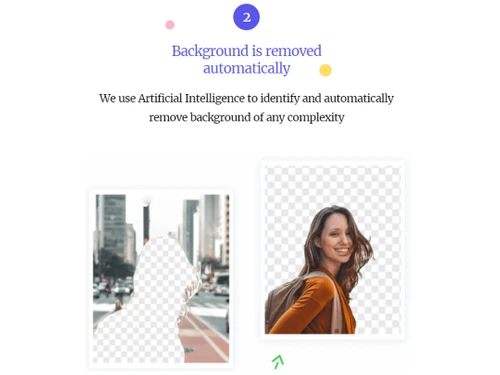
pfpmaker background remove
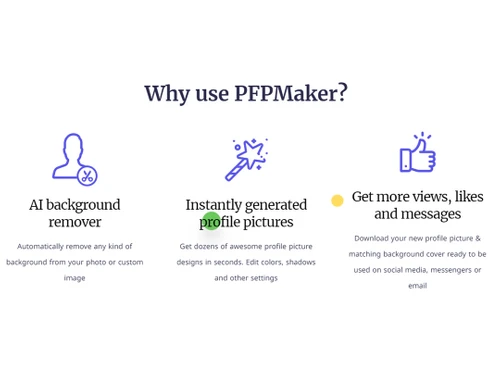
pfpmaker features
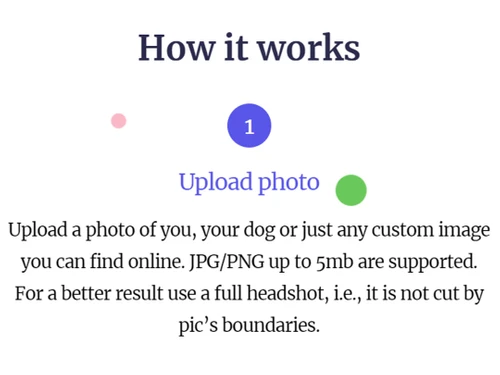
pfpmaker how it works

Profile Pic Maker

Brand: PFPMaker

  • 4.1

  • 6 Ratings

With its intuitive interface, extensive editing capabilities, and seamless integration with social media platforms, Profile Pic Maker is a valuable tool for anyone looking to enhance their online presence.

See More

Have you used Profile Pic Maker before?

Share your insights for better experience

Add a Review

Price Available on Request

Questions about pricing or customization? We’re here to help, just a click away.

100% Genuine
Products
Best Price
Guaranteed
Safe & Secure
Payment
  • Description

  • Pricing

  • Features

  • Specification

  • Review

  • Compare

  • Alternatives

  • FAQ

Profile Pic Maker Software Overview

What is Profile Pic Maker Software?

Profile Pic Maker (PFP) is a comprehensive photo editing software that uses Artificial intelligence to create unique profile pictures. It uses image processing algorithms and neural networks to process images, automatically remove the background, and customize the image. As a result, you can get customized professional, social media application-based, effects-based profile pictures in seconds.

Profile Pic Maker allows users to edit their photos and automatically remove any background, shadows, cutouts, edges, etc. It uses AI algorithms to process hair and colors, smooth the edges, change the gradient, and spice up your picture. After editing the image, you can add a stylish background, match the page color background, and download your profile picture.

Profile Pic Maker also allows you to add laser eye effects to your profile pic, make emoji pictures, combine pictures or avatars, generate avatars, make game characters, etc., all through easy creative tools.

Furthermore, this Profile Pic Creator seamlessly integrates with popular social media platforms, allowing you to directly upload your edited images without the hassle. The software supports all major image formats, ensuring compatibility with different devices and platforms. Whether you need a new profile picture for Facebook, Instagram, LinkedIn, or any other online platform, Profile Pic Maker simplifies editing and helps you create a visually appealing image that captures your attention and reflects your personal or professional brand.

In addition to its comprehensive editing features, Profile Pic Maker provides a range of templates specifically designed for various occasions, such as holidays, birthdays, or special events. These templates make it easy to create themed profile pictures with just a few clicks, saving you time and effort. So, whether you want to add festive elements to your profile picture during the holiday season or commemorate a milestone, Profile Pic Maker offers a wide selection of pre-designed templates.

Why Choose Profile Pic Maker?

  • Create profile Pics: Allows you to create excellent profile pictures that boost your profile looks and attract followers. You get stylish, professional profile pictures in a few seconds.
  • Add laser eyes effect: You can add effects of laser eyes and spice up your profile picture.
  • Make Emoji profiles: Profile pic generator allows you to create emoji of your picture and use it for fun.
  • Customize designs: Supports numerous tools that help edit photos and generate customized, stylish profile pictures.

Benefits of Profile Pic Maker

  • Attractive pics: It helps generate stunning and high-quality, unique profile pictures.
  • Automatic graphic: It uses AI algorithms to edit your pictures automatically and give you transparent images, colored images, and stylish images.
  • Easy to use: You can process 100s photos efficiently within a few seconds and get the style you choose.
  • Save time and effort: The application is simple and generates quality profile pictures quickly.
  • No coding or skills: You do not need any coding skills or special software to edit your profile pic or remove the background.

Profile Pic Maker Pricing

Profile Pic Maker photo editing software pricing is available on request at techjockey.com.

The overall pricing model is based on different factors such as personalization, extra features required, total users, and the deployment type. Please feel free to request a call from our product experts if you want to learn more about our subscription plans or premium package deals.

Read more

Profile Pic Maker Pricing & Plans

Looking for The Right Pricing?

Share your requirements and get a plan built around your business.

  • Define your business needs
  • Get customised pricing
  • Choose features that fit your workflow

Price Available on Request

Get personalised Profile Pic Maker pricing that fits your needs. Our team will connect with you.

Profile Pic Maker Features

  • icon_check AI Profile Picture Generator
    Creates professional and creative profile pictures from uploaded photos using AI-powered designs and templates.
  • icon_check Dynamic Background Replacement
    Replaces existing backgrounds with customized scenes, colors, or designs for more engaging profile photos.
  • icon_check AI Background Generator
    Generates unique AI-powered backgrounds that complement portraits and create visually appealing profile pictures.
  • icon_check Background Remover
    It uses AI algorithms to remove backgrounds from images automatically and make transparent quality images.
  • icon_check Photo Editing
    Provides editing tools to enhance, adjust, and customize profile pictures for different personal and professional uses.
  • icon_check Instantly generated profile pictures
    You can get hundreds of amazing instantly generated profile pictures of different styles.
  • icon_check Photo Enhancement
    Improves portrait quality by enhancing facial details, clarity, lighting, and overall image appearance.
  • icon_check Social Media Profile Pictures
    Use this application to create engaging social media profile pictures of matching backgrounds and different styles.
  • icon_check Watermarking
    Adds watermarks to images to support branding, ownership identification, and consistent visual presentation.
  • icon_check Business Headshots
    Use this application to create a perfect Business profile picture of you that reflects your professional image.
  • icon_check Messenger Display Pictures
    It allows you to create unforgettable, stylish, and attractive messenger display pictures for chats and profiles.
  • icon_check Creative Profile Pictures
    You can make a variety of stylish profile pictures by mixing images from your existing photo.
  • icon_check Mobile App
    This application is accessible via the Internet and will soon launch a mobile app for convenience.

Profile Pic Maker Specifications

Supported Platforms
Ubuntu Ubuntu Windows Windows MacOS MacOS Linux Linux
Devices
Desktop Desktop Mobile Mobile Tablet Tablet iPad iPad
Deployment
Cloud-Based Cloud-Based
Suitable For
All Industries
Business Specific
All Businesses
Business Size
Small Business Startups Medium Business Enterprises
Customer Support
Email Communities
Language
English
Integration
API Integration
Training Resources
Documentation Videos
AI Features
AI Integrated

Explore the Best Alternative Solutions Similar to Your Business Size and Needs

Profile Pic Maker Review

4.1

Out of 5

img

Overall Rating

Based on
6 Verified Ratings

Rating Breakdown

  • Features 3.9
  • Value for Money 4.4
  • Ease of Use 4.2
  • Customer Support 3.8

88% Recommend this Product

Add Review

Techjockey Trusted Reviews from Verified Users

No reviews are currently available for Profile Pic Maker. Discover similar Photo Editing Software reviews

  • Canva

    4.3

    Whats great - I enjoy how quickly and simply one can choose the template and begin tweaking. read more

  • Adobe Photoshop

    4.6

    Whats great - What I love most about Adobe Photoshop is its amazing editing capabilities. It's versatile, not just for photos but also for ... read more

  • Luminar Neo

    4.9

    Whats great - The interface is clean and easy to get around, so I’m not wasting time looking for tools. Sky AI, Relight AI, and portrait to... read more

Compare Profile Pic Maker With other Photo Editing Software

Products
Ratings
Pricing
Device Supported
Deployment
Supported Platforms
  • img

    Profile Pic Maker

  • 4.1

  • Price On Request

  • Desktop

    Mobile

  • Web based

    On Premises

  • Windows

    Mac OS

  • img

    Adobe Photoshop

  • 4.5

  • Price On Request

  • Desktop

    Mobile

  • Web based

    On Premises

  • Windows

    Mac OS

  • img

    Karizma Album

  • 4.4

  • ₹ 3500

  • Desktop

    Mobile

  • Web based

    On Premises

  • Windows

    Mac OS

  • img

    Affinity Photo

  • 4.2

  • ₹ 619

  • Desktop

    Mobile

  • Web based

    On Premises

  • Windows

    Mac OS

  • img

    Luminar Neo

  • 4.7

  • ₹ 4999

  • Desktop

    Mobile

  • Web based

    On Premises

  • Windows

    Mac OS

  • img

    darktable

  • 4.0

  • Price On Request

  • Desktop

    Mobile

  • Web based

    On Premises

  • Windows

    Mac OS

  • img

    Cutout Pro

  • 4.8

  • ₹ 247

  • Desktop

    Mobile

  • Web based

    On Premises

  • Windows

    Mac OS

  • img

    Lensa AI

  • 4.1

  • Price On Request

  • Desktop

    Mobile

  • Web based

    On Premises

  • Windows

    Mac OS

  • img

    AfterShot Pro 3

  • 4.5

  • ₹ 5966

  • Desktop

    Mobile

  • Web based

    On Premises

  • Windows

    Mac OS

  • img

    Evoto AI

  • 4.6

  • Price On Request

  • Desktop

    Mobile

  • Web based

    On Premises

  • Windows

    Mac OS

(0) Product(s) selected

Profile Pic Maker Alternatives

See All Profile Pic Maker Alternatives

Available

Price on Request

Starting Price:

$36 /Year

Starting Price:

$80 /year

Starting Price:

$35 /Lifetime

Starting Price:

$10 /Month

Starting Price:

$8 /Month

Starting Price:

$15 /Month

Starting Price:

$810 /Year
Articles for Profile Pic Maker

See All Related Articles

Which operating system does the Profile Pic Maker Software support?

Profile Pic Maker software is compatible with Windows and Mac operating systems.

Is there any Profile Pic Maker Photo Editing app?

Profile Pic Maker Photo Editing app is unavailable on Android and iOS devices.

What is the deployment type of the Profile Pic Maker System?

Profile Pic Maker supports cloud-based deployment.

How much does the Profile Pic Maker cost?

Profile Pic Maker software pricing is available on request at techjockey.com.

Who are the potential users of the Profile Pic Maker System?

Profile Pic Maker system can be used by photo editors, social media marketers, product photographers, freelancers, and individuals who need an effective AI-powered photo editing platform.

Is there any free trial or demo for Profile Pic Maker Photo Editor?

Profile Pic Maker demo is free with techjockey.com.

Is the Profile Pic Maker free?

Yes, Profile Pic Maker Photo Editor offers a free trial of 20 photo editing.

How can you download the Profile Pic Maker?

Profile Pic Maker is a cloud-based platform. So, download the installation file on your system and open the Setup Wizard to get started.

How does the Profile Pic Maker Photo Editor work?

Profile Pic Maker uses advanced AI algorithms to edit images seamlessly by removing or changing backgrounds. It reads the image content and identifies the subject and background elements. Then, it intelligently creates a professional-looking profile image.

20,000+ Software Listed

Best Price Guranteed

Free Expert Consultation

2M+ Happy Customers

Terms and Condtions

close

Users with registered businesses can purchase goods from merchants on the platform to satisfy their business needs. Users are not permitted to utilize any products acquired through the platform for resale, advertising, business, or further distribution.

For each purchase made, users will receive a Tax Invoice (or 'GST invoice') that includes specific details such as:

  • the GSTIN of the user associated with their registered business, and

  • the specified Entity Name for their business.

It should be noted that not all products are eligible for GST Invoice. Only the products displayed by participating sellers with the 'GST-based Invoice Available' callout on the product description page would qualify.

Certain goods and services are not eligible to get a GST Invoice, including items with VAS, i.e., Value Added Services (e.g., Total Mobile Protection/Assured Buyback) and those involving an exchange offer at the time of purchase.

Users must ensure the accuracy of the GSTIN, and business entity name provided for the GST Invoice. Requests for corrections into GST Invoice would not be accommodated by Techjockey.com or any Seller, and any issues arising from user-provided information are the sole responsibility of users.

Techjockey.com is not liable for the GST Invoice or any associated input tax credit. To efficiently claim an input tax credit, users should select the registered place of business address as per the GST authority's data and follow the provisions of the GST Act and rules.

To claim an input tax credit, the delivery and billing addresses must match. Furthermore, input tax credits will not be granted if the delivery address and GSTIN on the invoice are from different states. In case of incorrect GST details provided during the order placement, the order will be canceled automatically.