 USA
USA UAE
UAESmall Business
Designed for startups and growing businesses

See More


Brand: Program4PC
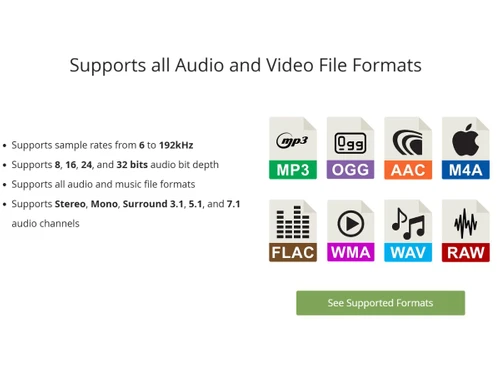
Audio Converter Pro, as the name implies, is an audio converting software which converts audio for music formats such as MP3, WMA, WAV, M4A, RA, OGG, FLAC, etc. It is also an audio extractor which can extract music from all popular formats and convert it to a format of your choice.
See MoreHave you used Program4Pc Audio Converter Pro before?
Share your insights for better experience
Brand: Program4PC
Founded Year: 2010
Program4PC
 Personalization Bulk Conversion Convert Video to Audio Easy-to-use Audio Converter Convert and Rip Audio CD Trim and Merge Audio Files Create Ringtone for iPhone
  Windows
  Desktop
  Perpetual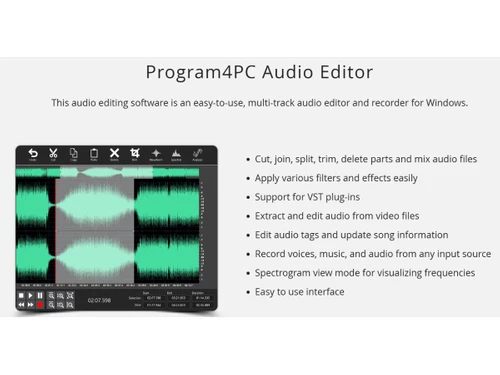
Small Business
Designed for startups and growing businesses
Medium Business
Built for business growth and flexibility
Enterprises
Designed for complex and large-scale business needs
4.5
Out of 5

Overall Rating
Based on
2 Verified Reviews
Rating Breakdown
95% Recommend this Product
Add Review
Feb 6, 2019
Techjockey Verified
“Legit easy to use”
Pros
It comes with a lot's of conversion formats. Pretty straightforward to use.
Cons
NO CONS
May 10, 2018
Techjockey Verified
“Techjockey has great operating model”
Pros
I spoke with the gentleman from Techjockey, and within fifteen minutes, I received the first of six or seven calls that I received that day from vendors seeking to meet my need for a billing and records platform.?
Cons
N/A

Program4Pc Audio Converter Pro
$ 29.95 excl. GST
Desktop
Mobile
Web based
On Premises
Windows
Mac OS

Audacity
Price On Request
Desktop
Mobile
Web based
On Premises
Windows
Mac OS

Cleanvoice AI
Price On Request
Desktop
Mobile
Web based
On Premises
Windows
Mac OS

AudioDirector 365
₹ 1599
Desktop
Mobile
Web based
On Premises
Windows
Mac OS

Supertone CLEAR
Price On Request
Desktop
Mobile
Web based
On Premises
Windows
Mac OS

BandLab
Price On Request
Desktop
Mobile
Web based
On Premises
Windows
Mac OS

Adobe Audition
Price On Request
Desktop
Mobile
Web based
On Premises
Windows
Mac OS

Moises
Price On Request
Desktop
Mobile
Web based
On Premises
Windows
Mac OS

Adobe Podcast
Price On Request
Desktop
Mobile
Web based
On Premises
Windows
Mac OS
Podcastle AI
Price On Request
Desktop
Mobile
Web based
On Premises
Windows
Mac OS

FMOD
Price On Request
Desktop
Mobile
Web based
On Premises
Windows
Mac OS
(2) Product(s) selected
Starting Price:
$69 /License
Starting Price:
$15 /month
Available
Price on Request
Starting Price:
$9 /Month

Starting Price:
₹9,281
Available
Price on Request

Available
Price on Request

Available
Price on Request
Available
Price on Request
Available
Price on Request
Available
Price on Request




It happens to the best of us. If you do lose your activation code, we will gladly provide you with a copy of your activation code. All you have to do is navigate to Retrieve Activation Code page and contact customer service, do not forget to include your name, your e-mail address (that was used to order the product), the product name, and the receipt number.
The activation code is a long sequence of letters and numbers that can be easily confused when typed. If you typed this information manually from your confirmation email, it is possible that errors may have been entered into the proper fields of the Activation screen so we recommend that you 'copy and paste' this information from your confirmation email onto the Activation screen.
20,000+ Software Listed
Best Price Guranteed
Free Expert Consultation
2M+ Happy Customers
Terms and Condtions

Users with registered businesses can purchase goods from merchants on the platform to satisfy their business needs. Users are not permitted to utilize any products acquired through the platform for resale, advertising, business, or further distribution.
For each purchase made, users will receive a Tax Invoice (or 'GST invoice') that includes specific details such as:
the GSTIN of the user associated with their registered business, and
the specified Entity Name for their business.
It should be noted that not all products are eligible for GST Invoice. Only the products displayed by participating sellers with the 'GST-based Invoice Available' callout on the product description page would qualify.
Certain goods and services are not eligible to get a GST Invoice, including items with VAS, i.e., Value Added Services (e.g., Total Mobile Protection/Assured Buyback) and those involving an exchange offer at the time of purchase.
Users must ensure the accuracy of the GSTIN, and business entity name provided for the GST Invoice. Requests for corrections into GST Invoice would not be accommodated by Techjockey.com or any Seller, and any issues arising from user-provided information are the sole responsibility of users.
Techjockey.com is not liable for the GST Invoice or any associated input tax credit. To efficiently claim an input tax credit, users should select the registered place of business address as per the GST authority's data and follow the provisions of the GST Act and rules.
To claim an input tax credit, the delivery and billing addresses must match. Furthermore, input tax credits will not be granted if the delivery address and GSTIN on the invoice are from different states. In case of incorrect GST details provided during the order placement, the order will be canceled automatically.


