linkedin
Skrill logo
play What is Skrill?
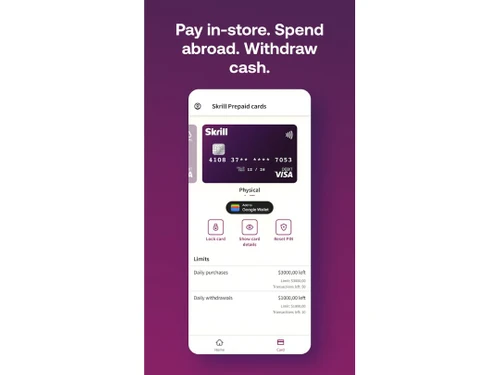
Skrill Dashboard
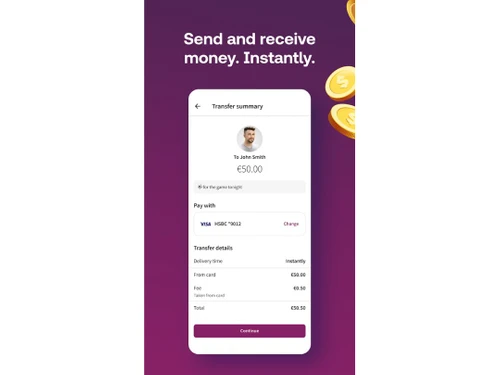
Skrill Transfer Money

Skrill

Brand: Skrill

  • 3.7

  • 13 Ratings & 13 Reviews

Make it easy to handle payments with Skrill Payment Gateway. It supports different currencies, offers quick checkout, and has strong security features.

See More

Have you used Skrill before?

Share your insights for better experience

Add a Review

Price Available on Request

Questions about pricing or customization? We’re here to help, just a click away.

100% Genuine
Products
Best Price
Guaranteed
Safe & Secure
Payment
  • Description

  • Pricing

  • Features

  • Specification

  • Review

  • Compare

  • Alternatives

  • FAQ

  • Questions

Skrill Software Overview

What is Skrill Payment Gateway?

Skrill Payment Gateway is a popular online payment service used by millions of people worldwide. It helps businesses handle payments safely and efficiently. Skrill supports over 100 local payment methods, including credit/debit cards, digital wallets, and bank transfers.

Skrill’s dashboard lets you see all your transactions clearly, making it simple to track and manage them. The interface is easy to use, helping businesses process payments and manage accounts effortlessly. Skrill also supports cryptocurrency and offers customization options to match your brand.

Why Choose Skrill Payment Gateway?

Skrill is known for easy setup, strong security, and support for many payment methods. Here are some reasons why people choose Skrill:

  • Multiple Payment Methods: Skrill supports many ways to pay, like credit/debit cards, digital wallets, and bank transfers, catering to different customer needs.
  • Chargeback Protection: Skrill protects you from chargebacks, so you don’t lose money if there's a payment dispute.
  • Simple Setup: Skrill is easy to set up with just one contract and a single API, saving time and effort.
  • Low Fees: Skrill has low processing fees, helping you save money on each transaction.
  • Fraud Protection: Skrill uses advanced systems to protect your transactions from fraud.
  • Multi-Currency Account: Manage over 40 currencies from one account, with detailed financial insights for better management.
  • Customer Support: Skrill provides support in multiple languages, ensuring you get help no matter where you are.

Additional Features of Skrill Payment Gateway

Skrill offers various features to make payment processing easier:

  • Digital Wallet: Customers can pay quickly using an email address and password. Skrill 1-Tap allows repeat payments with a single touch.
  • Skrill Crypto: Users can buy and withdraw funds as cryptocurrency.
  • Pay by Bank: Supports instant bank transfers from over 3000 banks worldwide.
  • Shopping Carts: Integrates with major shopping carts, offering access to credit cards and over 100 local payment options.
  • 1-Tap for Repeat Payments: Allows customers to store payment details for faster checkouts in future purchases.
  • Quick Checkout: Customers can pay directly on your platform without needing a separate Skrill account.
  • A/B Testing for Payments: Test new payment methods in the dashboard without coding.

Pricing of Skrill Payment Gateway

Skrill's fees include 2.50% for global deposit methods, 3.49% for local withdrawals, and up to 7.50% for certain card withdrawals. Sending money internationally via credit card incurs up to 2.99% fees, while domestic transfers cost up to 2%. There might be additional fees if the card is used for gambling purposes.

Read more

Skrill Company Details

Founded Year:  2001

Skrill has been making digital payments simple, secure and quick since 2001. It provides online payments for both consumers and businesses.

Director/Founders Brian Skrill
Company Size 501-1000 Employees

Skrill Pricing & Plans

Looking for The Right Pricing?

Share your requirements and get a plan built around your business.

  • Define your business needs
  • Get customised pricing
  • Choose features that fit your workflow

Price Available on Request

Get personalised Skrill pricing that fits your needs. Our team will connect with you.

Skrill Features

Core Functionalities

  • icon_check Loyalty Management
    Loyalty management in payment gateways involves integrating features that allow businesses to reward and retain customers through
  • icon_check Dedicated Account Manager
    A payment gateway's dedicated account manager provides one-on-one assistance for any questions or problems you may have.
  • icon_check Multi Currency Support
    Accept payments from all over the world with different currencies
  • icon_check Pre-onboarding Assistance
    Helping businesses with the process of setting up a merchant account and integrating payment processing into their business.
  • icon_check Branding & Customization
    The ability to customize the look and feel of the payment process to match your brand.
  • icon_check Currency Conversion
    The ability to process payments in different currencies and automatically convert them to your desired currency.
  • icon_check Mobile Responsiveness
    Ensuring that the payment process is optimized for mobile devices.
  • icon_check Payment Links
    Payment processing solutions that don't require a website. payments can be made through a link by sending it via SMS, Email etc.
  • icon_check Guest Checkout
    Allowing customers to make purchases without creating an account.
  • icon_check Multi-Language Checkout
    The ability to process payments and display information in multiple languages.
  • icon_check Instant Settlements
    The process of settling transactions with your bank account instantly
  • icon_check Dedicated POS
    Dedicated POS Payments in a payment gateway allow merchants to process payments independently using hardware and software. It
  • icon_check Coupons and Offers Engine
    A Coupons and Offers creation feature within a payment gateway allows merchants to directly design and manage discount promotions
  • icon_check Store Creation
    Tools and features to create an online store within the payment gateway app
  • icon_check Landing Page Creation
    The landing page creation feature in a payment gateway allows users to create custom web pages for initiating and processing
  • icon_check Split Payments
    Split payment in a payment gateway allows a single payment transaction to be divided and distributed to multiple recipients, such
  • icon_check Automated Reconciliation
    Automatic reconciliation uses software to match transactions between your bank and accounting records, saving time and minimizing

Payment Methods

  • icon_check Digital Wallet
    It is an electronic device or online service that allows individuals to make electronic transactions.
  • icon_check Debit / Credit Cards
    Accept various payment methods, including credit cards, debit cards,
  • icon_check Cryptocurrency
    The ability to accept payments in cryptocurrency.
  • icon_check ACH Payments
    ACH or Automated Clearing House payments, are electronic money transfers between banks and credit unions through a computer
  • icon_check UPI
    Unified Payments Interface is an instant real-time payment system developed by NPCI to facilitate inter-bank transactions through
  • icon_check Net Banking
    It is a convenient and secure way for customers to manage their bank accounts and perform financial transactions over the
  • icon_check Cardless EMI
    Cardless EMI is similar to traditional EMI but doesn't require a credit or debit card. It's facilitated through a partnership
  • icon_check Buy Now, Pay Later (BNPL)
    Buy Now, Pay Later (BNPL) in a payment gateway is a feature that allows customers to purchase items immediately but pay for them
  • icon_check QR Code Based Payments
    A QR code payment method is a way to make payments using a smartphone by scanning a special type of barcode called a QR code.

Subscription Management

  • icon_check Reccuring Payments
    Recurring payments, also known as subscription payments, auto-debit, or automatic payments, occur when a customer authorizes a
  • icon_check Proration
    Proration is a billing model that adjusts a customer's bill to reflect changes to their plan during a billing cycle.
  • icon_check Dunning
    Dunning refers to the process of communicating with customers to collect overdue payments.

Administrative Features

  • icon_check Reporting & Analytics
    Tools that allow merchants to track their payment activity, generate reports, and gain insights into their sales data.
  • icon_check User Access Management
    User, role, and access management in a payment gateway are ways to control who can access what features and data in the system
  • icon_check Merchant Portal
    A web interface that allows merchants to manage their payment accounts, view transactions, and access other features.
  • icon_check Tax Management
    Tax management involves automatically calculating, applying, and handling taxes during transactions.
  • icon_check Invoice Generation
    Automatically creates invoices for transactions, saving time and reducing errors. It includes all necessary details such as the

Security Features

  • icon_check Two-Factor Authentication (2FA)
    Two-factor authentication in a payment gateway adds an extra layer of security by requiring users to verify their identity
  • icon_check Risk Management
    Managing risks in payment gateways involves identifying, assessing, and minimizing potential issues associated with processing
  • icon_check PCI DSS Compliance
    Ensures a business adheres to Payment Card Industry Data Security Standards to protect cardholder information.
  • icon_check Fraud Detection & Prevention
    Systems that analyze transactions for suspicious patterns to identify and block fraudulent activity.
  • icon_check Tokenization
    Replaces sensitive data (like credit card numbers) with a unique identifier (token) for secure storage and processing.
  • icon_check Multi-Factor Authentication (MFA)
    Multi-Factor Authentication (MFA) refers to an authentication process that requires two or more verification factors to gain
  • icon_check Automatic Device Recognition
    Automatic device recognition is a security feature used by payment gateways to identify and authenticate devices that initiate

Integrations Supported

  • icon_check CRM Integration
    CRM integration with a payment gateway connects a CRM system to a payment gateway, allowing businesses to merge customer data
  • icon_check API Integration
    Integrating an API into a payment gateway platform connects your website or app to securely process payments, handle
  • icon_check E-Commerce Integration
    E-commerce integration in a payment gateway platform means connecting the payment system with an online store.
  • icon_check POS Integration
    A hardware and software solution used in retail environments to process sales transactions, manage inventory, and handle customer
  • icon_check Order Management
    Order management is the process of handling customer orders from placement to delivery. It's a crucial part of a business's
  • icon_check Third Party Integration
    Integrating a 3rd party plugin into a payment gateway platform allows you to accept payments directly on your site without
  • icon_check SDK Integration
    SDK integration in a payment gateway platform involves incorporating the payment gateway's software development kit (SDK) into

Alerts & Notifications

  • icon_check Downtime Alerts
    A message that tells you when the payment system is not working or is down. It helps you know immediately when there’s a
  • icon_check Transaction Notifications
    Tells you about transactions happening on your system, such as when a payment is successful or fails.
  • icon_check Security Alerts
    An alert that warns you about potential security threats, such as suspicious activities or attempts to hack into the system.
  • icon_check Discrepancy Alerts
    A notification that notifies you when there are inconsistencies or mismatches in transaction details, such as differences in
  • icon_check Custom Event Notifications
    Personalized messages set up to alert you about specific events or actions that you consider important, such as a high-value
Skrill Demo Video play icon

Get Skrill Demo

Watch the demo video to explore key features, real workflows, and how the software fits your business needs.

Understand
Key Features
Personal
Demo Insights
Interactive
Demo Support

Skrill Specifications

Supported Platforms
Windows Windows iOS iOS Android Android MacOS MacOS
Devices
Desktop Desktop Mobile Mobile
Deployment
Cloud-Based Cloud-Based
Suitable For
All Industries
Business Specific
All Businesses
Business Size
Small Business Startups Medium Business Enterprises SMBs SMEs MSMBs MSMEs
Customer Support
Email Live Chat Communities
Language
English
Training Resources
Videos

Explore the Best Alternative Solutions Similar to Your Business Size and Needs

Small Business

Designed for startups and growing businesses

BillDesk

3.6

MaxelPay

4.3

UnPay

4.3

See More

Enterprises

Designed for complex and large-scale business needs

PayG

3.7

Cashfree

4.3

airpay

4.2

See More

Skrill Reviews

3.7

Out of 5

img

Overall Rating

Based on
13 Verified Reviews

Rating Breakdown

  • Features 3.7
  • Value for Money 3.6
  • Ease of Use 3.8
  • Customer Support 3.6

77% Recommend this Product

Add Review

Pros

  • "There's nothing I can say I like about Skrill. It's been a complete headache from the start. The whole process feels frustrating and untrustworthy."

    Nandini GoswamiJul 4, 2024

  • "The reporting feature is good for reviewing payments to vendors."

    Janvi SumanJun 20, 2024

  • "I love how quick and cheap it is to deposit and withdraw money with Skrill. It’s very fast and saves a lot of time and money."

    Rohit PremjaniJun 14, 2024

Cons

  • "They used to charge nominal fees per transaction, but now it's free. This change is definitely a huge benefit. "

    SUNIL KUMARJul 6, 2024

  • "They used to charge nominal fees per transaction, but now it's free. This change is definitely a huge benefit. "

    SUNIL KUMARJul 6, 2024

  • "The fees can be a bit high sometimes, and I've experienced occasional transaction failures. It would be great if they could work on reducing the fees and improving reliability."

    Rishikesh Patil Jul 5, 2024

Skrill Video Reviews

youtubeVideoId

4.1

“Skrill Account Review: Pros and Cons”

Review by: FULL FINANCE REVIEW

youtubeVideoId

4

“Honest Skrill Review (Pros & Cons)”

Review by: Basic Value

Nidhi Shah

User

Industry: E-commerce User since: 6-12 months

3.7

Reviewed on: Jul 6, 2024

Techjockey Verified

“Easy to Receive Payments But Disappointing Experience”

Skrill initially appeared to be a great tool for handling payments, but their customer service and fund withholding issues are problematic.

Pros

Skrill seemed like a straightforward solution for receiving payments. Setting up the account was smooth, and the interface is user-friendly. The initial experience made it look like a hassle-free option for managing our company’s transactions.

Cons

However, when we decided to close our account, things went south. Skrill has been holding our funds for months with no clear reason, despite us providing all the necessary documents they asked for. This has caused significant inconvenience and frustration.

Switched from Paypal

Reason to switch

They are holding the money of our company for months without any reason.

Nandu

User

Industry: Finance User since: < 6 months

4

Reviewed on: Jul 4, 2024

Techjockey Verified

“Fast, Effective, and Secure Payment Solution for Sole Proprietors”

Skrill is a great tool for small business owners needing quick and secure payments, but it’s not very friendly for frequent travelers.

Pros

Skrill makes receiving and sending payments easy, especially for a sole proprietor working in different time zones. The platform is secure, and transactions are quick. I love the mobile app for tracking payments and the extra 2.5% I earn from my bank for using my credit card.

Cons

Skrill’s system recognizes your nationality as your address country, which is annoying for frequent travelers. The prepaid debit card availability also depends on nationality rather than where you earn your money.

Reason to switch

I chose Skrill because it’s efficient and secure for payments, but its limitations for frequent travelers are frustrating.

Mrs babita

User

Industry: E-commerce User since: < 6 months

3.7

Reviewed on: Jun 13, 2024

Techjockey Verified

“My Experience with Skrill”

Skrill is good for fast money transfers, but their customer support is very slow to respond.

Pros

The best thing about Skrill is the quick transfer of funds. It's a great platform for moving money around swiftly.

Cons

The response time from their support team is too long. It took several days to get a reply, which is not acceptable.

Reason to switch

I chose Skrill for its fast transfers, but the slow customer service response makes me think of other options.

See All Skrill Reviews

Compare Skrill With other Payment Gateway

Products
Ratings
Pricing
Device Supported
Deployment
Supported Platforms
  • img

    Skrill

  • 3.7

  • Price On Request

  • Desktop

    Mobile

  • Web based

    On Premises

  • Windows

    Mac OS

  • img

    airpay

  • 4.2

  • Price On Request

  • Desktop

    Mobile

  • Web based

    On Premises

  • Windows

    Mac OS

  • img

    Touras

  • 4.0

  • Price On Request

  • Desktop

    Mobile

  • Web based

    On Premises

  • Windows

    Mac OS

  • img

    UnPay

  • 4.3

  • Price On Request

  • Desktop

    Mobile

  • Web based

    On Premises

  • Windows

    Mac OS

  • img

    Razorpay

  • 4.4

  • Price On Request

  • Desktop

    Mobile

  • Web based

    On Premises

  • Windows

    Mac OS

  • img

    Cashfree

  • 4.3

  • Price On Request

  • Desktop

    Mobile

  • Web based

    On Premises

  • Windows

    Mac OS

  • img

    Paytm for Business

  • 4.2

  • Price On Request

  • Desktop

    Mobile

  • Web based

    On Premises

  • Windows

    Mac OS

  • img

    PayU

  • 4.1

  • Price On Request

  • Desktop

    Mobile

  • Web based

    On Premises

  • Windows

    Mac OS

  • img

    Verifone

  • 4.4

  • Price On Request

  • Desktop

    Mobile

  • Web based

    On Premises

  • Windows

    Mac OS

  • img

    PayDollar

  • 4.5

  • ₹ 10000

  • Desktop

    Mobile

  • Web based

    On Premises

  • Windows

    Mac OS

  • img

    Worldline

  • 3.9

  • Price On Request

  • Desktop

    Mobile

  • Web based

    On Premises

  • Windows

    Mac OS

(2) Product(s) selected

Skrill Alternatives

See All Skrill Alternatives

Available

Price on Request

PayU

4.1

Available

Price on Request

Available

Price on Request

Available

Price on Request

Available

Price on Request

Starting Price:

$25 /Month

Available

Price on Request

Available

Price on Request

Articles for Skrill

See All Related Articles

How do I integrate Skrill Payment Gateway with my website?

Skrill provides guides, SDKs, and plugins to make integration quick and easy. You can find these resources on the Skrill website.

What payment methods does Skrill support?

Skrill supports many ways to pay, including credit/debit cards, digital wallets, bank transfers, and more.

Can I accept international payments with Skrill?

Yes, Skrill supports multi-currency transactions, allowing you to accept payments from around the world.

Does Skrill offer recurring payment options?

Yes, Skrill supports recurring payments, ideal for subscription-based services.

Is there a mobile app for Skrill?

Yes, Skrill has a mobile app available on Android and iOS, allowing you to manage transactions on the go.

How can I get support if I face issues with Skrill?

Skrill offers customer support in multiple languages via email, phone, or through their website help section.

What is Skrill 1-Tap?

Skrill 1-Tap allows customers to make repeat payments with one touch, making transactions faster and more convenient.

Can I use Skrill for cryptocurrency transactions?

Yes, Skrill lets users buy and withdraw funds as cryptocurrency, catering to the demand for crypto transactions.

Skrill Questions

Q:

How can funds be withdrawn via Skrill?

Rahul • Oct 16, 2024
A:

To withdraw funds from Skrill, follow the steps given below:

Withdraw to a bank account

  • Open your Skrill account
  • Navigate to the Withdraw section
  • Under ‘Bank Account’, click on ‘Withdraw Now’
  • Select a bank account
  • Input the amount you wish to withdraw
  • Examine the information and verify using your Skrill PIN

Withdraw to a mobile wallet

  • Open your Skrill account
  • make sure that your Skrill account is fully verified
  • Navigate to the ‘Withdraw section’
  • Under ‘Mobile Wallet’, Hit ‘Withdraw Now’
  • Select a mobile wallet
  • Input the amount
  • Hit Next
  • Examine the information and verify using your Skrill PIN

Withdraw to a cryptocurrency wallet

  • Open your Skrill account
  • Click on Withdraw
  • Choose the ‘Crypto Wallet’ option
  • Select the cryptocurrency
  • Input the address to send the crypto to
  • Input the amount
  • Click on Confirm
tariq nawaz • Oct 16, 2024
Q:

How do I open an account with Skrill?

Rajin Ambitattil • Oct 16, 2024
A:

To open a Skrill account, follow the steps given below:

  • Navigate to the official website of Skrill
  • Hit Register
  • Choose your country and state
  • Input your email address and create a password
  • Use the Skrill verification link to confirm your email address.
  • Input your personal details
  • Add your address details
  • Enter and confirm your phone number with the Skrill SMS code.
  • Create a PIN for extra security
  • Add money to your wallet by selecting a method of payment.
Mohammed Salih • Oct 16, 2024
Q:

Where do I check my points balance in Skrill?

Sahu Sakshi • Oct 16, 2024
A:

To check your points balance in Skrill, follow the steps given below:

  • Open your Skrill account
  • Go to the ‘Knect’ section
  • You will be able to view your loyalty points balance here
VENKATESH VS • Oct 16, 2024
Q:

How can I submit supplemental documents to Skrill?

mreetunjay kumar • Oct 16, 2024
A:

You can either take pictures of your documents with your device's webcam or upload them using the safe online facility on the Skrill website to send supplementary documents to Skrill. To do this follow the steps given below:

  • Open your Skrill account
  • Navigate to Settings
  • Click on Verification
  • Choose the type of document you wish to upload
  • Allow webcam sharing on the browser
  • Capture a picture of the document and then take a selfie
Heba Ali • Oct 16, 2024
Q:

What currency can I deposit through Skrill?

Satyam Singh • Oct 16, 2024
A:

Skrill supports a wide range of currencies for deposits like INR, EUR, USD, GBP, CAD, JPY, AUD, CHF etc.

Ashish Mehra • Oct 16, 2024
See All Skrill Questions

20,000+ Software Listed

Best Price Guranteed

Free Expert Consultation

2M+ Happy Customers

Terms and Condtions

close

Users with registered businesses can purchase goods from merchants on the platform to satisfy their business needs. Users are not permitted to utilize any products acquired through the platform for resale, advertising, business, or further distribution.

For each purchase made, users will receive a Tax Invoice (or 'GST invoice') that includes specific details such as:

  • the GSTIN of the user associated with their registered business, and

  • the specified Entity Name for their business.

It should be noted that not all products are eligible for GST Invoice. Only the products displayed by participating sellers with the 'GST-based Invoice Available' callout on the product description page would qualify.

Certain goods and services are not eligible to get a GST Invoice, including items with VAS, i.e., Value Added Services (e.g., Total Mobile Protection/Assured Buyback) and those involving an exchange offer at the time of purchase.

Users must ensure the accuracy of the GSTIN, and business entity name provided for the GST Invoice. Requests for corrections into GST Invoice would not be accommodated by Techjockey.com or any Seller, and any issues arising from user-provided information are the sole responsibility of users.

Techjockey.com is not liable for the GST Invoice or any associated input tax credit. To efficiently claim an input tax credit, users should select the registered place of business address as per the GST authority's data and follow the provisions of the GST Act and rules.

To claim an input tax credit, the delivery and billing addresses must match. Furthermore, input tax credits will not be granted if the delivery address and GSTIN on the invoice are from different states. In case of incorrect GST details provided during the order placement, the order will be canceled automatically.