linkedin
Smart Office Management System logo
play Smart Office Client Login Panel Demo
smartdashport tasks
smartdashport payment

Smart Office Management System

Brand: Smart Dash Port Pvt. Ltd.

  • 5

  • 1 Rating & 1 Review

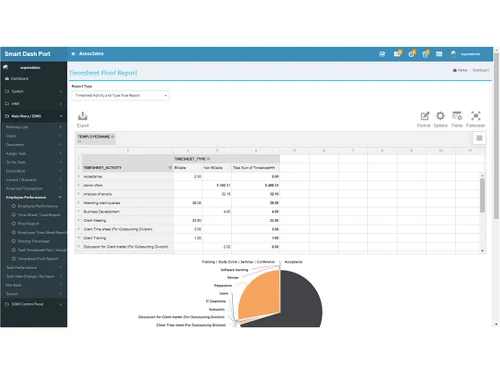
The Smart Office Management System is a tool that streamlines client management and task management with timesheets, document management, client billing, and payment collection automation.

See More

Have you used Smart Office Management System before?

Share your insights for better experience

Add a Review
Starting Price
₹10,000 excl.GST
₹ 11,800 incl. GST

View plans

offer Save upto 18%, Get GST Invoice on your business purchase T&C
offer Buy Now & Pay Later, Check offer on payment page.
Buy Now
100% Genuine
Products
Best Price
Guaranteed
Safe & Secure
Payment
  • Description

  • Pricing

  • Features

  • Specification

  • Review

  • Compare

  • Alternatives

  • FAQ

Starting at ₹10,000
Buy Now

Smart Office Management System Software Overview

What is Smart Office Management System?

Smart Office Management System is a specialized software designed for CA, CS, CPA, CIMA, ICWA, Tax Consultant, Advocate, and Professional Service Provider Offices to efficiently manage their office operations. The system enhances productivity by automating routine tasks with a required checklist, Timesheet, Client Bill, and Collection, providing secure data storage and allowing you to track tasks on different schedules (i.e., monthly, quarterly, half-yearly, etc.).

This CA office management software offers features like viewing all office tasks on a single screen, communicating with clients via email, SMS, and WhatsApp, and managing documents inward and outward. It also sets reminders for upcoming tasks and schedules upcoming Tasks; task-wise timesheets for costing for billing enhance staff productivity and provide easy-to-generate reports. Overall, it aims to reduce stress, prevent mistakes, improve client satisfaction, and increase revenue by making office operations smoother and more organized.

Why Choose Smart Office Management System?

  • Secure Client Data: Ensures client data remains secured and accessible only to you.
  • Comprehensive Task Management: Manages and tracks tasks on various schedules (yearly, quarterly, etc
  • Centralized Task Status: View all office tasks and their statuses on a single screen anytime and anywhere.
  • Revenue Growth: Potential to significantly increase revenue.
  • Client Accessibility: Clients can upload and access documents from anywhere, anytime.
  • Enhanced Communication: Communicates with clients via email, SMS, and WhatsApp.
  • Efficient Document Management: Manages inward and outward documents effectively.
  • Timely Reminders: Provides reminders for tasks and document renewals well in advance.
  • Work Flexibility: Allows for efficient work from any location, including home.
  • Staff Efficiency: Optimizes staff performance and productivity.
  • Detailed Reporting: Offers easy generation of task-wise and client-wise reports.
  • Billing Reminders: Reminds you to generate bills for clients as soon as any task is completed. Also, do Email, SMS, and What’s App payment collection reminders.
  • Checklists and Queries: Maintains task-specific checklists and query lists for thorough verification. Also attached is a document on the task.

Benefits of Smart Office Management Solution

  • Data Security: Keeps client data secure and private.
  • Efficient Task Management: Tracks and manages tasks on various schedules (annual, quarterly, etc.).
  • Unified Task View: This lets you see all office tasks and their statuses on a single screen.
  • Increased Revenue: Helps boost revenue by improving efficiency and client satisfaction.
  • Remote Accessibility: Enables clients to upload and access documents from anywhere.
  • Improved Communication: Facilitates communication with clients through Email, SMS, and WhatsApp.
  • Document Management: Manages both inward and outward documents efficiently. It can store documents in the system and give clients access to download their documents.
  • Advance Reminders: Sends timely reminders for tasks and document renewals.
  • Flexible Working: Supports efficient work from any location, including home.
  • Enhanced Staff Efficiency: Optimizes staff productivity, Billing cost estimation vs actual and performance.
  • Easy Reporting: Provides detailed and easy-to-generate task-wise, Task-wise timesheet and client-wise reports.
  • Billing Accuracy: Ensures timely billing and reminders after task completion with spend time and cost.
  • Thorough Verification: Maintains checklists and query lists for comprehensive task verification

Smart Office Management System prices

Smart Office Management System prices in India starts at  INR 10,000 at techjockey.com.

The pricing model is based on different parameters, including extra features, deployment type, and the total number of users. For further queries related to the product, you can contact our product team and learn more about the pricing and offers.

Read more

Smart Office Management System Pricing & Plans

5 User per Year

Calculated Price

10000 Exclusive of all taxes
    • Users

      Users
      Users
    • Yearly

      Yearly
      Yearly

Key Features

  • Unlimited Clients

  • Unlimited Task

  • Initial Data Migration Support

  • Product Updation

  • Online Training

  • Free Setups For What’s App API / SMS

  • Free Email Service

  • 50% AMC

  • Free Initial Setups

10 User per Year

Calculated Price

15000 Exclusive of all taxes
    • Users

      Users
      Users
    • Yearly

      Yearly
      Yearly

Key Features

  • Unlimited Clients

  • Unlimited Task

  • Initial Data Migration Support

  • Product Updation

  • Online Training

  • Free Setups For What’s App API / SMS

  • Free Email Service

  • 50% AMC

  • Free Initial Setups

15 User Per Year

Calculated Price

21000 Exclusive of all taxes
    • Users

      Users
      Users
    • Yearly

      Yearly
      Yearly

Key Features

  • Unlimited Clients

  • Unlimited Task

  • Initial Data Migration Support

  • Product Updation

  • Online Training

  • Free Setups For What’s App API / SMS

  • Free Email Service

  • 50% AMC

  • Free Initial Setups

Smart Office Management System Features

  • icon_check Task Management
    Manage and track tasks on various schedules with sub-task management, auto-assign, reminders, checklists, and follow-ups.
  • icon_check Document Management
    Securely manage inward and outward documents with digital storage, access, search, and expiry date tracking.
  • icon_check Invoice Management
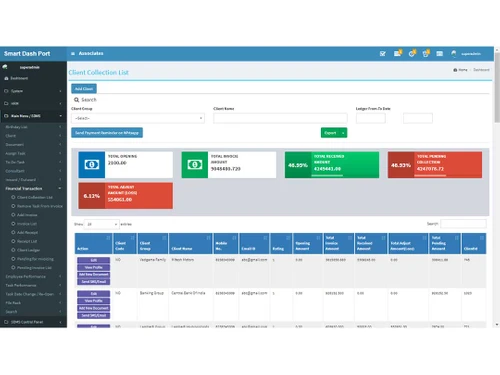
    Task-wise invoicing and fee collection with automatic billing reminders after task completion.
  • icon_check Client Management
    Manages comprehensive client profiles with multiple contact details, login, and digital document storage.
  • icon_check User Friendly
    Intuitive and easy-to-use interface simplifies complex office tasks for all users.
  • icon_check Dashboards
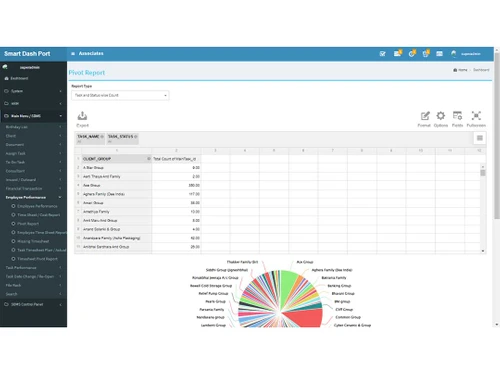
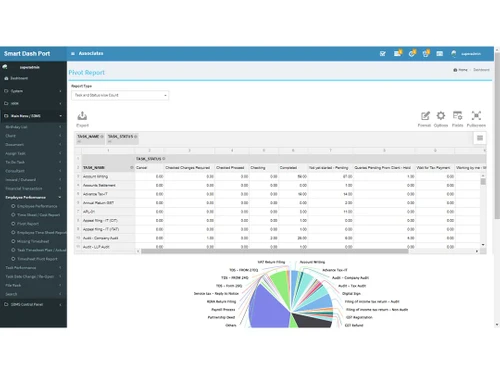
    Smart dashboard offers a real-time summary of tasks with auto-notifications and filters.
  • icon_check Employee Management
    Tracks employee tasks, manage multi-tasking, handover reports, and timesheet tracking with detailed reports.
  • icon_check Auto Email, Whatsapp & SMS
    Sends automatic notifications and reminders via email, WhatsApp, and SMS for timely communication.
  • icon_check Timesheets
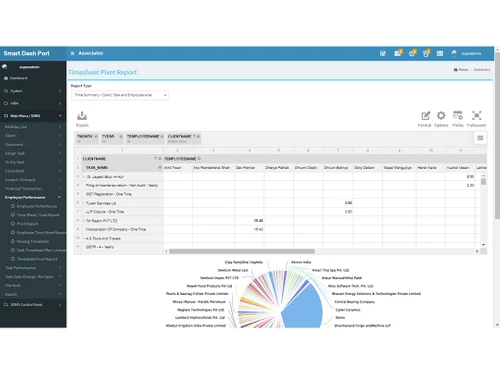
    Provides detailed tracking of employee work hours for accurate billing and productivity analysis.
  • icon_check Inward & Outward
    Efficiently manages incoming and outgoing documents with tracking and notifications for returnable documents.
Smart Office Management System Demo Video play icon

Get Smart Office Management System Demo

Watch the demo video to explore key features, real workflows, and how the software fits your business needs.

Understand
Key Features
Personal
Demo Insights
Interactive
Demo Support

Smart Office Management System Specifications

Supported Platforms
Ubuntu Ubuntu Windows Windows iOS iOS Android Android MacOS MacOS Windows(Phone) Windows(Phone)
Devices
Desktop Desktop Mobile Mobile
Deployment
Cloud-Based Cloud-Based Perpetual Perpetual
Suitable For
Basic Office Software Legal Audit Offices Accounting Firms Law Firms Tax
Business Specific
Law Firm
Business Size
Small Business Medium Business
Customer Support
Email
Language
English
Training Resources
Documentation

Explore the Best Alternative Solutions Similar to Your Business Size and Needs

Smart Office Management System Review

5

Out of 5

img

Overall Rating

Based on
1 Verified Review

Rating Breakdown

  • Features 5
  • Value for Money 5
  • Ease of Use 5
  • Customer Support 5

100% Recommend this Product

Add Review

Rupareliya Financial

Auditor

Industry: Professional Services

5

Reviewed on: Aug 12, 2024

Techjockey Verified

“Excellent Smart Office Management Software for Chartered Accountants (CA.)”

Very good that the software is installed in our office system.

Pros

This software is highly effective for firm partners and organizational employees, offering comprehensive tools for task tracking, employee management, and client reminders. It streamlines processes such as document collection, and sends reminders via email, SMS, or WhatsApp, while also managing billing and collections efficiently.

Cons

Software does not include Accounting Software

Switched from kdocs

Reason to switch

Better Features and good pricing

Compare Smart Office Management System With other CA Office Management Software

Products
Ratings
Pricing
Device Supported
Deployment
Supported Platforms
  • img

    Smart Office Management System

  • 5

  • ₹ 10000.00 excl. GST

  • Desktop

    Mobile

  • Web based

    On Premises

  • Windows

    Mac OS

  • img

    EasyCloudBooks

  • 4.7

  • Price On Request

  • Desktop

    Mobile

  • Web based

    On Premises

  • Windows

    Mac OS

  • img

    Turia

  • 4.7

  • ₹ 100

  • Desktop

    Mobile

  • Web based

    On Premises

  • Windows

    Mac OS

  • img

    CADashboard

  • 4.9

  • ₹ 12000

  • Desktop

    Mobile

  • Web based

    On Premises

  • Windows

    Mac OS

  • img

    ERPCA

  • 4.7

  • ₹ 1000

  • Desktop

    Mobile

  • Web based

    On Premises

  • Windows

    Mac OS

  • img

    MyTask

  • 3.7

  • ₹ 690

  • Desktop

    Mobile

  • Web based

    On Premises

  • Windows

    Mac OS

  • img

    CAProWin

  • 4.6

  • ₹ 100

  • Desktop

    Mobile

  • Web based

    On Premises

  • Windows

    Mac OS

  • img

    eProcessify

  • 4.2

  • ₹ 600

  • Desktop

    Mobile

  • Web based

    On Premises

  • Windows

    Mac OS

  • img

    CA Cloud Desk

  • 5

  • ₹ 3000

  • Desktop

    Mobile

  • Web based

    On Premises

  • Windows

    Mac OS

(0) Product(s) selected

Smart Office Management System Alternatives

See All Smart Office Management System Alternatives

Starting Price:

₹100 /Month

SPRO

4.8

Available

Price on Request

Starting Price:

₹600 /Month

Starting Price:

$79 /Month

Articles for Smart Office Management System

See All Related Articles

What is the pricing for the Smart Office Management System?

The price of the Smart Office Management System in India starts at INR 10,000 on techjockey.com.

Is there a mobile app available for the Smart Office Management System?

No, but you can access browsers and web applications with responsive design on a mobile or any device.

Which operating systems does Smart Office Management System support?

For installation, the Windows operating system needs something else. You can access any device through a browser with no limitations.

Does Smart Office Management System offer a trial version?

Smart Office Management System does not offer a free trial to users. So please contact our product experts to learn more about the pricing plans.

How does Smart Office Management System operate?

Smart Office Management System integrates task management, document handling, client interaction, Client Billing/payment collection, and workflow automation into a modular CRM solution tailored for professionals such as CA, CS, CPA, CIMA, ICWA, Tax Consultant, Advocate, and Professional Service Provider to streamline operations and enhance client service.

Who can benefit from using Smart Office Management System?

Professionals such as Chartered Accountants (CA), Company Secretaries (CS), CPA, CIMA, ICWA, Tax Consultants, Advocates, and professional service providers can benefit from using the Smart Office Management System to streamline tasks, manage documents, and improve client interactions efficiently.

Is Smart Office Management System software free to use?

No, Smart Office Management System software is not free.

20,000+ Software Listed

Best Price Guranteed

Free Expert Consultation

2M+ Happy Customers

Terms and Condtions

close

Users with registered businesses can purchase goods from merchants on the platform to satisfy their business needs. Users are not permitted to utilize any products acquired through the platform for resale, advertising, business, or further distribution.

For each purchase made, users will receive a Tax Invoice (or 'GST invoice') that includes specific details such as:

  • the GSTIN of the user associated with their registered business, and

  • the specified Entity Name for their business.

It should be noted that not all products are eligible for GST Invoice. Only the products displayed by participating sellers with the 'GST-based Invoice Available' callout on the product description page would qualify.

Certain goods and services are not eligible to get a GST Invoice, including items with VAS, i.e., Value Added Services (e.g., Total Mobile Protection/Assured Buyback) and those involving an exchange offer at the time of purchase.

Users must ensure the accuracy of the GSTIN, and business entity name provided for the GST Invoice. Requests for corrections into GST Invoice would not be accommodated by Techjockey.com or any Seller, and any issues arising from user-provided information are the sole responsibility of users.

Techjockey.com is not liable for the GST Invoice or any associated input tax credit. To efficiently claim an input tax credit, users should select the registered place of business address as per the GST authority's data and follow the provisions of the GST Act and rules.

To claim an input tax credit, the delivery and billing addresses must match. Furthermore, input tax credits will not be granted if the delivery address and GSTIN on the invoice are from different states. In case of incorrect GST details provided during the order placement, the order will be canceled automatically.