linkedin
Snapshare logo
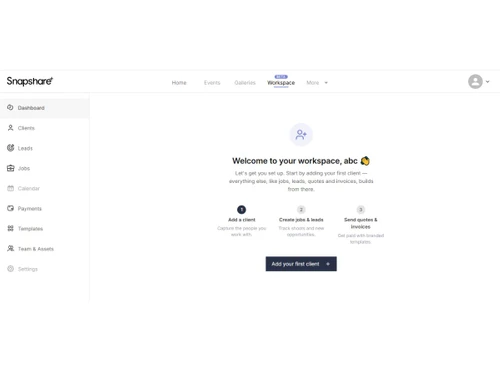
Snapshare dashboard
Snapshare leads
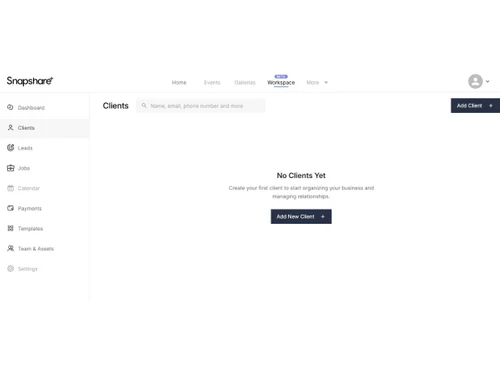
Snapshare clients

Snapshare

Brand: Snapshare

  • No Ratings & Reviews

Snapshare is a photography client management platform that helps photographers deliver client galleries, streamline workflows with AI, and manage clients more efficiently.

See More

Have you used Snapshare before?

Share your insights for better experience

Add a Review
Starting Price
₹700

View plans

100% Genuine
Products
Best Price
Guaranteed
Safe & Secure
Payment
  • Description

  • Pricing

  • Features

  • Specification

  • Review

  • Compare

  • Alternatives

  • FAQ

Starting at ₹700

Snapshare Software Overview

What is Snapshare?

Snapshare is a comprehensive utility software designed specifically for professional photographers. It functions as an all-in-one platform that combines client photo galleries, a customer relationship management (CRM) system, and powerful artificial intelligence (AI) tools. The primary goal of Snapshare is to simplify and streamline the photography workflow, from initial client management to final photo delivery.

The software enables photographers to create stunning, private, and branded online galleries for their clients. It automates tedious tasks like photo sorting and culling using AI, allowing photographers to deliver their work faster. By integrating a dedicated workspace for managing leads, bookings, and communication, Snapshare eliminates the need for multiple disparate tools, providing a single, efficient solution to manage and grow a photography business while delivering an exceptional and premium client experience.

Why Choose Snapshare?

  • Elevated Client Experience: Deliver photos in elegant, easy-to-navigate online galleries. Features like AI-powered face search and simple favoriting tools make it effortless for clients to find and select their images, providing a premium, high-end service feel.
  • Increased Efficiency: The platform significantly reduces manual labor. AI-driven photo culling automatically identifies the best shots from a session, and the integrated CRM centralizes all client management tasks, saving valuable time and effort.
  • Enhanced Branding and Growth: Turn every gallery into a marketing tool. Snapshare allows for deep customization with logos, branded color schemes, and elegant typography. The built-in lead capture functionality helps convert gallery viewers into new clients.
  • Unified Workflow: By combining gallery delivery, client management, photo selection, and AI tools into a single platform, Snapshare creates a seamless workflow. This integration means less time spent switching between applications and more time focusing on photography.
  • Secure and Controlled Sharing: Protect your creative work with robust security features. The software provides secure download access control, ensuring that only authorized individuals can download the high-resolution images.

Advanced Features of Snapshare

  • AI-Powered Face Recognition: This powerful feature automatically scans and organizes photos based on facial recognition. Clients can use a "selfie search" to instantly find all their photos from an event, eliminating the need for manual searching.
  • AI Photo Culling: Save hours of post-production time. The AI culling tool intelligently analyzes entire photo sets to identify and suggest the best images, flagging duplicates, blurry shots, or photos with poor expressions.
  • Customizable Gallery Layouts: Gain full creative control over the presentation of your work. A simple drag-and-drop interface allows you to sequence and arrange images to create a personalized and compelling viewing experience for each client.
  • Branding and Lead Capture: Transform your gallery into a powerful extension of your brand. Apply custom logos and color palettes, and utilize the integrated lead capture forms to generate new business directly from your shared galleries.
  • Smart Photo Selection: Streamline the proofing and approval process. Clients can easily browse their gallery, mark their favorite photos, and submit their selections directly through the platform, making communication clear and effortless.

Key Capabilities of Snapshare

  • Professional Client Galleries: The cornerstone of the platform, this capability allows for the creation of beautiful, private online galleries in seconds. It supports easy sharing via link, email, or WhatsApp and includes features for client favoriting and secure downloads.
  • Workspace (Photography CRM): This integrated CRM is the central hub for managing your business. It allows you to track leads, manage bookings, log client communication, and oversee all client galleries from a single, organized dashboard.
  • Portfolio Showcase: Present your best work in a clean, professional layout designed to showcase your photography and attract potential clients.
  • Digital Invitation Management: Designed for event photographers, this tool helps you manage and distribute secure, branded digital event invitations seamlessly, centralizing another key aspect of event photography management.

How to Use Snapshare?

  1. Manage Clients: Begin by using the Workspace CRM to track new leads, manage bookings, and organize all client-related information and communication.
  2. Upload and Organize: After a shoot, upload your photos to the platform. Utilize the AI Photo Culling feature to automatically sort through and select the best images.
  3. Create and Customize the Gallery: Build a new client gallery. Use the drag-and-drop editor to arrange the photos and apply your brand's logo, colors, and typography to create a unique, branded experience.
  4. Deliver to the Client: Share the finished gallery with your client instantly using a single, secure link. Clients can access their photos on any device.
  5. Facilitate Photo Selection: The client can use AI-powered face search to find relevant photos and the Smart Photo Selection tool to mark favorites for selection and download.
  6. Control Downloads: Manage download permissions to ensure your work is protected, allowing clients to download their selected images securely.

Snapshare Pricing

Snapshare price starts at INR 700 at techjockey.com.

The pricing model is based on different parameters, including extra features, deployment type, and the total number of users. For further queries related to the product, you can contact our product team and learn more about the pricing and offers.

Read more

Snapshare Pricing & Plans

Spark
Starting at ₹700
    • Quantity

      Quantity
      Quantity
    • Monthly

      Monthly
      Monthly

Key Features

  • Storage - 50 GB

  • Video Upload -3 GB

  • Events and Galleries Unlimited

  • Client Proofing

  • WhatsApp & Email

  • Digital Invitation

Ignite
Starting at ₹1300
    • Quantity

      Quantity
      Quantity
    • Monthly

      Monthly
      Monthly

Key Features

  • Storage - 200 GB

  • Video Upload -10 GB

  • Events and Galleries Unlimited

  • Client Proofing

  • WhatsApp & Email

  • Digital Invitation

Elevate
Starting at ₹2600
    • Quantity

      Quantity
      Quantity
    • Monthly

      Monthly
      Monthly

Key Features

  • Storage - 500 GB

  • Video Upload -50 GB

  • Events and Galleries Unlimited

  • Client Proofing

  • WhatsApp & Email

  • Digital Invitation

Ascend
Starting at ₹3900
    • Quantity

      Quantity
      Quantity
    • Monthly

      Monthly
      Monthly

Key Features

  • Storage - 1 TB

  • Video Upload -100 GB

  • Events and Galleries Unlimited

  • Client Proofing

  • WhatsApp & Email

  • Digital Invitation

Snapshare Features

  • icon_check Online Photo Galleries
    Create branded, private online galleries for clients and events.
  • icon_check Face Recognition
    Automatically identify people and help clients find their photos using selfie search.
  • icon_check Photo Selection
    Allow clients to favorite and select images directly from the gallery.
  • icon_check Digital Invitations
    Create and share branded digital event invitations.
  • icon_check Gallery Sharing
    Share galleries instantly via WhatsApp, email, or secure links.
  • icon_check QR Code Photo Access
    Let guests access and retrieve photos by scanning QR codes.
  • icon_check Cloud Photo Sync
    Upload and synchronize event photos to the cloud in real time.
  • icon_check Password-Protected Galleries
    Protect galleries with password-based access control.
  • icon_check Layouts
    Arrange photos using drag-and-drop layouts and personalized sequencing.
  • icon_check Lead Capture
    Collect visitor information and convert gallery visitors into potential clients.
  • icon_check Watermark Management
    Apply branded watermarks to protect photography assets.
  • icon_check Social Media Sharing
    Enable one-click sharing of photos across social platforms.
  • icon_check Themes & Appearance
    Personalize gallery themes, fonts, and visual styles.
  • icon_check Workflow Management
    Streamline gallery delivery and client approval workflows.
  • icon_check Dashboard & Analytics
    Monitor gallery activity, engagement, and client interactions.

Snapshare Specifications

Supported Platforms
Ubuntu Ubuntu Windows Windows iOS iOS Android Android MacOS MacOS Linux Linux
Devices
Desktop Desktop Mobile Mobile Tablet Tablet iPad iPad
Deployment
Cloud-Based Cloud-Based
Suitable For
All Industries
Business Specific
All Businesses
Business Size
Startups
Customer Support
Email
Language
English
Training Resources
Live Online Videos
AI Features
AI Integrated

Explore the Best Alternative Solutions Similar to Your Business Size and Needs

Snapshare Review

Techjockey Trusted Reviews from Verified Users

No reviews are currently available for Snapshare. Discover similar Utility Software reviews

  • Booky

    4.6

    Whats great - Booky.io has a clean and minimal layout. It's perfect for keeping my most-used links all in one place. The drag-and-drop make... read more

  • Defencebyte Computer Opmitizer

    4.1

    Whats great - Really I am happy now after using defencebyte Computer optimizer, My Pc performance boost after using defencebyte Computer op... read more

  • VMware

    4.5

    Whats great - Vmware offers a wide variety of management tools and features to help with both the initial configuration and ongoing adminis... read more

Compare Snapshare With other Utility Software

Products
Ratings
Pricing
Device Supported
Deployment
Supported Platforms
  • img

    Snapshare

  • Price On Request

  • Desktop

    Mobile

  • Web based

    On Premises

  • Windows

    Mac OS

  • img

    Truecaller

  • 4.2

  • ₹ 84

  • Desktop

    Mobile

  • Web based

    On Premises

  • Windows

    Mac OS

  • img

    WizTree

  • 4.3

  • Price On Request

  • Desktop

    Mobile

  • Web based

    On Premises

  • Windows

    Mac OS

  • img

    RestoreX360

  • 5

  • ₹ 1499

  • Desktop

    Mobile

  • Web based

    On Premises

  • Windows

    Mac OS

  • img

    Xplorer

  • 4.1

  • Price On Request

  • Desktop

    Mobile

  • Web based

    On Premises

  • Windows

    Mac OS

  • img

    CHIRP

  • 4.3

  • Price On Request

  • Desktop

    Mobile

  • Web based

    On Premises

  • Windows

    Mac OS

  • img

    IrfanView

  • 4.0

  • Price On Request

  • Desktop

    Mobile

  • Web based

    On Premises

  • Windows

    Mac OS

  • img

    Opal

  • 4.3

  • Price On Request

  • Desktop

    Mobile

  • Web based

    On Premises

  • Windows

    Mac OS

(0) Product(s) selected

Snapshare Alternatives

See All Snapshare Alternatives
SAVE UPTO 24%

Starting Price:

$25 /Quantity

Available

Price on Request

Available

Price on Request

Starting Price:

$12 /License

Opal

4.3

Starting Price:

$20 /Month

Available

Price on Request

Articles for Snapshare

See All Related Articles

How do I share files on Snapshare?

Snapshare allows photographers to deliver client galleries instantly via WhatsApp, email, or a single shareable link, providing a simple and efficient way to share photos.

Is Snapshare safe to use?

Yes, Snapshare is designed with security in mind, offering secure download access to protect your work and ensuring safe, branded sharing of digital invitations and photo galleries.

How do I download Snapshare?

Snapshare is a web-based platform for photographers; you can get started by signing up for free or viewing their plans directly on their website, rather than downloading a traditional software application.

What is the Snapshare app used for?

The Snapshare platform is used by photographers to create stunning client photo galleries, manage client relationships with an integrated CRM, and utilize AI tools for tasks like face recognition and photo culling.

Does Snapshare work offline?

Snapshare is primarily a cloud-based platform designed for online client gallery delivery, CRM management, and AI-powered photo processing, and its core functionalities require an internet connection.

Who can use Snapshare?

Snapshare is specifically designed for photographers and photography businesses looking to streamline their workflow, deliver client galleries, manage client relationships, and enhance their brand.

What AI features does Snapshare offer?

Snapshare offers AI-powered features such as facial recognition for easy client photo discovery and AI photo culling to automatically identify and select the best shots, significantly reducing manual sorting time.

Can I customize the appearance of my photo galleries in Snapshare?

Yes, Snapshare allows extensive customization of your photo galleries, including drag-and-drop layouts, branding with logos, and custom themes with branded color sets and elegant typography to match your style.

Is there a free trial available for Snapshare?

Yes, Snapshare offers a Start for free option, allowing users to begin using the platform and explore its features before committing to a paid plan.

How does Snapshare help with client management?

Snapshare includes a comprehensive photography CRM within its Workspace, enabling users to manage all client relationships, track leads, bookings, communication, and client galleries from a single centralized platform.

How much does Snapshare cost?

Snapshare price starts at INR 700 at techjockey.com.

21,000+ Software Listed

Best Price Guranteed

Free Expert Consultation

5M+ Happy Customers

Terms and Condtions

close

Users with registered businesses can purchase goods from merchants on the platform to satisfy their business needs. Users are not permitted to utilize any products acquired through the platform for resale, advertising, business, or further distribution.

For each purchase made, users will receive a Tax Invoice (or 'GST invoice') that includes specific details such as:

  • the GSTIN of the user associated with their registered business, and

  • the specified Entity Name for their business.

It should be noted that not all products are eligible for GST Invoice. Only the products displayed by participating sellers with the 'GST-based Invoice Available' callout on the product description page would qualify.

Certain goods and services are not eligible to get a GST Invoice, including items with VAS, i.e., Value Added Services (e.g., Total Mobile Protection/Assured Buyback) and those involving an exchange offer at the time of purchase.

Users must ensure the accuracy of the GSTIN, and business entity name provided for the GST Invoice. Requests for corrections into GST Invoice would not be accommodated by Techjockey.com or any Seller, and any issues arising from user-provided information are the sole responsibility of users.

Techjockey.com is not liable for the GST Invoice or any associated input tax credit. To efficiently claim an input tax credit, users should select the registered place of business address as per the GST authority's data and follow the provisions of the GST Act and rules.

To claim an input tax credit, the delivery and billing addresses must match. Furthermore, input tax credits will not be granted if the delivery address and GSTIN on the invoice are from different states. In case of incorrect GST details provided during the order placement, the order will be canceled automatically.