linkedin
Swishy logo
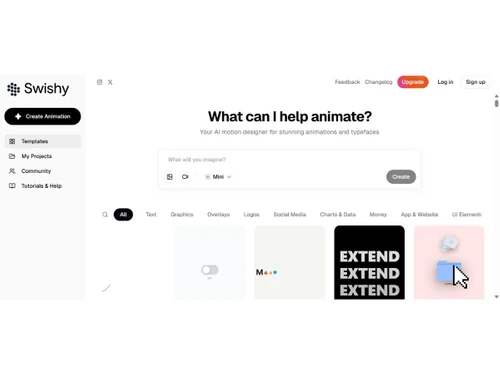
Swishy-dashboard
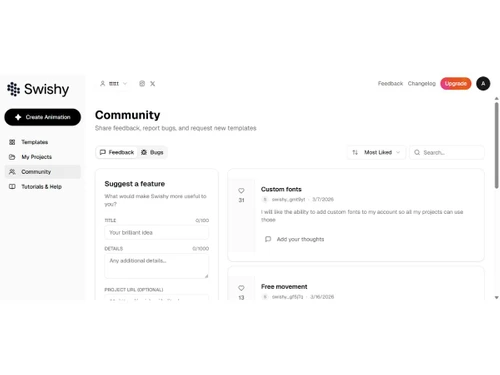
Swishy-community
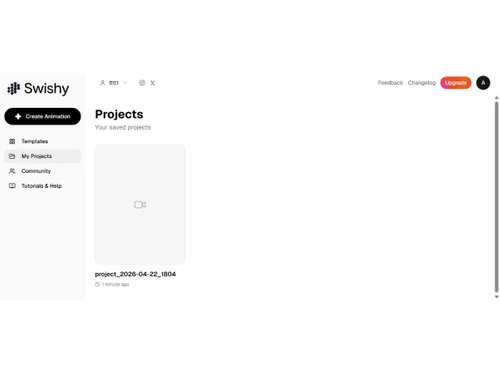
Swishy-projects

Swishy

Brand: Swishy

  • No Ratings & Reviews

Swishy is an AI-powered motion design tool that helps users create animations and custom typefaces for creative projects.

See More

Have you used Swishy before?

Share your insights for better experience

Add a Review
Starting Price
$19

View plans

100% Genuine
Products
Best Price
Guaranteed
Safe & Secure
Payment
  • Description

  • Pricing

  • Features

  • Specification

  • Review

  • Compare

  • Alternatives

Starting at $19

Swishy Software Overview

What is Swishy?

Swishy is an AI-powered motion design and animation platform that empowers users to create professional-quality motion graphics, kinetic typography, animated typefaces, and other animations using natural-language descriptions. It functions as an intuitive "AI motion designer," eliminating the steep learning curve and technical complexities traditionally associated with animation. By interpreting natural language descriptions, Swishy automates the creation of a vast range of visual effects, from intricate UI element animations to dynamic social media content.

The platform is designed for speed and accessibility, allowing creators, marketers, and businesses to produce professional animations without needing extensive animation expertise. Whether you need to animate a logo, visualize data, create an engaging explainer video, produce social media content, or showcase a product, Swishy provides tools to bring your ideas to life quickly.

Why Choose Swishy?

  • AI-Driven Simplicity: The primary benefit of Swishy is its prompt-based workflow. Users can simply describe the desired animation, such as "create a typewriter effect" or "animate a website easing in from the bottom," and the AI handles the complex execution. This democratizes motion design for users of all skill levels.
  • Accelerated Workflow: Reduce production time from hours to minutes or seconds. This rapid generation is ideal for quickly creating and iterating on motion graphics, social media content, and marketing campaigns.
  • Versatile Creative Canvas: Swishy is not limited to a single style or use case. Its capabilities span across numerous domains, including UI/UX design, data visualization, brand marketing, and creative storytelling, making it a highly versatile tool in any creative professional's arsenal.
  • High-Fidelity Output: Swishy produces polished motion graphics with AI-generated timing, easing, composition, and visual effects. Users can create professional animations and iterate on different styles and effects to match their creative vision.

Advanced Features of Swishy

  • Natural Language Animation Engine: At its core, Swishy utilizes a sophisticated AI that understands descriptive and contextual commands. It can interpret nuanced requests to control motion, timing, and style, such as creating "stretchy" text or a "minimalist time display animating between start and end times."
  • Contextual UI & UX Animation: A standout feature is its ability to generate realistic and animated UI elements.
  • Dynamic Data Visualization: Transform static data into compelling narratives. Swishy can animate charts to show trends, create timelines to illustrate skills or project phases, and generate financial graphics like "money falling" or "ad spend" visualizations.
  • Sophisticated Typographic Control: The software offers extensive control over text animation. Go beyond simple fades and slides with advanced effects like "squiggle flow text," "sentence reveal," "ASCII art transitions," and "wiggle text" to make typography a central, dynamic element of your design.
  • Brand Asset Animation: Animate logos and brand identity elements with dynamic reveals, transitions, and other motion effects for marketing campaigns, social content, and product presentations.

Key Capabilities of Swishy

  • Social Media Content: Quickly generate eye-catching animations tailored for different platforms, including Instagram stories, logo reveals, YouTube subscribe buttons, and animated profile elements.
  • UI/UX Prototyping: Create animated mockups of websites and applications.
  • Text and Title Effects: A robust set of tools for creating dynamic typography for videos, presentations, and websites. This includes everything from classic typewriter effects to modern, abstract text motions.
  • Logo and Brand Animation: Bring static brand assets to life. Animate logos with unique effects, create branded intro/outro sequences, and develop animated brand guidelines.
  • Data and Infographic Animation: Make data more understandable and engaging by animating charts, graphs, timelines, and statistical representations like population growth or financial trends.
  • Creative and Explainer Videos: Produce animations for marketing, educational content, product showcases, and creative projects. Capabilities include explainer animations, character animations, multi-layer compositions, and visual effects.

How to Use Swishy?

  1. Conceptualize Your Animation: Begin with a clear vision. Know what you want to animate, the style you are aiming for, and the key elements that should be in motion.
  2. Write a Descriptive Prompt: This is the core of the process. In the Swishy interface, type a detailed description of your desired animation. Be as specific as possible. For example, instead of "animate text," try "Create a comic-style slide-in text animation with the word 'Testing' in purple."
  3. Let the AI Generate: Once you submit your prompt, Swishy's AI engine gets to work. It processes your request, understands the context and desired motion, and generates the animation sequence for you.
  4. Review and Export: Review the generated animation, make adjustments as needed, and export the finished animation in MP4, MOV, or GIF format for websites, social media, presentations, and video content.

Swishy Pricing

Swishy price starts at USD 19 at techjockey.com.

The pricing model is based on different parameters, including extra features, deployment type, and the total number of users. For further queries related to the product, you can contact our product team and learn more about the pricing and offers.

Read more

Swishy Pricing & Plans

Beginner
Starting at $19
    • Licenses

      Licenses
      Licenses
    • Monthly

      Monthly
      Monthly

Key Features

  • 150 AI credits/month

  • Mini, Starter, Best models

  • Unlimited projects

  • Unlimited exports

  • MP4, GIF, MOV formats

  • Transparent export

Pro
Starting at $49
    • Licenses

      Licenses
      Licenses
    • Monthly

      Monthly
      Monthly

Key Features

  • 400 AI credits/month

  • All models including Pro

  • Unlimited projects

  • Unlimited exports

  • MP4, GIF, MOV formats

  • Transparent export

Swishy Features

  • icon_check AI Video Generation
    Converts text prompts into animated videos automatically, reducing manual editing and speeding up content creation workflows
  • icon_check Motion Graphics
    Automatically applies animations, transitions, and timing for professional motion graphics without manual keyframing
  • icon_check Template Library
    Offers pre-built templates for social media, logos, and ads to accelerate design and maintain visual consistency
  • icon_check Drag-and-Drop Editor
    Simple interface allows users to customize scenes, text, and elements without technical design expertise required
  • icon_check Real-time Preview
    Instantly previews animations and edits, helping users refine visuals quickly without waiting for full rendering
  • icon_check Multi-Format Export
    Exports videos in formats like MP4, GIF, and MOV optimized for various platforms and use cases
  • icon_check Social Media Optimization
    Automatically adjusts aspect ratios and layouts for platforms like Instagram, TikTok, and YouTube Shorts
  • icon_check AI Scene Composition
    Intelligently arranges text, visuals, and motion elements to create visually balanced and appealing compositions
  • icon_check Text-to-Animation
    Transforms written content into engaging animated visuals, ideal for marketing, education, and storytelling
  • icon_check Custom Branding
    Allows users to apply brand colors, fonts, and styles to maintain consistency across all generated content
  • icon_check Timeline Editing
    Provides basic timeline controls to adjust duration, sequence, and synchronization of animation elements
  • icon_check Collaborations
    Enables sharing projects or outputs with teams for feedback and collaborative content creation workflows
  • icon_check Fast Rendering Engine
    Generates high-quality animations within seconds, significantly reducing production time compared to traditional tools

Swishy Specifications

Supported Platforms
Windows Windows MacOS MacOS
Devices
Desktop Desktop
Deployment
Cloud-Based Cloud-Based
Suitable For
All Industries
Business Specific
All Businesses
Business Size
Individual Small Business Startups Medium Business Enterprises SMBs SMEs MSMEs Freelancers
Customer Support
Email
Language
English
Training Resources
Documentation Videos
AI Features
AI Integrated
Technology
Next Generation

Explore the Best Alternative Solutions Similar to Your Business Size and Needs

Swishy Review

Techjockey Trusted Reviews from Verified Users

No reviews are currently available for Swishy. Discover similar Animation Software reviews

  • Animaker

    4.5

    Whats great - I started using Animaker because of a sudden influx of assignments during my career’s initial video editing career. Today, th... read more

  • VideoScribe

    4.4

    Whats great - First of all, Videoscribe is great for making animated presentations. Just in case, you forgot to save the recent changes, wo... read more
  • Autodesk Maya

    4.8

    Whats great - Autodesk Maya is the best tool to convert your ideas into reality. You have a lot of possibilies with this software. If you w... read more
Compare Swishy With other Animation Software

Products
Ratings
Pricing
Device Supported
Deployment
Supported Platforms
  • img

    Swishy

  • Price On Request

  • Desktop

    Mobile

  • Web based

    On Premises

  • Windows

    Mac OS

  • img

    Autodesk Maya

  • 4.7

  • ₹ 16520

  • Desktop

    Mobile

  • Web based

    On Premises

  • Windows

    Mac OS

  • img

    Autodraft

  • 4.2

  • ₹ 833

  • Desktop

    Mobile

  • Web based

    On Premises

  • Windows

    Mac OS

  • img

    VideoScribe

  • 4.4

  • Price On Request

  • Desktop

    Mobile

  • Web based

    On Premises

  • Windows

    Mac OS

  • img

    LottieFiles

  • 4.3

  • Price On Request

  • Desktop

    Mobile

  • Web based

    On Premises

  • Windows

    Mac OS

  • img

    Jitter

  • 4.4

  • Price On Request

  • Desktop

    Mobile

  • Web based

    On Premises

  • Windows

    Mac OS

  • img

    Animation Desk

  • 4.6

  • Price On Request

  • Desktop

    Mobile

  • Web based

    On Premises

  • Windows

    Mac OS

  • img

    Immersity AI

  • 4.3

  • Price On Request

  • Desktop

    Mobile

  • Web based

    On Premises

  • Windows

    Mac OS

  • img

    Toonly

  • 4.4

  • Price On Request

  • Desktop

    Mobile

  • Web based

    On Premises

  • Windows

    Mac OS

  • img

    ImagetoCartoon

  • 4.3

  • Price On Request

  • Desktop

    Mobile

  • Web based

    On Premises

  • Windows

    Mac OS

  • img

    Lordicon

  • 4.5

  • Price On Request

  • Desktop

    Mobile

  • Web based

    On Premises

  • Windows

    Mac OS

(0) Product(s) selected

Swishy Alternatives

See All Swishy Alternatives

Starting Price:

$240 /User/Year

Starting Price:

$49

Starting Price:

$16

Starting Price:

$15 /Month
Starting Price:

$69 /Quantity $99

SAVE UPTO 30%

Starting Price:

$11 /Month

Starting Price:

$10 /Month

Articles for Swishy

See All Related Articles

20,000+ Software Listed

Best Price Guranteed

Free Expert Consultation

2M+ Happy Customers

Terms and Condtions

close

Users with registered businesses can purchase goods from merchants on the platform to satisfy their business needs. Users are not permitted to utilize any products acquired through the platform for resale, advertising, business, or further distribution.

For each purchase made, users will receive a Tax Invoice (or 'GST invoice') that includes specific details such as:

  • the GSTIN of the user associated with their registered business, and

  • the specified Entity Name for their business.

It should be noted that not all products are eligible for GST Invoice. Only the products displayed by participating sellers with the 'GST-based Invoice Available' callout on the product description page would qualify.

Certain goods and services are not eligible to get a GST Invoice, including items with VAS, i.e., Value Added Services (e.g., Total Mobile Protection/Assured Buyback) and those involving an exchange offer at the time of purchase.

Users must ensure the accuracy of the GSTIN, and business entity name provided for the GST Invoice. Requests for corrections into GST Invoice would not be accommodated by Techjockey.com or any Seller, and any issues arising from user-provided information are the sole responsibility of users.

Techjockey.com is not liable for the GST Invoice or any associated input tax credit. To efficiently claim an input tax credit, users should select the registered place of business address as per the GST authority's data and follow the provisions of the GST Act and rules.

To claim an input tax credit, the delivery and billing addresses must match. Furthermore, input tax credits will not be granted if the delivery address and GSTIN on the invoice are from different states. In case of incorrect GST details provided during the order placement, the order will be canceled automatically.