linkedin
TheQuickAssist logo
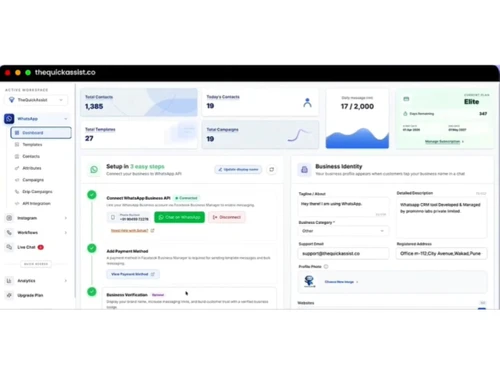
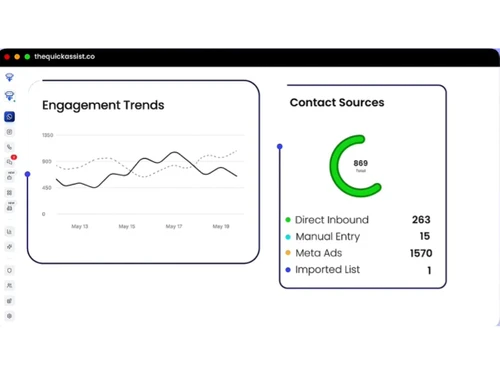
Thequickassist dashboard
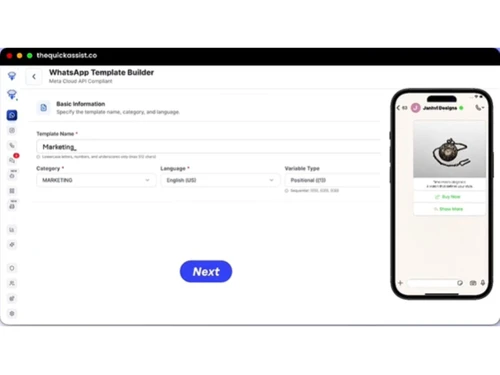
Thequickassist template
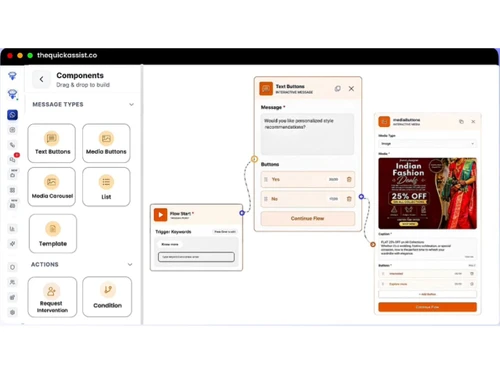
Thequickassist components

TheQuickAssist

Brand: TheQuickassist.co

  • No Ratings & Reviews

Have you used TheQuickAssist before?

Share your insights for better experience

Add a Review
Starting Price
₹599

View plans

100% Genuine
Products
Best Price
Guaranteed
Safe & Secure
Payment
  • Description

  • Pricing

  • Features

  • Specification

  • Review

  • Compare

  • Alternatives

Starting at ₹599

TheQuickAssistSoftware Overview

TheQuickassist.co Company Details

Founded Year:  2026

QuickAssist is an AI-powered automation solution that helps businesses capture and convert leads instantly on WhatsApp and their website.

Director/Founders Sainath Survase
Company Size 1-100 Employees

TheQuickAssist Pricing & Plans

Growth
Starting at ₹599
    • Quantity

      Quantity
      Quantity
    • Monthly

      Monthly
      Monthly

Key Features

  • Unlimited Templates & Contacts

  • Unlimited Campaigns

  • Opt-in and Opt-out Management

  • 10 Custom Attributes

  • 1 Drip Campaigns

  • AI Agent

Pro
Starting at ₹1199
    • Quantity

      Quantity
      Quantity
    • Monthly

      Monthly
      Monthly

Key Features

  • Unlimited Templates & Contacts

  • Unlimited Campaigns

  • Opt-in and Opt-out Management

  • Free 500 AI Credits

  • 5 Drip Campaigns

  • AI Agent Appointment Scheduling Upto 3 Users

Elite
Starting at ₹2999
    • Quantity

      Quantity
      Quantity
    • Monthly

      Monthly
      Monthly

Key Features

  • Unlimited Templates & Contacts

  • Unlimited Campaigns

  • Opt-in and Opt-out Management

  • Free 1,000 AI Credits

  • 10 Drip Campaigns

  • AI Agent Appointment Scheduling Upto 10 Users

TheQuickAssist Features

Bulk Messaging & Broadcasting

  • icon_check Bulk Messaging
    Transmits massive broadcast campaigns to thousands of contacts instantly.
  • icon_check Customizable Templates
    Designs flexible message blueprints with clickable buttons for broadcasts.
  • icon_check Auto Replies
    Triggers instant automated welcome texts when a customer opens a window.
  • icon_check Rich Media Support
    Supports distributing custom PDFs, documentation brochures, and images.
  • icon_check Scheduled Messaging
    Drafts marketing items beforehand to deploy precisely at a planned time.
  • icon_check Message Templates
    Manages pre-approved WhatsApp template APIs for official broadcasts.
  • icon_check Preview Mode
    Displays chat formatting visual mockups before executing campaigns.
  • icon_check Broadcast Lists
    Groups contact targets into targeted lists for rapid outreach.

Contact Management & Segmentation

  • icon_check Sync Contacts
    Natively imports and updates client listings directly inside CRM folders.
  • icon_check Import/Export Contacts
    Pulls database contact registries up to custom quota constraints.
  • icon_check Contact Tagging & Segmentation
    Categorizes consumers dynamically by custom attributes and filter tags.
  • icon_check Blacklist/Unsubscribe
    Includes native opt-in/opt-out management to enforce client request states.
  • icon_check Deduplication
    Detect and merge duplicate contacts automatically.

Chatbot & Automation

  • icon_check Drip Campaigns
    Sends automated multi-day follow-up messaging sequences to contacts.
  • icon_check Workflow Automation
    Uses a visual builder to automate processes and trigger multi-step logic.
  • icon_check Canned Responses
    Saves quick response templates to resolve frequent customer inquiries.
  • icon_check Auto Replies
    Triggers instant automated welcome texts when a customer opens a window.
  • icon_check Automated Follow-Ups
    Sets custom trigger rules to follow up with quiet or stalling deals.
  • icon_check Automatic Retry
    Re-submits message packages autonomously if network failures disrupt delivery.
  • icon_check Campaign Scheduling
    Plans operational calendar slots to dispatch broad customer notifications.
  • icon_check Hybrid Mode
    Blends AI conversation handling with automatic routing to human agents.
  • icon_check Recurring Messaging
    Triggers routine notifications automatically like fee or circular warnings.

AI Features

  • icon_check Lead Qualification
    Employs AI agents to autonomously question and tag hot vs. cold prospects.
  • icon_check AI Chatbots
    Builds no-code assistants trained on your website data and PDFs in minutes.
  • icon_check AI Sentiment Analysis
    Employs natural language insights to parse visitor mood and buyer intent.
  • icon_check Auto-Responders
    Generates immediate out-of-office or welcome text replies to user inputs.
  • icon_check Predictive Analytics
    Use AI to forecast user behavior and engagement.

Multi-Agent & Team Collaboration

  • icon_check Alerts & Notifications
    Fires real-time internal alerts when hot leads land or actions trigger.
  • icon_check Internal Notes
    Allows team members to drop private collaboration notes inside threads.
  • icon_check Shared Inbox
    Centralizes WhatsApp, Instagram, and web chats into one workspace for teams.
  • icon_check Live Agent Support
    Permits human representatives to step into threads to handle complex cases.
  • icon_check Chat Transfer
    Automatically routes active tickets to the correct sales or tech engineer.
  • icon_check Unlimited Agents
    Allow multiple agents to manage conversations.

Integrations

  • icon_check CRM Integration
    Features a built-in WhatsApp CRM to manage profiles and sync list data.
  • icon_check API Integration
    Provides robust technical access to programmatically connect external systems.
  • icon_check Third Party Integrations
    Connects communication data smoothly with external business systems.
  • icon_check OpenAI Integration
    Harnesses advanced architectures like GPT-4 to power intent-aware chats.
  • icon_check WhatsApp Business API
    Built upon official safe Meta API connections to avoid block risks.
  • icon_check E-Commerce Platforms
    Adapts sales workflows specifically to fit boutique or online retail stores.
  • icon_check Webhooks Integration
    Fires automated custom data event updates directly to target outer endpoints.
  • icon_check Chatbot Integration
    Embeds intelligent conversational bubble widgets right onto your homepages.
  • icon_check ERP Integration
    Synchronize with enterprise resource planning systems.
  • icon_check Payment Gateway Integration
    Enable payments within WhatsApp conversations.
  • icon_check TallyPrime Integration
    Link WhatsApp messages with accounting software.
  • icon_check E-Signatures
    Collect legally binding electronic signatures.

Analytics & Reporting

  • icon_check Conversion Tracking
    Gathers analytics to monitor lead milestones and sales conversions.
  • icon_check Campaign Performance
    Delivers reports to track broadcast delivery rates, opens, and link clicks.
  • icon_check Delivery & Read Reports
    Includes tracking maps that capture message delivery ticks and link opens.
  • icon_check Engagement Metrics
    Tracks user interaction values, response tracking, and campaign metrics.
  • icon_check Real Time Dashboards
    Offers a centralized web dashboard to monitor live chats and responses.
  • icon_check Agent Performance Metrics
    Tracks human support team response latencies and conversation totals.

Security & Compliance

  • icon_check Data Encryption
    Adheres to strict privacy designs to ensure communications stay locked and secure.
  • icon_check Role-Based Access Control (RBAC)
    Limits administrative features and folder views by allocating agent roles.
  • icon_check GDPR & CCPA Compliance
    Employs privacy-focused architectures to securely house user logs.
  • icon_check API Rate Limiting
    Regulates programmatic script pacing to respect strict official API rules.
  • icon_check Anti Spam Filtering
    Flags and segments unverified incoming numbers to maintain inbox cleanliness.
  • icon_check Data Retention
    Securely archives user history timelines and conversations within your database.
  • icon_check Opt-In/Opt-Out Management
    Provides robust, foundational opt-out handlers to secure messaging health.
  • icon_check Audit Logs
    Maintain records of system and user activities.
  • icon_check Audit Trail
    Track and review system actions for compliance.
  • icon_check IP Whitelisting
    Restrict access to authorized IP addresses only.

TheQuickAssist Specification

Supported Platforms
Ubuntu Ubuntu Windows Windows iOS iOS Android Android MacOS MacOS Windows(Phone) Windows(Phone) Linux Linux
Devices
Desktop Desktop Mobile Mobile Tablet Tablet iPad iPad
Deployment
Web-Based Web-Based
Suitable For
All Industries
Business Specific
All Businesses
Business Size
Small Business Startups Medium Business Enterprises SMBs SMEs MSMBs MSMEs
Customer Support
Phone Email
Language
English
Integration
API Integration
Training Resources
Live Online Documentation Videos
AI Features
AI Integrated

Explore the Best Alternative Solutions Similar to Your Business Size and Needs

TheQuickAssist Review

Techjockey Trusted Reviews from Verified Users

No reviews are currently available for TheQuickAssist. Discover similar WhatsApp Marketing Software reviews

  • Whatso

    4.1

    Whats great - It is more efficient with excellent response. read more

  • Rapbooster

    4.3

    Whats great - It works Perfectly fine, with the best support, interactive, Responsive UI, and API. read more

  • WappBlaster

    3.9

    Whats great - Nothing read more

Compare TheQuickAssist With other WhatsApp Marketing Software

Products
Ratings
Pricing
Device Supported
Deployment
Supported Platforms
  • img

    TheQuickAssist

  • Price On Request

  • Desktop

    Mobile

  • Web based

    On Premises

  • Windows

    Mac OS

  • img

    Whatso

  • 4.0

  • Price On Request

  • Desktop

    Mobile

  • Web based

    On Premises

  • Windows

    Mac OS

  • img

    Flowcart

  • 4.4

  • ₹ 1900

  • Desktop

    Mobile

  • Web based

    On Premises

  • Windows

    Mac OS

  • img

    Chati

  • 4.3

  • ₹ 999

  • Desktop

    Mobile

  • Web based

    On Premises

  • Windows

    Mac OS

  • img

    Foxglove

  • 5

  • ₹ 10000

  • Desktop

    Mobile

  • Web based

    On Premises

  • Windows

    Mac OS

  • img

    Gallabox

  • 4.1

  • ₹ 43188

  • Desktop

    Mobile

  • Web based

    On Premises

  • Windows

    Mac OS

  • img

    WappBlaster

  • 3.9

  • ₹ 1549

  • Desktop

    Mobile

  • Web based

    On Premises

  • Windows

    Mac OS

  • img

    WAPlus

  • 4.2

  • ₹ 9999

  • Desktop

    Mobile

  • Web based

    On Premises

  • Windows

    Mac OS

  • img

    ChatMitra

  • 4.4

  • ₹ 980

  • Desktop

    Mobile

  • Web based

    On Premises

  • Windows

    Mac OS

  • img

    NovoChat

  • 4.3

  • Price On Request

  • Desktop

    Mobile

  • Web based

    On Premises

  • Windows

    Mac OS

  • img

    Finbite

  • 4.3

  • ₹ 24999

  • Desktop

    Mobile

  • Web based

    On Premises

  • Windows

    Mac OS

(0) Product(s) selected

TheQuickAssist Alternatives

See All TheQuickAssist Alternatives

Starting Price:

₹999 /Month

Starting Price:

₹10,000 /OneTime

Starting Price:

$25 /Month

Starting Price:

₹24,999 /Year

Available

Price on Request

Starting Price:

$49 /Month

Starting Price:

₹699 /Month

Articles for TheQuickAssist

See All Related Articles

20,000+ Software Listed

Best Price Guranteed

Free Expert Consultation

2M+ Happy Customers

Terms and Condtions

close

Users with registered businesses can purchase goods from merchants on the platform to satisfy their business needs. Users are not permitted to utilize any products acquired through the platform for resale, advertising, business, or further distribution.

For each purchase made, users will receive a Tax Invoice (or 'GST invoice') that includes specific details such as:

  • the GSTIN of the user associated with their registered business, and

  • the specified Entity Name for their business.

It should be noted that not all products are eligible for GST Invoice. Only the products displayed by participating sellers with the 'GST-based Invoice Available' callout on the product description page would qualify.

Certain goods and services are not eligible to get a GST Invoice, including items with VAS, i.e., Value Added Services (e.g., Total Mobile Protection/Assured Buyback) and those involving an exchange offer at the time of purchase.

Users must ensure the accuracy of the GSTIN, and business entity name provided for the GST Invoice. Requests for corrections into GST Invoice would not be accommodated by Techjockey.com or any Seller, and any issues arising from user-provided information are the sole responsibility of users.

Techjockey.com is not liable for the GST Invoice or any associated input tax credit. To efficiently claim an input tax credit, users should select the registered place of business address as per the GST authority's data and follow the provisions of the GST Act and rules.

To claim an input tax credit, the delivery and billing addresses must match. Furthermore, input tax credits will not be granted if the delivery address and GSTIN on the invoice are from different states. In case of incorrect GST details provided during the order placement, the order will be canceled automatically.