linkedin
Toon Boom Harmony logo
play About Toon Boom Animation
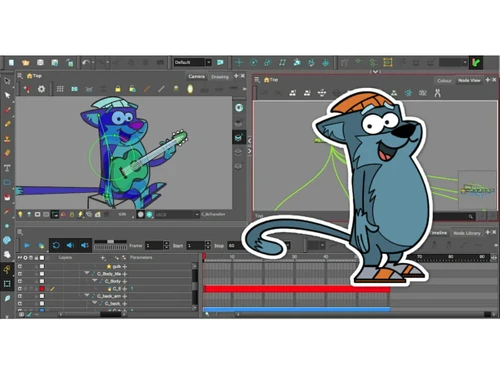
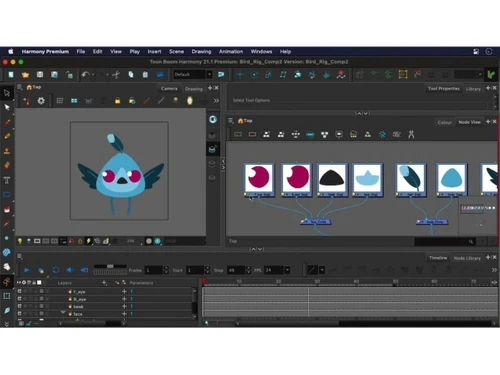
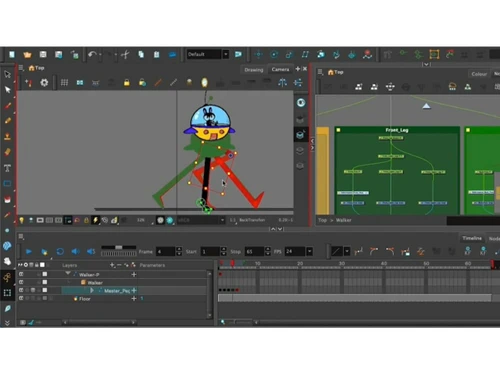
Toon Boom Harmony-dashboard
Toon Boom Harmony-animation

Toon Boom Harmony

Brand: Toon Boom

  • No Ratings & Reviews

Toon Boom Harmony is a professional 2D animation software used to create cartoons, animated films, games, and high-quality visual effects.

See More

Have you used Toon Boom Harmony before?

Share your insights for better experience

Add a Review
Starting Price
$30

View plans

100% Genuine
Products
Best Price
Guaranteed
Safe & Secure
Payment
  • Description

  • Pricing

  • Features

  • Specification

  • Review

  • FAQ

Starting at $30

Toon Boom Harmony Software Overview

What is Toon Boom Harmony?

Toon Boom Harmony is a professional 2D animation software used to create cartoons, TV shows, movies, games, and animated videos. It helps animators make high-quality animations using both traditional frame-by-frame and modern rig-based animation techniques. The software includes powerful drawing, painting, rigging, compositing, and special effects tools in one platform. Animators can create characters, backgrounds, camera movements, and visual effects easily.

Harmony supports both vector and bitmap drawing for flexible animation styles. It also provides bone rigging and deformation tools for smooth character movements. The software is widely used by professional animation studios around the world for large-scale productions. Toon Boom Harmony supports 2D and 3D integration for more advanced animation workflows. It works on Windows and macOS systems and supports collaboration for animation teams.

Why Choose Toon Boom Harmony Software?

  • Professional Animation Tools: Designed for high-quality 2D animation production.
  • Industry Standard Software: Widely used by professional animation studios.
  • Frame-by-Frame Animation: Supports traditional hand-drawn animation techniques.
  • Rig-Based Animation: Allows faster character animation with rigs and bones.
  • Vector and Bitmap Support: Works with different drawing styles and formats.
  • Advanced Drawing Tools: Provides professional sketching and painting features.
  • Character Rigging: Simplifies character movement and animation control.
  • Smooth Deformations: Creates natural and flexible character motions.
  • Special Effects Tools: Includes effects for lighting, shadows, and compositing.
  • Camera Controls: Supports cinematic camera movements and scenes.
  • 2D and 3D Integration: Combines 2D animation with 3D elements.
  • Layer Management: Organizes complex animation projects efficiently.
  • Audio Synchronization: Supports lip-syncing and sound integration.
  • High-Quality Rendering: Produces professional animation output.
  • Animation Pipeline Support: Fits into studio production workflows easily.

Benefits of Toon Boom Harmony Software

  • Asset Reusability: Saves time by reusing animation assets and rigs.
  • Creative Freedom: Supports multiple animation styles and techniques.
  • Professional Compositing: Combines scenes and effects within the software.
  • Storyboard Compatibility: Integrates with storyboard and pre-production tools.
  • Game Animation Support: Useful for animated game assets and characters.
  • Strong Performance Tools: Handles detailed and complex animations efficiently.
  • Modern Animation Technology: Includes advanced animation and rigging features.
  • Complete Animation Solution: Combines drawing, rigging, animation, and compositing in one platform.

Toon Boom Harmony Pricing

Toon Boom Harmony price starts at USD 30 at techjockey.com.

The pricing model is based on different parameters, including extra features, deployment type, and the total number of users. For further queries related to the product, you can contact our product team and learn more about the pricing and offers.

Read more

Toon Boom Company Details

Founded Year:  1994

Toon Boom has been changing the animation world one production at a time.

Director/Founders Jacques Bilodeau
Company Size 1-100 Employees

Toon Boom Harmony Pricing & Plans

Essential
Starting at $30
    • Licenses

      Licenses
      Licenses
    • Monthly

      Monthly
      Monthly

Key Features

  • Vector & Bitmap Drawing Tools

  • Frame-by-Frame Animation

  • Cut-Out

  • Advanced Rigging System

  • Deformers

  • Special Effects & Particles

Advanced
Starting at $77
    • Licenses

      Licenses
      Licenses
    • Monthly

      Monthly
      Monthly

Key Features

  • Vector & Bitmap Drawing Tools

  • Frame-by-Frame Animation

  • Cut-Out

  • Advanced Rigging System

  • Deformers

  • Special Effects & Particles

Premium
Starting at $139
    • Licenses

      Licenses
      Licenses
    • Monthly

      Monthly
      Monthly

Key Features

  • Vector & Bitmap Drawing Tools

  • Frame-by-Frame Animation

  • Cut-Out

  • Advanced Rigging System

  • Deformers

  • Special Effects & Particles

Toon Boom Harmony Features

  • icon_check Drawing Tools
    Create scalable vector art or textured bitmap drawings with professional brushes and precision controls.
  • icon_check Frame-by-Frame Animation
    Produce traditional hand-drawn animation with onion skinning and full timeline exposure control.
  • icon_check Cut-Out
    Build reusable character rigs with bones and deformers for efficient puppet-style animation.
  • icon_check Advanced Rigging System
    Create complex character hierarchies with inverse kinematics and nested node structures.
  • icon_check Deformers
    Add curve, envelope, and bone deformers to create smooth and natural character motion.
  • icon_check Node-Based Compositing
    Use a powerful node view to control effects, blending modes, and compositing workflows.
  • icon_check Effects
    Add lighting, shadows, blurs, particles, and other effects for cinematic 2D production.
  • icon_check 3D Integration
    Import 3D models and cameras into 2D scenes to create hybrid animation workflows.
  • icon_check Camera & Multi-Plane Support
    Create dynamic camera moves, multiplane depth, and parallax effects within scenes.
  • icon_check Lip-Sync Tools
    Automatically generate lip movements using audio analysis and phoneme mapping.
  • icon_check Color Management System
    Apply consistent palettes and manage color styles across scenes and productions.
  • icon_check Library Management
    Store and reuse characters, props, and backgrounds with centralized asset libraries.
  • icon_check Timeline & Exposure Sheet
    Control animation timing precisely using timeline layers and traditional X-sheet views.
  • icon_check Audio Import
    Import soundtracks and dialogue tracks to synchronize animation accurately.
  • icon_check Pipeline Integration
    Integrate with production pipelines using scripting, batch rendering, and file exchange tools.
  • icon_check Batch Rendering
    Render multiple scenes simultaneously to optimize production efficiency.
  • icon_check Collaboration Tools
    Enable team-based workflows with shared scenes and structured project organization.
Toon Boom Harmony Demo Video play icon

Get Toon Boom Harmony Demo

Watch the demo video to explore key features, real workflows, and how the software fits your business needs.

Understand
Key Features
Personal
Demo Insights
Interactive
Demo Support

Toon Boom Harmony Specifications

Supported Platforms
Windows Windows MacOS MacOS
Devices
Desktop Desktop
Deployment
Cloud-Based Cloud-Based
Suitable For
All Industries
Business Specific
All Businesses
Business Size
Small Business Startups Medium Business Enterprises
Customer Support
Email Communities
Language
English
Training Resources
Videos

Toon Boom Harmony Review

Techjockey Trusted Reviews from Verified Users

No reviews are currently available for Toon Boom Harmony. Discover similar Animation Software reviews

  • Animaker

    4.5

    Whats great - I started using Animaker because of a sudden influx of assignments during my career’s initial video editing career. Today, th... read more
  • VideoScribe

    4.4

    Whats great - First of all, Videoscribe is great for making animated presentations. Just in case, you forgot to save the recent changes, wo... read more
  • Autodesk Maya

    4.8

    Whats great - Autodesk Maya is the best tool to convert your ideas into reality. You have a lot of possibilies with this software. If you w... read more
Articles for Toon Boom Harmony

See All Related Articles

How much does Toon Boom Harmony Software cost?

Toon Boom Harmony pricing starts at USD 30 on techjockey.com.

Is there a mobile app available for Toon Boom Harmony Software?

No, Toon Boom Harmony is primarily desktop-based software and does not offer a dedicated mobile app.

Which operating systems are compatible with Toon Boom Harmony Software?

Toon Boom Harmony is compatible with Windows and macOS operating systems.

Does Toon Boom Harmony Software offer a free trial?

Yes, Toon Boom Harmony offers a free trial for users to explore its features before purchasing.

How does Toon Boom Harmony Software function?

Toon Boom Harmony helps users create 2D animations using drawing, rigging, compositing, and special effects tools.

Who uses Toon Boom Harmony Software?

Professional animators, animation studios, game developers, educators, and content creators use Toon Boom Harmony.

Is a free demo available for Toon Boom Harmony Software?

Yes, users can request a demo or try the software through the official website.

Is Toon Boom Harmony Software available for free?

No, Toon Boom Harmony is paid software, but it provides a limited free trial version.

20,000+ Software Listed

Best Price Guranteed

Free Expert Consultation

2M+ Happy Customers

Terms and Condtions

close

Users with registered businesses can purchase goods from merchants on the platform to satisfy their business needs. Users are not permitted to utilize any products acquired through the platform for resale, advertising, business, or further distribution.

For each purchase made, users will receive a Tax Invoice (or 'GST invoice') that includes specific details such as:

  • the GSTIN of the user associated with their registered business, and

  • the specified Entity Name for their business.

It should be noted that not all products are eligible for GST Invoice. Only the products displayed by participating sellers with the 'GST-based Invoice Available' callout on the product description page would qualify.

Certain goods and services are not eligible to get a GST Invoice, including items with VAS, i.e., Value Added Services (e.g., Total Mobile Protection/Assured Buyback) and those involving an exchange offer at the time of purchase.

Users must ensure the accuracy of the GSTIN, and business entity name provided for the GST Invoice. Requests for corrections into GST Invoice would not be accommodated by Techjockey.com or any Seller, and any issues arising from user-provided information are the sole responsibility of users.

Techjockey.com is not liable for the GST Invoice or any associated input tax credit. To efficiently claim an input tax credit, users should select the registered place of business address as per the GST authority's data and follow the provisions of the GST Act and rules.

To claim an input tax credit, the delivery and billing addresses must match. Furthermore, input tax credits will not be granted if the delivery address and GSTIN on the invoice are from different states. In case of incorrect GST details provided during the order placement, the order will be canceled automatically.