linkedin
VanceAI logo
play VanceAI - Online Photo Editing and Enhancement Tools
VanceAI Image Upscaler
VanceAI Portrait

VanceAI

Brand: VanceAI

  • 4.5

  • 3 Ratings

VanceAI is an online platform that offers AI-powered image enhancement and editing services for photographers, designers, and businesses.

See More

Have you used VanceAI before?

Share your insights for better experience

Add a Review
Starting Price
$5

View plans

100% Genuine
Products
Best Price
Guaranteed
Safe & Secure
Payment
  • Description

  • Pricing

  • Features

  • Specification

  • Review

  • Compare

  • Alternatives

  • FAQ

Starting at $5

VanceAI Software Overview

What is VanceAI?

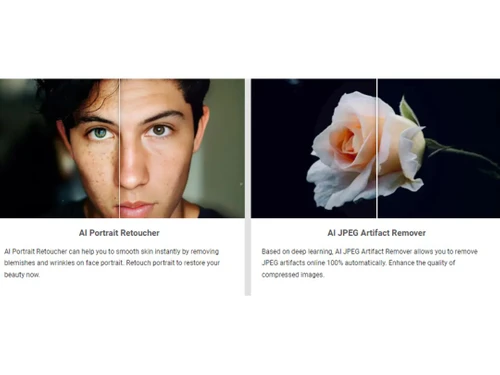
VanceAI is an innovative AI-powered photo editing software that specializes in image enhancement and editing services. It offers a range of tools and features tailored for photographers, designers, and businesses seeking to improve the quality and aesthetics of their images. Using advanced artificial intelligence algorithms, VanceAI can enhance images, remove background, retouch portraits, and perform other editing tasks quickly and efficiently.

The platform provides easy-to-use tools accessible via a web interface, allowing users to enhance their images without the need for extensive editing skills or software installations. VanceAI's services are designed to streamline the image editing process, saving time and effort while producing professional-quality results. With its intuitive interface and powerful AI capabilities, VanceAI is a valuable asset for anyone looking to enhance their visual content effortlessly.

Why Choose VanceAI Photo Editing Software?

  • Advanced AI Technology: It harnesses cutting-edge artificial intelligence algorithms to provide powerful image enhancement and editing capabilities, ensuring high-quality results.
  • Time and Cost Efficiency: Users can achieve professional-level image enhancements quickly and easily, saving time and resources compared to traditional manual editing methods.
  • Versatility: It offers a wide range of image editing tools and features, catering to diverse editing needs such as background removal, portrait retouching, and image enhancement.
  • User-Friendly Interface: The platform features an intuitive and user-friendly interface, making it accessible to users of all skill levels.
  • Web-Based Accessibility: It is a web-based platform, allowing users to access its image editing tools from anywhere with an internet connection, eliminating the need for complex software installations.
  • Consistent Results: With its AI-powered editing capabilities, users can achieve consistent and professional-quality results across their images, ensuring visual consistency in their projects.

Benefits of VanceAI Software

  • Enhanced Creativity: It empowers users to explore creative possibilities by providing advanced image editing tools and features.
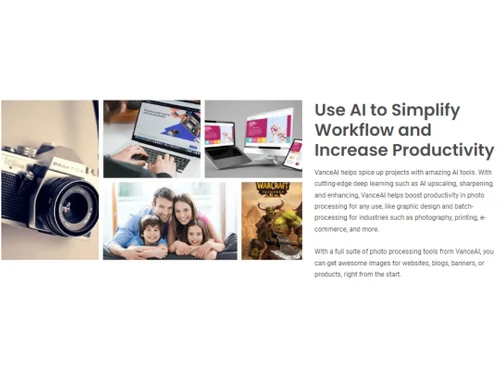
  • Increased Productivity: Users can accomplish image editing tasks more efficiently with it, allowing them to focus on other aspects of their projects.
  • Improved Accessibility: With its web-based platform, it offers convenient access to image editing tools from any location with internet connectivity.
  • Seamless Integration: It seamlessly integrates with existing workflows and software applications, enhancing overall productivity and efficiency.
  • Cost-Effective Solution: It offers professional-level image editing capabilities at an affordable price point, providing excellent value for users.
  • Enhanced Collaboration: It facilitates collaboration among team members by enabling them to share and work on edited images in real-time, fostering teamwork and creativity.

Pricing Of VanceAI

VanceAI price in India starts at $5 at techjockey.com.

The pricing model is based on different parameters, including extra features, deployment type, and the total number of users. For further queries related to the product, you can contact our product team and learn more about the pricing and offers.

Read more

VanceAI Company Details

Founded Year:  2020

World Leading AI Photo Enhancer Solution Provider

Director/Founders Flora Zou
Company Size 1-100 Employees

VanceAI Pricing & Plans

Basic(100 Credits)
Key Features
  • No Watermark
  • Upload Large Image
  • Batch Processing
  • Offline Processing
  • 7x24 Customer Support
Starting at $5
    • Quantity

      Quantity
      Quantity
    • Monthly

      Monthly
      Monthly

Key Features

  • No Watermark

  • Upload Large Image

  • Batch Processing

  • Offline Processing

  • 7x24 Customer Support

VanceAI Features

  • icon_check Video Editing
    It provides tools for editing videos, allowing users to enhance and modify their video content.
  • icon_check No Watermark
    Users can edit videos without any watermark added by the software, ensuring a clean and professional output.
  • icon_check Batch Processing
    It supports batch processing, enabling users to apply edits to multiple videos simultaneously, saving time and effort.
  • icon_check Video Enhancement
    It offers features for enhancing the quality of videos, including adjustments to color, sharpness, and clarity.
  • icon_check Artificial Intelligence
    The software utilizes artificial intelligence algorithms to automate and enhance various aspects of video editing.
  • icon_check Background Remover
    Users can remove backgrounds from videos with ease, allowing for greater customization and creativity.
  • icon_check Content Import/ Export
    It facilitates the import and export of video content, supporting seamless integration with other software and platforms.
  • icon_check Templates
    Pre-designed templates enable effortless creation of professional videos.
  • icon_check Photo Enhancement
    Improves resolution, color, sharpness, contrast, exposure, and overall image quality automatically with AI.
  • icon_check Image Upscaling
    Enlarges images by 2x, 4x, or 8x online while reconstructing details and keeping edges sharp.
  • icon_check Background Removal
    Automatically detects the main subject and removes the existing background to create a clean image.
  • icon_check Batch Processing
    Processes multiple images locally in batches, making large-scale enhancement and editing workflows faster and efficient.
VanceAI Demo Video play icon

Get VanceAI Demo

Watch the demo video to explore key features, real workflows, and how the software fits your business needs.

Understand
Key Features
Personal
Demo Insights
Interactive
Demo Support

VanceAI Specifications

Supported Platforms
Ubuntu Ubuntu Windows Windows MacOS MacOS Linux Linux
Devices
Desktop Desktop Mobile Mobile Tablet Tablet iPad iPad
Deployment
Cloud-Based Cloud-Based
Suitable For
All Industries
Business Specific
All Businesses
Business Size
Small Business Medium Business SMBs SMEs
Customer Support
Email Communities
Language
English
Training Resources
Videos
AI Features
AI Integrated

Explore the Best Alternative Solutions Similar to Your Business Size and Needs

VanceAI Review

4.5

Out of 5

img

Overall Rating

Based on
3 Verified Ratings

Rating Breakdown

  • Features 4.6
  • Value for Money 4.3
  • Ease of Use 4.6
  • Customer Support 4.6

86% Recommend this Product

Add Review

Techjockey Trusted Reviews from Verified Users

No reviews are currently available for VanceAI. Discover similar Photo Editing Software reviews

  • Canva

    4.3

    Whats great - I enjoy how quickly and simply one can choose the template and begin tweaking. read more

  • Adobe Photoshop

    4.6

    Whats great - What I love most about Adobe Photoshop is its amazing editing capabilities. It's versatile, not just for photos but also for ... read more

  • Luminar Neo

    4.9

    Whats great - The interface is clean and easy to get around, so I’m not wasting time looking for tools. Sky AI, Relight AI, and portrait to... read more

Compare VanceAI With other Photo Editing Software

Products
Ratings
Pricing
Device Supported
Deployment
Supported Platforms
  • img

    VanceAI

  • 4.5

  • Price On Request

  • Desktop

    Mobile

  • Web based

    On Premises

  • Windows

    Mac OS

  • img

    Adobe Photoshop

  • 4.5

  • Price On Request

  • Desktop

    Mobile

  • Web based

    On Premises

  • Windows

    Mac OS

  • img

    Karizma Album

  • 4.4

  • ₹ 3500

  • Desktop

    Mobile

  • Web based

    On Premises

  • Windows

    Mac OS

  • img

    Affinity Photo

  • 4.2

  • ₹ 619

  • Desktop

    Mobile

  • Web based

    On Premises

  • Windows

    Mac OS

  • img

    Luminar Neo

  • 4.7

  • ₹ 4999

  • Desktop

    Mobile

  • Web based

    On Premises

  • Windows

    Mac OS

  • img

    darktable

  • 4.0

  • Price On Request

  • Desktop

    Mobile

  • Web based

    On Premises

  • Windows

    Mac OS

  • img

    Cutout Pro

  • 4.8

  • ₹ 247

  • Desktop

    Mobile

  • Web based

    On Premises

  • Windows

    Mac OS

  • img

    Lensa AI

  • 4.1

  • Price On Request

  • Desktop

    Mobile

  • Web based

    On Premises

  • Windows

    Mac OS

  • img

    AfterShot Pro 3

  • 4.5

  • ₹ 5966

  • Desktop

    Mobile

  • Web based

    On Premises

  • Windows

    Mac OS

  • img

    Evoto AI

  • 4.6

  • Price On Request

  • Desktop

    Mobile

  • Web based

    On Premises

  • Windows

    Mac OS

(2) Product(s) selected

VanceAI Alternatives

See All VanceAI Alternatives

Available

Price on Request

Starting Price:

$36 /Year

Starting Price:

$80 /year

Starting Price:

$35 /Lifetime

Starting Price:

$10 /Month

Starting Price:

$8 /Month

Starting Price:

$15 /Month

Starting Price:

$810 /Year

Articles for VanceAI

See All Related Articles

Which operating system does VanceAI Software Support?

VanceAI Software is compatible with Ubuntu, Windows, Linux and MacOS.

Is there any VanceAI Software App?

VanceAI Software app is not available for Android and iOS app users.

What is the deployment type of VanceAI Photo Editing Software?

VanceAI Photo Editing Software supports web-based deployment.

How much does VanceAI Software Cost?

VanceAI price in India starts at $5 at techjockey.com.

Who are the potential users of VanceAI Software?

VanceAI Software is typically used by all industries to enhance their visual content with AI-powered tools.

Is there any free demo for VanceAI Photo Editing Software?

Free demo of VanceAI is available at techjockey.com.

Is VanceAI Software Free?

VanceAI Software is not available for free. You can connect with our product experts to know more about the pricing plans.

Does this product offer a free trial?

VanceAI Software does not offer a free trial.

How can you download VanceAI Software?

VanceAI Software installation is not required, as it is web-based. Just open the Setup Wizard to get started.

How does VanceAI Software Work?

VanceAI software utilizes advanced artificial intelligence algorithms to enhance and edit images, providing users with high-quality results quickly and easily.

20,000+ Software Listed

Best Price Guranteed

Free Expert Consultation

2M+ Happy Customers

Terms and Condtions

close

Users with registered businesses can purchase goods from merchants on the platform to satisfy their business needs. Users are not permitted to utilize any products acquired through the platform for resale, advertising, business, or further distribution.

For each purchase made, users will receive a Tax Invoice (or 'GST invoice') that includes specific details such as:

  • the GSTIN of the user associated with their registered business, and

  • the specified Entity Name for their business.

It should be noted that not all products are eligible for GST Invoice. Only the products displayed by participating sellers with the 'GST-based Invoice Available' callout on the product description page would qualify.

Certain goods and services are not eligible to get a GST Invoice, including items with VAS, i.e., Value Added Services (e.g., Total Mobile Protection/Assured Buyback) and those involving an exchange offer at the time of purchase.

Users must ensure the accuracy of the GSTIN, and business entity name provided for the GST Invoice. Requests for corrections into GST Invoice would not be accommodated by Techjockey.com or any Seller, and any issues arising from user-provided information are the sole responsibility of users.

Techjockey.com is not liable for the GST Invoice or any associated input tax credit. To efficiently claim an input tax credit, users should select the registered place of business address as per the GST authority's data and follow the provisions of the GST Act and rules.

To claim an input tax credit, the delivery and billing addresses must match. Furthermore, input tax credits will not be granted if the delivery address and GSTIN on the invoice are from different states. In case of incorrect GST details provided during the order placement, the order will be canceled automatically.