 USA
USA UAE
UAESmall Business
Designed for startups and growing businesses


See More





Brand: WhatsBoost
Have you used WhatsBoost before?
Share your insights for better experience
View plans
 Save upto 18%, Get GST Invoice on your business purchase T&C Buy Now & Pay Later, Check offer on payment page.
 Brand: WhatsBoost
Founded Year: 2021
WhatsBoost was born out of a passion for revolutionizing how businesses communicate. In a world where instant, direct communication is key, we recognized the untapped potential of WhatsApp as a powerful marketing tool.
Bulk Messaging & Broadcasting
 Bulk Messaging Scheduled Messaging Message Templates Customizable Templates Auto Replies Rich Media Support Preview Mode Broadcast Lists
 Contact Management & Segmentation
Sync Contacts Contact Tagging & Segmentation Import/Export Contacts Deduplication Blacklist/Unsubscribe Chatbot & Automation
Drip Campaigns Workflow Automation Automated Follow-Ups Auto Replies Recurring Messaging Automatic Retry Canned Responses Campaign Scheduling Hybrid Mode AI Features
Lead Qualification AI Sentiment Analysis Predictive Analytics AI Chatbots Auto-Responders Multi-Agent & Team Collaboration
Alerts & Notifications Chat Transfer Shared Inbox Unlimited Agents Live Agent Support Internal Notes Integrations
CRM Integration API Integration WhatsApp Business API Chatbot Integration E-Commerce Platforms OpenAI Integration Webhooks Integration ERP Integration Payment Gateway Integration Third Party Integrations TallyPrime Integration E-Signatures Analytics & Reporting
Campaign Performance Delivery & Read Reports Engagement Metrics Real Time Dashboards Conversion Tracking Agent Performance Metrics Security & Compliance
Data Encryption GDPR & CCPA Compliance API Rate Limiting Anti Spam Filtering Role-Based Access Control (RBAC) Audit Logs Data Retention Opt-In/Opt-Out Management Audit Trail IP Whitelisting 

Watch the demo video to explore key features, real workflows, and how the software fits your business needs.
 Windows
  MacOS
MacOS  Desktop
  Cloud-Based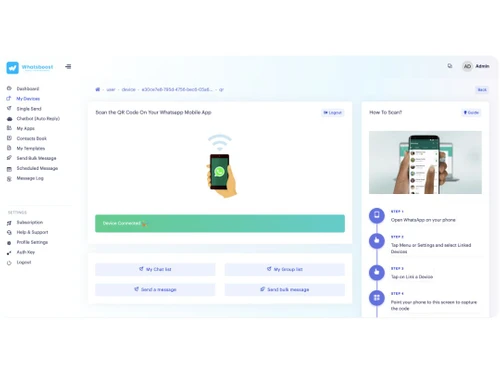


Small Business
Designed for startups and growing businesses
Medium Business
Built for business growth and flexibility
Enterprises
Designed for complex and large-scale business needs
5
Out of 5

Overall Rating
Based on
1 Verified Review
Rating Breakdown
90% Recommend this Product
Add Review
Apr 16, 2025
Techjockey Verified
“Mahesh from the Team is Go to Guy for Any Advice”
Product is compatible with Industry Standard Tools, They keeps on updating with new features and Integrations.
Pros
WhatsBoost stands out for its ease of use and smooth integrations. The platform is beginner-friendly, allowing businesses to get started quickly without a steep learning curve. Its seamless integration with popular tools makes communication and automation effortless.
Cons
Only 5 Workflows, I need more
Reason to switch
It is Automating workflows and Sending Automated Messages

WhatsBoost
₹ 3999.00 excl. GST
Desktop
Mobile
Web based
On Premises
Windows
Mac OS

RichAutomate
Price On Request
Desktop
Mobile
Web based
On Premises
Windows
Mac OS

Whatso
Price On Request
Desktop
Mobile
Web based
On Premises
Windows
Mac OS
Flowcart
₹ 1900
Desktop
Mobile
Web based
On Premises
Windows
Mac OS

Chati
₹ 999
Desktop
Mobile
Web based
On Premises
Windows
Mac OS

WappBlaster
₹ 1549
Desktop
Mobile
Web based
On Premises
Windows
Mac OS

Gallabox
₹ 43188
Desktop
Mobile
Web based
On Premises
Windows
Mac OS

Foxglove
₹ 10000
Desktop
Mobile
Web based
On Premises
Windows
Mac OS
ChatMitra
₹ 980
Desktop
Mobile
Web based
On Premises
Windows
Mac OS

WAPlus
₹ 9999
Desktop
Mobile
Web based
On Premises
Windows
Mac OS

WhatSender Pro
₹ 1000
Desktop
Mobile
Web based
On Premises
Windows
Mac OS
(0) Product(s) selected
Available
Price on Request
Starting Price:
₹999 /Month
Starting Price:
₹10,000 /OneTime

Starting Price:
$25 /Month

Starting Price:
₹24,999 /Year

Starting Price:
₹1,999

Available
Price on Request

Starting Price:
₹9,999 /Month



The pricing of WhatsBoost starts at INR 3,999 per month at Techjockey.
It is used to automate WhatsApp messaging, create chatbots, send notifications, and integrate workflows across different business tools.
It connects your WhatsApp number with automation workflows and external apps, enabling automated messaging based on triggers and events.
It is ideal for businesses, marketers, customer support teams, and agencies that rely on WhatsApp for communication and engagement.
No, WhatsBoost is a no-code platform, making it easy for non-technical users to set up and use.
Yes, it supports bulk messaging and campaign scheduling for marketing and updates.
Yes, WhatsBoost offers a free 5-day trial with access to core features.
Yes, it integrates with multiple platforms like CRM tools, automation apps, and eCommerce platforms for seamless workflows.
20,000+ Software Listed
Best Price Guranteed
Free Expert Consultation
2M+ Happy Customers
Terms and Condtions

Users with registered businesses can purchase goods from merchants on the platform to satisfy their business needs. Users are not permitted to utilize any products acquired through the platform for resale, advertising, business, or further distribution.
For each purchase made, users will receive a Tax Invoice (or 'GST invoice') that includes specific details such as:
the GSTIN of the user associated with their registered business, and
the specified Entity Name for their business.
It should be noted that not all products are eligible for GST Invoice. Only the products displayed by participating sellers with the 'GST-based Invoice Available' callout on the product description page would qualify.
Certain goods and services are not eligible to get a GST Invoice, including items with VAS, i.e., Value Added Services (e.g., Total Mobile Protection/Assured Buyback) and those involving an exchange offer at the time of purchase.
Users must ensure the accuracy of the GSTIN, and business entity name provided for the GST Invoice. Requests for corrections into GST Invoice would not be accommodated by Techjockey.com or any Seller, and any issues arising from user-provided information are the sole responsibility of users.
Techjockey.com is not liable for the GST Invoice or any associated input tax credit. To efficiently claim an input tax credit, users should select the registered place of business address as per the GST authority's data and follow the provisions of the GST Act and rules.
To claim an input tax credit, the delivery and billing addresses must match. Furthermore, input tax credits will not be granted if the delivery address and GSTIN on the invoice are from different states. In case of incorrect GST details provided during the order placement, the order will be canceled automatically.



