

linkedin
ZingHR logo
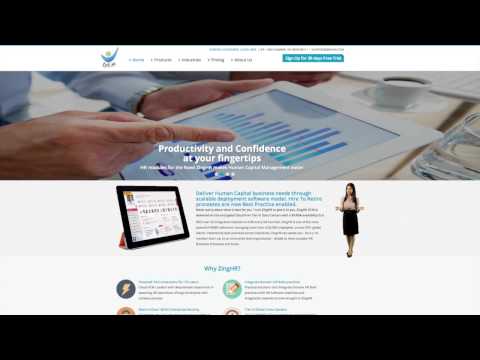
play ZING HR Product Overview
play ZingHR - Best Practice HCM on the Cloud
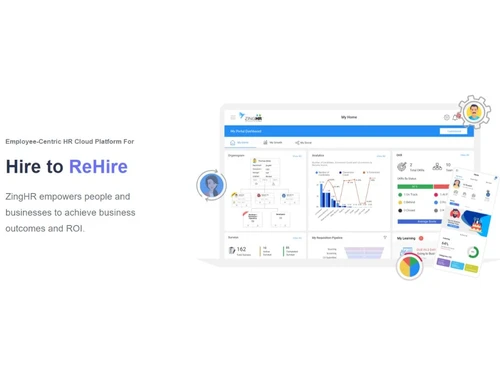
ZingHR ReHire

ZingHR

Brand: Zing Hr

  • 4.5

  • 5 Ratings & 5 Reviews

Simplify work with smart HR software! From attendance to payroll, manage everything easily and boost your team's productivity.

See More

Have you used ZingHR before?

Share your insights for better experience

Add a Review

Price Available on Request

Questions about pricing or customization? We’re here to help, just a click away.

100% Genuine
Products
Best Price
Guaranteed
Safe & Secure
Payment
  • Description

  • Pricing

  • Features

  • Specification

  • Review

  • Compare

  • Alternatives

  • FAQ

  • Questions

ZingHR Software Overview

What is ZingHR? 

ZingHR is a cloud-based HR solution, providing integrated human resource management and payroll services to enterprises. This mobile-first, ZingHR online platform leverages artificial intelligence and automation to simplify payroll and compensation structures, with zero error. This HR and payroll management system relies on a comprehensive data-based dashboard to enhance productivity and compliance. It helps manage the entire life cycle of employees from recruitment to disengagement.  

ZingHR portal allows organizations to evaluate the performance of employees, and create learning plans, succession planning, etc. ZingHR app helps at every stage of employee lifecycle management. ZingHR employee management software also comes equipped with a wide variety of tools and advanced features like QR Code Attendance, Push Notifications, Mass Messaging, Survey, SMSs, Digital Onboarding, and more. Enterprises can generate engaging learning experiences for their employees using ZingHR HRMS software.  

ZingHR Online Features Powered by AI & Machine Learning 

  • Talent Acquisition 
  • Hiring & Onboarding 
  • Travel & Expense 
  • Travel & Performance 
  • Learning Management 
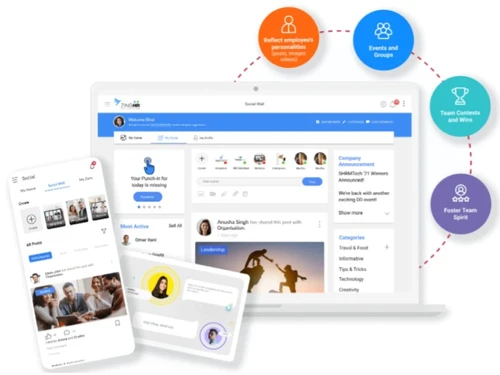
  • ESS, MSS & Social 
  • Leave & Attendance 

Benefits of ZingHRMS Employee Management Software

  • Geo-Fencing: This module streamlines the productivity of WFH employees by monitoring their login and log-out timings. It also sends mass notifications on connected mobile devices and enables employees to raise help tickets so that their concerns can be promptly addressed. 
  • Digital Locker: Organizations can store crucial documents like identity proof, educational certificates, medical records, financial invoices etc. Share the documents at their convenience and get access to them at any time from any place. 
  • Face Recognition: ZingHR attendance tracking through face recognition ensures 95 percent accuracy. Your remote employees can mark attendance from anywhere with the ZingHR portal.  
  • Digital Onboarding: ZingHR mobile app ensures a secure, paperless, and hassle-free onboarding process, making new joiners feel valued.  
  • Chatbots: ZingHR HR app acts as a virtual HR management platform where employee-related queries can be addressed 24xx&. This will ensure higher employee engagement.  
  • Biometric Attendance: Manage your field force by capturing their data directly through the smartphone using the ZingHR app and a biometric machine that is portable.  

How Does ZingHR Help in Streamlining the Offboarding Process 

  • Compliance: Organisations can generate proper workflows and clearance protocols to ensure compliance in the separation process. 
  • Insights: They can uncover relevant insights from the employee lifecycle, resulting in minimum employee attrition. 
  • Automate Initiation: The program systematizes separation initiation, enabling employees to generate online requests with the help of available tools like online resignations, absconders, separations and more. 
  • Standardize Exit: Enterprises can create multiple categories to segregate employee’s exit formality. They get access to unlimited clearance grouping and process tools. 
  • Checklist: HRs can generate No Dues Checklist covering multiple items assigned to different departments, roles, SBUs, etc. 
  • Compensation: The portal comes with an in-built E-Separation Formula Builder for provisions like Gratuity, PF, allowances, and unprocessed loans. It also helps HR to generate E-Separation statements after the processing is done. 

ZingHR Pricing

The price of ZingHR is available on request. If you want to know more about the solution, please request a callback. Our in-house product experts will get back to you at the earliest. 

Read more

Zing Hr Company Details

Founded Year:  2002

ZingHR has been the driving force that is helping organizations go beyond Automation, and deliver a solution that could directly impact Business Outcomes and Enhance Employee Experience. ZingHR aims for an Employee-Centric and mobile first approach.

Director/Founders Ravi Bajaj
Company Size 101-500 Employees

ZingHR Pricing & Plans

Looking for The Right Pricing?

Share your requirements and get a plan built around your business.

  • Define your business needs
  • Get customised pricing
  • Choose features that fit your workflow

Price Available on Request

Get personalised ZingHR pricing that fits your needs. Our team will connect with you.

ZingHR Features

  • icon_check 360 Degree Feedback
    Enterprises get access to customizable forms, KRA/KPIs, Cascading, Balanced Scorecard, etc., ensuring an effective 360-degree
  • icon_check Employee Lifecycle Management
    With this intelligent and configurable module, HRs can effectively map out and monitor the real-time status and movement of an
  • icon_check Learning Management
    With Zing Learn, its cloud-based module, enterprises can devise gamified and interactive courses for employees, driving them
  • icon_check Payroll Management
     HR can process 500+ calculations within a minute, ensuring zero errors. They can even manage complex as well as standard
  • icon_check Performance Management
    Managers can define multiple parameters within the PM module of the software and track the progress levels of assigned tasks,
  • icon_check Recruitment Management
    HRs get to centralize the recruitment database, expand their productivity levels, facilitate real-time collaboration and
  • icon_check Shift Management
     Organizations who run their business in different shifts can configure their timesheets and log-ins and log-outs with this
  • icon_check Helpdesk Management
    With ZingHR, enterprises can organize employee requests, track issues and resolve problems in an accurate manner.
  • icon_check Compensation Management
    Organizations can configure the compensations offered to individual employees as per their business needs.   
  • icon_check Leave Management
    Managers can process online leave requests, enable multi-mode approval process, design leave-based workflow and set holiday
  • icon_check Mobile Support
    The solution is available on mobile platforms for managers and employees to effectively carry out operations from anywhere and
  • icon_check Loan Management
    With ZingHR, enterprises can monitor the current loan requests made by individual employees and take care of the pre-existing
  • icon_check Asset Management
    HRs can monitor the assets assigned to individual employees and charge penalties in case of detected mishandling. 
  • icon_check Performance Evaluation
    Regular feedback and continuous monitoring ensure better performance evaluation of employees.    
  • icon_check Training Management
    Enterprises can provide a mobile-friendly, personalized, and connected training process to new recruits. This digitalizes the
  • icon_check Time and Attendance
    Users gain access to dashboards that capture time and attendance backed by tools like Punch In/Out based on Geo-Fencing, a prompt
  • icon_check Time & Expenses Management
    With the single repository for Claim Management, HR can link expense claims with payroll compliance and validate them quickly.
  • icon_check Employee Self Service
    Employees can work in a flexible manner, get access to company-related information and manage their individual documents as well.
  • icon_check Appraisal Management
    Managers can monitor the performance of each employee within the online portal, and encourage them to boost their productivity
ZingHR Demo Video play icon

Get ZingHR Demo

Watch the demo video to explore key features, real workflows, and how the software fits your business needs.

Understand
Key Features
Personal
Demo Insights
Interactive
Demo Support
Product Enrichment Section Image

ZingHR Specification

Supported Platforms
Windows Windows iOS iOS Android Android MacOS MacOS
Devices
Desktop Desktop Mobile Mobile Tablet Tablet iPad iPad
Deployment
Web-Based Web-Based
Suitable For
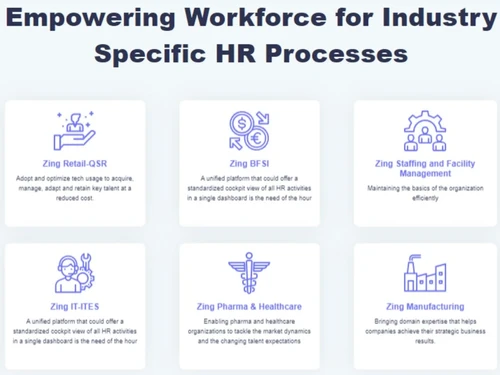
All Industries
Business Specific
All Businesses
Business Size
Small Business Startups Medium Business Enterprises SMBs MSMBs MSMEs
Customer Support
Phone Email Live Chat Communities
Language
English
Integration
API Integration
Training Resources
Documentation Videos
AI Features
AI Integrated

Explore the Best Alternative Solutions Similar to Your Business Size and Needs

ZingHR Reviews

4.5

Out of 5

img

Overall Rating

Based on
5 Verified Reviews

Rating Breakdown

  • Features 4.5
  • Value for Money 4.4
  • Ease of Use 4.6
  • Customer Support 4.5

92% Recommend this Product

Add Review

ZingHR Video Reviews

youtubeVideoId

4.8

“ZingHR App Full Review[attendance regularize payslip] in Hindi {By-Rahul Singh} in hindi”

Review by: imasmonitor

youtubeVideoId

4.8

“Customer Success Story Tata Motors | ZingHR”

Review by: ZingHRweb

youtubeVideoId

4.8

“Customer Success Story: Enrich Salon Empowers Employees with AI Bots”

Review by: ZingHRweb

Vaishnavi Bhambure

User

User since: < 6 months

4

Reviewed on: Jan 24, 2020

Techjockey Verified

“Efficient and User friendly software. ”

Pros

Efficient and good user interface

Cons

NA

sorabh ncmcnm

User

4.5

Reviewed on: Jan 9, 2019

Techjockey Verified

“Integrated biometric !!”

Pros

Provides the integration with biometric on auto pilot & easy since installiation. Offer Calculations & TDS calculation is a good feature to look at.

Cons

Unnecessary follow ups

See All ZingHR Reviews

Compare ZingHR With other HR Software

Products
Ratings
Pricing
Device Supported
Deployment
Supported Platforms
  • img

    ZingHR

  • 4.5

  • Price On Request

  • Desktop

    Mobile

  • Web based

    On Premises

  • Windows

    Mac OS

  • img

    Spine HR

  • 4.3

  • Price On Request

  • Desktop

    Mobile

  • Web based

    On Premises

  • Windows

    Mac OS

  • img

    ClusterHR

  • 5

  • ₹ 40

  • Desktop

    Mobile

  • Web based

    On Premises

  • Windows

    Mac OS

  • img

    Fix HR

  • 4.9

  • ₹ 600

  • Desktop

    Mobile

  • Web based

    On Premises

  • Windows

    Mac OS

  • img

    Zfour HRMS

  • 4.9

  • ₹ 45

  • Desktop

    Mobile

  • Web based

    On Premises

  • Windows

    Mac OS

  • img

    WeekMate

  • 4.7

  • ₹ 3999

  • Desktop

    Mobile

  • Web based

    On Premises

  • Windows

    Mac OS

  • img

    SignalHRM

  • 4.6

  • ₹ 648

  • Desktop

    Mobile

  • Web based

    On Premises

  • Windows

    Mac OS

  • img

    WoCo

  • 4.8

  • ₹ 50

  • Desktop

    Mobile

  • Web based

    On Premises

  • Windows

    Mac OS

  • img

    Presence360

  • 4.9

  • ₹ 2999

  • Desktop

    Mobile

  • Web based

    On Premises

  • Windows

    Mac OS

  • img

    TruHR

  • 4.9

  • ₹ 2200

  • Desktop

    Mobile

  • Web based

    On Premises

  • Windows

    Mac OS

  • img

    Keka HR

  • 4.4

  • Price On Request

  • Desktop

    Mobile

  • Web based

    On Premises

  • Windows

    Mac OS

(0) Product(s) selected

ZingHR Alternatives

See All ZingHR Alternatives

Starting Price:

₹600 /Month ₹900

SAVE UPTO 33%

Starting Price:

₹2,200 /Month

Starting Price:

₹49 /Month

Starting Price:

₹890 /Month
Starting Price:

₹1,499 /Month

Starting Price:

$49 /Month

Available

Price on Request

Starting Price:

₹5,000 /Month

Articles for ZingHR

See All Related Articles

Where does ZingHR save my data?

ZingHR uses cloud-based services for data storage. It also helps in the transfer of data among different teams or departments for seamless working.

Can I use this software on smartphones?

ZingHR, human resource management software, provides mobile apps for both the Android and iPhone platforms.

What is the system requirement for ZingHR?

ZingHR is a web-based application that can be accessed via web browsers. Hence, there are no necessary hardware or software requirements for ZingHR to operate smoothly.

Is my data safe with ZingHR?

Zing HR follows the CIASP module to provide high-quality data security services to its users. It stands for Confidentiality, Integrity, Availability, Security, and Privacy.

Does ZingHR help with audit trails?

Yes, ZingHR has an integrated Audit Trail module, that facilitates organizations with automated audit logs, remediations, and user accountability.

Is ZingHR available for an online demo?

Yes, you can request an online demo of ZingHR. Our in-house product experts will get back to you as per the date and time mentioned in your demo request.

How to use ZingHR app?

For ZingHR app login, you need to create a Quick PIN’. Once you login to ZingHR portal on your android or iOS device, you can access all its features for HR and payroll management.

How to download payslip in ZingHR?

Once you login to your ZingHR account, click on ‘Menu’. There you will get the tab for ‘My Compensation, click on that. Then, you have to click on payslip and download it in the PDF format.

What is ZingHR portal?

ZingHR is an HR and payroll management software, which helps with biometric attendance, face recognition, digital onboarding, electronic document management, etc. ZingHR employee management software ensures hassle-free HR processes for both in-house and remote workers.

How do I login to ZingHR portal?

ZingHR login process is based on OTP, where the user gets OTP on their verified mobile number. Once they verify, they need to set the QUICK PIN. This Quick Pin will be used every time for ZingHR login, sign-in and sign-out.

Is there any ZingHR app?

ZingHR online HR software has an app version for both android and iPhone platforms.

How much does ZingHR cost?

ZIng HR prices are available on request at techjockey.com.

ZingHR Questions

A:

There are a few steps to add employees to the ZingHR:

  • Log in as an Admin and navigate to the employee
  • Click on the 'Add New Employee' button
  • Fill in the necessary details
  • Enter personal, salary, and other required details
  • Assign the vacant role under the details tab
  • Click on save and send the approval
Vikas Karwasra May 4, 2026
Q:

How to check salary slip in ZingHR?

Terence Chan Mar 31, 2026
A:

To check your salary, slip using ZingHR choose the month and financial year, download the payslip, open or delete the payslip. Once you open the earning section the division of your earnings will be displayed.

Rakesh Apr 1, 2026
A:

Yes, ZingHR has a dedicated mobile app compatible with Android and iOS devices.

Teresa Billy Mar 29, 2026
Q:

Is it possible to conduct surveys with ZingHR?

satinder pal Mar 26, 2026
A:

Yes, you can conduct SMS, in App and Email based surveys with ZingHR and stay in touch with your employees and their mindsets.

SURGYAN Mar 30, 2026
Q:

Will ZingHR help my organization with contract management?

Dharambir Chaudhary Mar 25, 2026
A:

Yes, ZingHR will facilitate you with a Contract Management module, that will ensure contract compliance, decrease timelines for implementation, and shorten the approval time.

Dharambir Chaudhary Mar 29, 2026
See All ZingHR Questions

20,000+ Software Listed

Best Price Guranteed

Free Expert Consultation

2M+ Happy Customers

Terms and Condtions

close

Users with registered businesses can purchase goods from merchants on the platform to satisfy their business needs. Users are not permitted to utilize any products acquired through the platform for resale, advertising, business, or further distribution.

For each purchase made, users will receive a Tax Invoice (or 'GST invoice') that includes specific details such as:

  • the GSTIN of the user associated with their registered business, and

  • the specified Entity Name for their business.

It should be noted that not all products are eligible for GST Invoice. Only the products displayed by participating sellers with the 'GST-based Invoice Available' callout on the product description page would qualify.

Certain goods and services are not eligible to get a GST Invoice, including items with VAS, i.e., Value Added Services (e.g., Total Mobile Protection/Assured Buyback) and those involving an exchange offer at the time of purchase.

Users must ensure the accuracy of the GSTIN, and business entity name provided for the GST Invoice. Requests for corrections into GST Invoice would not be accommodated by Techjockey.com or any Seller, and any issues arising from user-provided information are the sole responsibility of users.

Techjockey.com is not liable for the GST Invoice or any associated input tax credit. To efficiently claim an input tax credit, users should select the registered place of business address as per the GST authority's data and follow the provisions of the GST Act and rules.

To claim an input tax credit, the delivery and billing addresses must match. Furthermore, input tax credits will not be granted if the delivery address and GSTIN on the invoice are from different states. In case of incorrect GST details provided during the order placement, the order will be canceled automatically.