linkedin

Get Free Advice

Get Quote

Act! logo
Gallery Stop the Chaos. Start Organizing.
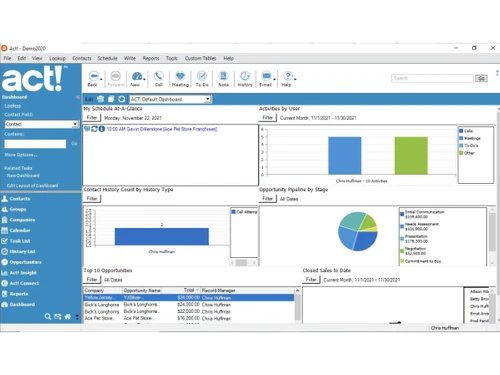
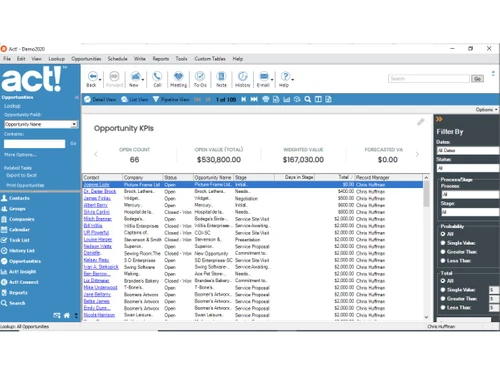
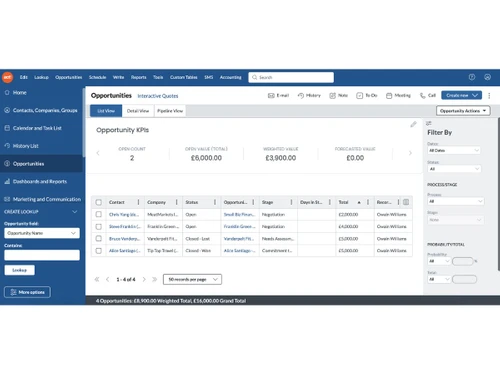
Act-dashboard Act-KPIs Act-opportunites
play Stop the Chaos. Start Organizing.
Act-dashboard
Act-KPIs
Act-opportunites

Act!

Brand : Act!

Starting at

$ 30

Save Extra with 2 Offers

  • offer_icon Save upto 18%, Get GST Invoice on your business purchase |
  • offer_icon Buy Now & Pay Later, Check offer on payment page.
  • AdviceGet Instant Expert
    Advice
  • PaymentSafe & Secure
    Payment
  • GuaranteedAssured Best Price
    Guaranteed

Act! Pricing & Plans

Standard
  • Full-featured CRM & Mobile App
  • Basic Email Marketing (includes 2,500 sends/mo)
  • Office 365 & Gmail Integration
  • Reports & Interactive Dashboards
    • Users
    • Monthly
Starting at $ 30
Professional
  • Email Marketing Plus (includes 25,000 sends/mo)
  • Advanced Interactive Quotes and Payments
  • Advanced Forms, Surveys, Website Chat
  • Accounting Integration
    • Users
    • Monthly
Starting at $ 45
Ultimate
  • Marketing Automation (includes 50,000 sends/mo)
  • Lead Scoring, Prioritized Activity Scheduling
  • Additional Email Domain
  • Online Customer Portal
    • Users
    • Monthly
Starting at $ 60

Get Act! Demo

We make it happen! Get your hands on the best solution based on your needs.

Interacted

Act! Features

Customer Data Management (CDM)

  • icon_check Contact Management Store, organize, and access customer contact details for easy retrieval and updates.
  • icon_check Account Management Track and manage business relationships with key accounts and clients.
  • icon_check Customer Profiles Build comprehensive profiles with data on preferences, interactions, and purchase history.
  • icon_check Contact Segmentation Group contacts based on behavior, demographics, or interests for personalized engagement.
  • icon_check Activity History Record and review all past customer interactions, including calls, emails, and meetings.

Sales Management

  • icon_check Lead Management Capture, track, and nurture leads across different stages of the sales cycle.
  • icon_check Quote Management Generate accurate, branded quotes and proposals to accelerate sales processes.
  • icon_check Sales Forecasting Predict future sales and revenue using historical data and current opportunities.
  • icon_check Deal Management Organize, prioritize, and manage deals, ensuring timely follow-up and closure.
  • icon_check Sales Automation Automate tasks like follow-up emails, lead assignment, and reminder notifications.
  • icon_check Workflow Automation and Management Automate repetitive tasks and workflows to improve sales team efficiency.
  • icon_check Opportunity & Pipeline Management Visualize and track deals through stages from lead generation to closing.
  • icon_check Order Management Track and manage orders from customers to ensure timely fulfillment and accurate billing.
  • icon_check Contract Management Managing contracts from their creation, execution, and performance tracking to their eventual termination.
  • icon_check Territory Management Assign, monitor, and optimize sales territories to improve regional sales efforts.

Marketing Automation

  • icon_check Email Marketing Design and send personalized email campaigns, track opens, clicks, and conversions.
  • icon_check Campaign Management Plan, execute, and monitor marketing campaigns across channels and touchpoints.
  • icon_check Lead Nurturing Engage and educate leads over time with targeted content to move them toward conversion.
  • icon_check Customer Journey Tracking Monitor and analyze the customer journey from awareness to purchase.
  • icon_check Customer Segmentation Group customers based on behavior, demographics, or preferences for tailored campaigns.
  • icon_check Event-Triggered Workflows Automate responses and actions based on customer behaviors (e.g., email opens, site visits).
  • icon_check Automated Campaigns Automatically trigger campaigns based on customer behavior, interests, or milestones.

Data Sourcing / Integrations

  • icon_check Social Media Integration Manage social media accounts and track customer engagement directly within the CRM.
  • icon_check Data Import/Export Easily import/export customer and business data in bulk or via integration with other systems.
  • icon_check API Access Customizable API for integrating with other business applications or extending CRM capabilities.
  • icon_check Calendar Integration Sync CRM with calendars to schedule and manage appointments and follow-ups.
  • icon_check Third Party Integrations Connect CRM with a variety of third-party tools and services to enhance functionality.
  • icon_check Email Marketing Tools Integration Connect CRM with email platforms like Mailchimp or SendGrid for seamless campaigns.
  • icon_check Marketing Tools Integration Integrate with marketing platforms (e.g., Google Ads, HubSpot) to enhance campaign effectiveness.
  • icon_check eCommerce Integrations Sync CRM with eCommerce platforms like Shopify, WooCommerce for a unified customer experience.
  • icon_check Interactive Voice Response (IVR) Integration Integrate CRM with IVR systems to manage customer calls and enhance support.

Collaboration Tools

  • icon_check Team Communication Enable real-time internal communication between teams with built-in messaging or chat features.
  • icon_check Task / Activity Management Assign, track, and manage tasks and activities to ensure team productivity and accountability.
  • icon_check Document Sharing & File Storage Store and share important files, documents, and customer resources easily.
  • icon_check Omnichannel Support & Engagement Provide consistent customer support across multiple channels, including email, chat, and social media.

Security & Compliance

  • icon_check Audit Trail Track changes and updates within the system for enhanced security and transparency.
  • icon_check Data Encryption Encrypt data both at rest and in transit to safeguard customer information.
  • icon_check Role-Based Access Control (RBAC) Control user access based on their roles, limiting access to sensitive data.
  • icon_check GDPR & Data Privacy Comply with regulations such as GDPR, HIPAA, and CCPA. to protect customer privacy.
  • icon_check Backup & Disaster Recovery Ensure business continuity with secure backups and disaster recovery plans.

AI & Machine Learning

  • icon_check Lead Scoring Use AI to score leads based on their likelihood to convert, helping prioritize sales efforts.
  • icon_check Predictive Analytics Leverage AI to predict future trends, sales, and customer behavior for better decision-making.
  • icon_check Chatbots Automate customer interactions with AI-driven chatbots to assist or direct inquiries efficiently.

Reporting & Analytics

  • icon_check Real Time Analytics Monitor and analyze real-time data to make timely, informed decisions.
  • icon_check Campaign Performance Measure the effectiveness of marketing campaigns, including ROI, reach, and conversion rates.
  • icon_check Custom Dashboards Create personalized dashboards to visualize key metrics and data relevant to your business.
  • icon_check Sales Performance Reports Track individual and team sales metrics, including revenue, win rates, and pipeline health.
  • icon_check Customer Insights Analyze customer behavior and interactions to gain actionable insights for better engagement.
  • icon_check Forecasting & Trends Use historical data to forecast future sales and trends for improved business planning.
  • icon_check Performance Tracking Monitor team performance across various functions, tracking progress against KPIs.
  • icon_check Predictive Analytics Leverage AI to predict future trends, sales, and customer behavior for better decision-making.

Alerts & Notifications

  • icon_check Event-Triggered Notifications Automatically notify users of key events, such as new leads, meetings, or customer actions.
  • icon_check Custom Workflow Alerts Create custom alerts for specific workflows or actions, ensuring nothing gets missed.
  • icon_check Customer Interaction Alerts Get notified when customers engage with emails, forms, or other touchpoints.
  • icon_check Workflow Trigger Alerts Alert users when specific workflow conditions or triggers are met.
  • icon_check Lead Activity Alerts Get alerts when leads take important actions (e.g., filling out a form or making a purchase).
  • icon_check System Errors/Failures Receive immediate notifications for any system failures or errors for quick resolution.
  • icon_check SLA Violations Receive notifications when service level agreements are breached or approaching deadlines.

Act! Specifications

  • Supported Platforms :
  • Device:
  • Deployment :
  • Suitable For :
  • Business Specific:
  • Business Size:
  • Customer Support:
  • Integration:
  • Training:
  • Language:
  • AI Features:
  • Technology:
  • Ubuntu Windows MacOS Linux
  • Desktop
  • Web-Based, Perpetual
  • All Industries
  • All Businesses
  • Small Business, Medium Business, Enterprises, SMBs, SMEs
  • Phone, Email, Live Chat
  • API Integration
  • In Person, Live Online, Webinars, Documentation, Videos
  • English
  • AI Integrated
  • Next Generation

Act! Reviews and Ratings

banner

Would you like to review this product?

Submit Reviews

Act! Company Details

Brand Name Act!
Information Act! is a provider of all-in-one CRM and marketing automation systems that help small and medium sized enterprises with marketing and sales.
Founded Year 1987
Director/Founders Bob Ogdon, Lanae Fehr, Matt Showalter
Company Size 1-100 Employees

Act! Alternatives

See All
Why Choose Techjockey?

Software icon representing 20,000+ Software Listed 20,000+ Software Listed

Price tag icon for best price guarantee Best Price Guaranteed

Expert consultation icon Free Expert Consultation

Happy customer icon representing 2 million+ customers 2M+ Happy Customers