linkedin
AnyMeeting logo
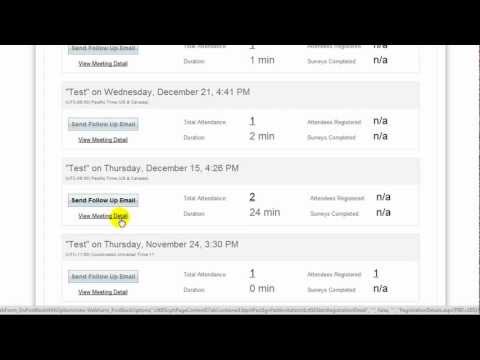
play AnyMeeting Account Manager Overview demo
anymeeting video conference
anytime-dashboard

AnyMeeting

Brand: Anymeeting

  • 4.6

  • 2 Ratings & 2 Reviews

Anymeeting Conferencing is a reliable video conferencing software that can be used by businesses of all sizes. Users get access to HD quality audio and video calls, advanced Artificial Intelligence and interactive collaborative tools in real-time. Further, Anymeeting Conferencing supports up to 12 webcams within a particular meeting, enabling its users to schedule a meeting with a large team in a...

See More

Have you used AnyMeeting before?

Share your insights for better experience

Add a Review
Starting Price
₹699

View plans

100% Genuine
Products
Best Price
Guaranteed
Safe & Secure
Payment
  • Description

  • Pricing

  • Features

  • Specification

  • Review

  • Compare

  • Alternatives

  • FAQ

Starting at ₹699

AnyMeeting Software Overview

What is Anymeeting Conferencing?

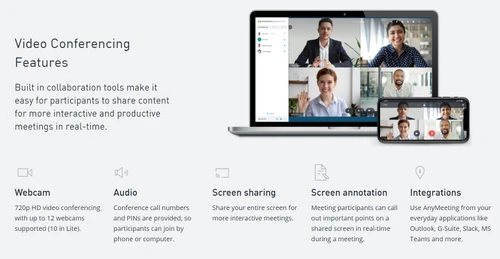
Anymeeting Conferencing is a reliable video conferencing software that can be used by businesses of all sizes. Users get access to HD quality audio and video calls, advanced Artificial Intelligence and interactive collaborative tools in real-time. Further, Anymeeting Conferencing supports up to 12 webcams within a particular meeting, enabling its users to schedule a meeting with a large team in a hassle-free way. Moreover, the screen sharing option offered by Anymeeting Conferencing allows users to share their computer screens with team members, facilitating better interaction and communication. Most importantly, the video conferencing software allows its users to host an unlimited number of meetings and they get to generate their own meeting URL. 

What type of meeting management tools are offered by Anymeeting Conferencing?

Anymeeting video conferencing software solution features a wide variety of meeting management tools, enabling its users to host business meetings with their clients and other team members in an efficient manner. 

  1. Mute attendees: As a host, admins can mute the attendees during a live meeting to channelize proper communication between team members
  2. Disable/Enable Chimes: Anymeeting Conferencing notifies the host when a new attendee enters a meeting or someone exists. Admin can disable or enable those notifications or chimes as per their individual choice. 
  3. Hide Side Panel: Hosts can hide the side panels from a live meeting to ensure a greater screen view.
  4. Remove Attendees: Meeting hosts can remove an attendee just by selecting their name from the attendee list and clicking on the ‘Remove from the meeting’ option.
  5. Lock Meeting: In order to prevent extra attendees from joining a particular meeting, hosts can lock their meeting room by clicking on the lock icon. The software notifies all the present attendees with a verbal announcement. 

Pricing of Anymeeting Conferencing

Anymeeting online video conferencing software is available as per the following pricing plans:

  1. Anymeeting Lite: It is available at a price of ₹ 699.3 on a monthly basis.
  2. Anymeeting Pro: It is available at a price of ₹ 909.3 on a monthly basis.

You can send us a callback request, our software experts will get back to you in real-time. 

Compatible Platforms for Anymeeting Conferencing

Anymeeting Conferencing is compatible with 

  1. Windows 7 and higher versions
  2. Mac OS 10.8 and higher versions
  3. Linux
  4. Ubuntu
  5. iOS 9.3 and higher versions
  6. Android 6.0 and higher versions. 

Benefits of Anymeeting Conferencing

  1. Screen Annotation: Users can easily highlight and explain their ideas on a particular topic by using the screen annotation feature offered by the software. They can draw project-related plans or highlight relevant points as per their choice.  
  2. Note Capture: Participants within a meeting can capture all meeting related notes including plans, important points and more. Anymeeting Conferencing automatically sends these notes to the participants after the meeting gets completed. 
  3. Security: Anymeeting Conferencing ensures that the meetings hosted over the platform are secure from illegal intruders by offering them a wide variety of security tools and features. Admins can assign a security PIN to their attendees that they need to dial to enter scheduled audio or video meetings. 
  4. Remote Control: Large teams can easily collaborate with each other by sharing the control of their own desktop with their team members in real-time. 
Read more

Anymeeting Company Details

Founded Year:  2011

Anymeeting

Director/Founders Costin Tuculescu
Company Size 1-100

AnyMeeting Pricing & Plans

AnyMeeting Pro
Starting at ₹909
    • Users (User(s))

      Users (User(s))
      Users (User(s))
    • Monthly (Month(s))

      Monthly (Month(s))
      Monthly (Month(s))

Key Features

  • Custom Branding

  • Personalization

  • Integration

  • Video Call Recording

  • Meeting

  • File Sharing

AnyMeeting Lite
Starting at ₹699
    • Users (User(s))

      Users (User(s))
      Users (User(s))
    • Monthly (Month(s))

      Monthly (Month(s))
      Monthly (Month(s))

Key Features

  • Personalization

  • Integration

  • Video Call Recording

AnyMeeting Features

  • icon_check Custom Branding
    Business owners can customize their virtual meeting rooms by adding in their brand’s logo and personalized backgrounds.
  • icon_check Personalization
    Users can add in company logos, banners and backgrounds within their meeting rooms to maintain the authenticity of their brand.
  • icon_check Integration
    Anymeeting Conferencing can be integrated with Outlook, Slack, MS Teams, G-Suite and other video conferencing solutions.
  • icon_check Video Call Recording
    The video conferencing software hosts an unlimited recording storage space, enabling its users to record their company meetings
  • icon_check Meeting
    Meeting coordinators get to transcribe an entire meeting recording and the software sends the transcript with all action items to
  • icon_check File Sharing
    Admins can share project-related files, images and videos with their clients and team members over the intuitive platform
AnyMeeting Demo Video play icon

Get AnyMeeting Demo

Watch the demo video to explore key features, real workflows, and how the software fits your business needs.

Understand
Key Features
Personal
Demo Insights
Interactive
Demo Support

AnyMeeting Specifications

Supported Platforms
Ubuntu Ubuntu Windows Windows MacOS MacOS Linux Linux
Devices
Desktop Desktop Mobile Mobile Tablet Tablet iPad iPad
Deployment
Cloud-Based Cloud-Based
Suitable For
All Industries
Business Specific
All Businesses
Business Size
Small Business Startups Medium Business Enterprises
Customer Support
Phone Email Communities
Language
English
Training Resources
Videos

Explore the Best Alternative Solutions Similar to Your Business Size and Needs

AnyMeeting Reviews

4.6

Out of 5

img

Overall Rating

Based on
2 Verified Reviews

Rating Breakdown

  • Features 4.5
  • Value for Money 4.2
  • Ease of Use 4.4
  • Customer Support 4.5

95% Recommend this Product

Add Review

Manoj Bansal

User

5

Reviewed on: Oct 6, 2017

Techjockey Verified

“ give great information on companies”

Pros

I found Techjockey as part of Google search results for Business Intelligence software. They recommended a few options right away and had the vendors call me directly. Soon after, we were engaged in conversations with the vendors and found the right solution.

Cons

N/A

badal mittal

4.2

Reviewed on: Aug 3, 2018

Techjockey Verified

“Good connection, easy to use.”

Pros

Generally easy to use. Allows for screen share and upload of documents. Network has been good. Allows for recording of meetings and access later.

Cons

It is difficult working with multiple people who may be presenting information. If the host's email is logged in, the entire meeting ends when that person logs out and you cannot restart a meeting so mistakes require a brand new meeting to be created.

Compare AnyMeeting With other Video Conferencing Software

Products
Ratings
Pricing
Device Supported
Deployment
Supported Platforms
  • img

    AnyMeeting

  • 4.6

  • Price On Request

  • Desktop

    Mobile

  • Web based

    On Premises

  • Windows

    Mac OS

  • img

    Cisco Webex

  • 4.6

  • ₹ 950

  • Desktop

    Mobile

  • Web based

    On Premises

  • Windows

    Mac OS

  • img

    Tencent RTC

  • 4.0

  • Price On Request

  • Desktop

    Mobile

  • Web based

    On Premises

  • Windows

    Mac OS

  • img

    Interactio

  • 4.5

  • Price On Request

  • Desktop

    Mobile

  • Web based

    On Premises

  • Windows

    Mac OS

  • img

    AONMeetings

  • 4.7

  • ₹ 152

  • Desktop

    Mobile

  • Web based

    On Premises

  • Windows

    Mac OS

  • img

    Pexip

  • 4.2

  • Price On Request

  • Desktop

    Mobile

  • Web based

    On Premises

  • Windows

    Mac OS

  • img

    VideoMeet

  • 4.5

  • ₹ 499

  • Desktop

    Mobile

  • Web based

    On Premises

  • Windows

    Mac OS

  • img

    JioMeet

  • 3.6

  • Price On Request

  • Desktop

    Mobile

  • Web based

    On Premises

  • Windows

    Mac OS

  • img

    xpression camera

  • 4.4

  • Price On Request

  • Desktop

    Mobile

  • Web based

    On Premises

  • Windows

    Mac OS

  • img

    Evercast

  • 4.6

  • Price On Request

  • Desktop

    Mobile

  • Web based

    On Premises

  • Windows

    Mac OS

  • img

    Vidyo

  • 4.4

  • Price On Request

  • Desktop

    Mobile

  • Web based

    On Premises

  • Windows

    Mac OS

(2) Product(s) selected

AnyMeeting Alternatives

See All AnyMeeting Alternatives

Starting Price:

$125 /Month

Available

Price on Request

Starting Price:

$849 /Month

Starting Price:

₹1,299 /Month

Starting Price:

$20

Starting Price:

$99 /Month

Available

Price on Request

Available

Price on Request

Articles for AnyMeeting

See All Related Articles

Does Anymeeting Conferencing offer international dial-in numbers?

Yes, you can get access to international dial-in numbers using Anymeeting Conferencing.

Are the meetings conducted via Anymeeting Conferencing encrypted?

Anymeeting Conferencing connects the participants and the hosts of a meeting by using Secure Socket Layer Signaling. It secures the shared media with DTLS, SCTP and SRTP encryption formats.

Can I get a demo of Anymeeting Conferencing?

Yes, you can send in a demo request for Anymeeting Conferencing. Techjockey product experts will get back to you as per the time and date that you prefer.

Who can get access to the recordings done via Anymeeting Conferencing?

The host gets sole access to a meeting recording once the process is complete. They can share the recording with their teammates or protect it with a password. All meeting recordings remain stored within the servers unless they are deleted by the host using the administrator tool.

Is there any Anymeeting Conferencing app for video and web meetings?

Anymeeting Conferencing has a dedicated mobile app for its users. It is compatible with Android and iOS operated mobiles.

20,000+ Software Listed

Best Price Guranteed

Free Expert Consultation

2M+ Happy Customers

Terms and Condtions

close

Users with registered businesses can purchase goods from merchants on the platform to satisfy their business needs. Users are not permitted to utilize any products acquired through the platform for resale, advertising, business, or further distribution.

For each purchase made, users will receive a Tax Invoice (or 'GST invoice') that includes specific details such as:

  • the GSTIN of the user associated with their registered business, and

  • the specified Entity Name for their business.

It should be noted that not all products are eligible for GST Invoice. Only the products displayed by participating sellers with the 'GST-based Invoice Available' callout on the product description page would qualify.

Certain goods and services are not eligible to get a GST Invoice, including items with VAS, i.e., Value Added Services (e.g., Total Mobile Protection/Assured Buyback) and those involving an exchange offer at the time of purchase.

Users must ensure the accuracy of the GSTIN, and business entity name provided for the GST Invoice. Requests for corrections into GST Invoice would not be accommodated by Techjockey.com or any Seller, and any issues arising from user-provided information are the sole responsibility of users.

Techjockey.com is not liable for the GST Invoice or any associated input tax credit. To efficiently claim an input tax credit, users should select the registered place of business address as per the GST authority's data and follow the provisions of the GST Act and rules.

To claim an input tax credit, the delivery and billing addresses must match. Furthermore, input tax credits will not be granted if the delivery address and GSTIN on the invoice are from different states. In case of incorrect GST details provided during the order placement, the order will be canceled automatically.